
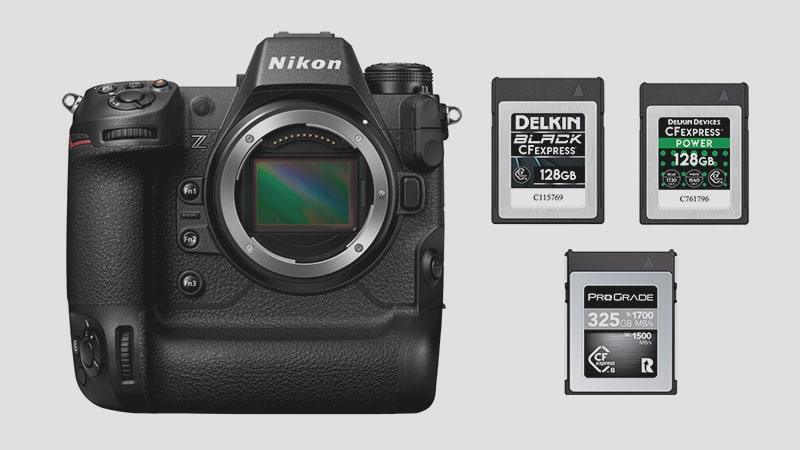
The Nikon Z9 isn’t just a camera; it’s a high-speed data processor. With its ability to shoot internal 8K/60p N-RAW and 45MP RAW bursts at 20fps, the bottleneck is almost always the memory card.
Unlike the Z6 II, the Z9 features dual CFexpress Type B slots and supports the full bandwidth of the CFexpress 2.0 (and 4.0) standard. In this guide, I’ve moved beyond “box speeds” to perform real-world sustained write benchmarks specifically for the Z9. Whether you’re a wildlife photographer clearing a buffer or a cinematographer shooting 12-bit RAW, these are the cards that can keep up with the flagship.
Burst Speed vs. Sustained Speed: What Z9 Owners Need to Know
There is a common misconception that a card rated at “1700 MB/s” is fast enough for 8K video. That number is the Burst Read speed.
For 8K N-RAW Video: You need high Sustained Write speeds. For 8K/60p N-RAW, your card must maintain a minimum of 400 MB/s to 800 MB/s (depending on the compression) throughout the entire clip. If the speed drops for even a second, the Z9 will stop recording.
For Sports/Wildlife: You need high Burst Write speeds to clear the buffer after a 20 fps or 30 fps burst. If your card isn’t fast enough, the camera will “stutter” or slow down after about 3–5 seconds of continuous shooting.
Recommended Memory Cards Nikon Z9
Based on my technical testing, there are a lot of great cards available now to truly unlock the Z9’s full potential. Here are a few highlights.
The Cinema Standard: Delkin Black and Lexar Diamond. These cards are specifically designed for thermal efficiency. In my tests, they maintain some of the highest sustained write speeds in the industry, making them the most reliable choice for long-form 8K N-RAW sessions.
The Workflow Powerhouse: ProGrade Cobalt. This has long been a favorite among Z9 shooters for its consistency. It doesn’t have the highest “box speed,” but its “Minimum Sustained Speed” is guaranteed, which is the only number that matters.
The 4.0 Upgrade: The Nextorage B2 Pro CF4.0 is backward compatible with the Z9. While the camera won’t shoot “faster” with a 4.0 card, your offload times to your computer will be significantly reduced—a massive win for DITs and editors working with terabytes of 8K footage.
| Memory Cards | Review Links | Rating | USB-C Write | USB-C Read | Tested Sustain Speeds | Check Price |
|---|---|---|---|---|---|---|
| CFExpress Type-B | ||||||
| Lexar Diamond CF4.0 128GB-1TB | VPG400 | Amazon / B&H | ||||
| Lexar Diamond 128/256/512GB | Lexar Diamond CFeB Review | VPG400 | 1621 | 1700 | 1565 | Amazon / B&H |
| Lexar Gold CF4.0 512/1TB/2TB | Amazon / B&H | |||||
| Lexar Gold 2TB | Lexar Gold 1TB-2TB CFeB Review | 1642 | 1695 | 1582 | B&H | |
| Lexar Gold 128/256GB | Lexar Gold 128-512GB CFeB Review | 1410 | 1525 | 1382 | Amazon / B&H | |
| Lexar Silver CF4.0 256/512GB/1/2TB | Amazon | |||||
| Prograde Iridium CF4.0 400GB | VPG400 | 2704 | 3212 | 808 | Amazon / B&H | |
| ProGrade Gold CF4.0 256GB/512GB | 2545 | 3203 | 844 | Amazon / B&H | ||
| Delkin Black CF4.0 512GB/1/2TB | 1736 | 2476 | 1693 | Amazon / B&H | ||
| Delkin Power G4 128/165/256/325/2TB | Delkin Power 128-512GB G4 CFeB Review | 920 | 1226 | 842 | Amazon / B&H | |
| Hoodman Steel 1TB | Hoodman Steel 1TB CFeB Review | 1528 | 1121 | 1502 | Amazon / B&H | |
| Angelbird Pro XT Mk II 330/660/1320GB | 1595 | 1597 | 1583 | Amazon / B&H | ||
| Nextorage B2 Pro CF4.0 660/1330GB | VPG400 | B&H | ||||
| Nextorage B2 Pro CF4.0 165/330GB | VPG400 | B&H |
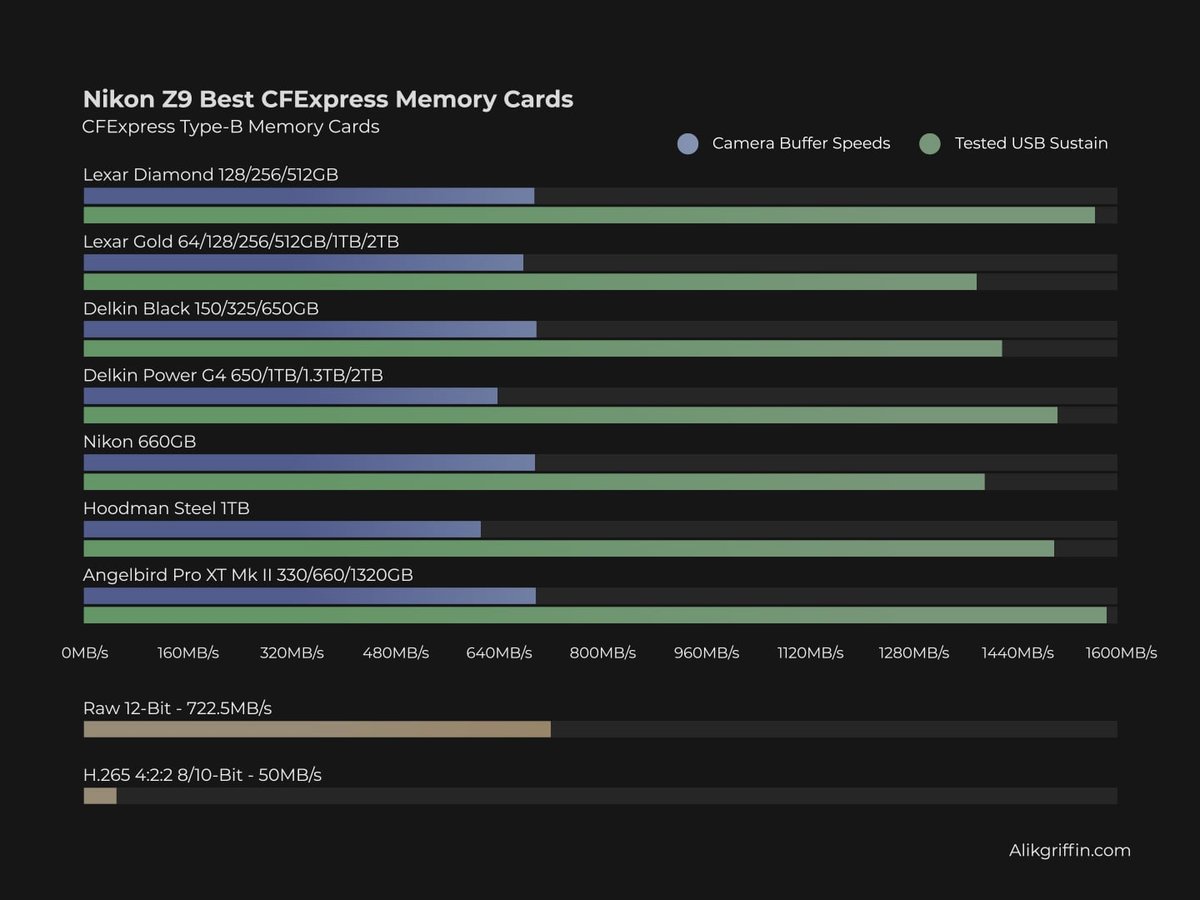
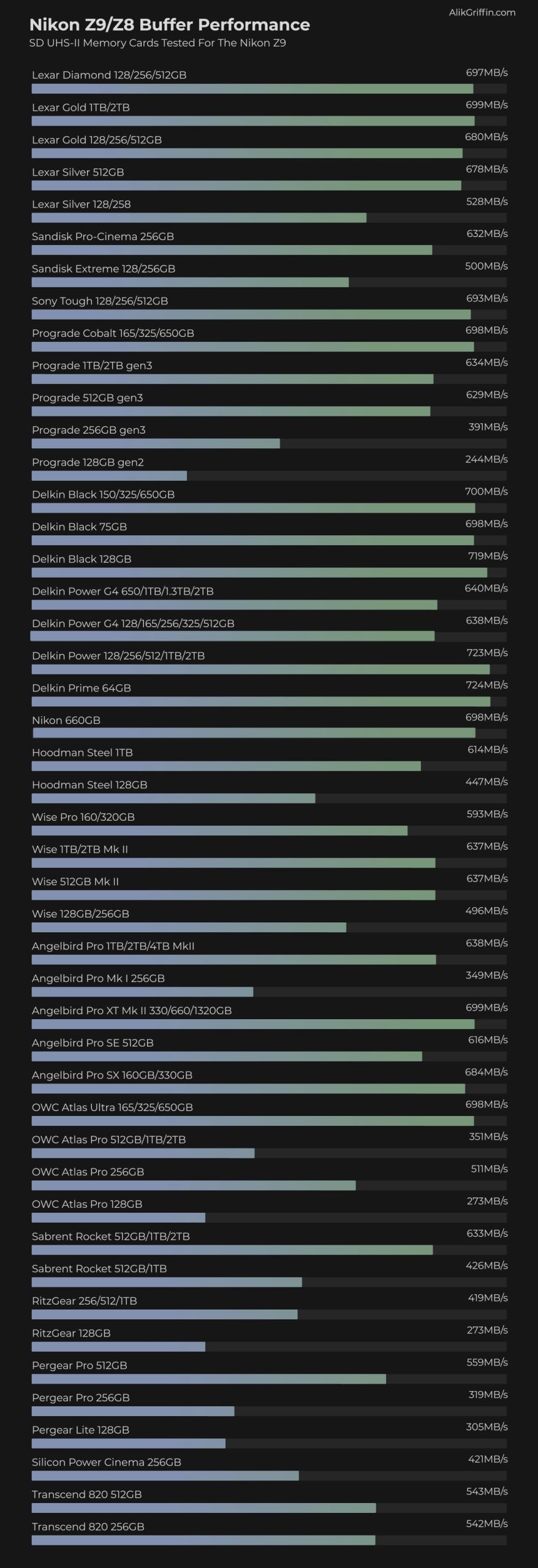
Back when the Nikon Z9 first came out, I tested it with most of the cards that were available at the time. This chart gives you an idea of how fast the buffer on the Z9 performs with various cards.
In-Camera Benchmarks
Testing Method
For the in-camera benchmarks, a series of continuous bursts was taken until the buffer was filled. The time to clear the buffer was recorded and compared to the amount of data written. The Z9 doesn’t record uncompressed RAW; it uses a compressed RAW format.
I originally took all the benchmarks in the Z9, but have now redone everything with new cards in the Z8. Both cameras are performing the same, and since I own a Z8, I can keep up with testing the latest cards.
To see the CFeB memory cards tested sustain speeds or to see USB-C tested read and write speeds, check out this guide to CFexpress Type-B Memory Cards.
A lot of the cards here have been updated by the brands, and some of the new cards will likely perform much better. Also, most brands are now moving to CF4.0 cards.
RAW Recording Modes
Lossless Compression – A clean compression of the images, with no information removed.
Files are large; expect about 80 shots or more with the best card rated at 1500-1700MB/s write.
High Efficiency * – lossy compressed. There are different ways to do this type of compression, but the short explanation is that information not used from the entire 14-bit color space is discarded, which is why you generally see no loss in quality. How complicated the scene is will affect the file sizes and the information, so your buffer performance could vary from scene to scene.
High Efficiency – lossy compression, more info reduced. There is a set of parameters, and any information outside those parameters is clipped. Usually, you won’t notice this unless you do heavy editing.
Unlimited shots in this mode with a good card.
There is no longer an Uncompressed RAW in the Nikon Z9. It is no longer needed since continuous burst speeds can run at full performance with lossless compression. Older cameras would not perform at full burst speeds with lossless compression. For example, the Z6 could only shoot at 9 fps with lossless compression.
The Nikon Z9 is a different class of machine compared to the Z6 or Z7 series. As the flagship with no mechanical shutter, it relies entirely on the speed of your media to handle 20fps RAW bursts and internal 8K/60p N-RAW.
To update this article for 2026 SEO, we need to focus on “Sustained Write Performance”—the single most important metric for a Z9 owner—and move away from generic “fastest” terminology.
Thermal Management (Use-Case Tip)
A Note on Heat and 8K Video
Recording 8K N-RAW generates significant heat. In my experience, the choice of memory card directly impacts the “Hot Card” warning on the Z9. High-performance cards like the Delkin Black are built to handle heat more efficiently than budget-friendly options. If you’re shooting in the sun or doing long takes, spending the extra money on a thermally-optimized card is as much about protecting your camera as it is about data speed.
CFexpress Cards For Video
The Nikon Z9 has some interesting video specs. However, we don’t have all the abilities or the full specs yet since they will be releasing those via firmware next year. I’ll keep this updated as more information is released.
The Nikon Z9 will shoot internally, H.265, ProRes RAW, ProRes HQ (limited to 4k60 10-bit), and Nikon RAW.
NRAW Record Settings
| Resolution | HQ N-RAW | Normal N-RAW | ||
| Mbps | MB/s | Mbps | MB/s | |
| 8256×4644 24-60fps FX | 2310 – 5780 | 288.75 – 722.5 | 1390 – 3470 | 173.75 – 433.75 |
| 5392×3032 50p-60p DX | 2470 – 2960 | 308.75 – 370 | 1240 – 1490 | 155 – 186.25 |
| 5392×3032 24p-30p DX | 1190 – 1480 | 148.75 – 185 | 600 – 750 | 75 – 93.75 |
| 4096×2160 100p-120p FX | 2900 – 3840 | 362.5 – 480 | 1460 – 1750 | 182.5 – 218.75 |
| 4096×2160 50p-60p FX | 1450 – 1740 | 181.25 – 217 | 730 – 880 | 91.25 – 110 |
| 4096×2160 24p-30p FX | 700 – 870 | 87.5 – 108.75 | 350 – 440 | 43.75 – 55 |
H.265 Record Settings
| Resolution | H.265 10-bit | H.265 8-bit | ||
| Mbps | MB/s | Mbps | MB/s | |
| 7680×4320 24-30p | 400 | 50 | 370 | 46.25 |
| 3840×2160 100-120p | 400 | 50 | 370 | 46.25 |
| 3840×2160 24-30p | 190 | 23.75 | 150 | 18.75 |
| 1920×1080 100-120p | 190 | 23.75 | 150 | 18.75 |
| 1920×1080 50-60p | 100 | 12.5 | 80 | 10 |
| 1920×1080 24-30p | 50 | 6.25 | 40 | 5 |
Choosing the Right Capacity: 1TB is the New 128GB
If you are shooting 8K/60p N-RAW, a 128GB card will fill up in less than 10 minutes.
Cinematography (8K Video): You should be looking at 1.3 TB or 2 TB cards. I’ve found that a card like the Angelbird AV PRO XT MK2 is one of the few high-capacity cards that maintains pro-level speeds at the 1TB+ price point. But be sure to check the charts above for any new cards available today.
Wildlife/Sports (Stills): I recommend a 512GB card. This gives you enough headroom for a full day of high-speed RAW bursts without having to manage files in the field.








Viltrox Z2 Flash Review: The Perfect Compact Companion
Fujifilm X-E5 Review: Their Best Camera So Far
Adapt Leica M-Mount Lenses to Fujifilm (The Right Way)
Viltrox TCL-X100VI Review | A Budget-Friendly 50mm Upgrade
Thypoch Simera 75mm f1.4 Review & Sample Photos