
The Specs . . . 4k video, a 24-megapixel sensor, two-way tilt screen, dual UHS-II memory card slots, boost performance of 14fps with a battery grip.
Did Fujifilm make the best APS-C camera on the market?
Fujifilm X-T2 Review
With the introduction of the X-T2, Fujifilm has not only made some huge improvements to the X-T1, but they’ve also, quite possibly, made one of the best cameras on the market to date. It’s also Fujifilm’s first real legitimate foray into the digicam-video space. There is now a real potential for Fujifilm to take a bite out of the videographer scene with the introduction of 4k video recording and wider color space of F-Log HDMI out.
Across the board, this camera is a mouth-watering, feature-rich, performance-shattering, image-capturing monster! With some notes of cool.
Camera Specs
Sensor: APS-C 24.3 MP / Processor: X-Processor Pro
Sensor SD Memory Card Type: UHS-II / UHS-II
Continuous Burst: 8fps – 14fps
Size of Buffer: 1GB
Uncompressed Shots Till Buffer Fills: 24-29 depending on card.
Est. Time Taken To Clear Buffer: 10 seconds with the Lexar 2000x
Must-Have Accessories For The Fujifilm X-T2
Best SD Memory Card For The Fujifilm X-T2
Fujifilm X-T2 Review | Impressions

Look And Feel
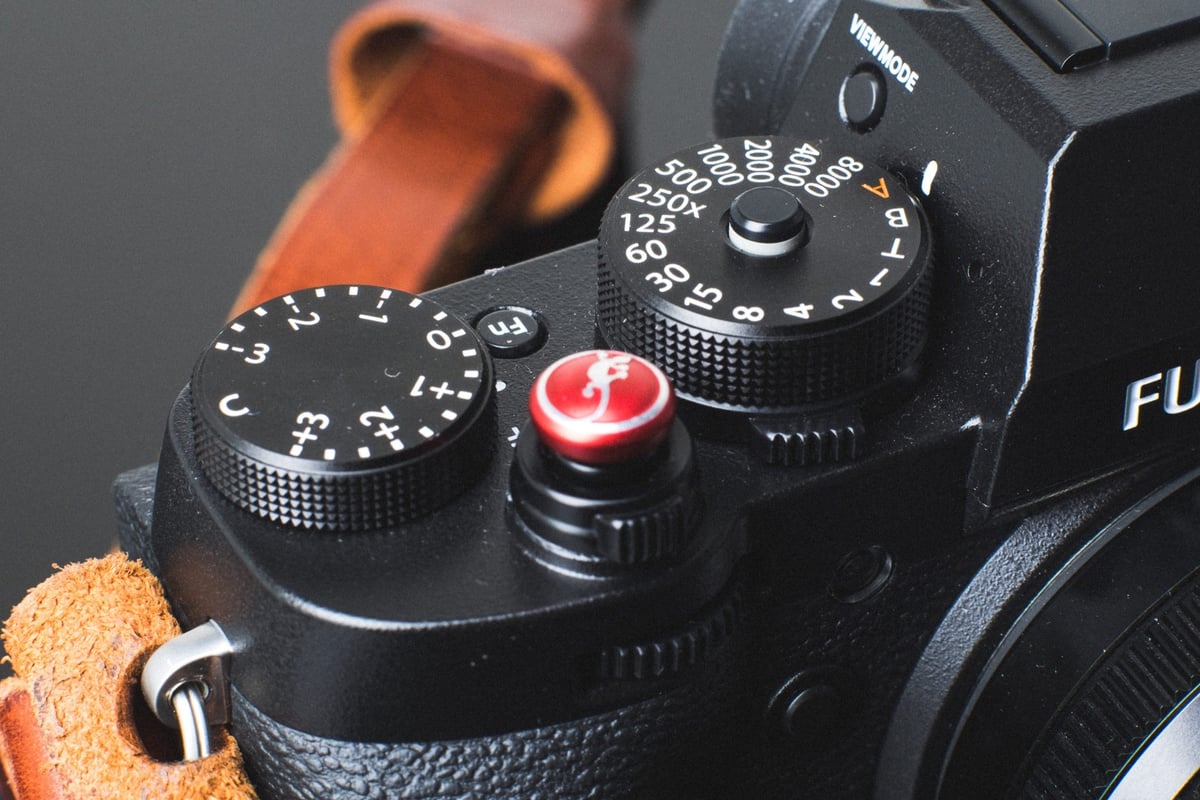
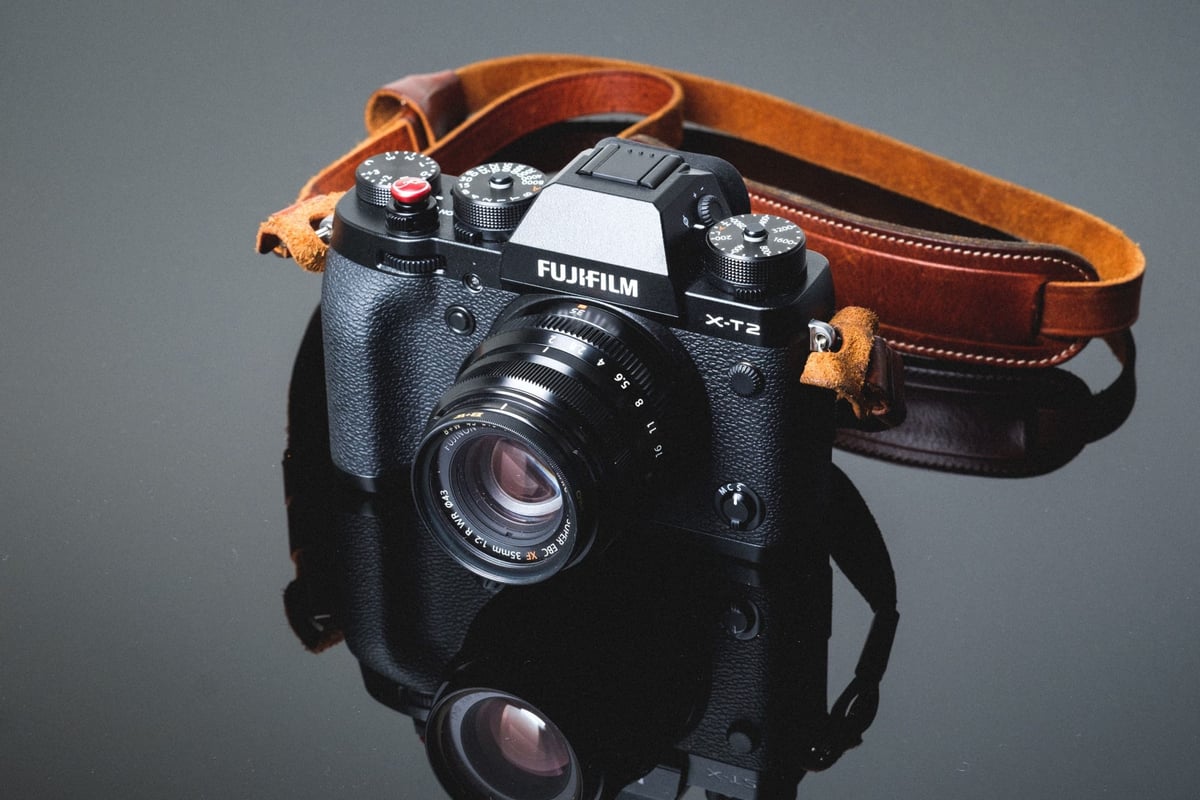
Those familiar with the Fujifilm XT1 will feel right at home with the new model. The camera is slightly thicker but still feels the same in the hand.
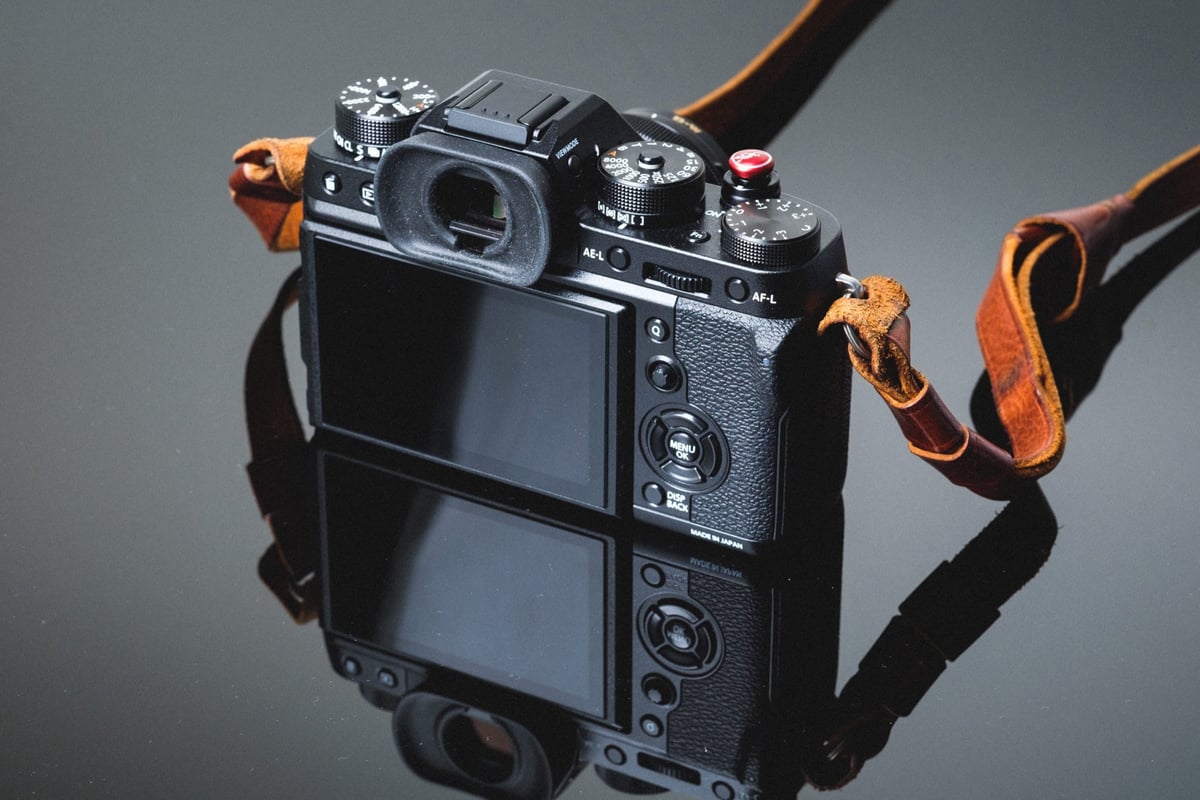
Fujifilm has improved on features such as the button locks on the shutter and ISO dial. They’ve also added the movie function on the control dial, so you can now put the camera in movie mode and use the shutter to trigger the record without wasting an Fn button just for video.
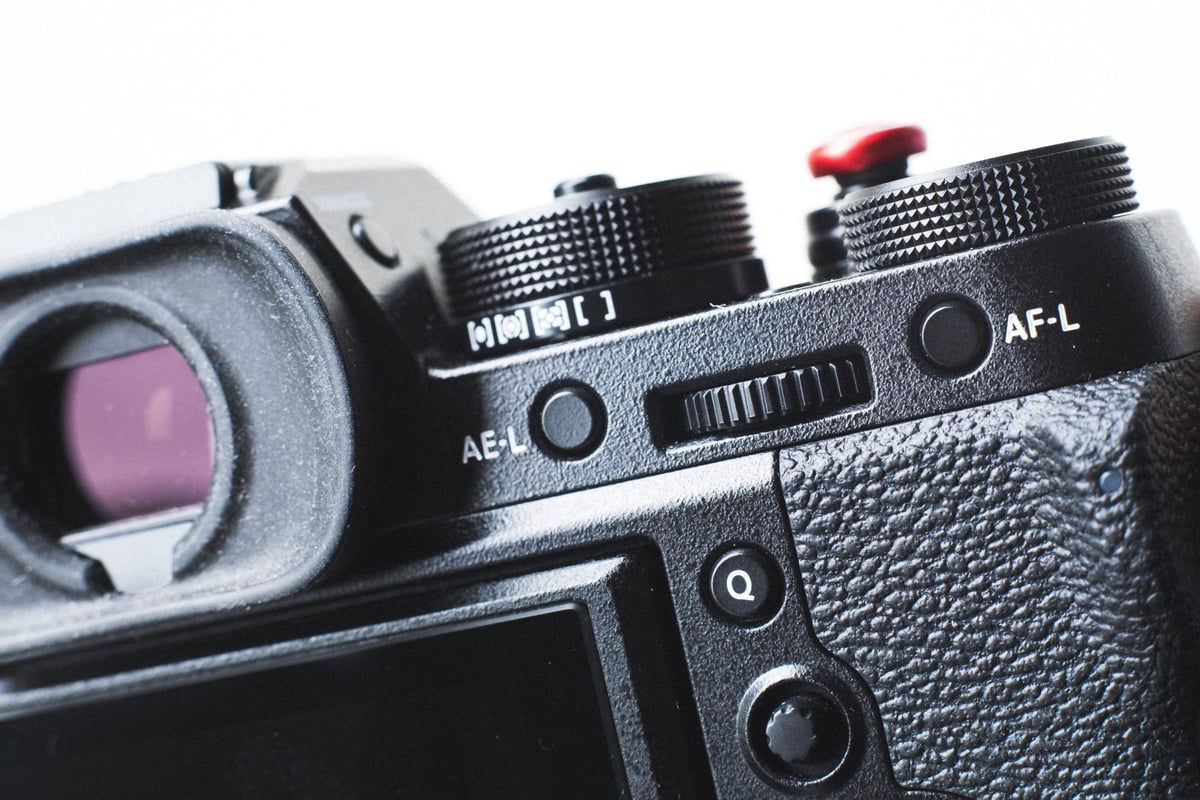
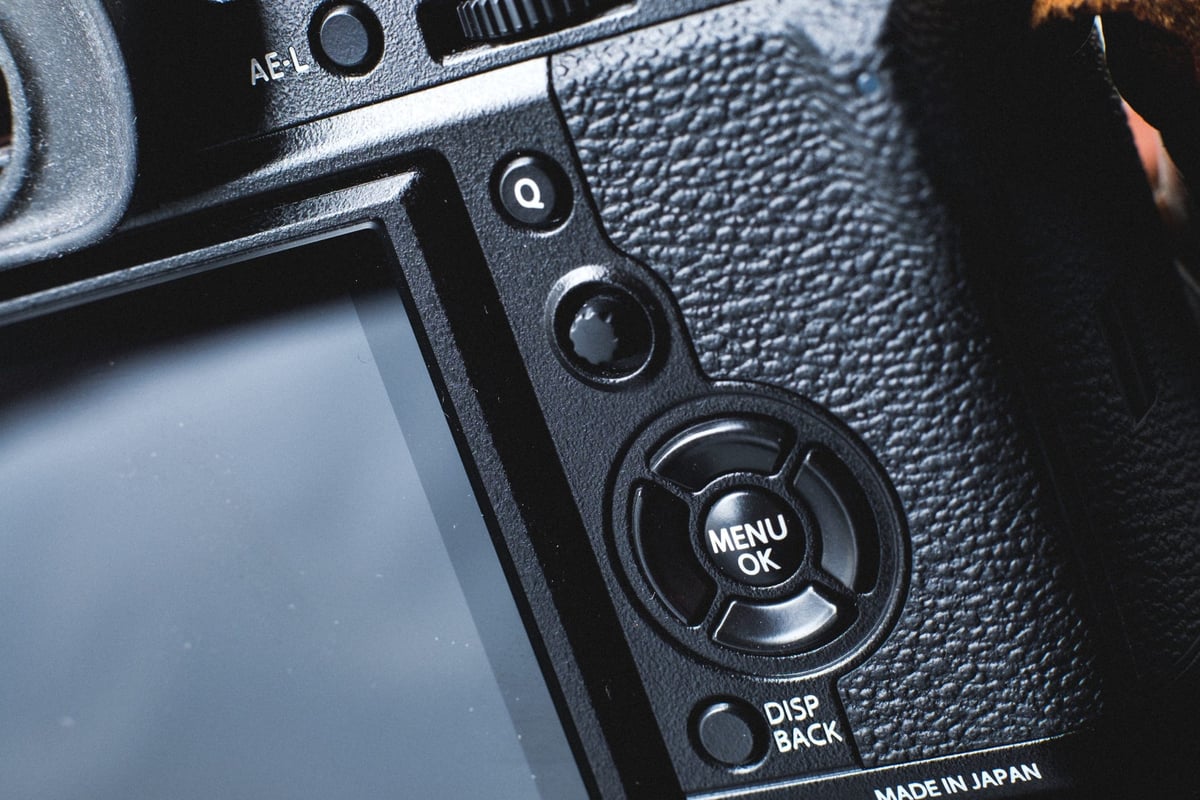
As far as buttons and layout go, the only difference is removing the focus assist button, which is now replaced with a thumbstick to adjust the focus point.
They’ve also put on a different rubber eyepiece over the EVF that works better for blocking the sun.
All in all, the camera will feel like an improvement for anyone familiar with the XT1, but it also feels rock solid and very high quality compared to most of the competition.

What I Love
– I like the new auto-focus features. I’m not going to lie; I never liked AF-C until I started using the A6300. This is because most cameras were just terrible at it. The XT2 took it a step further with selectable modes to help make this feature even more accurate – and I have to say, it’s good even for video.
– 4k video with the Fujifilm film simulators produces the same look and feel as the Fujifilm JPEGs we all love. This gives us some of the best-looking colors in our video of any camera out there. This means Provia, Velvia, Arcos, etc. There is also the option for F-log HDMI out for those who want more color grading options.
– Jpegs look amazing, and their processing is improved over the XT1. The in-camera RAW converter also allows you to turn your RAWs into JPEGs on the fly, with many options for controlling the image’s tonality.

What I Don’t Love
– The Q menu needs to allow me to add more functions to it. It just seems I should be allowed to add whatever I want, like Photometry or the ISO Auto Settings.
– When shooting RAW and trying to transfer images to your phone via the iPhone app, you can’t. The images must be JPEG before being sent to your phone. This means you have to go into your RAW converter and make the shots JPEG first. Kind of a pain, this should just happen on the fly when you try to transfer RAW images to your phone like it does with Sony cameras. This is the same with all Fujifilm cameras.
– The camera doesn’t come set up well. You need to go into the settings and customize a lot of things before it feels comfortable. For example, auto shut-off happens after two minutes by default. This is detrimental to battery life if you’re unaware of it. Also, a super minor thing that bugs me to no end happens when setting the countdown timer to 2 seconds or 10 seconds from the Q menu; it resets to off every time the camera goes into auto shut off.

Fujifilm X-T2 Build Quality
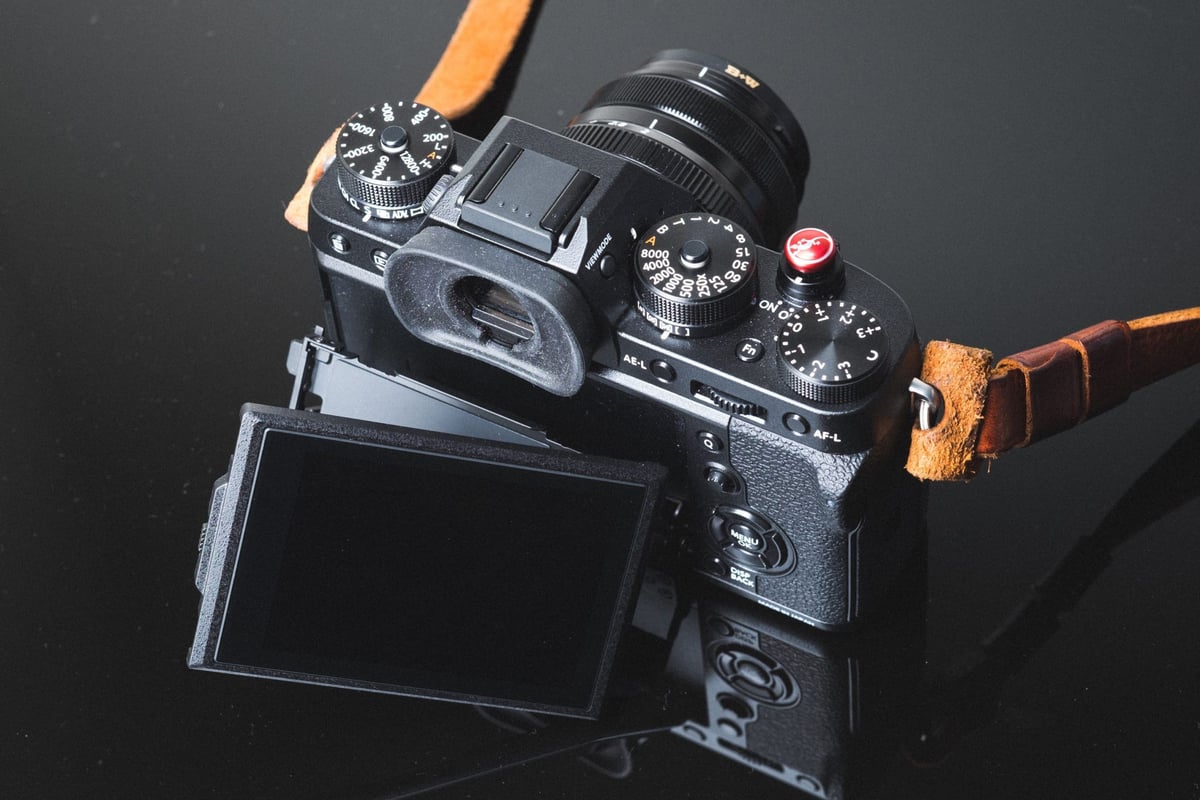
Aside from the origami tilt-screen that I always feel like I’m going to break, the build quality on this camera can rival anything. It feels solid, like the Olympus EM5-II or even the new Sony A7 II.
The shutter feels and sounds great, and all the dials give the right amount of resistance. Nothing feels loose or cheap. I imagine some people will complain about the rear wheel on the back. Since it also functions as a button, it ends up having some wiggle to it, which is forgivable because it’s doing two things at once.
If you’re used to the X-Pro 2, you’ll be relieved to know that this is much lighter and a little smaller. It’s a much easier camera to use all around.
Fujifilm X-T2 – Hardware & Performance

What’s New
– 24 Megapixels
– Improved autofocus tracking system
– 4k Video with F-Log HDMI out
– Two UHS-II memory card slots
– Turbo Mode
– Push locks on the ISO and shutter dials
Resolution
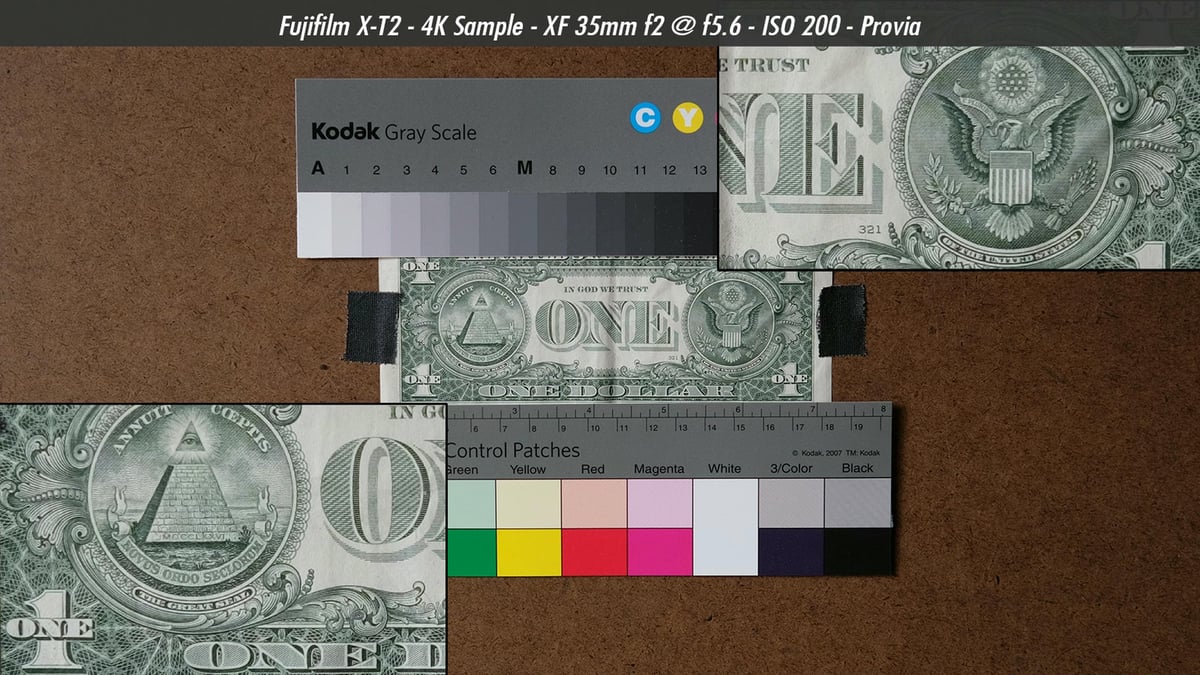
Some say that X-Trans sensors produce higher-resolution images than standard Bayer sensors. While the images are high quality, I think what’s happening is the sensor produces significantly fewer moiré patterns that allow for more clarity in fine details. This means the sensor won’t need an optical low-pass filter.
You can see how there is almost no moiré, and the fine details are still very clear.
Here is a real-world example of sharpness at a 100% crop.
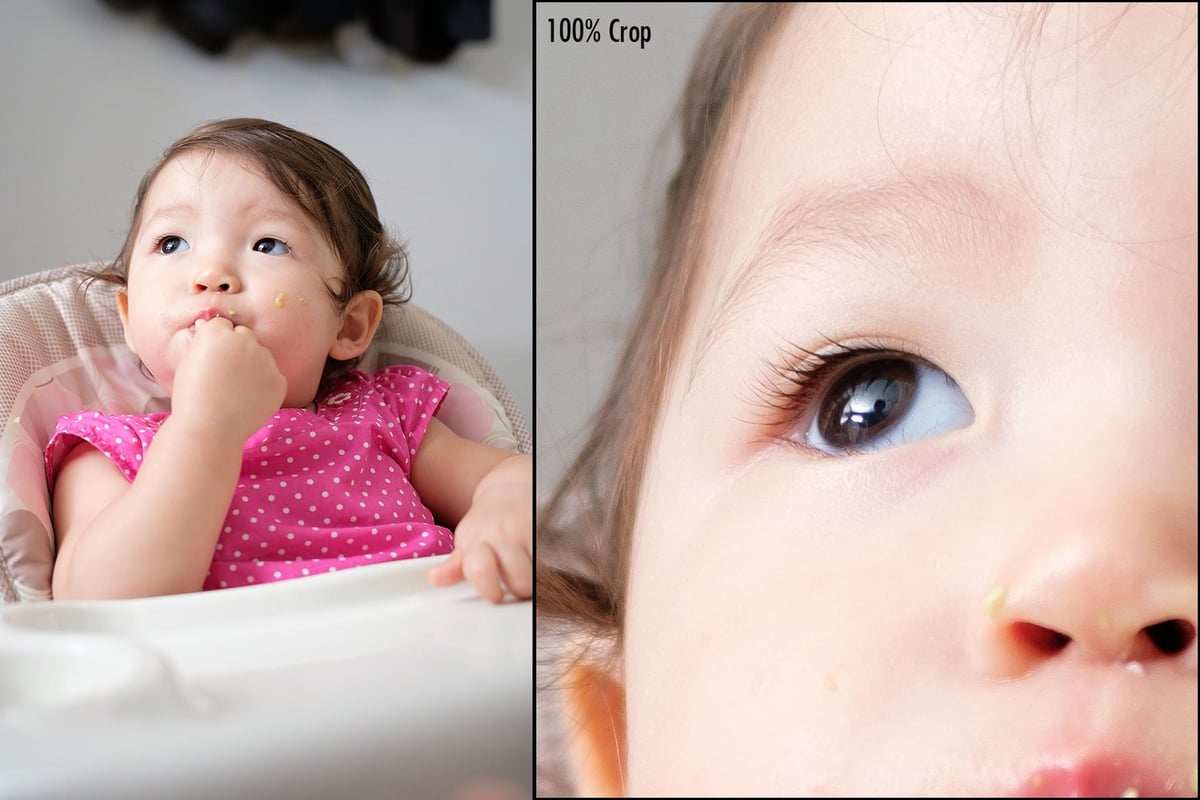
Voigtlander 35mm f1.7 Ultron – ISO 200 – f2 – 1/80 – Provia
ISO Performance
ISO performance is very good, and it easily matches the competition.
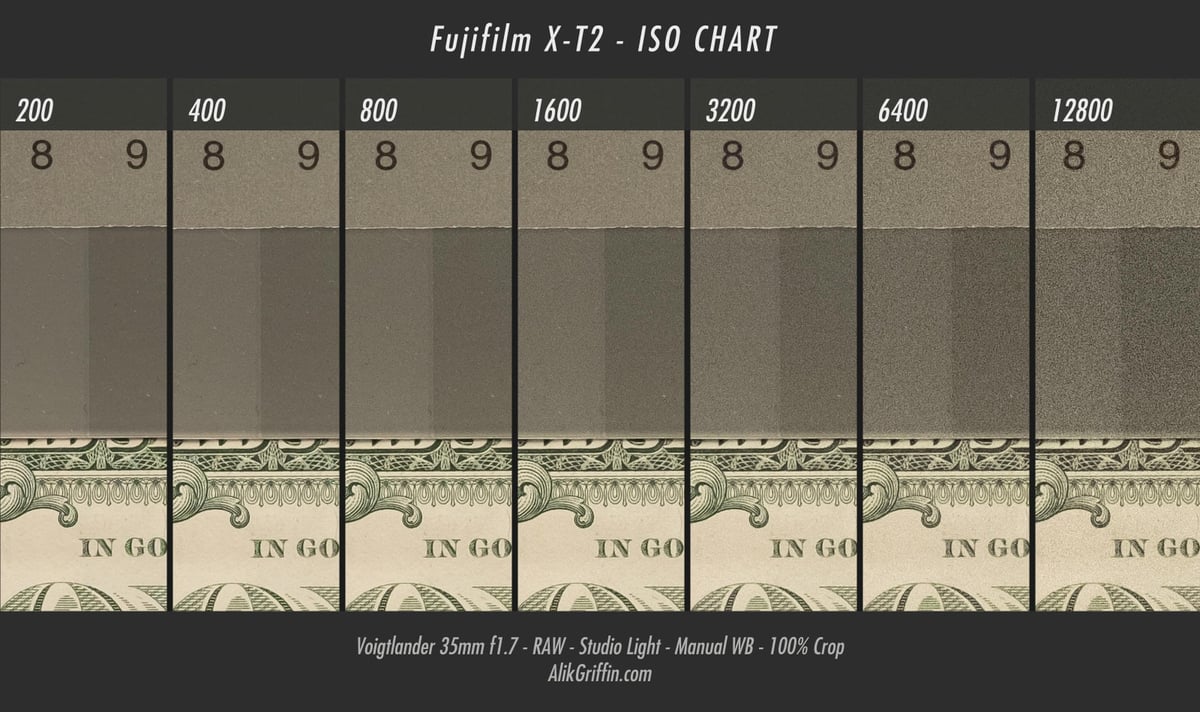
Unlike the X-T1, I would feel comfortable using ISO 6400. At around 128,000, you’ll see a little bit of that purple amp glow. But it’s still usable unless you’re trying to lift some mids or shadows; things might get a little sloppy.
You will have to be careful when shooting video because the camera will apply some noise reduction at high ISO that softens the image. The workaround is to set noise reduction to -3 in the menu and deal with the grain in post.
Dynamic Range
The Dynamic Range of the X-T2 is pretty insane. Take a look at the shadow recovery.

Shadow Recovery – Before

Shadow Recover +4EV
Diffraction
The new 24.3 MP sensor means you’ll have a diffraction limit that you’ll start noticing, possibly around f8-f11. Any aperture above that will create Airy Disc patterns that are too large for the sensor’s pixel pitch. This will cause the image to soften up.
If you need a very deep depth of field at f16 or even f19, you’ll have to sacrifice some sharpness.
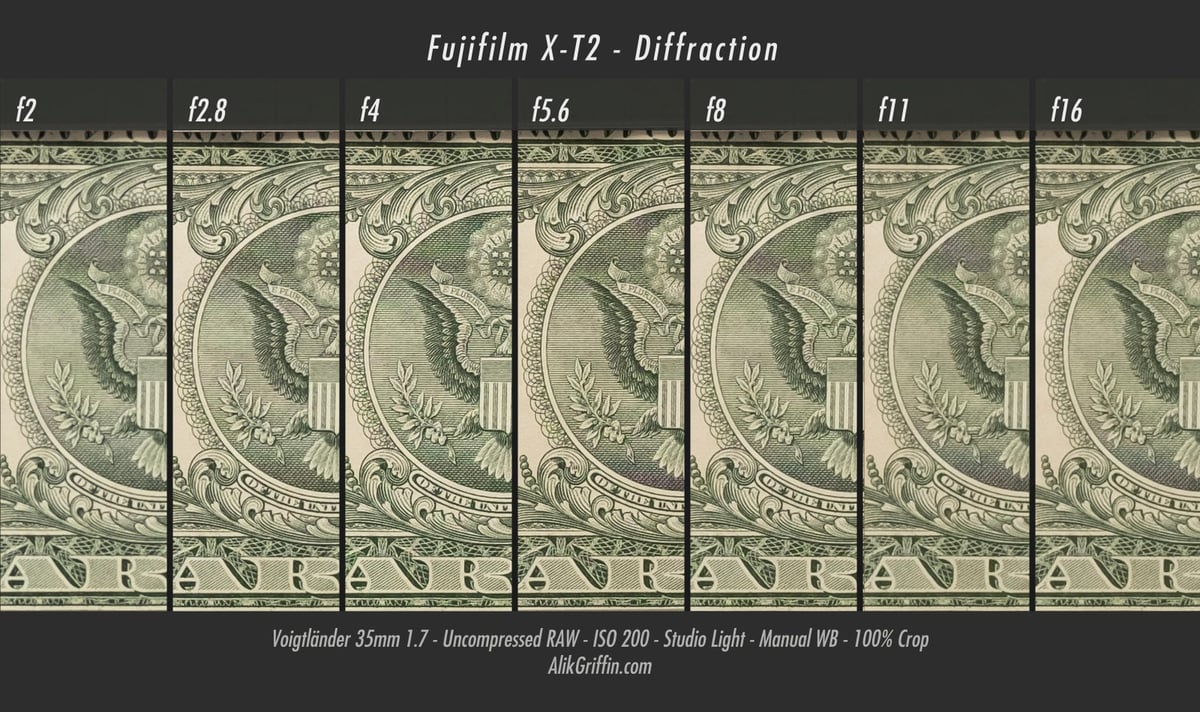
You’ll also see softness at around f2-f2.8 if the camera is too close to the subject due to spherical aberrations, but this has little to do with the sensors or even the camera and is more of a characteristic of how lenses work.
The sweet spot is going to be somewhere between f4-f8 with most lenses.
Auto Focus
The X-T2 has a 325-point intelligent hybrid focus with 91 phase detection focus points and 234 contrast detection focus points. A small upgrade from the X-Pro 2.
So how fast is it?
AF-C
Honestly, in real-world use, I can’t tell the difference between the X-T2, the A6300, and the X-Pro2 regarding auto-focus speed. But I feel like the X-T2 is slightly better at AF-C when set to the right mode, at least with accuracy.
And what better to test it than a baby on a swing?
This was set to AF-C – Auto Shutter, Auto ISO, F2.8 – Boost Mode Off – Lens used Fujinon 35mm f2. This shot burst at 8fps, so I slowed down the GIF to 4fps.

I did this probably three to four times. Sometimes, I got better focus, and sometimes, I got shots that were more out of focus; this was a good average.
It looks like focus misses here, and it did a few times, but actually, what was happening was that the camera would focus on the swing or seat vs. her face, partly because I had facial tracking turned off. So, although her face gets soft in this 1:1 crop, it’s often because the focus is on something else, like her seat or feet. If you were to shoot at f5.6 or even f8, you would get a deeper focus, which would be less of an issue.
You could achieve even better results if you had the additional battery grip and shot in Boost Mode.
There are still only a handful of lenses Fujifilm has made with the latest chips that allow for quick autofocus performance. The lens I used for this test was such a lens, the Fujinon 35mm f2. Don’t expect such results if you’re using some of Fujifilm’s lenses from a few years ago.
AF-S
When shooting in AF-S, it’s also quick enough to keep up with most urban wildlife. I had no problem catching up to this twitchy little squirrel and getting a few shots of him.

Fujinon 35mm f2 – ISO 200 – f2 – 1/450sec
UHS-II Memory Card Write Speeds
Now that we have a camera that shoots amazing burst speeds with AF-C, it’s even nicer to have extremely fast memory card write speeds. And the X-T2 doesn’t hold back!
It’s the fastest camera I’ve tested to date when it comes to memory card write speeds, maxing out at an average of 158MB/s
See the fastest memory cards for the Fujifilm X-T2 here.
This is one area where Fujifilm just annihilates the competition.
Video Quality & Features
The Fujifilm X-T2 now takes on filmmaking with some serious capabilities. It has almost everything you could ask for in a mirrorless camera of this size but with today’s limitations. Clean 8-bit HDMI out at 4k 30p with an F-log color profile.
Because of the X-Trans sensor, we also get incredibly sharp video without much moiré or aliasing.
All film simulator settings are left at default settings
Video Features
The camera does not pixel bin or line skip. It essentially is shooting 6k and scaling down to just about Super 35mm in 4k at a 1.17x crop, and at 1080, we are getting true Super 35mm.
- The X-T2 can shoot 4k at up to 30fps, and at 1080p, we can shoot 60fps.
- There is a 3.5mm mic socket.
- For the average Joe, we have access to all of Fujifilm’s great film simulators that can be used to make videos.
- 8-bit 4:2:2 F-Log with an HDMI mini for the more serious videographer looking for a wider color gamut.
- The video data rate isn’t that bad, either. I seem to be getting slightly over 100Mbit/s on 4k clips. With 1080p, I get 50-100Mbit/s.
- Record times for 4k are set at 10 minutes, but with the battery grip, they allow for 30 minutes. When shooting 1080p, record times are set to 15 minutes and 30 minutes with the grip. Keep in mind that it will break your clips into 4GB chunks.
- You can get about 1 hour of record time per battery. With the grip, that means 2 extra hours, giving 3 hours of recording.
- After recording for the 10-minute limit, you can start recording again immediately, and it will continue. I did this for 30 minutes straight with no issues, but the camera did get hot, and it was not hot enough to give me a warning. It was probably about 80 degrees in the shade when I did this. So, in a cooler environment, you could probably go much longer.
- So, how much video can you fit on a 64GB card? You can get about 80 minutes of video per 64GB card.
JPEG Colors
The Jpeg color engine in the camera has improved with the new processor. Like the X-Pro2, we get a couple of new color features, such as grain, as well as the new Arcos B&W film simulator.
Shooting JPEG isn’t a bad idea on this camera, either. I know a lot of people say not to shoot JPEG, but really, it’s totally fine with the XT2.
The quality you get from in-camera JPEG is slightly better than the Lightroom or Iridient profiles that simulate the effect, but It is close, so you could just shoot RAW and convert the colors back to Provia or whatever you want in post.
Straight out of camera Jpegs – all JPEG settings zeroed out.

Provia

Velvia

Astia

Classic Chrome

Pro Neg – High
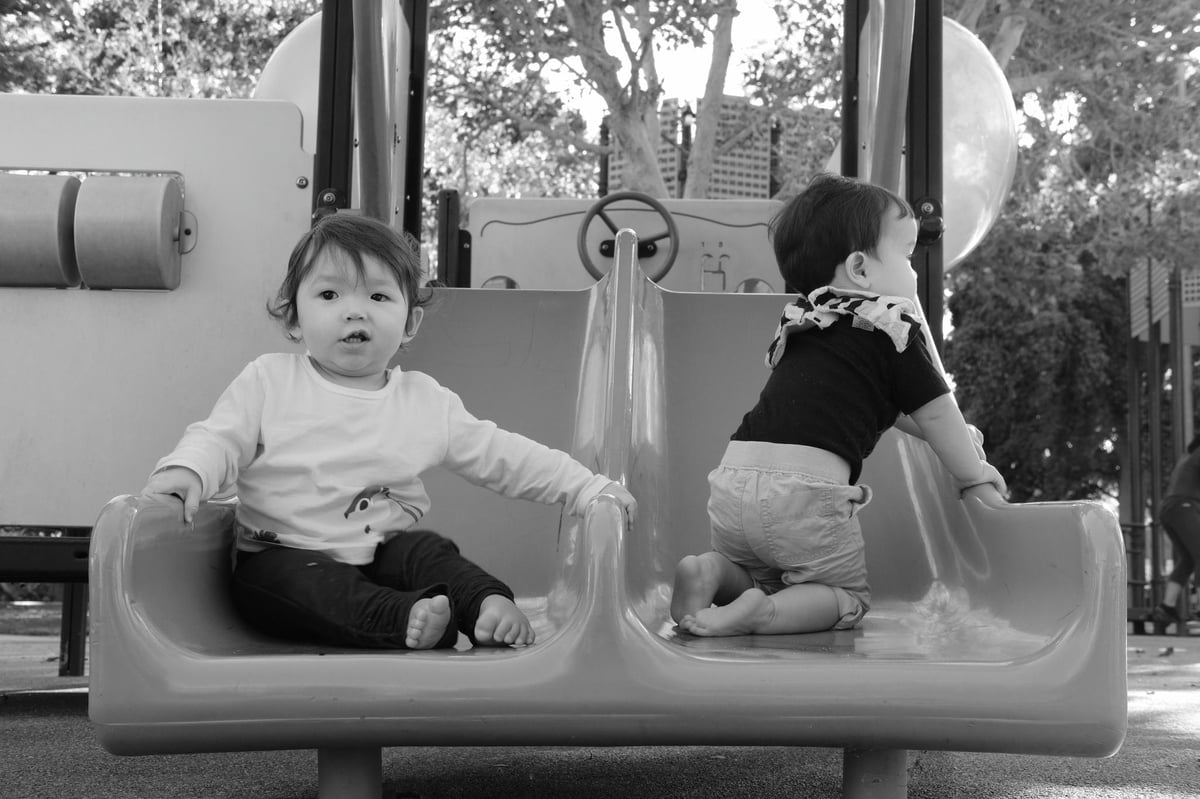
Arcos
Fujifilm X-T2 Unique Features
A few great new features make the XT2 a competitive camera that allows it to excel in any situation.




LCD Screen – LCD screens on Fujifilm cameras always feel nice. The X-T2 falls short of the X-Pro 2 in terms of pixel density, but man, I spent at least an hour with the X100T, X-Pro 2, XT1, XT2, A6300, and A7RII all side-by-side trying to see a difference. The X-Pro 2 felt slightly more vibrant / brighter than the other Fujifilm cameras, which are all set to the same setting but hardly noticeable. Other than that, resolution and everything else looked the same. So, I’m not sure what’s going on here. All the Fujifilm screens did feel nicer than the Sony screens in terms of clarity and vibrancy, but I think this is because Sony screens feel just a tad over-saturated.
The new screen also has a horizontal tilt for shooting low-angle shots with the camera tilted to portrait.
Here is what some of the competition is doing.
Fujifilm X-T2 – 3.0″ 1.04m-Dot
Fujifilm X-Pro 2 – 3.0″ 1.62m-Dot
Sony A6300 – 3.0″ 921.6k-Dot
Canon 6DII – 3.0″ 1.04m-Dot
Canon 7DII – 3.0″ 1.04m-Dot
Canon M5 – 3.2″ 1.62m-Dot – Touch Screen
Nikon D7200 – 3.2″ 1.229m-Dot
Boost Mode – What is boost mode? It overclocks the camera slightly. It gives you improved performance in the EVF from 60fps to 100fps; it also speeds up autofocus, decreasing focus time from 0.08 to 0.06.
If you have a battery grip, you can increase your continuous burst shooting from 8fps to 11fps with the mechanical shutter and up to 14fps with an electronic shutter.
Improved Bracketing – The XT1 and all other cameras before the release of the X-Pro2 could only bracket at +-1EV. This made landscape and HDR photography a little bit difficult on these cameras. With the +-2EV feature and a built-in countdown timer, shooting high-contrast landscapes is much easier since you can set it up and shoot without having to control the exposure comp dial to get your exposures.
Uncompressed RAW – This trend started a few years ago and is now being adopted by almost everybody, including Fujifilm. Like the X-Pro 2, the XT2 can also shoot uncompressed RAW for those who want to pull every little detail out of their shadows. I’ve yet to notice a significant difference other than how quickly my hard drive space disappears. It’s just not practical for everyday shooting, but it is a nice feature to have when shooting landscapes.
HSS Flash Support – The XT2 now has HSS flash support, and Fujifilm offers a new EX-X500 flash to take advantage of it. There were hacks to do this with the XT1 with certain adapters, but now you can do it simply with the Fujifilm flash or any of the HSS third-party speed lights like the Nissin i60A.




Useful Tips
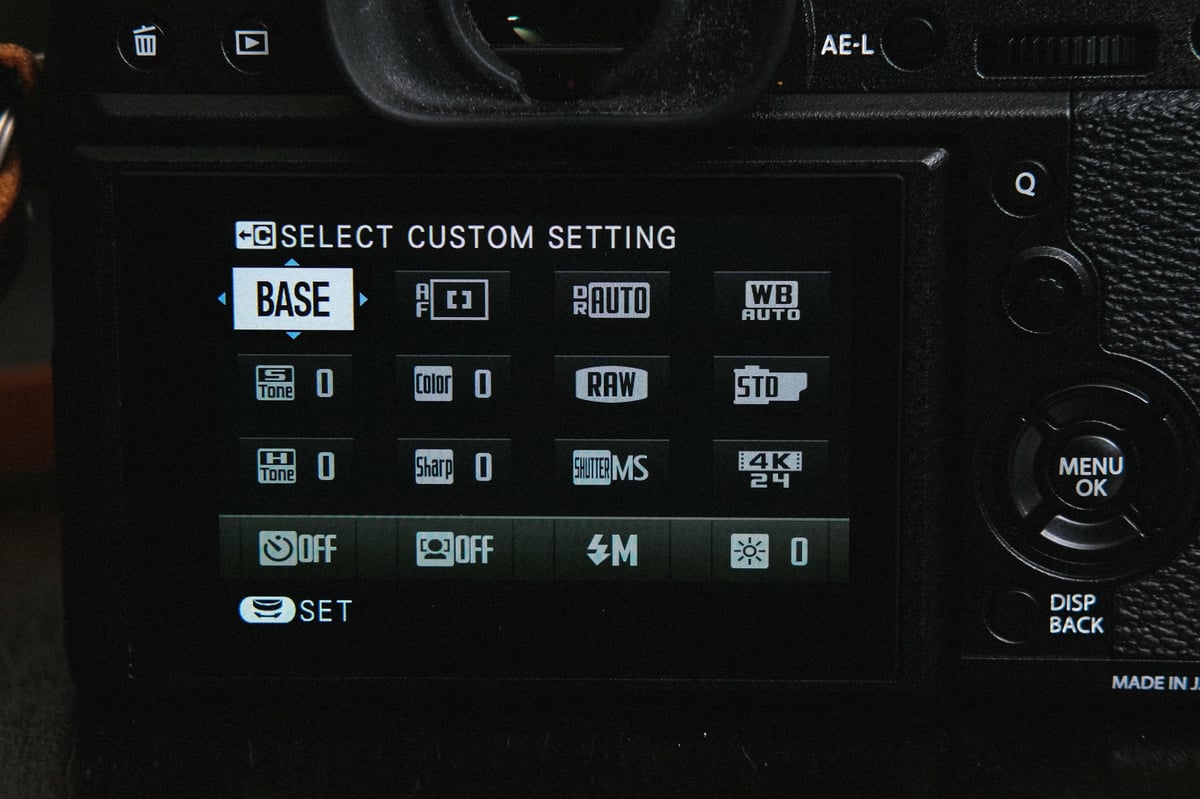
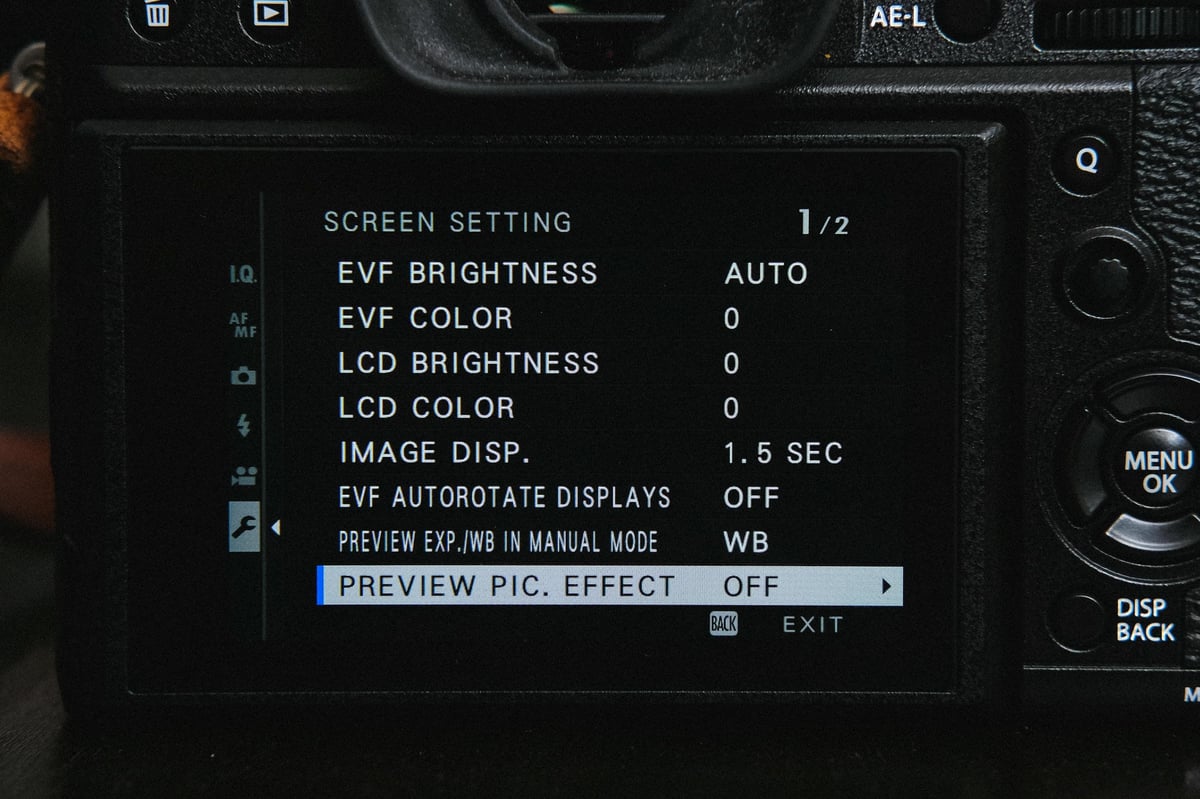
For some reason, Fujifilm cameras always come set up so weirdly. For example, there is no image preview after taking a photo and a 2-minute auto shut-off. They’ve also defaulted Boost Mode on the camera’s body. This is not exactly a feature you must toggle very often, especially if you’re not using a battery grip.
Here’s how I’ve set my cameras, which makes using them a bit easier for my average Joe shooting style. This should also help improve your battery performance.
Fujifilm X-T2 vs Sony A6300
The Sony A6300 is one of my favorite cameras, but I think I finally have a camera that I like more. Feature-wise, it matches the Sony at everything except a few video controls, and the Sony EVF can display at 20fps more than the X-T2.
Where the Fujifilm XT2 is better
The X-T2 excels over the A6300 with the sharpness and detail. X-T2 handles moiré a lot better because of the X-Trans CMOS II sensor.
The Fujifilm JPEGs and the general look of the image and even now video are unmatched by Sony, in my opinion, of course.
Being able to customize how your AF-C functions, I think, will help in those tough situations. However, I still need a lot more time with the camera to get a feel for this.
The LCD screen does look a little nicer, and the horizontal tilt I’m finding to be very useful.
When using SD memory cards, the Fujifilm X-T2 also has dual UHS-II slots, and the X-T2 outperforms the Sony A6300 by about 120MB/s when it comes to writing to memory cards.
Where the Sony A6300 is better
Where Sony excels is with its video features. It’s still a bit more robust than the X-T2, although it does have heat issues. As time passes, we’ll have to see how the X-T2 handles heat when shooting longer videos. I can tell you right now it gets hot, so I imagine it will have similar limitations when recording for a long time in hot conditions.
A6300 is still priced better. However, you do get more bang for your buck with Fujifilm lenses, so if you’re investing in a whole kit with a couple of lenses, you might walk away with a nicer kit for a lower price if you go with Fujifilm.
Because of the e-mount on the Sony A6300, the camera has access to all of Sony’s full-frame lenses. This means you have way more lens options than Fujifilm. Granted, full-frame lenses are going to be a lot more expensive. It’s rumored Sony will also give their APS-C lens lineup some love in the near future.
Fujifilm X-T2 vs X-Pro 2
It’s tough to compare the X-T2 to the X-Pro 2 because the X-Pro 2 is a unique camera designed for a very specific type of person. I like the X-Pro 2 a lot, and it feels so classy. However, the X-T2 is a lot smaller and lighter, making it a little more comfortable to carry around. The flip screen and option for a battery grip that enhances performance make the X-T2 also more of a practical camera.
However, the X-Pro 2 has that hybrid OVF. I will forever love shooting through the range finder style OVF; nothing else is like it.
Where the X-T2 is better
The X-T2 is lighter and smaller and has more features like 4k video.
You can also customize the X-T2 a little more with the menus. Like on the X-Pro 2, you can only set the power saving option to be 2-minutes or 5-minutes. If you’re not used to turning your camera on and off to save battery life, then you’ll have terrible battery life.
I also really like the ISO and Shutter dials on the X-T2 and the way they lock more than I like how they set up the X-Pro 2. I never loved how the ISO dial works on the X-Pro 2. You get used to it, and it’s fine, but the X-T2 is easier.
Boost Mode also enhances the autofocus speed and the fps the camera can shoot.
Where the X-Pro 2 is better
The OVF is a lot of fun, and sometimes, it’s nice to set the camera to viewfinder only and treat it like a classic film camera. And I think that makes the X-Pro 2 such a desirable camera. It feels so classic, and it’s one of those cameras that are a conversation starter everywhere you go, especially if you get a nice leather case.
Fujifilm X-T2 | Using Retro Lenses
One of the great things about mirrorless cameras like the Fujifilm X-T2 is they give you this amazing ability to attach old retro lenses of almost any type, or even lenses from other brands. I use a lot of Leica M lenses as well as old M42 mount screw-on lenses.
Since the Fujifilm has great manual focus assist settings, like focus peaking and a few other display configurations, the camera becomes one of the best, if not the best, for adapting old retro lenses.
I use many old Helios lenses, the Industar, or my favorite Voigtlander lenses, and they all work great.









Fujifilm X-T2 Review | Bottom Line
There is no doubt that Fujifilm created a monster with the X-T2. This camera can comfortably be used in any situation and in any style of photography, and now, with 4k video, it’s also an amazing tool for filmmakers.
It’s a little expensive compared to some of the competition, like the Sony A6000 or the A6300, but if you’re looking for a camera that is relatively future-proof for at least the next five years, has a great and expanding lens lineup and can do anything without any restrictions, this is the camera.
Must-Have Accessories For The Fujifilm X-T2
Best SD Memory Card For The Fujifilm X-T2
Complete List Of Every Lens Made For The Fujifilm X-Mount
Fujfilm X-T2 Sample Photos





















Leave a Reply