We use minimal analytics to improve the site. Is that okay?

Alik Griffin
San Clemente Sunset
Subscription Form
  • Reviews
    • Accessory Reviews
    • Calculators
      • Video Data Rate Calculator | Record Time Calculator
      • Diffraction Calculator
      • DoF Calculator | Lens Equivalent
      • Shutter Speed to Shutter Angle Calculator
    • Camera Reviews
    • Lens Reviews
    • Memory Cards Recommendations
      • Fastests SD Memory Cards
      • Fastest MicroSD Cards
      • Fastest CFExpress Type-B Card
      • Fastest CFExpress Type-A Cards
      • Best CFast Memory Card
    • List of Mics
      • Best Streaming & Podcast Mics
  • Camera Guides
    • List of all Blackmagic Cameras
    • List Of all Canon RF Cameras
    • List of all Fujifilm Cameras
    • List of all Nikon Z Cameras
    • List of all Panasonic Cameras
    • List Of all Sony E Cameras
  • List of Lenses
    • Canon RF Lenses
    • Fujifilm GFX Lenses
    • Fujifilm XF Lenses
    • L-Mount Lenses
    • Leica M Lenses
    • Micro Four Thirds Lenses
    • Nikon Z Lenses
    • PL Mount Cine Lenses
    • Sony E Lenses (FE and APS-C)
  • Store
  • My account
Alik Griffin
Alik Griffin
  • Reviews
    • Accessory Reviews
    • Calculators
      • Video Data Rate Calculator | Record Time Calculator
      • Diffraction Calculator
      • DoF Calculator | Lens Equivalent
      • Shutter Speed to Shutter Angle Calculator
    • Camera Reviews
    • Lens Reviews
    • Memory Cards Recommendations
      • Fastests SD Memory Cards
      • Fastest MicroSD Cards
      • Fastest CFExpress Type-B Card
      • Fastest CFExpress Type-A Cards
      • Best CFast Memory Card
    • List of Mics
      • Best Streaming & Podcast Mics
  • Camera Guides
    • List of all Blackmagic Cameras
    • List Of all Canon RF Cameras
    • List of all Fujifilm Cameras
    • List of all Nikon Z Cameras
    • List of all Panasonic Cameras
    • List Of all Sony E Cameras
  • List of Lenses
    • Canon RF Lenses
    • Fujifilm GFX Lenses
    • Fujifilm XF Lenses
    • L-Mount Lenses
    • Leica M Lenses
    • Micro Four Thirds Lenses
    • Nikon Z Lenses
    • PL Mount Cine Lenses
    • Sony E Lenses (FE and APS-C)
  • Store
  • My account
  • Pure Cinema
    Viltrox TCL-X100VI Review | A Budget-Friendly 50mm Upgrade
    • February 21, 2026
  • Thypoch Simera 75mm f1.4 Review
    Thypoch Simera 75mm f1.4 Review & Sample Photos
    • February 18, 2026
  • Kakurajima View
    Viltrox WCL-X100VI Review | A Budget-Friendly 28mm Upgrade
    • February 17, 2026
  • Viltrox 9mm f2.8 Air Review
    Viltrox 9mm f2.8 AIR Review & Sample Photos
    • February 18, 2026
  • Biker Bro
    Viltrox Spark Z3 Flash – Review & Sample Photos
    • February 16, 2026
  • Pure Cinema

    Viltrox TCL-X100VI Review | A Budget-Friendly 50mm Upgrade

    View Post
  • Thypoch Simera 75mm f1.4 Review

    Thypoch Simera 75mm f1.4 Review & Sample Photos

    View Post
  • Kakurajima View

    Viltrox WCL-X100VI Review | A Budget-Friendly 28mm Upgrade

    View Post
Trending Posts
  • Nikon Zf Official Announcement 1
    Nikon Zf – The Fujifilm Killer?
    • February 18, 2026
  • Nikon Z 50mm f1.8 S Lens Review 2
    Nikon Z 50mm f1.8 S Lens Review & Sample Photos
    • February 18, 2026
  • Kamlan 50mm f1.1 II Product Shot 3
    Kamlan 50mm f1.1 II Review & Sample Photos
    • January 18, 2025
0
  • Blog
  • Photo Tips
  • Update

3 Must Know Tips for Photographers using Smugmug Pro

  • Alik Griffin
  • April 14, 2024
  • No comments

This website contains affiliate links. We will earn a small commission on purchases made through these links. Some of the links used in these articles will direct you to Amazon. As an Amazon Associate, I earn from qualifying purchases.

If you’re a photographer, you’ve probably heard of Smugmug and know how great of a service it is. It’s pricey but pays for itself quickly. Mine did after only a few months. So here are some cool SEO (search engine optimization) tricks you can do with Smugmug to help enhance your blog and increase photography print sales.
Use smugmug like a pro

1. Use Can Use Smugmug To Embed Your Photos Directly Into Your Blog

This is great because it takes the load off your web server and increases your page load time, which Google likes. The photo is distributed from Smugmug’s global content delivery network, making your photos load super quickly.

Here’s a cool trick on how you can embed

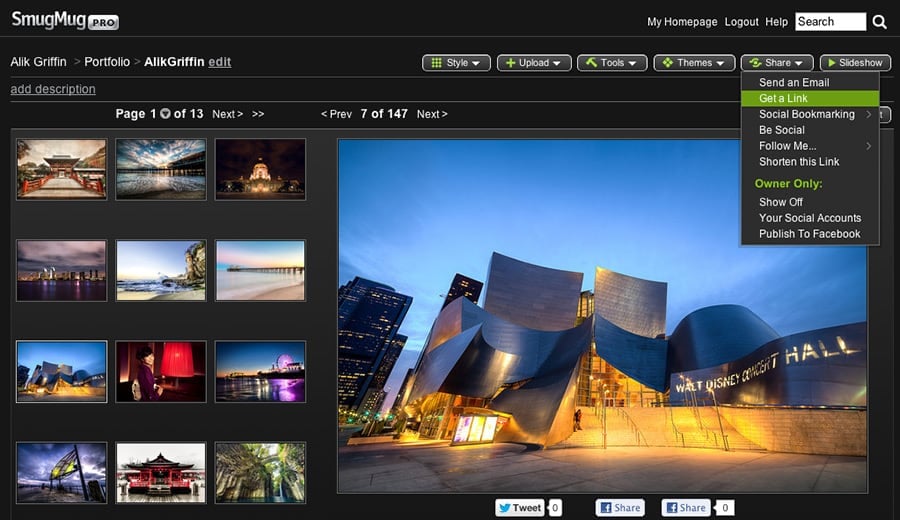
With Smugmug’s share feature, you can get a link that gives you access to embed links for your blog.

Then, you have several options to allow you to use your photo for Forums, Embeds, Feeds, etc. I will cover the ’embeddable links’ tab for now since this topic is about using Smugmug to distribute your photos on your blog.

Now, you have three default sizes to choose from. Small, Medium, and Large.

You simply click the copy button, and then you can paste the code into your blog. You’ll need to use either HTML edit mode or plain text editor mode on your blog to get it displayed correctly.

How to Change the Embed Size with Smugmug Pro

If these sizes aren’t the droids you’re looking for, there is a very simple technique to customize the size of your photo. After you paste the code, look for your image source line. It looks something like this

This is an example using the Large Setting, so we’re going to replace where you see the “L” with the appropriate dimensions we want for our site. For my blog, I like to use 900×600, so I replace the ‘L’ with ‘900×600’ so now it looks something like this:

This will now fetch this photo size from Smugmug at this dimension.

You can also now use the photo sizes by Smugmug, Ti, Th, S, M, L, XL, X2, X3, O instead of the dimensions (900×600). Then, resize your WYSIWYG when posting your photos on your blog. You can also set your width and height manually in HTML, which would look something like this:

I’ve found for the sharpest, clearest images I’ll now post on my blog bigger photos than I need, something like XL, or X2, then resize in my wysiwyg to be 900×600 or the desired dimensions. This way you’re loading a larger image and scaling down which helps with sharpness.

2. Using the Buy Link

In the same ‘Get A Link’ window there is a ‘Photo Links’ Tab and down at the very bottom there is a ‘Buy Link.’

You can use this URL as a hyperlink on your photo or in text next to your photo to drive people directly to the buy page on your Smugmug account. The benefits of this are pretty obvious. Fewer clicks to get someone to your sales page is always a plus. Otherwise, on the default Smugmug layout, the ‘Buy’ button isn’t the most obvious feature on the page and can be easily missed.

3. Use Smugmug for Backlinks

One really cool thing about Smugmug is that its page description is editable HTML. It’s basically a Web 2.0 Blog built around pictures. So you can throw in all that good stuff, like h1 and bold tags, as well as links back to your site using Anchor Text, which all help SEO (search engine optimization). It also allows you to sculpt your site’s authority by building your keywords into your descriptions and then linking back to your main site. This means that if your anchor text is correct, Google will now read this link back to my site and associate it with HDR Photography.

So, you can build some of your backlinks to your Smugmug account instead of your main site, and both sites will benefit from being well-indexed in Google’s system.

Smugmug + Your Blog + Pintrest

One other cool thing about this ability to edit caption on Smugmug is when you embed your photo on your blog, this caption will show up as the photo’s ‘alt text’ and ‘title.’ So when someone is on your blog and pins the image to Pintrest, the Pintrest description defaults to the Smugmug’s photo caption that you built to have all your great keywords. So, all those keywords related to your photo will be pinned, repinned, and indexed by Google. Now you might be saying, “But Pintrest links are all nofollow, so they won’t pass that magical link juice stuff.” This is true; they may not pass link juice, but they will tell Google what your site and your photos are about.

The Important One-Way Linking and the Nofollow Tag

If you’re going to take complete advantage of this, make sure that any link on your blog that links back to Smugmug includes a rel=”nofollow.” That way, your site will not pass link juice back to Smugmug. Link juice, as I mentioned earlier, is a magical Google substance that gets passed from one site to another to help a site get page rank. If you link two sites together, this effect can be canceled.

You can add a nofollow by editing this text on a link on your blog:

This is obviously just one very small step in marketing your site and driving up those photo sales. But every little thing is important, and every detail makes a difference over time. As a photographer trying to make a living with fine art photography, it’s important to understand how Google works and ensure your site is properly built to maximize search results.

Hopefully, this tip will help those of you using Smugmug Pro and I will continue to post new tips and techniques on SEO for you photographers as I go. My site is still young and I will try to post all the great successes and failures I make as I go.


0
0
2
0
0
Alik Griffin

A professional video editor, and photographer with a Bachelors in Film studies from UCSD. Based in Los Angeles, I have created commercials, trailers, and other video content for various clients and platforms since 2005. I also love to write about my passions and share my insights on my blog.

Related Topics
  • Photography Tips
Previous Article
Miyajima Shrine
  • Blog
  • Update

How to Shoot Better Handheld Photography

  • Alik Griffin
  • April 14, 2024
View Post
Next Article
Under Niagara Falls
  • Blog
  • Photo Stories

Behind the Niagara Falls

  • Alik Griffin
  • December 7, 2024
View Post

Subscribe

Subscribe now to our newsletter

You May Also Like
Pure Cinema
View Post
  • Blog
  • Featured
  • Lens Reviews
  • Reviews

Viltrox TCL-X100VI Review | A Budget-Friendly 50mm Upgrade

  • Alik Griffin
  • February 21, 2026
  • No comments
Thypoch Simera 75mm f1.4 Review
View Post
  • Blog
  • Featured
  • Lens Reviews

Thypoch Simera 75mm f1.4 Review & Sample Photos

  • Alik Griffin
  • February 18, 2026
  • No comments
Kakurajima View
View Post
  • Blog
  • Featured
  • Lens Reviews

Viltrox WCL-X100VI Review | A Budget-Friendly 28mm Upgrade

  • Alik Griffin
  • February 17, 2026
  • 2 comments
Sony A7V Announcement
View Post
  • Blog
  • What's New

Sony A7V – They’re Back In The Game

  • Alik Griffin
  • December 30, 2025
  • 4 comments

Leave a Reply Cancel reply

Your email address will not be published. Required fields are marked *

San Clemente Sunset

Join The Newsletter

Featured
  • Nikon Z 50mm f1.8 S Lens Review
    Nikon Z 50mm f1.8 S Lens Review & Sample Photos
    • 59 comments
  • TTArtisan 27mm f2.8 AF Front of Lens
    TTArtisan AF 27mm f2.8 Review & Sample Photos
    • 5 comments
  • Pure Cinema
    Viltrox TCL-X100VI Review | A Budget-Friendly 50mm Upgrade
    • No comments
  • Tiffen Black Pro Mist Filter At Night. Streets Of Tenjin Japan
    Tiffen Black Pro Mist Review – Is This The One?
    • 10 comments
  • Nikon Z 28mm f2.8 Review & Sample Photos
    • 18 comments
  • Kalina Picking Sakura
    Nikon Z 85mm f1.8 S Review & Sample Photos
    • 20 comments
  • Nikon Z 26mm f2.8 Review – A Little Miracle
    • 24 comments
  • How To Edit Photos To Look Like Film
    • 4 comments

Subscribe

Subscribe now to our newsletter

Privacy Policy | Licensing | About Me | Contact

Copyright © Alik Griffin Inc. 2025

Input your search keywords and press Enter.










