We use minimal analytics to improve the site. Is that okay?

Alik Griffin
San Clemente Sunset
Subscription Form
  • Reviews
    • Accessory Reviews
    • Calculators
      • Video Data Rate Calculator | Record Time Calculator
      • Diffraction Calculator
      • DoF Calculator | Lens Equivalent
      • Shutter Speed to Shutter Angle Calculator
    • Camera Reviews
    • Lens Reviews
    • Memory Cards Recommendations
      • Fastests SD Memory Cards
      • Fastest MicroSD Cards
      • Fastest CFExpress Type-B Card
      • Fastest CFExpress Type-A Cards
      • Best CFast Memory Card
    • List of Mics
      • Best Streaming & Podcast Mics
  • Camera Guides
    • List of all Blackmagic Cameras
    • List Of all Canon RF Cameras
    • List of all Fujifilm Cameras
    • List of all Nikon Z Cameras
    • List of all Panasonic Cameras
    • List Of all Sony E Cameras
  • List of Lenses
    • Canon RF Lenses
    • Fujifilm GFX Lenses
    • Fujifilm XF Lenses
    • L-Mount Lenses
    • Leica M Lenses
    • Micro Four Thirds Lenses
    • Nikon Z Lenses
    • PL Mount Cine Lenses
    • Sony E Lenses (FE and APS-C)
  • Store
  • My account
Alik Griffin
Alik Griffin
  • Reviews
    • Accessory Reviews
    • Calculators
      • Video Data Rate Calculator | Record Time Calculator
      • Diffraction Calculator
      • DoF Calculator | Lens Equivalent
      • Shutter Speed to Shutter Angle Calculator
    • Camera Reviews
    • Lens Reviews
    • Memory Cards Recommendations
      • Fastests SD Memory Cards
      • Fastest MicroSD Cards
      • Fastest CFExpress Type-B Card
      • Fastest CFExpress Type-A Cards
      • Best CFast Memory Card
    • List of Mics
      • Best Streaming & Podcast Mics
  • Camera Guides
    • List of all Blackmagic Cameras
    • List Of all Canon RF Cameras
    • List of all Fujifilm Cameras
    • List of all Nikon Z Cameras
    • List of all Panasonic Cameras
    • List Of all Sony E Cameras
  • List of Lenses
    • Canon RF Lenses
    • Fujifilm GFX Lenses
    • Fujifilm XF Lenses
    • L-Mount Lenses
    • Leica M Lenses
    • Micro Four Thirds Lenses
    • Nikon Z Lenses
    • PL Mount Cine Lenses
    • Sony E Lenses (FE and APS-C)
  • Store
  • My account
  • Pure Cinema
    Viltrox TCL-X100VI Review | A Budget-Friendly 50mm Upgrade
    • February 21, 2026
  • Thypoch Simera 75mm f1.4 Review
    Thypoch Simera 75mm f1.4 Review & Sample Photos
    • February 18, 2026
  • Kakurajima View
    Viltrox WCL-X100VI Review | A Budget-Friendly 28mm Upgrade
    • February 17, 2026
  • Viltrox 9mm f2.8 Air Review
    Viltrox 9mm f2.8 AIR Review & Sample Photos
    • February 18, 2026
  • Biker Bro
    Viltrox Spark Z3 Flash – Review & Sample Photos
    • February 16, 2026
  • Pure Cinema

    Viltrox TCL-X100VI Review | A Budget-Friendly 50mm Upgrade

    View Post
  • Thypoch Simera 75mm f1.4 Review

    Thypoch Simera 75mm f1.4 Review & Sample Photos

    View Post
  • Kakurajima View

    Viltrox WCL-X100VI Review | A Budget-Friendly 28mm Upgrade

    View Post
Trending Posts
  • Nikon Zf Official Announcement 1
    Nikon Zf – The Fujifilm Killer?
    • February 18, 2026
  • Nikon Z 50mm f1.8 S Lens Review 2
    Nikon Z 50mm f1.8 S Lens Review & Sample Photos
    • February 18, 2026
  • Kamlan 50mm f1.1 II Product Shot 3
    Kamlan 50mm f1.1 II Review & Sample Photos
    • January 18, 2025
0
  • Photo Tips

4 Ways to Improve Your HDR Photography Before Tone Mapping

  • Alik Griffin
  • April 12, 2024
  • No comments

This website contains affiliate links. We will earn a small commission on purchases made through these links. Some of the links used in these articles will direct you to Amazon. As an Amazon Associate, I earn from qualifying purchases.

Are you looking for ways to improve your HDR photography? Are you wondering where in your HDR workflow you are making mistakes?

Chances are there are a few steps you’re completely overlooking, and they happen before you even start.

I’ve compiled a list of four techniques you need to use for every HDR photo before tone mapping.

Here they are.
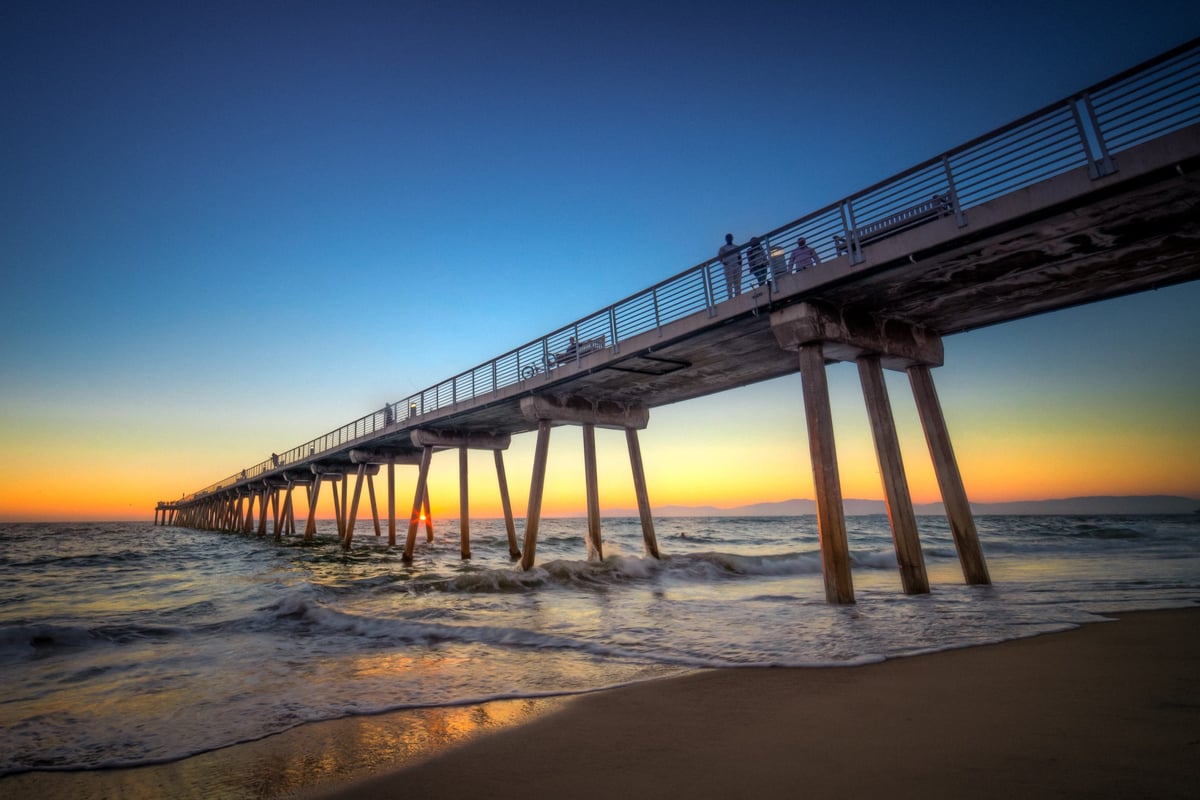
HDR Photo of Hermosa Pier

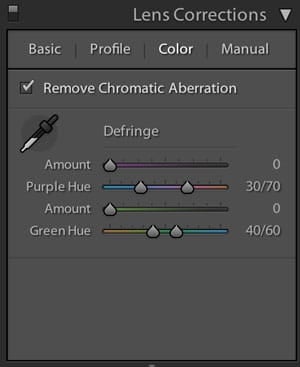
1. Correct Chromatic Aberrations

This can easily be done in Lightroom. Select the Remove Chromatic Aberrations in the Lens Correction module.

If you don’t do this here, you’ll have chromatic aberrations in your merged HDR image that will be much more difficult to remove. 
lens correction, chromatic

2. Turn Sharpness Down

If you’re working in Lightroom, you’ll notice that every photo has sharpness already set to 25. This will slightly enhance the grain, causing the tone mapping processes to bring out even more unwanted HDR noise.

Sharpening your Landscape and HDR photos is a crucial step, but it should be done last. One of the best techniques for sharpening your HDR photos at the end of your process is with the High Pass filter in Photoshop.

3. Noise Reduction

To help keep HDR noise to a minimum, you should reduce noise before tone-mapping your images together. 

If you use Photomatix, you’ll notice it can remove noise on underexposed images, but you cannot control what it does. Instead, reduce the noise in your darker images in Lightroom a little. There are also a few programs that do it even better. My favorite is Dfine 2 by Nik. I’ve also used Topaz Denoise with great results. 

Adding a little noise reduction first will remove some color noise and eliminate any unwanted artifacts that tone mapping will only enhance. 

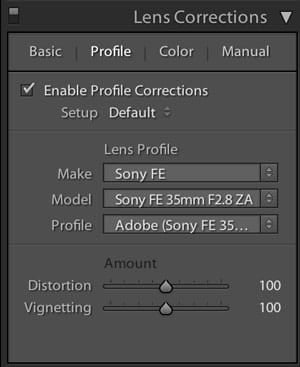
4. Load Your Lens Profile

If you’re shooting HDR photography on ultra-wide lenses, chances are you have some crazy barrel distortion. The best time to remove this lens distortion is when you’re still working with your RAW files.

In Lightroom this can easily be done by loading your lens profile in the Lens Correction module in Lightroom.

Keep in mind that after you have combined your images and are working in a TIF file, you will lose most of your lens profiles since you no longer have access to Camera Raw information.
lens correction
 

Conclusion

I know these results may seem small, but they will give you that extra little bit of quality that may have been missing in your HDR photos.

If you find doing these four steps on every photo in your bracketed sequence tedious, remember you can always copy and paste settings or even build a preprocessing HDR preset in Lightroom for every lens you might shoot on. 

0
0
0
0
0
Alik Griffin

A professional video editor, and photographer with a Bachelors in Film studies from UCSD. Based in Los Angeles, I have created commercials, trailers, and other video content for various clients and platforms since 2005. I also love to write about my passions and share my insights on my blog.

Related Topics
  • HDR Photography
  • Photography Tips
Previous Article
HardGraft Camera Wrist Strap
  • Camera Guides
  • Memory Cards Recommendations

Best SD Memory Cards For The Fuji x100T, X-E2, X30

  • Alik Griffin
  • February 13, 2026
View Post
Next Article
  • Memory Cards Recommendations

Sandisk Extreme Plus SD Memory Card Review

  • Alik Griffin
  • November 13, 2017
View Post

Subscribe

Subscribe now to our newsletter

You May Also Like
MidJourney V6 - RoboGirl
View Post
  • Photo Tips

How AI Will Dramatically Change Photography

  • Alik Griffin
  • March 13, 2025
  • No comments
View Post
  • Blog
  • Featured
  • Photo Tips

How To Edit Photos To Look Like Film

  • Alik Griffin
  • November 29, 2024
  • 4 comments
What is Micro Contrast
View Post
  • Blog
  • Featured
  • Photo Tips

Micro-Contrast, Is It Real? – Samples With Lens Comparisons

  • Alik Griffin
  • August 29, 2024
  • 17 comments
Fujifilm X100VI Black or Silver
View Post
  • Blog
  • Photo Tips

Fujifilm X100VI – Black or Silver? Why Silver Is Best

  • Alik Griffin
  • March 5, 2024
  • 19 comments

Leave a Reply Cancel reply

Your email address will not be published. Required fields are marked *


San Clemente Sunset

Join The Newsletter

Featured
  • Nikon Z 40mm f2 Review | The New Compact King
    • 26 comments
  • Zeiss Planar 50mm f2 on the Leica M11
    Zeiss Planar 50mm f2 Review & Sample Photos
    • 5 comments
  • Kalina Picking Sakura
    Nikon Z 85mm f1.8 S Review & Sample Photos
    • 20 comments
  • Kalina Flower FIeld
    Nikon Z 50mm f1.4 Review & Sample Photos
    • 24 comments
  • Viltrox 9mm f2.8 Air Review
    Viltrox 9mm f2.8 AIR Review & Sample Photos
    • 2 comments
  • Nikon Z 26mm f2.8 Review – A Little Miracle
    • 24 comments
  • On Board
    Fujifilm X100VI Review & Sample Photo
    • 5 comments
  • Kakurajima View
    Viltrox WCL-X100VI Review | A Budget-Friendly 28mm Upgrade
    • 2 comments

Subscribe

Subscribe now to our newsletter

Privacy Policy | Licensing | About Me | Contact

Copyright © Alik Griffin Inc. 2025

Input your search keywords and press Enter.











