
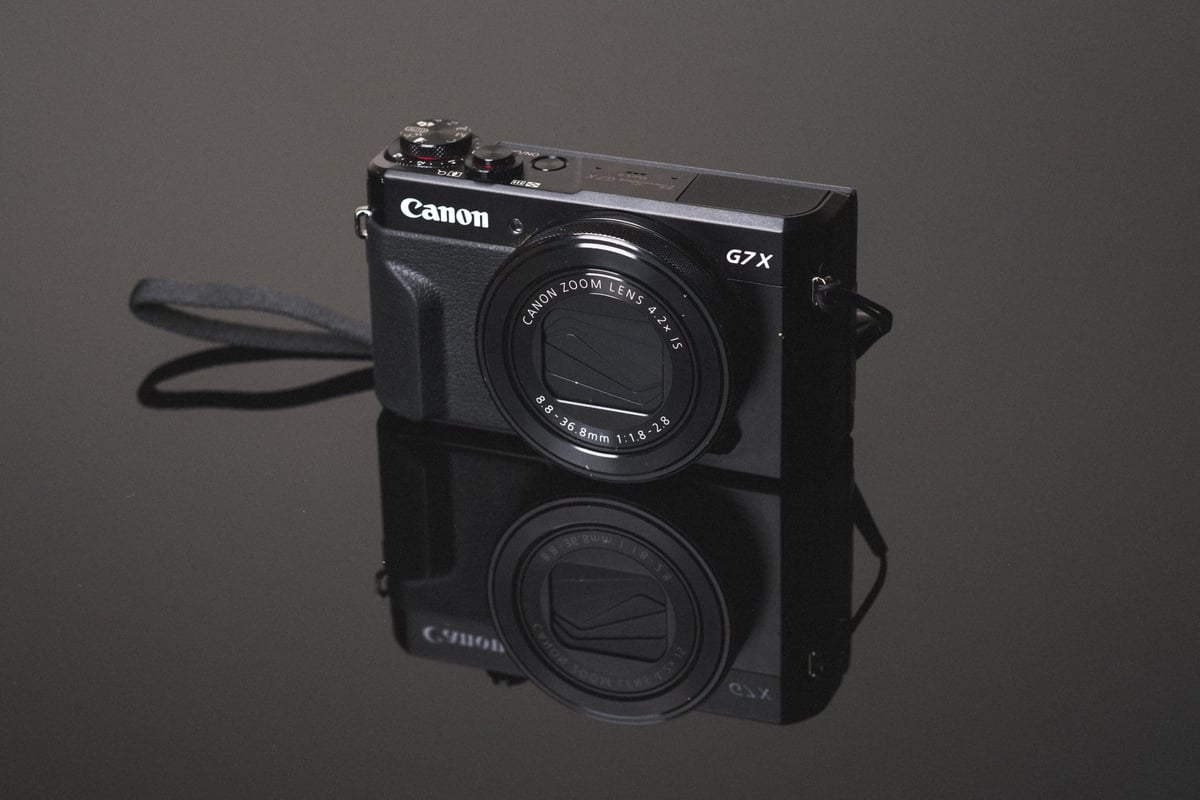
A speed comparison between all the most popular UHS-I and UHS-II SD memory cards in the Canon G7x II.
Use this guide to help you find the best memory cards for your style of shooting.
Best Memory Cards Canon G7X Mark II | Speed Test
After testing all the most popular memory cards in the Canon G7X Mark II I’ve found that there seems to be a speed bottleneck with the write access of the card. This is good and bad, It’s bad because the camera caps out at a memory card write speed of about 49 MB/s, which means it will take longer to clear the camera buffer, as well as could cause some delay with in-camera playback. But it’s good it makes shopping for the best memory card a lot easier.
Since there is a little bit of a speed cap, it becomes more about finding a good reliable, and affordable memory card. See the speed tests below.
Canon G7X Mark II Memory Card Speed Chart
| SD Memory Cards | USB 3.0 Read | USB 3.0 Write | Canon G7X II |
| UHS-II | |||
| Toshiba U3 64GB | 238.5 MB/s | 199.7 MB/s | 39.50 MB/s |
| Delkin UHS-II 250 U3 64GB | 245.1 MB/s | 164.6 MB/s | 39.11 MB/s |
| Transcend U3 64GB | 268.9 MB/s | 174.3 MB/s | 39.05 MB/s |
| Sony UHS-II U3 64GB | 253.2 MB/s | 91.62 MB/s | 38.99 MB/s |
| Sandisk Extreme Pro U3 64GB | 257.3 MB/s | 109.9 MB/s | 38.88 MB/s |
| Lexar 1000x U3 64GB | 145.0 MB/s | 60.7 MB/s | 38.81 MB/s |
| Lexar 2000x U3 64GB | 280.9 MB/s | 181.4 MB/s | 38.71 MB/s |
| UHS-I | |||
| Sandisk Extreme Pro 64GB U3 | 98.6 MB/s | 90.8 MB/s | 39.44 MB/s |
| Samsung Pro 64GB U3 | 97.7 MB/s | 78.6 MB/s | 39.12 MB/s |
| Sandisk Extreme Plus 64GB U3 | 99.0 MB/s | 64.4 MB/s | 39.00 MB/s |
| Samsung Pro+ 64GB U3 | 97.5 MB/s | 87.3 MB/s | 38.94 MB/s |
| Sandisk Extreme 64GB U3 | 72.43 MB/s | 54.1 MB/s | 38.70 MB/s |
| Kingston 64GB U3 | 98.1 MB/s | 90.4 MB/s | 38.70 MB/s |
| PNY 64GB U1 | 96.5 MB/s | 66.5 MB/s | 38.48 MB/s |
| Sony 64GB U3 (Old Model) | 96.5 MB/s | 84.5 MB/s | 38.07 MB/s |
| PNY 64GB U3 | 96.5 MB/s | 66.1 MB/s | 37.55 MB/s |
| Samsung Pro 64GB U1 | 96.3 MB/s | 82.2 MB/s | 37.49 MB/s |
| Lexar 633x 64GB U3 | 93.3 MB/s | 67.3 MB/s | 37.00 MB/s |
| Sony 64GB U3 (New Model) | 96.7 MB/s | 56.2 MB/s | 35.97 MB/s |
| Lexar 600x 64GB U1 | 95.4 MB/s | 64.8 MB/s | 36.89 MB/s |
| Transcend 64GB U3 | 96.7 MB/s | 68.4 MB/s | 36.30 MB/s |
| Samsung 64GB SDXC EVO U1 | 47.7 MB/s | 27.3 MB/s | 24.47 MB/s |
As usual, the Sandisk Extreme Pro card outperforms all other brands. However, Kingston, PNY, and Samsung also performed very well. You also won’t see any speed increase from using UHS-II memory cards in this camera since it does not support that type of interface.
Fastest Memory Cards For the Canon G7X II | The Results
Fastest UHS-II Memory Card
While the Canon G7X Mark II cannot take full advantage of the UHS-II memory cards, they still do work in-camera. They will just function as UHS-I cards. However, you will see a dramatic boost to speed when transferring from your card to your computer when using a UHS-II memory card reader.
If you decide to go with a UHS-II memory card, Toshiba and Delkin seem to perform slightly better than any of the others. If you decide to go with Sandisk, there is one available now that is 300MB/s, the one I tested was only 280MB/s. I’ve been having good results with the Lexar 2000x as well as the Sony card as well.
Toshiba 64GB UHS-II – Amazon
Delkin UHS-II U3 – Amazon / B&H
Fastest UHS-I Memory Cards
Since all the UHS-I memory cards perform very close to the same, I recommend going with Sandisk cards, they are one of the most reliable brands. However, Samsung and Sony cards are also great. Transcend, Lexar and PNY sometimes give me some problems with some cameras so only buy them if you get a good deal. For the most part, though, all these cards worked fine for me in the G7X II, so your chances of getting a bad card are rare.
Sandisk Extreme Pro U3 64GB – Amazon / Adorama / B&H
Samsung Pro U1 64GB – Amazon / Adorama
Sandisk Extreme Plus 64GB U3 – Amazon / Adorama / B&H
Camera Specs
Sensor: 1″ 20.1MP / Processor: Digic 7
Memory Card Type: SD UHS-I
Video: [1920 x 1080]: 59.94 fps / 29.97 fps / 23.976
Est. Size Of Buffer: 500MB
Continues Shooting Speed: 8fps
Shots To Fill Buffer: 23 RAW
Time To Clear Buffer: 12.25 seconds
Canon G7X Mark II – Amazon / Adorama / BHphoto
You can find all the best G7XII accessories here.
Where To Buy Memory Cards
If you don’t buy a memory card from one of the links above, you’ll need to be careful you don’t get counterfeit cards. They are very common on eBay, even sometimes on Amazon. Always make sure you buy your cards from a trusted source on Amazon, or a trusted camera store like Adorama, or B&HPhoto. I would avoid buying any memory cards on eBay.
Best Cards For Video In The Canon G7X Mark II
The Canon G7X II doesn’t have any restrictions on memory cards when it comes to shooting video. Even at 1080p, the camera shoots at a low enough bitrate so that any of the new memory cards, except maybe the Samsung EVO will work fine.
Frequently Ask Questions
I’ve been doing these memory card speed tests for several years now and I get a lot of the same questions asked, so I’ll do my best to answer those here.
Do I need a UHS-II Memory Card? – You do not need a UHS-II memory card and they actually will give you no benefit over a UHS-I memory card when used in the camera. The only difference a UHS-II memory card will make in the Canon G7X Mark II is it will allow you to transfer your data to your computer quickly if you have a fast UHS-II memory card reader.
What’s the difference between U1 and U3 SD Memory cards? – The main difference has to do with minimum write speeds. U1 cards are guaranteed to write at a minimum speed of 10MB/s, and U3 SD memory cards can write at a minimum speed of 30MB/s. Now of course many things go on inside the camera that might not guarantee this, but it’s usually not the card’s fault. You’ll also start seeing V30, V60, and V90 written on cards. This has to do with the minimum write speeds of V30 – 30MB/s, V60 – 60MB/s, V90 – 90MB/s.
What’s the difference between SDHC and SDXC with SD memory cards? – This has to do with the formatting of the card. SDHC cards are Fat32, and SDXC cards are exFat. Now pretty much SDHC means any card 32GB and smaller, and SDXC means 64GB and larger.
My memory card is creating corrupt shots what do I do? – Unfortunately in this situation, you likely have a bad card. There isn’t a lot you can do about this other than to replace your card.
My memory card doesn’t work what do I do? – It’s likely you could have a bad memory card, but also make sure you always format your card in camera. This tends to reduce issues with cards not working or not performing correctly.
My buffer keeps getting filled when recording video. – This usually means you’re memory card is not fast enough and you’ll need to get a faster card. If you already have a card on the list above, you should try a different brand. Not all cameras work the same with each card, different production cycles between cameras and cards can produce various results and there is no guarantee the cards I rated will work perfectly with your camera. Lexar, Toshiba, Samsung, and Sandisk are usually pretty safe bets.
Best Memory Card For The Canon G7X Mark II | Conclusions
Whether you’re looking for the fastest memory card or just a memory card that will last you a long time, the difference between 5MB/s or even maybe 10MB/s write speeds won’t make a very noticeable difference when you’re dealing with already very fast memory cards. So if there is a card that performs well but has a better warranty and is at a better price, it might be a good idea to just grab that.
If you’re doing a lot of burst shooting for sports, nature, or even landscape photography, then it might be a good idea to go with the fastest card you can afford so you never find yourself waiting on that annoying buffer.














Leave a Reply to Alik Griffin Cancel reply