
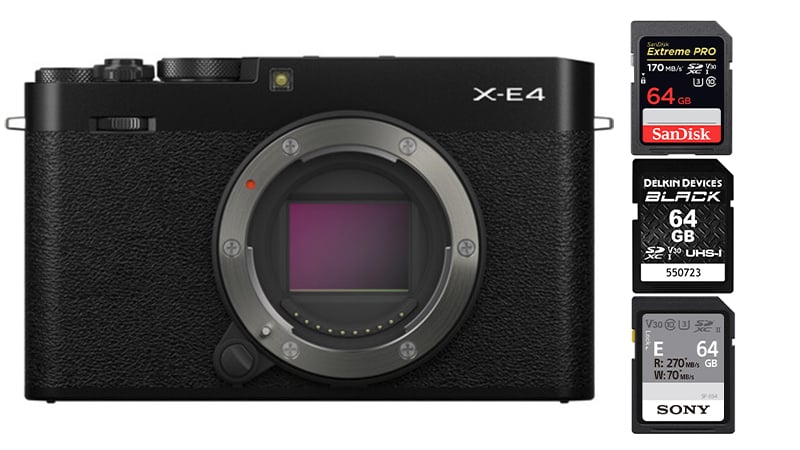
The Fujifilm X-E4 uses a single UHS-I memory card.
For Stills Shooters: Most UHS-I SD cards work well as long as you buy one with a speed class rating of V30 or U3. SanDisk cards have always been the go-to brand and one of the top sellers, and their cards are among the best. Lately, the new Sony E card is also a nice option if you want faster transfer speeds to your computer with a UHS-II reader.
For Video Shooters: Photographers who also shoot a lot of video might like larger cards with faster transfer speeds, so something like a Sony M or a ProGrade V60 is a great option here. These also work well for cameras like the Fujifilm X-Pro3 or X-T4 if you’re pairing up the X-E4 with something like that.
You can’t go wrong with any of these cards, so check sales and prices and go with the best deal, but know that all you really need for the Fujifilm X-E4 is a UHS-I card rated U3.
| Recommended SD Cards | Speed Class | USB Write | USB Read | Links |
|---|---|---|---|---|
| SD UHS-II V60 | Hide | |||
| Sony E v60 128GB | UHS-II v60 | 142 | 252 | Amazon / B&H |
| Sony E v30 64GB | UHS-II v30 | 73 | 247 | Amazon / B&H |
| UHS-I U3 | Hide | |||
| Sandisk Extreme Pro 32GB-1TB | UHS-I | 137 | 175 | Amazon / B&H |
| Kingston CanvasGo! 128/256/512GB/1TB | UHS-I | 124 | 161 | Amazon / B&H |
| Delkin Advantage 128GB-1TB | UHS-I | 77 | 93 | Amazon / B&H |
Must-Have Accessories Fuji X-E4
Best Memory Cards Fujifilm X-E4
Before buying a memory card for the X-E4, you should know the basic requirements and specs to avoid buying more than you need.
The Fujifilm X-E4 has only a UHS-I single card slot. You can buy UHS-II cards and use them, but they won’t offer any benefit to in-camera speeds or reliability. Some photographers and videographers still use UHS-II cards for faster write speeds when using a UHS-II card reader with a computer.
When shooting video with the X-E4, the 4 K bitrate can reach 200 Mbps (25 MB/s). This means you will need at least a U3 memory card to shoot 4k video reliably on the X-E4.
Even if you shoot at 100 Mbps, you will still need a U3-rated memory card as a minimum requirement.
Fujifilm X-E4 Camera Specs
| Sensor: APS-C 26.1MP CMOS 4 Processor: X-Processor 4 Continuous Shoot: 8fps Mechanical, 20fps Electronic Est. Buffer Size: Unknown RAW Shots To Fill Buffer: 18 RAW | 105 JPEG @ 8fps Max Memory Card Capacity: unknown DCI 4k Datarate: 100-200 Mbps | 25 MB/s 1080p Datarate: 100-200 Mbps | 25 MB/s |
Do This When You First Buy Your Memory Card
There are a lot of counterfeit memory cards out there, and even retailers selling on Amazon sometimes ship them.
Whenever you buy a new memory card, you should always test to see if it is counterfeit.
Counterfeit cards often have memory controllers that have been hacked, so they are sold with more memory than is actually on the card. For example, you might buy a 128GB card, put it in your camera, and it says you have 128GB of memory, but there is really only 64GB on the card. It will work fine up to 64GB, but once you record more than that, the card will get corrupted.
This is often why you see bad reviews of people saying, “The card worked great for a few weeks.” Likely, it was working fine until the day they crossed that 64GB threshold.
So how do you test for this?
Easy, the first thing you do when you buy a new memory card is max out the capacity. If you were able to fill the card without it becoming corrupted and it performed according to spec, you likely have an official card. I like to do this by recording video to avoid wearing out the camera’s shutter, or you can use stills as long as the camera is set to electronic shutter mode.
Best Memory Cards For Video
For those looking to use the Fujifilm X-E4 for video, there are a few stats you should know.
The X-E4 shoots DCI 4k ( 4096 x 2160 ). That’s pretty cool. Most of our mirrorless cameras today only shoot UHD 4 K (3840 x 2160).
The X-E4 also has a few nice bitrate options.
200Mbps = 25MB/s
100Mbps = 12.5Mb/s
To get consistent 200 Mbps recording with the X-E4, you will need a UHS-I card rated at least U3.
The camera’s record limit is set to 30 minutes. We’re not yet sure of the 4k limits and how the heat will play into this.
What Size Memory Card To Buy
Casual shooters will be fine with a 64GB card; however, I’ve been liking 128GB cards because they let me go a few days without clearing my cards.
Or I can leave some files on my cards from the previous day, as everything on my computer is backed up to my server.
Video shooters will likely need to start with a 128GB card, especially if shooting at 200Mbps is of interest.
Best SD Cards Fujifilm X-E4 Conclusions
Finding the right memory card for your shooting style can be a little tricky, but this guide should make it easier and hopefully save you money and headaches.
If you just want the best, most reliable card, stick with the SanDisk Extreme Pro. The Sony E is also a great option, as it supports faster write speeds with a UHS-II reader.
You definitely don’t need an expensive UHS-II card for this camera, and if you want to buy them for faster transfer speeds, stick with the V60 cards or the Sony E card.













Leave a Reply