|

Best Memory Cards Sony A9 II

We tested each memory card in the Sony A9II to see which had the best performance. Turns out, there are only a few you should buy.

Use this guide to find the best memory cards for your Sony A9II.
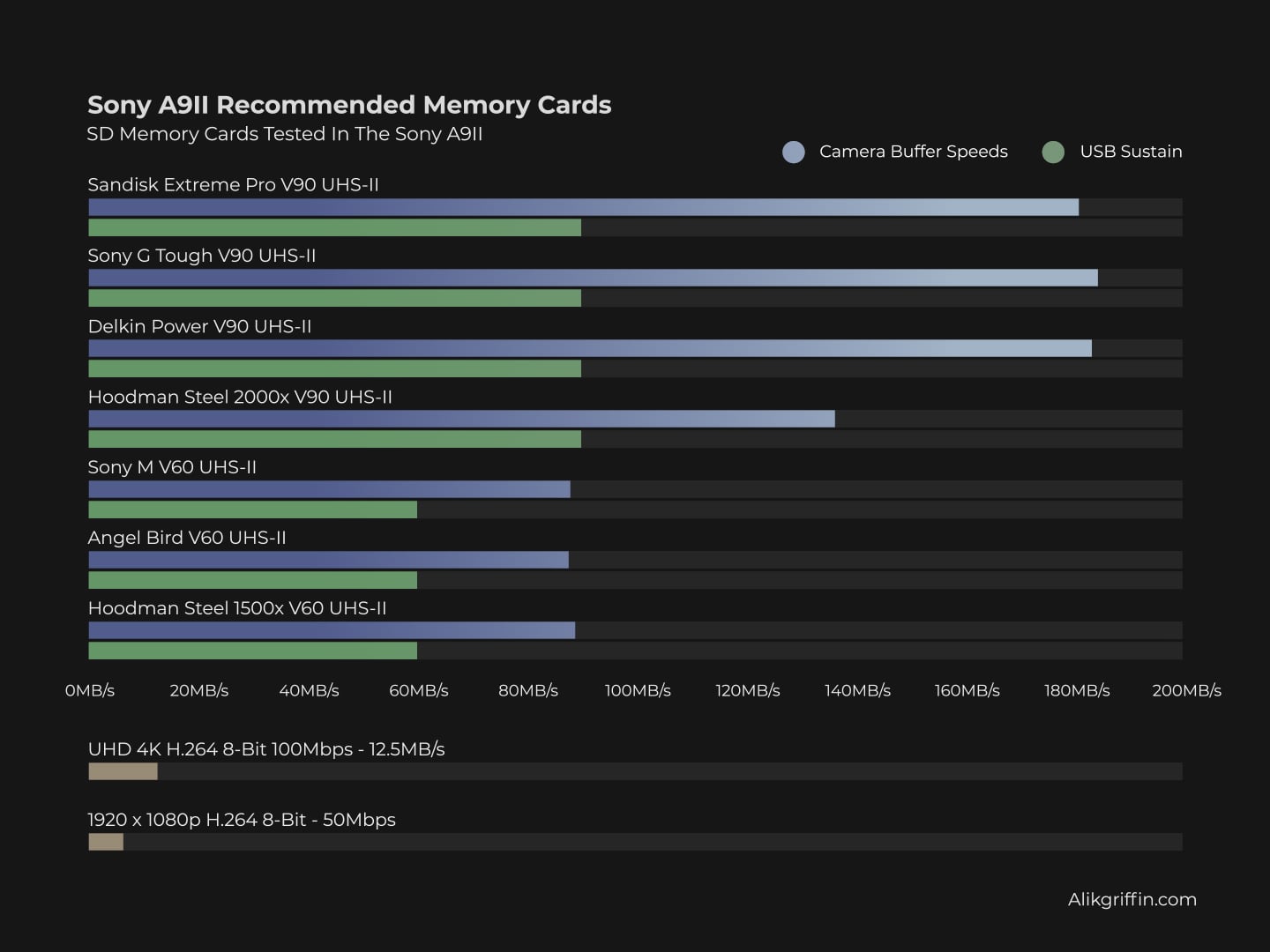
Sony A79 II Recommended Memory Card with Buffer Speeds

Recommended Memory Card Sony A9 II

The Sony A9 II has a dual memory card configuration with both slots taking UHS-II V90 memory cards. This means you can use two V90 UHS-II cards without throttling performance.
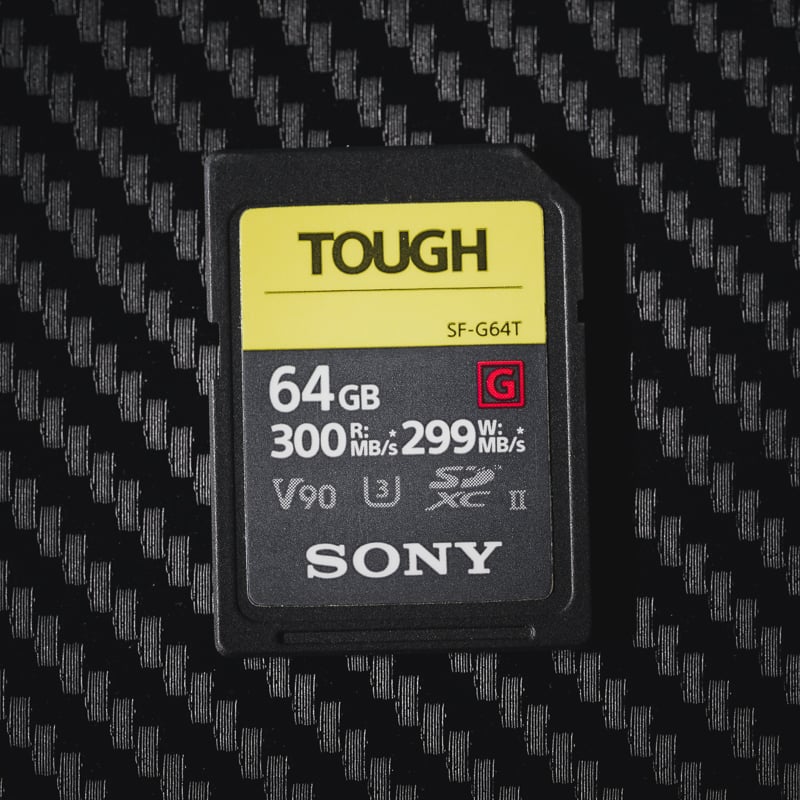
Best Memory Card Sony A9II Sony Tough G

For video shooters, you don’t need v90 cards or even V60 cards. UHS-I U3 SD cards will run fine for the 100Mbps 4k video internal recording.

Each card has been tested in-camera using a continuous burst with an uncompressed raw format.

Here are the best-performing SD cards in the Sony A9II.

Card NameIn-Camera SpeedOrder
Sony G Tough184.5MB/sAmazon / B&H
Delkin Power v90183.4MB/sAmazon / B&H
Sandisk Extreme Pro181.0MB/sAmazon / B&H
Toshiba Exceria Pro166.8MB/sAmazon

That’s it. Everything else is significantly slower.

Also, check out the List of Essential Accessories Sony A9 II

Sony A9 II In-Camera Speed Test

Speed Chart

This chart shows how each memory card performed in the Sony A9II. Note there are a lot of new cards today, but you’ll likely still want to stick with the champions, the Delkin Black, or the Sony G Tough.

See more SD Memory Card Benchmarks like USB Read and Write speeds.
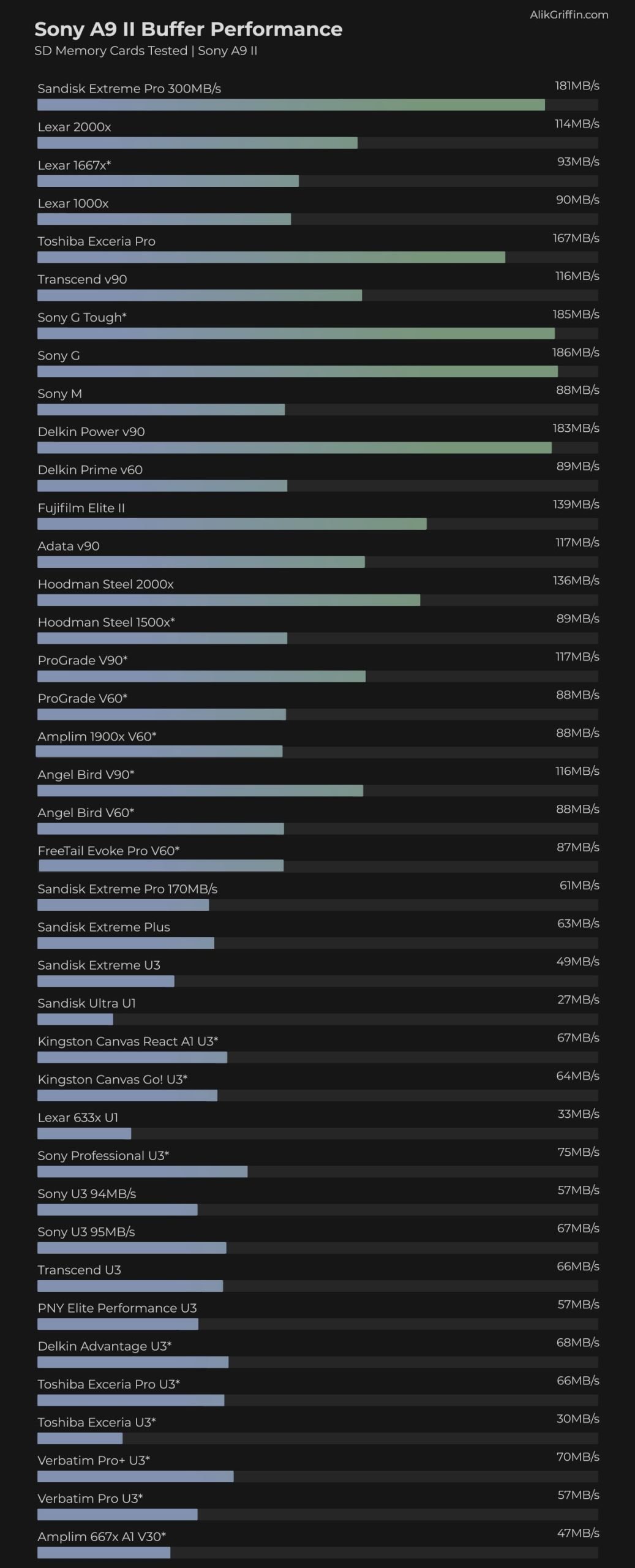
Sony A9 II SD Memory Card Buffer Tests

Sony A9 II Camera Specs And Buffer Questions

Sensor: 24.2MP Full-Frame Exmor RS CMOS Sensor
Processor: BIONZ X
SD Cards Slot: Dual Slot, UHS-II
Continuous Burst: 20 fps
Video: 4k30p 100Mbps.
Can I Use UHS-I Cards? Yes, but they are slower
What Is The Max Video Bitrate? 100Mbps (12.5MB/s)
How Big Is The Buffer? 5GB
How Many Shots To Fill Buffer? 143 Uncompressed RAW
What Size Are The Raw Files: 49.1MB Uncompressed
How Long To Clear Buffer? 24:22 That’s 24seconds 22 frames in a 60fps sequence.

Best SD Memory Cards For 4k Video

If you’re going to be using the Sony A9 II for a lot of video, you don’t need a very fast memory card. Still, the max bitrate of the A9II is only 100Mbps. This is only 12.5MB/s. 

For Primary video shoots you could stick with a U3/V30 SD UHS-I card or try the Sony E cards.

Sony A9 II Video Record Times

Most of the Sony cameras are all shooting with the same video specs even the Sony A9 II.

You can shoot 4k at 30fps with 100Mbps, or 1080p up to 120fps.

Here a list of video record times for the different sizes of cards for the different record settings.

ResolutionFormatBitrate32GB64GB128GB256GB
4k30p, 24pXAVC S 4K100Mbps43min85min171min341min
4k30p, 24pXAVC S 4K60Mbps71min142min284min569min
1080 120p, 100pXAVC S HD100Mbps43min85min171min341min
1080 120p, 100pXAVC S HD60Mbps71min142min284min569min
1080 24p, 25p, 30p, 50p, 60pXAVC S HD50Mbps85min171min341min683min
1080 25p, 30pXAVC S HD16Mbps267min533min1067min2133min
1080 60iAVCHD24Mbps178min356min711min1422min
1080 60iAVCHD17Mbps251min502min1004min2008min

Comments

29 responses to “Best Memory Cards Sony A9 II”

      1. Mark Harris Avatar
        Mark Harris

        If you have an affiliate link for it, I can use it.
        Thanks!

      1. Mark Harris Avatar
        Mark Harris

        This is the weirdest thing with that USB-C reader.
        I bought it and tested one of my Sony cards (not the tough but previous gen) and it was writing from my PC to the Card at 200MB and reading at 235MB. Did it like 2 times both ways to confirm. Then did it with my other Sony card and same thing.
        Then tried my Transcend card and it actually writes at 210MB and reads at the same 235MB.
        But here comes the weird part…after that I CANNOT have either of my Sony cards to even pass 100MB either way. I tried formatting in camera and with SD Formatter and nothing helps.
        They still read at the same speed as they did before in my Kingston reader (about 170MB) but I have no idea why now this Sandisk USB-C reader is doing that.
        Any clue??/
        Thanks

        1. Alik Griffin Avatar

          Is your Wifi set to 2.4 or 5Ghz? Set your wifi to 5Ghz if you can when using USB-C. Since USB-C runs at a 2.4Ghz frequency and it will interfere with the device.

          It also could be some thermal throttling going on. Let everything cool for like 15 minutes and try again.

          Also make sure any virus scanner didn’t start running or something.

          Then software to test, on Windows you can try Crystal Disk, on Mac you can try Black Magic Speed Test and AJA System Test, they all give different results.

          I had that exact same issue happen with my CFexpress reader. In that case it was thermal throttling. I left everything alone for awhile and came back and it was fine again.

          1. Mark Harris Avatar
            Mark Harris

            I tried a 3rd Sony card that I was not even using and same issue but the Transcend still runs at full speed which is the weirdest part. I dont have anything on 2.4Ghz and it would affect the transcend too anyways so somehow the reader just decided to not like the Sony cards after the first few tests.

          2. Alik Griffin Avatar

            Let me go back and forth with mine and see if I get that issue. Hold on.

          3. Mark Harris Avatar
            Mark Harris

            Thanks man, you rock!

          4. Alik Griffin Avatar

            Ok, going back and forth between Sony and Transcend, the Sony cards run constantly fast. On OSX the transcend cards are running quite a bit slower, I formatted them in a Sony camera and it helped a little but they still run slower on OSX than they did on windows. 152Write and 231Read on Mac, on Windows I got 192Write and 282Read.

            Try putting a few shots or some video on the Sony cards. I’ve seen some cards behave really weird before if there is nothing on them when you start the test.

          5. Mark Harris Avatar
            Mark Harris

            I will give that a shot. Thanks for checking!

          6. Alik Griffin Avatar

            Also, have you ever maxed out the capacity of those Sony cards to make sure they aren’t counterfeit?

          7. Mark Harris Avatar
            Mark Harris

            Yes I have many times. 🙂
            They still hit much higher on my Kingston reader..is just the Sandisk that after uinning 200MB first now wont pass even 100MB with them. Talk about a mystery lol

          8. Alik Griffin Avatar

            Strange, it seems like it just somehow stopped seeing those cards are UHS-II or something. Maybe check the pins, try to clean them, see if anything got bent.

          9. Mark Harris Avatar
            Mark Harris

            will check. I was expecting an issue like that to also mess them up on my Kingston yet, no problem there. That is the thing that is driving me crazy. Oh well 😀

          10. Alik Griffin Avatar

            Yeah, it’s a super weird one. It might be best to return it for something else. Some component in the reader maybe got corrupted or something and now it doesn’t like Sony memory controllers.

          11. Mark Harris Avatar
            Mark Harris

            I think you nailed it because I tested my lower speed Sony card and is running at the same speed as the fastest one so like you said, is not recognizing the Sony as UHS2 any more it seems.
            Gonna try to exchange and if I have any issues, I will stick to the trust Kingston I suppose LOL

          12. Alik Griffin Avatar

            Yeah, Kingston makes good stuff so that’s not a bad thing. Then just wait for more USB-C readers to come.

          13. Mark Harris Avatar
            Mark Harris

            I will let you know if the replacement is any better. Thanks

          14. Mark Harris Avatar
            Mark Harris

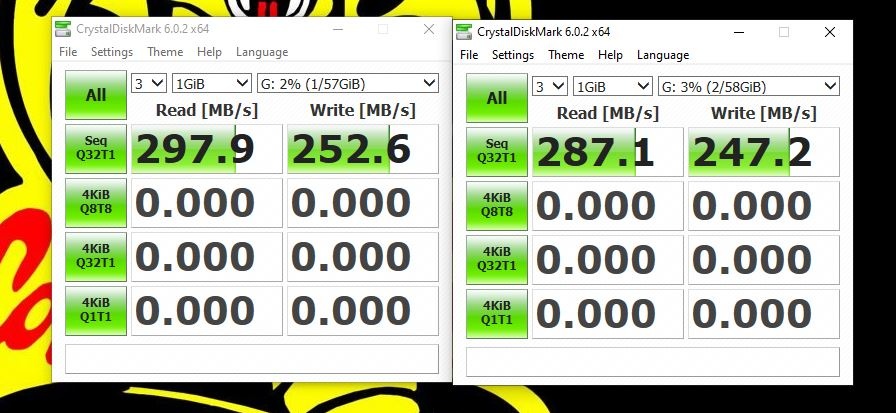
            Great news..the replacement is SMOKING FAST and no issue with any card!
            https://uploads.disquscdn.com/images/7def734e08cf479143efb2685d3b474cfec5f0c42b5411f85ca278229a3b2b0a.jpg
            The left one is the Transcend and the right one is the Sony.
            This is the one:
            https://www.amazon.com/gp/product/B07YJXLL3X/ref=ppx_yo_dt_b_asin_title_o01_s00?ie=UTF8&psc=1

          15. Mark Harris Avatar
            Mark Harris

            I was upgrading from my Kingston but maybe I should have gone with the Lexar…but then again , they were reading so much faster at 235MB…except now of course only the Transcend reads that fast :/

  1. Linwood Ferguson Avatar
    Linwood Ferguson

    I suspect most action shooters, who I think were the primary target, are unlikely to shoot uncompressed raw. Some will shoot jpg and those really are moot, the buffer is so huge. I would wager most who do not will shoot compressed raw. In testing some slower cards it appears (I don’t have the fastest), maybe, that the A9ii gets cpu limited there, at least the data rate is substantially slower in brief testing I did. Have you considered also doing your tests on the (I believe) more common compressed raw? It may be one could buy, say, the Sony M and get the same performance as the Sony G. Maybe — pure speculation as I do not have any G.

    1. Alik Griffin Avatar

      I tested the D850 in Compressed and Uncompressed and the results in the Sony G card were about a 15Mb/s difference. The Compressed shots take a CPU hit, so they delay the write time as the files are being compressed, that’s actually why there is a speed difference, the cards always write at the same speed regardless of uncompressed vs compressed. So I think what you’re getting at, is can you get more shots on the card in the same amount of time if you shoot compressed, and will a Sony M keep up to a G if that is the case? That is an interesting idea.

      Here is some stats from the D850. With Uncompressed I was able to fill the buffer with 28 Uncompressed (94MB) and 35 Compressed shots (48MB) before the buffer was filled. But, the shots do write to the card during the sequence, so you’re able to get more data out of the uncompressed which looks like this.
      Total Data Written: Compressed 1.6GB, Uncompressed 2.5GB
      Time To Clear: Compressed 11sec, Uncompressed 15.5sec.

      So on that camera, with the Sony M card, I was able to write 1.2GB at 27 shots with Compressed with a time of about 14.5 seconds and 2.3GB 26 shots with Uncompressed with a time of about 26seconds.

      Conclusion
      So on a Sony M, I was able to do 27 compressed shots in 14 seconds, vs 28 uncompressed shots in 15.5 seconds with the Sony G.

      So yeah, on that camera your theory just about works out. Sony M cards with compressed give you close to the same results as uncompressed with a faster card, of course, that camera has a massive sensor and an older processor. It could swing even more on the A9II maybe, the D85 also wasn’t writing nearly as fast as the A9II, but compressed is still faster on the Sony G with 35 shots in 11 seconds.

      Hopefully all that looks right, I’m still working on my morning coffee. 🙂

      1. Linwood Ferguson Avatar
        Linwood Ferguson

        Yes. I think I followed that. My real point is that the most useful speed statistics is one that matches actual use. People do not care about card write speed in an absolute sense, what they care about is buffer size and clear speed using their normal setup, which I would argue on the A9ii is compressed (if shooting raw at all). If CPU speed limits you to (say) 100MB/s then it is pointless (at least with regard to shooting) to buy a card much faster than that. Or… and this is where things get counter-intuitive… maybe someone looking for raw speed will find shooting uncompressed will clear the buffer faster than compressed with fast cards, even with twice the data. I bet few sports shooters even consider that. That’s why I am interested in knowing the same statistic on the Sony G. (It is worth thinking though, that downstream workflow with twice the data, if they shoot raw at all, e.g. upload to editors, may be prohibitive with uncompressed.)

  2. arbit000 Avatar
    arbit000

    Hi. First up thanks for all the detailed testing you do as it certainly helps to know where to spend one’s money for memory cards to maximize performance.

    My question is do you know why the Lexar 2000x card that usually was one of the fastest in most older UHS-II cameras is one of the worst in the A9II and A7RIV?
    Why does that card write at 146MB/s in the A9 and only 114MB/s in the A9II?

    Was the card tested the same card? Asking also because I have an older Micron version of that card and a newer Longsys version and the newer one does test slower for writes using CrystalDiskMarka and BlackMagic Speed test. Although it doesn’t seem to be as significant of a gap as the A9 vs A9II results.

    Thanks

    1. Alik Griffin Avatar

      I updated all the cards last year with Longsys cards. In general there seems to be a drop in performance for the brand. They have pretty terrible reviews on Amazon now too. They might not be getting their flash from Micron anymore, but I’m not sure. What I do notice is that Lexar cards are no longer what they once were. Then Sony also updated something in the A9II and A7rIV to improve performance which was interesting but it mostly only affects a certain type of flash that only some cards use.

      1. arbitrage Avatar

        Thanks Alik. Do you know anything about Delkin’s Black Series cards? They seem like they might be a POWER card in a tougher casing?? Have you ever tested one to see if it performs just like the POWER card?

      2. arbitrage Avatar

        Thanks Alik. Do you know anything about Delkin’s Black Series cards? They seem like they might be a POWER card in a tougher casing?? Have you ever tested one to see if it performs just like the POWER card?

        1. Alik Griffin Avatar

          I just did a post on this. It’s looking like it’s just a tougher case to their cards. My guess is they will perform the same as the Power cards, like the Sony G cards perform the same as the G Tough cards.

Leave a Reply to Alik Griffin Cancel reply

Your email address will not be published. Required fields are marked *

Join The Newsletter