We use minimal analytics to improve the site. Is that okay?

Alik Griffin
San Clemente Sunset
Subscription Form
  • Reviews
    • Accessory Reviews
    • Calculators
      • Video Data Rate Calculator | Record Time Calculator
      • Diffraction Calculator
      • DoF Calculator | Lens Equivalent
      • Shutter Speed to Shutter Angle Calculator
    • Camera Reviews
    • Lens Reviews
    • Memory Cards Recommendations
      • Fastests SD Memory Cards
      • Fastest MicroSD Cards
      • Fastest CFExpress Type-B Card
      • Fastest CFExpress Type-A Cards
      • Best CFast Memory Card
    • List of Mics
      • Best Streaming & Podcast Mics
  • Camera Guides
    • List of all Blackmagic Cameras
    • List Of all Canon RF Cameras
    • List of all Fujifilm Cameras
    • List of all Nikon Z Cameras
    • List of all Panasonic Cameras
    • List Of all Sony E Cameras
  • List of Lenses
    • Canon RF Lenses
    • Fujifilm GFX Lenses
    • Fujifilm XF Lenses
    • L-Mount Lenses
    • Leica M Lenses
    • Micro Four Thirds Lenses
    • Nikon Z Lenses
    • PL Mount Cine Lenses
    • Sony E Lenses (FE and APS-C)
  • Store
  • My account
Alik Griffin
Alik Griffin
  • Reviews
    • Accessory Reviews
    • Calculators
      • Video Data Rate Calculator | Record Time Calculator
      • Diffraction Calculator
      • DoF Calculator | Lens Equivalent
      • Shutter Speed to Shutter Angle Calculator
    • Camera Reviews
    • Lens Reviews
    • Memory Cards Recommendations
      • Fastests SD Memory Cards
      • Fastest MicroSD Cards
      • Fastest CFExpress Type-B Card
      • Fastest CFExpress Type-A Cards
      • Best CFast Memory Card
    • List of Mics
      • Best Streaming & Podcast Mics
  • Camera Guides
    • List of all Blackmagic Cameras
    • List Of all Canon RF Cameras
    • List of all Fujifilm Cameras
    • List of all Nikon Z Cameras
    • List of all Panasonic Cameras
    • List Of all Sony E Cameras
  • List of Lenses
    • Canon RF Lenses
    • Fujifilm GFX Lenses
    • Fujifilm XF Lenses
    • L-Mount Lenses
    • Leica M Lenses
    • Micro Four Thirds Lenses
    • Nikon Z Lenses
    • PL Mount Cine Lenses
    • Sony E Lenses (FE and APS-C)
  • Store
  • My account
  • Pure Cinema
    Viltrox TCL-X100VI Review | A Budget-Friendly 50mm Upgrade
    • February 21, 2026
  • Thypoch Simera 75mm f1.4 Review
    Thypoch Simera 75mm f1.4 Review & Sample Photos
    • February 18, 2026
  • Kakurajima View
    Viltrox WCL-X100VI Review | A Budget-Friendly 28mm Upgrade
    • February 17, 2026
  • Viltrox 9mm f2.8 Air Review
    Viltrox 9mm f2.8 AIR Review & Sample Photos
    • February 18, 2026
  • Biker Bro
    Viltrox Spark Z3 Flash – Review & Sample Photos
    • February 16, 2026
  • Pure Cinema

    Viltrox TCL-X100VI Review | A Budget-Friendly 50mm Upgrade

    View Post
  • Thypoch Simera 75mm f1.4 Review

    Thypoch Simera 75mm f1.4 Review & Sample Photos

    View Post
  • Kakurajima View

    Viltrox WCL-X100VI Review | A Budget-Friendly 28mm Upgrade

    View Post
Trending Posts
  • Nikon Zf Official Announcement 1
    Nikon Zf – The Fujifilm Killer?
    • February 18, 2026
  • Nikon Z 50mm f1.8 S Lens Review 2
    Nikon Z 50mm f1.8 S Lens Review & Sample Photos
    • February 18, 2026
  • Kamlan 50mm f1.1 II Product Shot 3
    Kamlan 50mm f1.1 II Review & Sample Photos
    • January 18, 2025
0
  • Photo Tips

How I’ve Set The ‘Q’ Menu On The Fujifilm X100T

  • Alik Griffin
  • April 12, 2024
  • No comments

This website contains affiliate links. We will earn a small commission on purchases made through these links. Some of the links used in these articles will direct you to Amazon. As an Amazon Associate, I earn from qualifying purchases.

I’ve been shooting for years now with the Fujifilm X100 series of cameras and have come to really love the Q menu. The ability to customize your settings and get to anything you want with a single click is genius.

Have you noticed that the default Q menu is kind of useless? Well, not if you use JPGs, but if you’re a RAW shooter, there is a lot on there that you don’t really need.

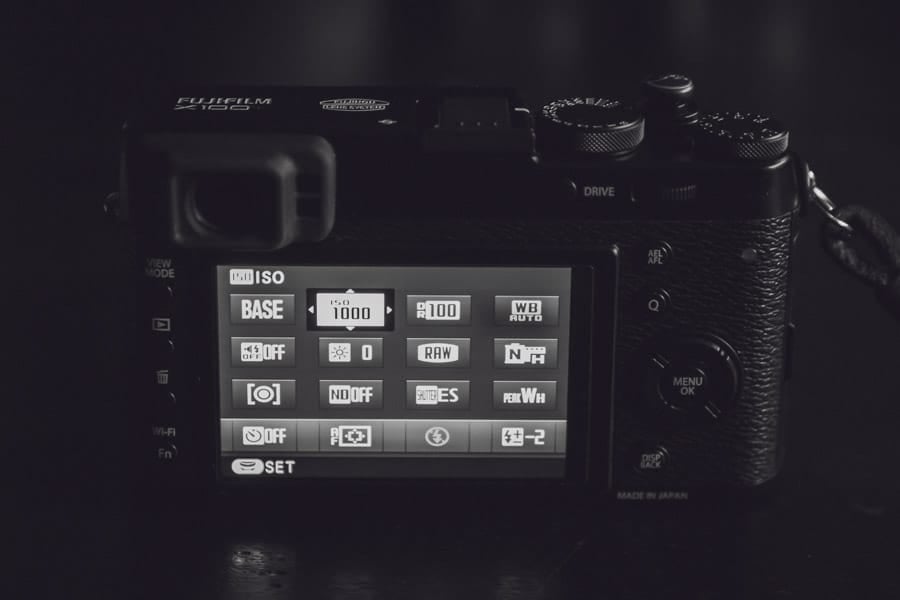
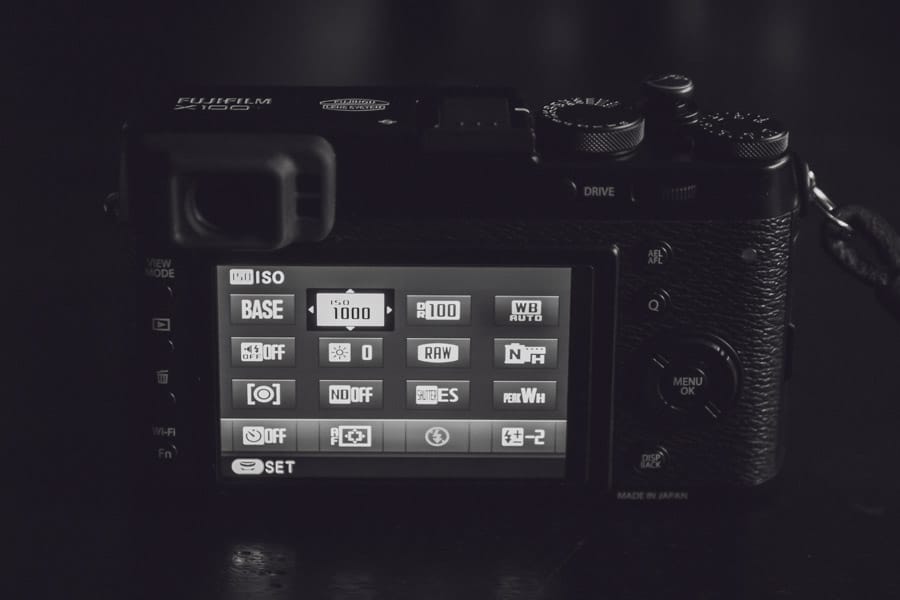
Here is how I’ve changed my Q menu for RAW shooting.
X100 Adjusting Q menu for RAW shooting

ISO—I keep the ISO as my first setting. It’s nice to have at the tip of your fingers, although I’ve also set it to another Fn button. I don’t use the Fn buttons much because I always forget what they are set to.

Dynamic Range – I could probably do away with DR in my Q menu, but I still like to adjust it depending on my lighting situation. It’s very useful to have your ISO throttled behind the scenes to preserve highlights in very high-contrast situations. It does this even when you’re shooting RAW.

White Balance – A must for obvious reasons.

Silent Mode—I find silent mode really nice when you’re shooting street stuff and want to sneak a shot off behind some pedestrians without them raising suspicion. 

LCD Brightness—This is Nice for indoors or outdoors. At night, you can turn it down to save battery, but you’ll need it on full power if you’re out in the midday sun. A true retro photographer would just turn it off and only use the OVF. 

Image Quality—I sometimes shoot just RAW, sometimes RAW+N, and sometimes just N. So having this in the Q menu is nice.

Film Simulation – I’m always flipping this around, trying different film stocks. It’s especially nice if you accidentally use this camera to shoot video for whatever strange reason or if you end up shooting a lot in JPEG mode.

Photometry—This is sort of my wild card spot. I almost always keep it on Multi, but I could see changing it to spot or average if I was shooting a grey card or something. If I got a conversion lens, I would likely change this setting to toggle between lenses.

ND Filter – Great for outdoor photography or flash usage.

Shutter Type – You have to have quick access to this. If you want to shoot fast flash sync speeds, you need to go MS. But if you want silent shooting, you need to use ES.

MF Assist is a nice feature for adjusting focus, peak colors, and intensity. I’m still playing around with these settings, but I’m mostly using WH now. 

Self-Timer – A must for slow shutter tripod work or selfies on a tripod.

AF Mode – I don’t play around with this too much, but sometimes I’ll switch things up.

Flash Mode – A must. I also have this set as my top Fn button.

Flash Compensation is another must-have. You should never use your flash without adjusting it for the scene. 


What I Wish I Could Add To The Q Menu

There are a few things I wish we could get access to in the Q menu.

Drive Mode—I know there is a dedicated button for this at the top, but I would rather have it in the menu and use that top button for something else.

Interval Timer Shooting—This is another fun toy that’s fun to play with but is buried in menus. I keep forgetting the camera can even do this.

Movie Settings – This doesn’t really count for the Fuji X100T since the video was such an afterthought. But if this were the X-T1 – maybe it would be very nice to have quicker access to the video controls and set up my Q menu to be more video-focused. After all, the X-T1 doesn’t have a flash or built-in ND filter, so right there, you free up three slots. But unfortunately, I don’t have the X-T1 yet, so maybe we can add more features to its Q menu, I don’t know – can anyone confirm?

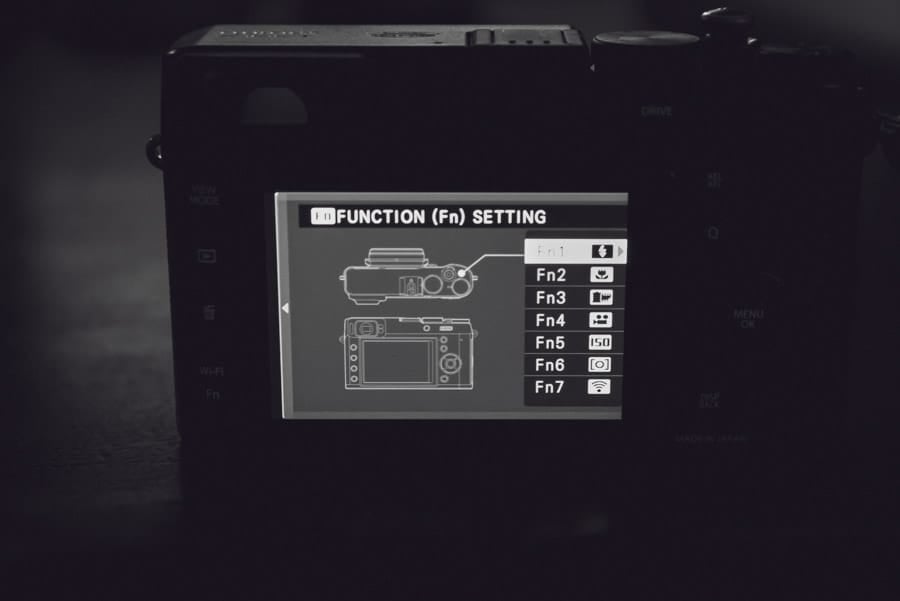
Also, for those curious, here is how I’ve customized my Fn menu. The only function buttons I really ever seem to use are the flash Fn 1 and macro focus Fn 2.

I might move my video record button back up to Fn 1 or somewhere out of the way so I don’t accidentally click it. Fn 1 was probably still the best place for it.
Fujifilm X100T Function Button

That’s my Q menu. Is anyone doing anything different? Please share in the comments.

To learn more about how I use the Fuji X100T, check out my full review.

0
0
1
0
0
Alik Griffin

A professional video editor, and photographer with a Bachelors in Film studies from UCSD. Based in Los Angeles, I have created commercials, trailers, and other video content for various clients and platforms since 2005. I also love to write about my passions and share my insights on my blog.

Related Topics
  • Fuji X100T
  • Reviews
Previous Article
Hawaii Above The Clouds
  • Blog
  • Photo Stories

Above The Sky – Mount Kilauea

  • Alik Griffin
  • December 14, 2024
View Post
Next Article
Big Bear Lake
  • Blog
  • Photo Stories

A Fuji Xmas At Big Bear

  • Alik Griffin
  • December 14, 2024
View Post

Subscribe

Subscribe now to our newsletter

You May Also Like
MidJourney V6 - RoboGirl
View Post
  • Photo Tips

How AI Will Dramatically Change Photography

  • Alik Griffin
  • March 13, 2025
  • No comments
View Post
  • Blog
  • Featured
  • Photo Tips

How To Edit Photos To Look Like Film

  • Alik Griffin
  • November 29, 2024
  • 4 comments
What is Micro Contrast
View Post
  • Blog
  • Featured
  • Photo Tips

Micro-Contrast, Is It Real? – Samples With Lens Comparisons

  • Alik Griffin
  • August 29, 2024
  • 17 comments
Fujifilm X100VI Black or Silver
View Post
  • Blog
  • Photo Tips

Fujifilm X100VI – Black or Silver? Why Silver Is Best

  • Alik Griffin
  • March 5, 2024
  • 19 comments

Leave a Reply Cancel reply

Your email address will not be published. Required fields are marked *


San Clemente Sunset

Join The Newsletter

Featured
  • Kakurajima View
    Viltrox WCL-X100VI Review | A Budget-Friendly 28mm Upgrade
    • 2 comments
  • On Board
    Fujifilm X100VI Review & Sample Photo
    • 5 comments
  • TTArtisan 27mm f2.8 AF Front of Lens
    TTArtisan AF 27mm f2.8 Review & Sample Photos
    • 5 comments
  • Kalina Flower FIeld
    Nikon Z 50mm f1.4 Review & Sample Photos
    • 24 comments
  • Thypoch Simera 75mm f1.4 Review
    Thypoch Simera 75mm f1.4 Review & Sample Photos
    • 2 comments
  • San Clemente Sunkiss
    Viltrox 15mm f1.7 Air Lens Review & Sample Photos
    • 6 comments
  • Nikon Z 50mm f1.8 S Lens Review
    Nikon Z 50mm f1.8 S Lens Review & Sample Photos
    • 59 comments
  • Zeiss Planar 50mm f2 on the Leica M11
    Zeiss Planar 50mm f2 Review & Sample Photos
    • 5 comments

Subscribe

Subscribe now to our newsletter

Privacy Policy | Licensing | About Me | Contact

Copyright © Alik Griffin Inc. 2025

Input your search keywords and press Enter.











