We use minimal analytics to improve the site. Is that okay?

Alik Griffin
San Clemente Sunset
Subscription Form
  • Reviews
    • Accessory Reviews
    • Calculators
      • Video Data Rate Calculator | Record Time Calculator
      • Diffraction Calculator
      • DoF Calculator | Lens Equivalent
      • Shutter Speed to Shutter Angle Calculator
    • Camera Reviews
    • Lens Reviews
    • Memory Cards Recommendations
      • Fastests SD Memory Cards
      • Fastest MicroSD Cards
      • Fastest CFExpress Type-B Card
      • Fastest CFExpress Type-A Cards
      • Best CFast Memory Card
    • List of Mics
      • Best Streaming & Podcast Mics
  • Camera Guides
    • List of all Blackmagic Cameras
    • List Of all Canon RF Cameras
    • List of all Fujifilm Cameras
    • List of all Nikon Z Cameras
    • List of all Panasonic Cameras
    • List Of all Sony E Cameras
  • List of Lenses
    • Canon RF Lenses
    • Fujifilm GFX Lenses
    • Fujifilm XF Lenses
    • L-Mount Lenses
    • Leica M Lenses
    • Micro Four Thirds Lenses
    • Nikon Z Lenses
    • PL Mount Cine Lenses
    • Sony E Lenses (FE and APS-C)
  • Store
  • My account
Alik Griffin
Alik Griffin
  • Reviews
    • Accessory Reviews
    • Calculators
      • Video Data Rate Calculator | Record Time Calculator
      • Diffraction Calculator
      • DoF Calculator | Lens Equivalent
      • Shutter Speed to Shutter Angle Calculator
    • Camera Reviews
    • Lens Reviews
    • Memory Cards Recommendations
      • Fastests SD Memory Cards
      • Fastest MicroSD Cards
      • Fastest CFExpress Type-B Card
      • Fastest CFExpress Type-A Cards
      • Best CFast Memory Card
    • List of Mics
      • Best Streaming & Podcast Mics
  • Camera Guides
    • List of all Blackmagic Cameras
    • List Of all Canon RF Cameras
    • List of all Fujifilm Cameras
    • List of all Nikon Z Cameras
    • List of all Panasonic Cameras
    • List Of all Sony E Cameras
  • List of Lenses
    • Canon RF Lenses
    • Fujifilm GFX Lenses
    • Fujifilm XF Lenses
    • L-Mount Lenses
    • Leica M Lenses
    • Micro Four Thirds Lenses
    • Nikon Z Lenses
    • PL Mount Cine Lenses
    • Sony E Lenses (FE and APS-C)
  • Store
  • My account
  • Pure Cinema
    Viltrox TCL-X100VI Review | A Budget-Friendly 50mm Upgrade
    • February 21, 2026
  • Thypoch Simera 75mm f1.4 Review
    Thypoch Simera 75mm f1.4 Review & Sample Photos
    • February 18, 2026
  • Kakurajima View
    Viltrox WCL-X100VI Review | A Budget-Friendly 28mm Upgrade
    • February 17, 2026
  • Viltrox 9mm f2.8 Air Review
    Viltrox 9mm f2.8 AIR Review & Sample Photos
    • February 18, 2026
  • Biker Bro
    Viltrox Spark Z3 Flash – Review & Sample Photos
    • February 16, 2026
  • Pure Cinema

    Viltrox TCL-X100VI Review | A Budget-Friendly 50mm Upgrade

    View Post
  • Thypoch Simera 75mm f1.4 Review

    Thypoch Simera 75mm f1.4 Review & Sample Photos

    View Post
  • Kakurajima View

    Viltrox WCL-X100VI Review | A Budget-Friendly 28mm Upgrade

    View Post
Trending Posts
  • Nikon Zf Official Announcement 1
    Nikon Zf – The Fujifilm Killer?
    • February 18, 2026
  • Nikon Z 50mm f1.8 S Lens Review 2
    Nikon Z 50mm f1.8 S Lens Review & Sample Photos
    • February 18, 2026
  • Kamlan 50mm f1.1 II Product Shot 3
    Kamlan 50mm f1.1 II Review & Sample Photos
    • January 18, 2025
0
  • Blog
  • Photo Tips

How To Sharpen Your Photos With The High Pass Filter

  • Alik Griffin
  • December 7, 2024
  • No comments

This website contains affiliate links. We will earn a small commission on purchases made through these links. Some of the links used in these articles will direct you to Amazon. As an Amazon Associate, I earn from qualifying purchases.

This is a great Photoshop technique I picked up a few years ago. I’m always trying new things, new plugins, and new software, but I always seem to come back to the High Pass filter as my favorite sharpening trick. It works well on Landscape and HDR Photography.

Lately, my two combo punches as been to use Define 2, part of the Nik Collection, to remove noise, and then the High Pass filter to sharpen.

Since using Dfine 2 is just pushing one button, I won’t go over that.

Sharpening With The High Pass Filter

You can do this technique at any stage in your process. A lot of people like to do it towards the end.

If I’m just coloring with basic curves and nothing destructive, I might do it first so I can have a better look at the details of my photo.

Step 1) Create a Stamp Visible Layer And Duplicate

So the first thing you want to do in Photoshop is create a Stamp Visible Layer.

Do this by selecting your topmost layer and pressing Command+Option+Shift+E.  (Ctrl+Alt+Shift+E on PC)

If you’re doing this technique first, then ignore that first part, as you’ll just be duplicating your background image.

Then, you can duplicate that layer. (Command+J) or (Ctrl+J on PC).
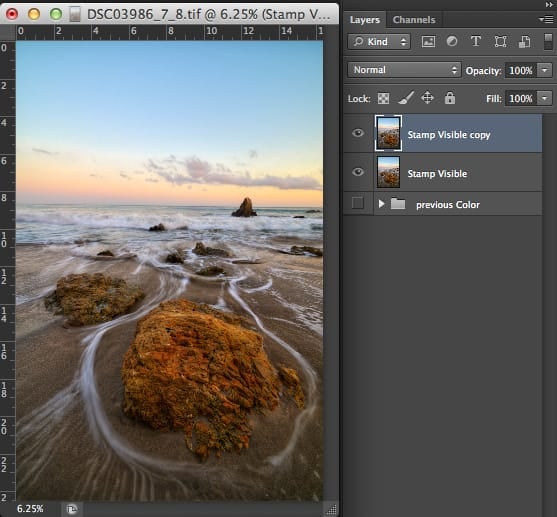
Stamp Visible Duplicate

Step 2) Use The High Pass Filter

Now we’ll go up to Filters->Other and set the High Pass Filter.
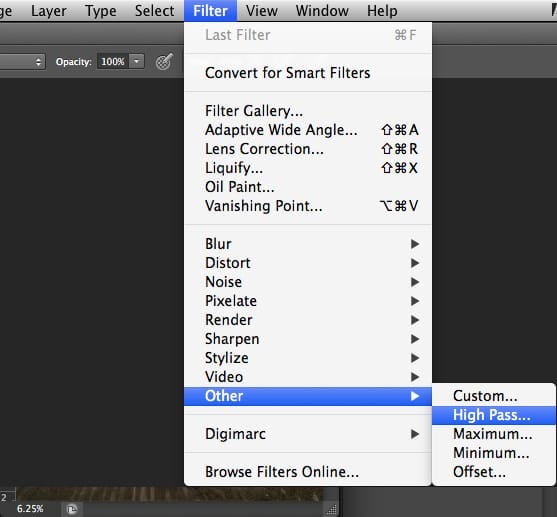
Select HIghpass

Step 3) Adjust Radius

Now, you’ll adjust the radius of the High Pass filter so that the edges and details are barely visible. If you do this too much, you’ll get that halo-sharpening effect around your edges. So keep it low if you can. This will also depend on how sharp your images are to begin with.
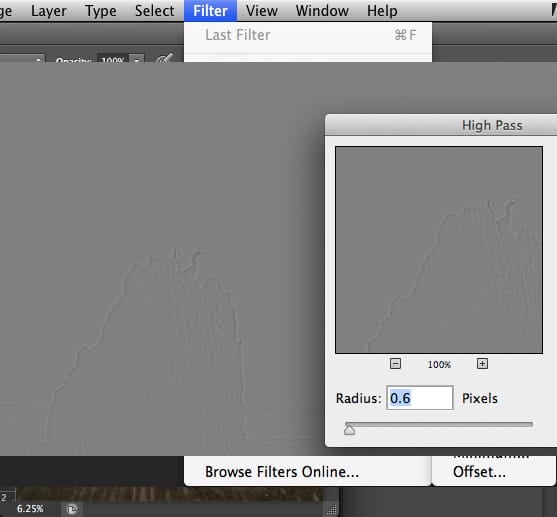
Highpass Adjust Radius

Step 4) Set The Blending Mode To Linear Light, Overlay, or Soft Light

Once you’ve created this grayed-out-looking layer, you’ll want to set the blending mode to Linear Light, Overlay, or Soft Light. Whichever you prefer.

The difference is that linear Light will give you the most detail, sometimes too much detail. You can dial it back by using Overlay or Soft Light. It’s really up to you.
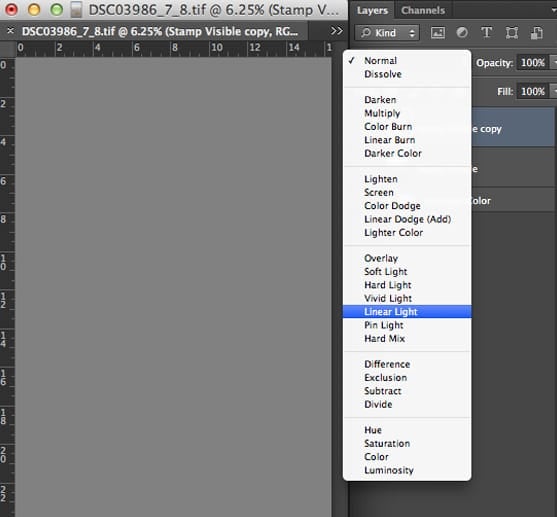
Set Linear LIght

Our Before And After

This is a 100% crop on the image, so you can see the difference. Try to look past the web compression. 

Before
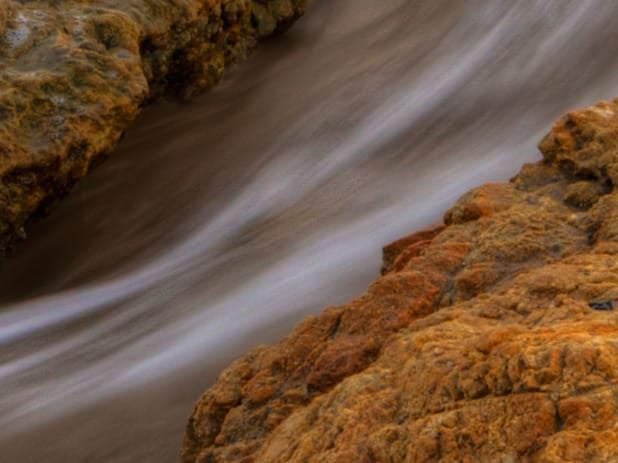
Highpass Before

After

Highpass After

The effect works great.

Step 5) Stop Here Or Duplicate Layer

If you’re happy with the results, you can stop here. But usually, I like to duplicate this layer at least once, sometimes twice. But duplicating too much can reveal some noise and grain.

Command+J (Ctrl+J) To Duplicate.
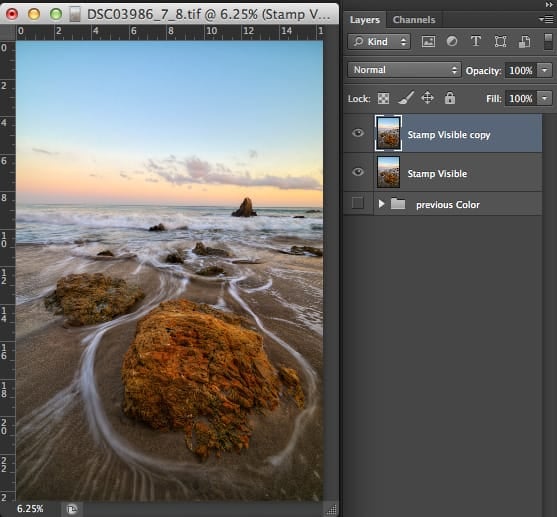
Duplicate Layer

On this second layer, I’ll often set it to Overlay or Soft Light so the sharpness isn’t too exaggerated. But it’s up to you, and every image is different.

Here is what that looks like: 100% Cropped.

That’s It!

In the image above, a bit of grain appears in the water. That’s because this was an HDR photo, so you’ll see more of that tone-mapped grain. Usually, doing a noise reduction pass before using the High Pass filter will fix this. But if it doesn’t, you can throw these layers into a group and apply a layer mask. Then, you can brush out all the areas on the layer mask that you don’t want sharp. It works really well. However, using Layer Masks will be a completely different tutorial.

Final Landscape Photo – ‘Good Promises’
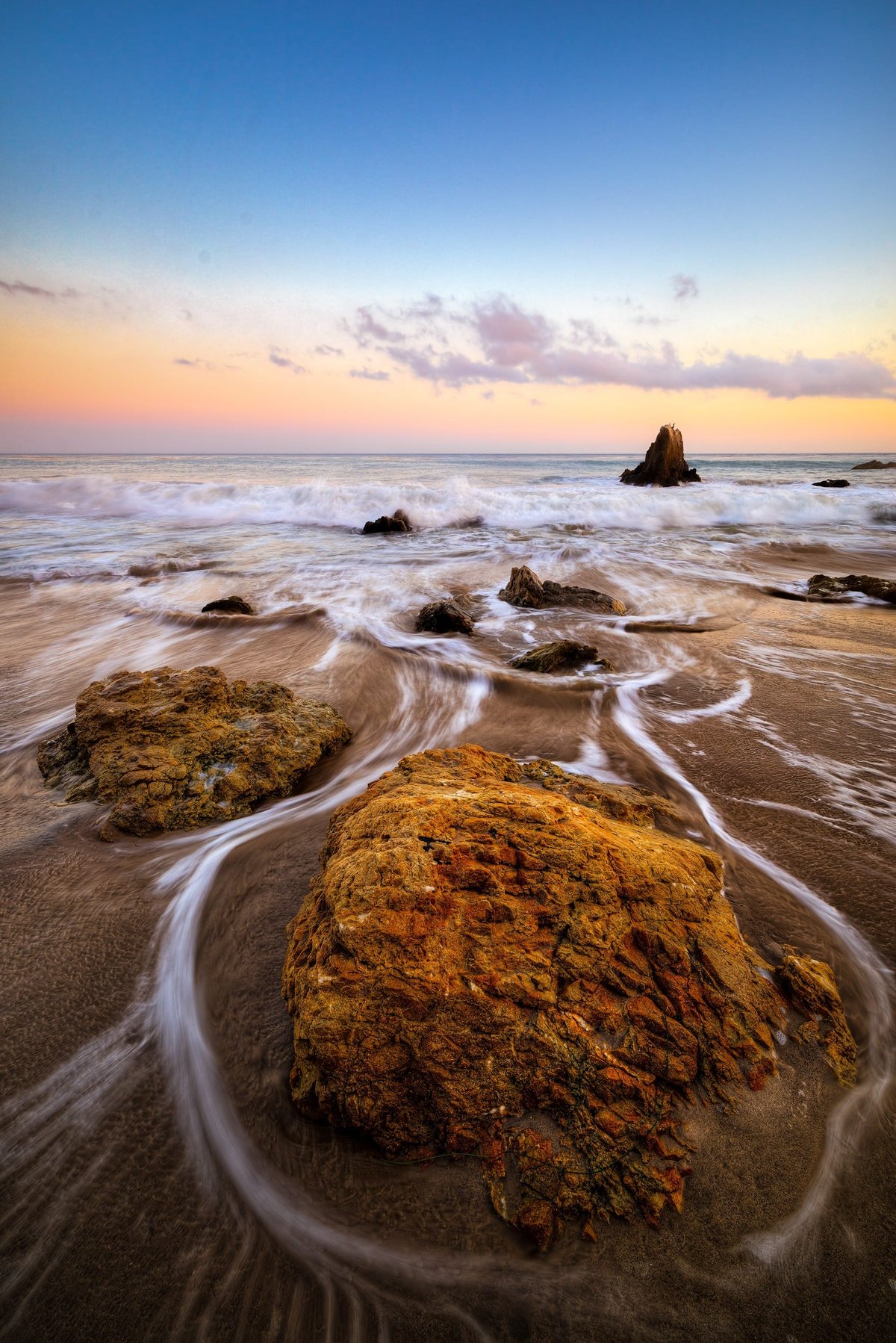
El Matador Beach Sample Landscape Photo using the Highpass Filter
Good Promises, Landscape Photography By Alik Griffin

Camera Used: Sony A7r
Lens: Rokinon 14mm
ISO: 100
Aperture: 16mm
Shutter: 1/4
Bracketed -+2EV 3 Shots

0
0
0
0
0
Alik Griffin

A professional video editor, and photographer with a Bachelors in Film studies from UCSD. Based in Los Angeles, I have created commercials, trailers, and other video content for various clients and platforms since 2005. I also love to write about my passions and share my insights on my blog.

Related Topics
  • Photography Tips
Previous Article
Sensor Brush
  • Accessory Reviews

Camera Cleaning Accessories – Here Is What You Need

  • Alik Griffin
  • April 14, 2024
View Post
Next Article
Zotac Graphics Card Installed
  • Blog

How To Upgrade Your Mac Pro Graphics Card

  • Alik Griffin
  • April 15, 2024
View Post

Subscribe

Subscribe now to our newsletter

You May Also Like
Pure Cinema
View Post
  • Blog
  • Featured
  • Lens Reviews
  • Reviews

Viltrox TCL-X100VI Review | A Budget-Friendly 50mm Upgrade

  • Alik Griffin
  • February 21, 2026
  • No comments
Thypoch Simera 75mm f1.4 Review
View Post
  • Blog
  • Featured
  • Lens Reviews

Thypoch Simera 75mm f1.4 Review & Sample Photos

  • Alik Griffin
  • February 18, 2026
  • No comments
Kakurajima View
View Post
  • Blog
  • Featured
  • Lens Reviews

Viltrox WCL-X100VI Review | A Budget-Friendly 28mm Upgrade

  • Alik Griffin
  • February 17, 2026
  • 2 comments
Sony A7V Announcement
View Post
  • Blog
  • What's New

Sony A7V – They’re Back In The Game

  • Alik Griffin
  • December 30, 2025
  • 4 comments

Leave a Reply Cancel reply

Your email address will not be published. Required fields are marked *

San Clemente Sunset

Join The Newsletter

Featured
  • Kalina Picking Sakura
    Nikon Z 85mm f1.8 S Review & Sample Photos
    • 20 comments
  • What is Micro Contrast
    Micro-Contrast, Is It Real? – Samples With Lens Comparisons
    • 17 comments
  • Tiffen Black Pro Mist Filter At Night. Streets Of Tenjin Japan
    Tiffen Black Pro Mist Review – Is This The One?
    • 10 comments
  • Thypoch Simera 75mm f1.4 Review
    Thypoch Simera 75mm f1.4 Review & Sample Photos
    • No comments
  • Viltrox 9mm f2.8 Air Review
    Viltrox 9mm f2.8 AIR Review & Sample Photos
    • 2 comments
  • Zeiss Planar 50mm f2 on the Leica M11
    Zeiss Planar 50mm f2 Review & Sample Photos
    • 5 comments
  • TTArtisan 27mm f2.8 AF Front of Lens
    TTArtisan AF 27mm f2.8 Review & Sample Photos
    • 5 comments
  • Kakurajima View
    Viltrox WCL-X100VI Review | A Budget-Friendly 28mm Upgrade
    • 2 comments

Subscribe

Subscribe now to our newsletter

Privacy Policy | Licensing | About Me | Contact

Copyright © Alik Griffin Inc. 2025

Input your search keywords and press Enter.











