
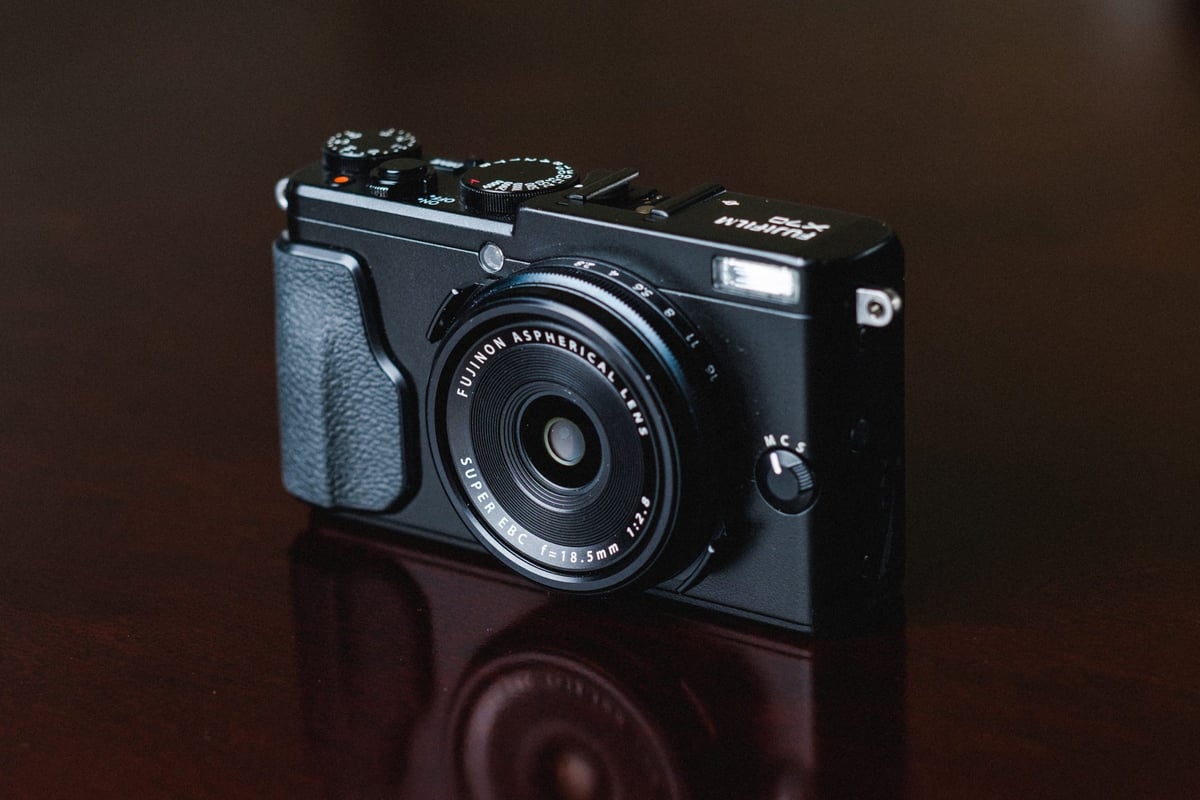
With the Fujifilm X70 being the little sister to the X100T, it shares a lot of the same characteristics. The sensor works the same, the processor speed is about the same, and the write speed to memory cards is very close. The main difference is that the X70 is much smaller and has a wider lens, but both cameras use SD UHS-I memory cards.
If you’re looking for the best or fastest memory card for the Fujifilm X70, there are only a few options. Several brands perform wildly different so it’s important to find the best memory card for your camera so you never run into wait times as your buffer clears.
Recommended SD Memory Cards For The X70
Here are some of the best UHS-I SD memory cards available today. You should stick with cards no larger than 512GB on some of these older cameras to ensure compatibility.
| UHS-I U3 SD Memory Cards | Tested USB Write | Tested USB Read | Links |
|---|---|---|---|
| Sandisk Extreme Pro 32GB-1TB | 137 | 175 | Amazon / B&H |
| Sandisk Extreme 256GB | 126 | 175 | Amazon / B&H |
| Kingston CanvasGo! 128/256/512GB/1TB | 124 | 161 | Amazon / B&H |
| Lexar SILVER Plus 128-256GB | 166 | 177 | Amazon |
| Transcend Ultra 340s A2 128/256/512GB | 90 | 148 | Amazon / B&H |
Fujifilm X70 Camera Specs
Sensor: APS-C 16.3 MP / Processor: EXR Processor II
Sensor SD Memory Card Type: UHS-I
Continuous Burst: 8fps
Size of Buffer: 256 MB
Shots Till Buffer Fills 7, depending on the card.
Est. Time Taken To Clear Buffer: About 6 seconds – (Lexar 2000x UHS-II)
Best Memory Card For The Fujifilm X70
The Fujifilm X70 has a single UHS-I slot that reaches a top speed of about 42 MB/s. Although UHS-II will work, the camera is not designed to take advantage of it. However, with the proper USB 3.0 memory card reader, you can see huge speed improvements when transferring data from your card to your computer.
Fujifilm X70 Memory Card Speed Tests
These tests are taken from an average of three; sometimes these cards perform faster, sometimes slower.
All USB 3.0 tests were performed using CrystalDiskMark on Windows 10 with the Lexar SR2.
| SD Memory Cards | USB 3.0 Read | USB 3.0 Write | Fuji X70 Write Speeds |
| UHS-II | |||
| Lexar 64GB 2000x UHS-II | 272.7 MB/s | 244.5 MB/s | 42.38 MB/s |
| Toshiba 64GB UHS-II | 258.8 MB/s | 226.5 MB/s | 39.85 MB/s |
| Transcend 64GB UHS-II | 290.2 MB/s | 182.1 MB/s | 39.59 MB/s |
| Lexar 64GB 1000x UHS-II | 147.4 MB/s | 78.4 MB/s | 35.47 MB/s |
| Delkin 32GB UHS-II | 253.5 MB/s | 219.6 MB/s | 35.40 MB/s |
| SanDisk Extreme Pro 64GB UHS-II | 260.5 MB/s | 214.8 MB/s | 21.16 MB/s |
| UHS-I | |||
| SanDisk Extreme Pro 64GB U3 | 98.6 MB/s | 90.8 MB/s | 42.93 MB/s |
| Samsung Pro+ 64GB U3 | 97.5 MB/s | 87.3 MB/s | 41.77 MB/s |
| Samsung Pro 64GB U1 | 96.3 MB/s | 82.2 MB/s | 40.50 MB/s |
| Samsung Pro 64GB U3 | 97.7 MB/s | 78.6 MB/s | 39.99 MB/s |
| SanDisk Extreme Plus 64GB U3 | 99.0 MB/s | 64.4 MB/s | 37.21 MB/s |
| Sony 64GB U3 | 96.5 MB/s | 84.5 MB/s | 36.73 MB/s |
| PNY 64GB U1 | 96.5 MB/s | 66.5 MB/s | 36.16 MB/s |
| Transcend 64GB U3 | 96.7 MB/s | 68.4 MB/s | 35.80 MB/s |
| Lexar 633x 64GB U3 | 93.3 MB/s | 67.3 MB/s | 35.43 MB/s |
| Lexar 600x 64GB U1 | 95.4 MB/s | 64.8 MB/s | 35.25 MB/s |
| PNY 64GB U3 | 96.5 MB/s | 66.1 MB/s | 34.67 MB/s |
| SanDisk Extreme 64GB U3 | 72.43 MB/s | 54.1 MB/s | 33.40 MB/s |
| Kingston 64GB U3 | 98.1 MB/s | 90.4 MB/s | 26.63 MB/s |
| Samsung 64GB U1 EVO | 47.7 MB/s | 27.3 MB/s | 18.78 MB/s |
Difference Between U1 and U3 Memory Cards
You might see little symbols on your card saying U1 or U3. This doesn’t necessarily affect your card’s speed; it’s about the minimum write speed. U3 cards are guaranteed to always perform at a minimum of 30MB/s while U1 cards are only guaranteed to perform at a minimum write speed of 10MB/s.
Although most modern cards perform well, when shooting video, it’s important to have a card that never drops below the bit rate it can write.
It shouldn’t matter for the Fujifilm X70 which card you use, but with other brands like Sony, you need U3 memory cards to record 4K video.
X100T vs X70
Although the X100T and X70 share similar specs, the X100T does write to memory cards slightly faster. The fastest-performing card on the X100T was 55.81 MB/s, while the X70 topped out at 42.93 MB/s. I’ll be updating my X100T speeds soon to confirm whether the camera is actually faster or if the differences were due to test controls. I tested the X100T a long time ago now, and my lighting setup has changed since then.
I have also noticed that processing time and memory card write speeds slow down when shooting with lower light and at higher ISO. The camera spends more time processing the noisier images. In both cameras and all my tests, I always try to adjust the lighting so the camera is at ISO 1000, giving it a nice middle ground to simulate real-world shooting conditions.
Best SD Memory Card Fuji X70 Conclusions
While most of the modern SD memory cards perform about the same in the Fujifilm X70, you definitely will see speed improvements with Sandisk and Samsung cards over the other brands if you’re doing a lot of burst photography.
If you don’t do a lot of burst shooting, most popular brands will work fine, except for Kingston and Samsung EVO cards. For some reason, my Kingston card doesn’t perform well on the X100T either.













Leave a Reply