
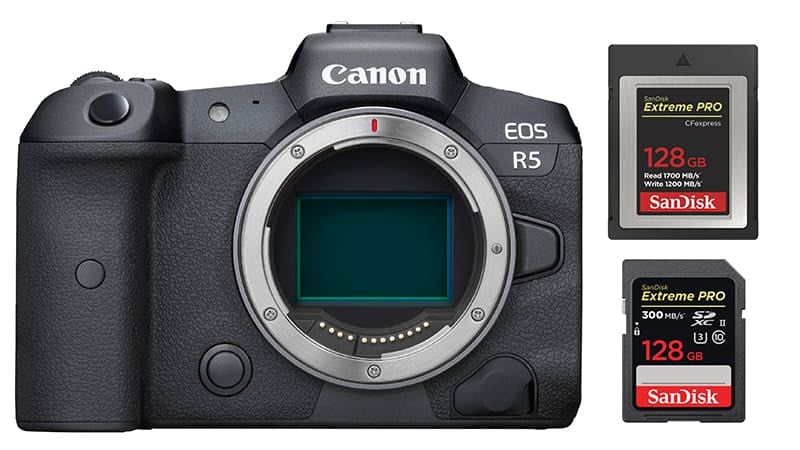
The Canon EOS R5 features two memory card slots. It can take one CFexpress Type B and one SD UHS-II card.
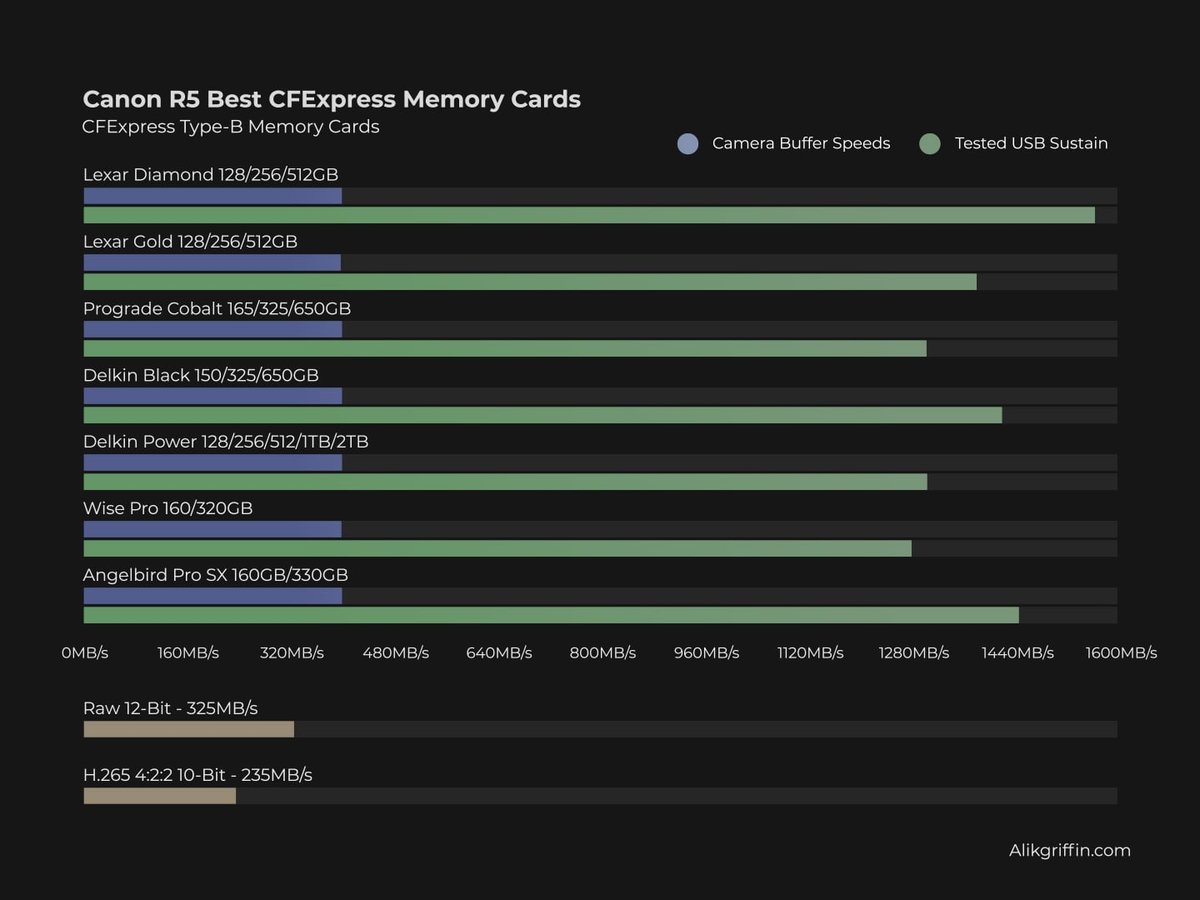
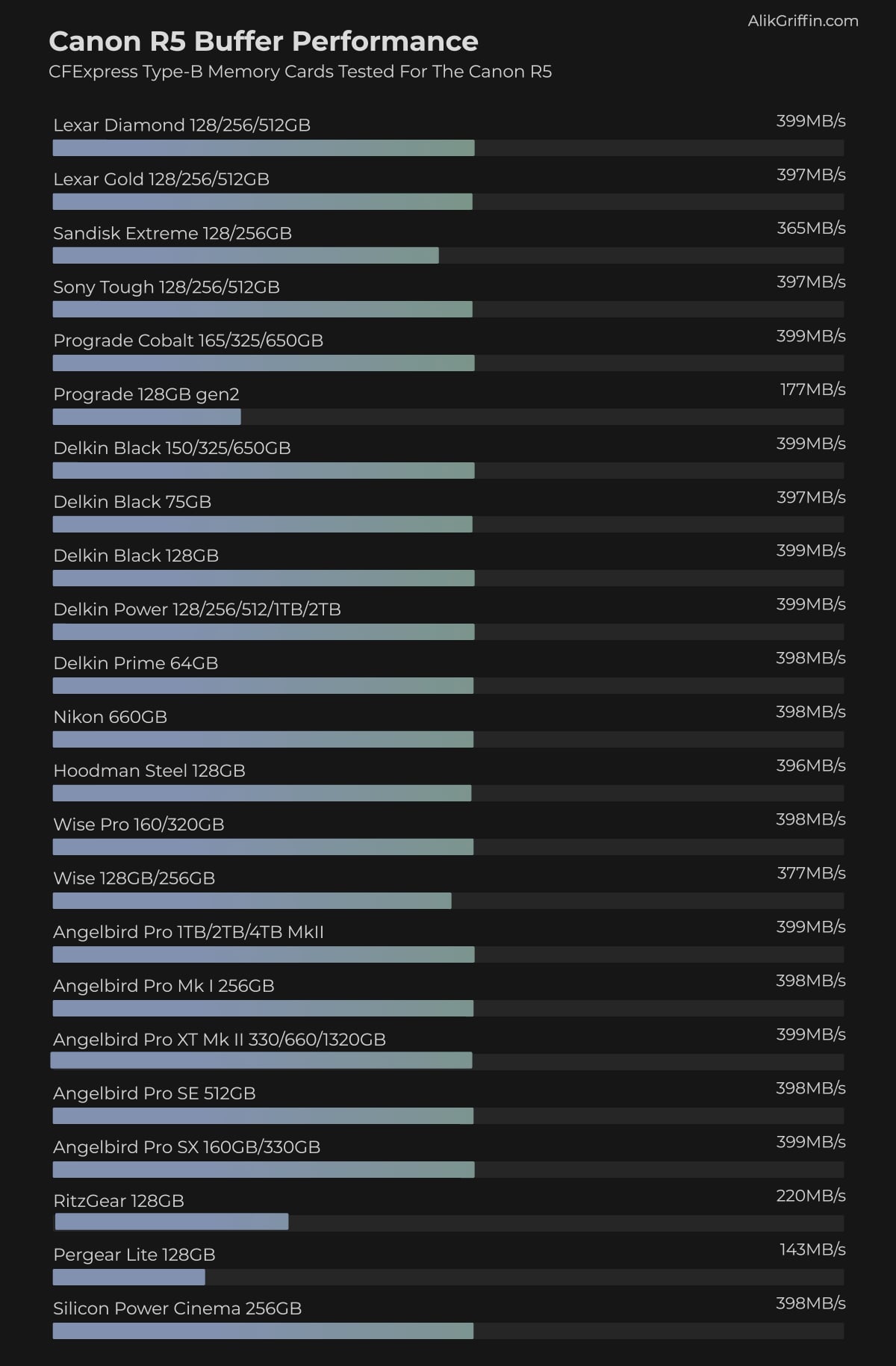
The Canon R5 has a buffer speed bottleneck of about 400MB/s, so there won’t be any noticeable difference between premium cards like the Lexar Diamond or Delkin Black and midrange cards like the Lexar Gold or Delkin Prime.
However, some premium cards often have better warranties, tougher builds, or improved speeds when transferring cards to your computer.
For video, it’s generally a good idea to pick a card that can hit 400 MB and sustain speed to ensure optimal performance, and some CFxB cards now feature the VPG 400 rating, which guarantees 400MB/s sustain speeds.
Recommended Memory Cards For The Canon EOS R5
I tested most of the memory cards out there for this camera when it launched and found there to be a bus speed bottleneck of around 400MB/s. Since mid-2024 and now 2025, we have seen a total refresh of CFexpress Type-B memory cards with the new CF4.0 technology, so many of the cards I tested are no longer available.
However, you definitely don’t need the new CF4.0 cards as they provide no benefit, so I’ve updated the list of best cards for the Canon R5, which now includes some of the new CF4.0 cards since the older CF2.0 cards are getting harder to find. And it never hurts being a little future-proof, but the older CF2.0 cards are usually a much better value than these new CF4.0 cards.
Here are a few details you should know before buying a card.
CFexpress Type-B Cards: Use these as your primary cards; they are the fastest cards you can get for the Canon R5.
UHS-II V60 or V90 Cards: V90 cards usually offer no extra cost savings compared to CFeB cards, but V60 will and are great for casual shooters or videographers recording at lower bitrates.
You must stick to CFexpress Type-B cards to record RAW 12-bit or even the high frame rate H.265 codec.
If you’re recording a lot of video under 480Mbps, grab a v60 card. This will give you some great cost savings.
| Memory Cards | USBW | USBR | Heat | Check Price | Canon R5 Speeds | Sustained | Minimum |
|---|---|---|---|---|---|---|---|
| CFExpress Type-B | |||||||
| Lexar Diamond CF4.0 128GB-1TB | Amazon / B&H | 3200 | 400 | ||||
| Lexar Gold CF4.0 512/1TB/2TB | Amazon / B&H | 3000 | |||||
| Lexar Gold 128/256GB | 1410 | 1525 | 1382 | Amazon / B&H | 397 | 1000 | |
| Lexar Silver CF4.0 256/512GB/1/2TB | Amazon | 200 | |||||
| Prograde Iridium CF4.0 400GB | 2704 | 3212 | 808 | Amazon / B&H | 850 | ||
| ProGrade Gold CF4.0 256GB/512GB | 2545 | 3203 | 844 | Amazon / B&H | 850 | ||
| Delkin Black CF4.0 512GB/1/2TB | 1736 | 2476 | 1693 | Amazon / B&H | 2040 | 400 | |
| Delkin Power CF4.0 512GB | Amazon / B&H | 820 | |||||
| Wise Pro MkII CF4.0 660GB/1.3TB | B&H | 3400 | |||||
| Wise Advance Mk II CF4.0 512GB | B&H | 800 | |||||
| Nextorage B2 Pro CF4.0 660/1330GB | B&H | 3400 | 400 | ||||
| Nextorage B2 Pro CF4.0 165/330GB | B&H | 3400 | 400 |
Can you use UHS-I cards in the Canon R6? Yes.
Can you shoot 8k RAW video to UHS-II cards? No
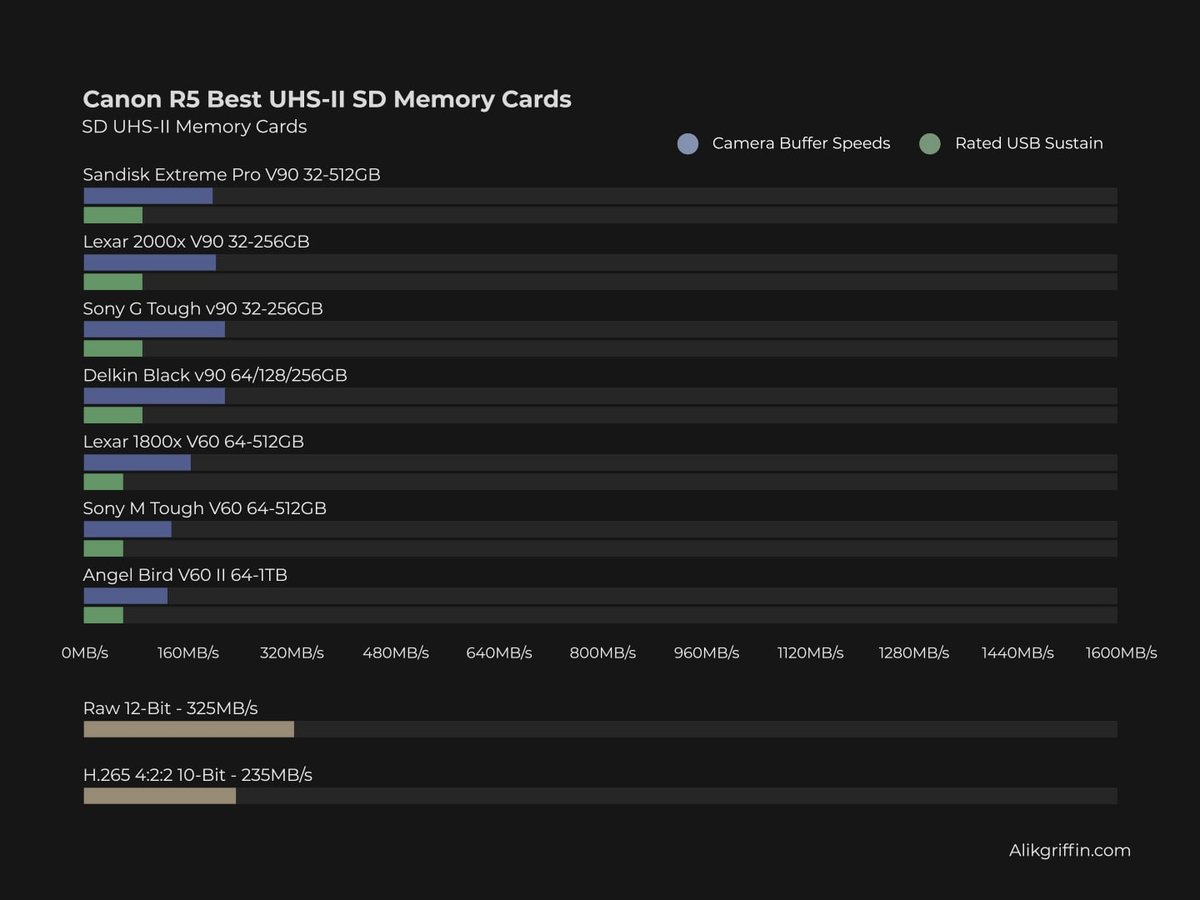
Various specs for UHS-II memory cards run at different speeds, but these speeds are nowhere near as fast as CFexpress cards. If you record them in a backup configuration, UHS-II cards will bottleneck the performance of the CFexpress cards. Buying the fastest UHS-II memory cards will be important to keep the camera clearing the buffer as quickly as possible when running in a backup configuration.
If you just want to shoot casually as a photographer, you can use just the UHS-II memory card slots, and even the slower v60 cards will work fine for casual work.
In-Camera CFeB Memory Card Benchmarks
These camera memory card speeds are obtained by shooting a series of continuous bursts and then recording the time the buffer clears compared to the amount of data written.
To see more benchmarks and specs for each card, check out the CFeB Memory Card Guide.
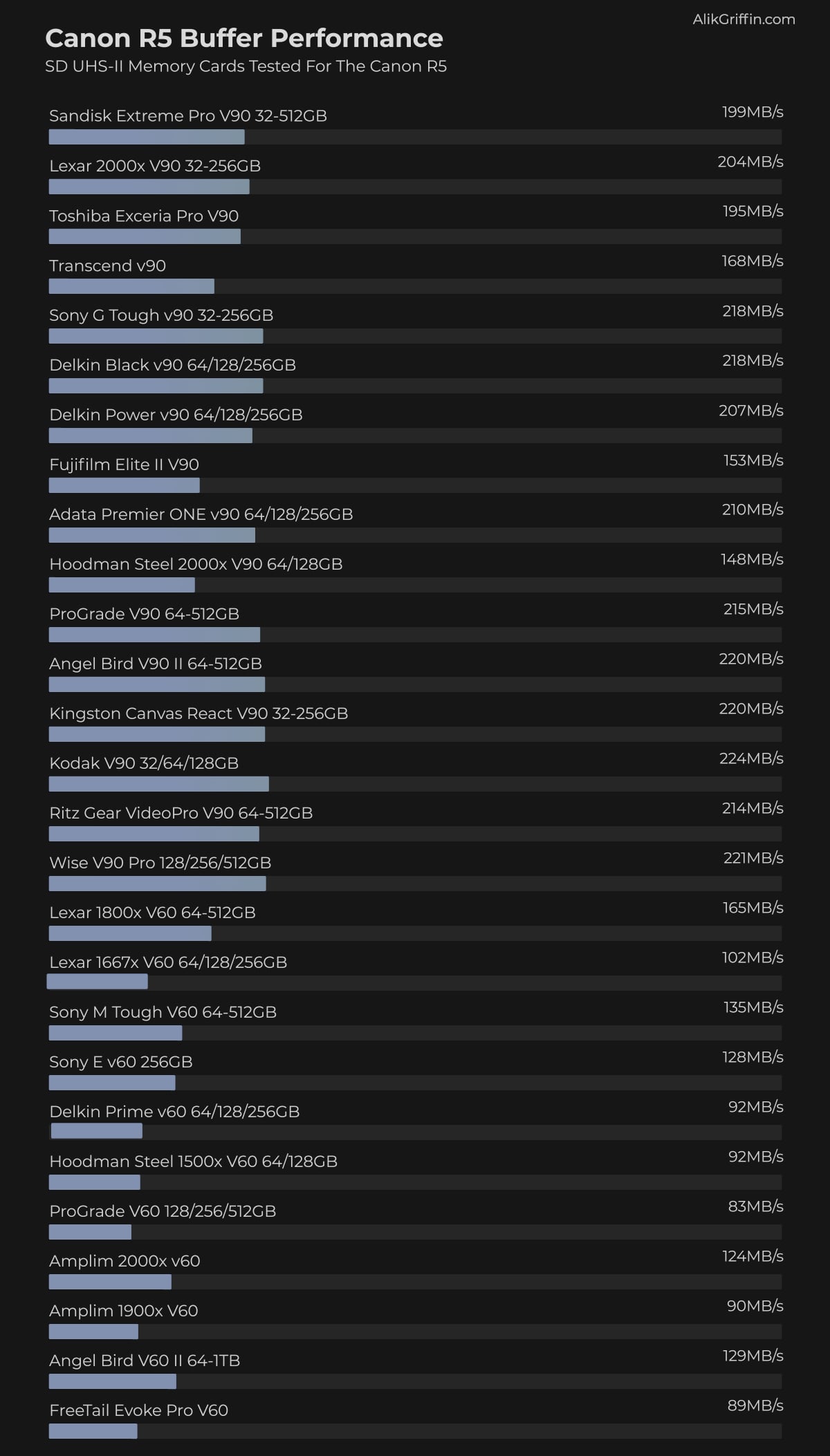
In-Camera UHS-II SD Memory Card Benchmarks
To see more specs and tests for each card, check out the SD Memory Card Guide.
Also, check out the Must-Have Accessories For The Canon R5 guide.
Canon R5 Memory Card Setup
The Canon R5 has several settings for dual memory card configuration.
For Video
You can record video with redundancy to a second card. However, if you’re shooting RAW, only the highest bitrate version of the RAW file will go to the CFexpress card, and a lower bitrate will go to the second SD card.
If you are recording H.265 at a bitrate compatible with both CFexpress and SD cards, then the recording will go to both cards.
For Stills
You can record stills with the usual redundancy: RAW+RAW or RAW+JPG. The new HEIF option is also available.
Keep in mind that if you are bursting RAW+RAW, the system will slow down to the speed of the SD card. So, if you’re doing a lot of bursting, you will still need fast UHS-II cards for the second card slot. This isn’t as important when shooting RAW+JPG since JPG files are smaller.
Do XQD Memory Cards Work For The Canon R5?
No. XQD cards will not work in the Canon R5.
Canon EOS R5 Specs
| Sensor: Full Frame 45MP CMOS Processor: Digic X Continuous Shoot: 12fps Mechanical, 20fps Electronic Est. Buffer Size: 2.5GB RAW Shots To Fill Buffer: 180 RAW | 350 JPEG @ 12fps Max Memory Card Size: Any size, no limit. Time To Clear Buffer: 5:42 Delkin CFx Card 8k Datarate: 2600 Mbps | 325MB/s 4k Datarate: 1880 Mbps | 235 MB/s 1080p Datarate: 230 Mbps | 28.75 MB/s |
Best Cards For 8k Video
To shoot the maximum quality 8k video in the Canon R5, you will need CFexpress cards.
You can record 8k or 4k60 to a UHS-II memory card, but you must use the lower IPB bitrate settings.
The slowest CFexpress card has a rated write speed of up to 600MB/s, and the Canon R5 will record 8k RAW at 325 MB/s, so you don’t need to worry about which card will work for 8k video.
Can you record 4k video to the UHS-II memory card slot?
We’re unsure which video formats Canon allows you to record in the UHS-II memory card slot. You will be limited since even the Canon 4k bitrates are very high.
Based on the specs, only some of the 4k 10-bit or 8-bit modes (likely the IPB settings) will work with UHS-II memory cards.
Canon EOS R5 Video Specs & Recording Modes
The Canon R5’s video quality is very impressive, with a maximum bitrate of 2600Mbps in 8k and 1880Mbps in 4k.
It also will have some of the best 1080p in-camera recordings with 230Mbps using H.265 at 10-bit 4:2:2.
Record Limit: 30 minutes.
Audio File Format: AAC, Linear PCM
| 8K Recording Modes DCI 8k RAW: 12-bit 24-30p | 2600Mbps DCI 8k H.265: 4:2:2 10-bit 24-30p | 680 to 1300 Mbps UHD 8k H.265: 4:2:2 10-bit 24-30p | 680 to 1300 Mbps DCI 8k H.264: 4:2:0 8-bit 24p-30p | 470 to 1300 Mbps UHD 8k H.264: 4:2:0 8-bit 24p-30p | 470 to 1300 Mbps 4k Recording Modes DCI 4k H.265: 4:2:2 10-bit 24p-120p | 170 to 1880 Mbps UHD 4k H.265: 4:2:2 10-bit 24p-120p | 170 to 1880 Mbps DCI 4k H.264: 4:2:0 8-bit 24p-120p | 120 to 1880 Mbps UHD 4k H.264: 4:2:0 8-bit 24p-120p | 120 to 1880 Mbps 1080p Recording Modes Full HD H.265: 4:2:2 24p to 60p | 28mbps to 230 Mbps Full HD H.264: 4:2:0 8-bit 24p-60 | 12 to 180 Mbps |
What’s the difference between DCI and UHD? Frame size.
You’ll see 4k or 8k thrown around a lot, but there are two different standards. DCI and UHD are two different standards that have dramatically different frame sizes.
DCI true 8k, or true 4k, UHD is more of what you would see as a broadcasted spec.
8k DCI: 8192 x 4320
8K UHD: 7680 x 4320
4K DCI: 4096 x 2160
4K UHD: 3840 x 2160
Canon R5 Memory Card Capacity – Record Times
The size of cards that you can use with the Canon R5 is unlimited. This means you can use a 2TB memory card if necessary.
To help you decide which memory card size for the R5 is best, here are the record times for the various bitrates based on a few memory card sizes.
This table shows the memory card capacity with different record settings.
The camera won’t tell you which bitrate it is recording at. You’ll have to match the bitrate and the setting with the chart above to know which setting produces which bitrate.
| Canon R5 Record Times | 64GB | 128GB | 256GB | 512GB | 1TB |
| 8K | |||||
| 8k 2600 Mbps | 3 min | 7 min | 13 min | 26 min | 53 min |
| 8k 1300 Mbps | 6 min | 13 min | 26 min | 51 min | 103 min |
| 8k 680 Mbps | 13 min | 25 min | 50 min | 100 min | 201 min |
| 8k 470 Mbps | 18 min | 36 min | 73 min | 145 min | 290 min |
| 4k | |||||
| 4k 1880 Mbps | 5 min | 9 min | 18 min | 36 min | 73 min |
| 4k 170 Mbps | 50 min | 100 min | 201 min | 402 min | 803 min |
| 4k 120 Mbps | 71 min | 142 min | 284 min | 569 min | 1138 min |
| 1080p | |||||
| 1080p 230Mbps | 37 min | 74 min | 148 min | 297 min | 594 min |
| 1080p 180Mbps | 47 min | 95 min | 190 min | 379 min | 759 min |
| 1080p 28Mbps | 305 min | 610 min | 1219 min | 2438 min | 4876 min |
| 1080p 12Mpbs | 711 min | 1422 min | 2844 min | 5689 min | 11378 min |
Canon R5 Bitrates Written as MB/s
Cameras typically write their bitrates as Mbps, yet our memory card speeds are written as MB/s. There is a slight difference between the two that must be understood.
This chart shows the Canon R5 bitrates written as MB/s. Even the slowest CFexpress memory card can write at a rated data rate of 600MB/s, which means even the slowest CFexpress memory cards (from the trusted brands) will be fast enough to record 8k RAW internally.
| Canon Bitrates Converted to MB/s | |
| Mbps | MB/s |
| 12 Mbps | 1.5 MB/s |
| 28 Mbps | 3.5 MB/s |
| 120 Mbps | 15 MB/s |
| 170 Mpbs | 21.25 MB/s |
| 180 Mbps | 22.5 MB/s |
| 230 Mpbs | 28.75 MB/s |
| 470 Mbps | 58.75 MB/s |
| 680 Mbps | 85 MB/s |
| 1300 Mbps | 162.5 MB/s |
| 1880 Mbps | 235 MB/s |
| 2600 Mbps | 325 MB/s |









Leave a Reply