
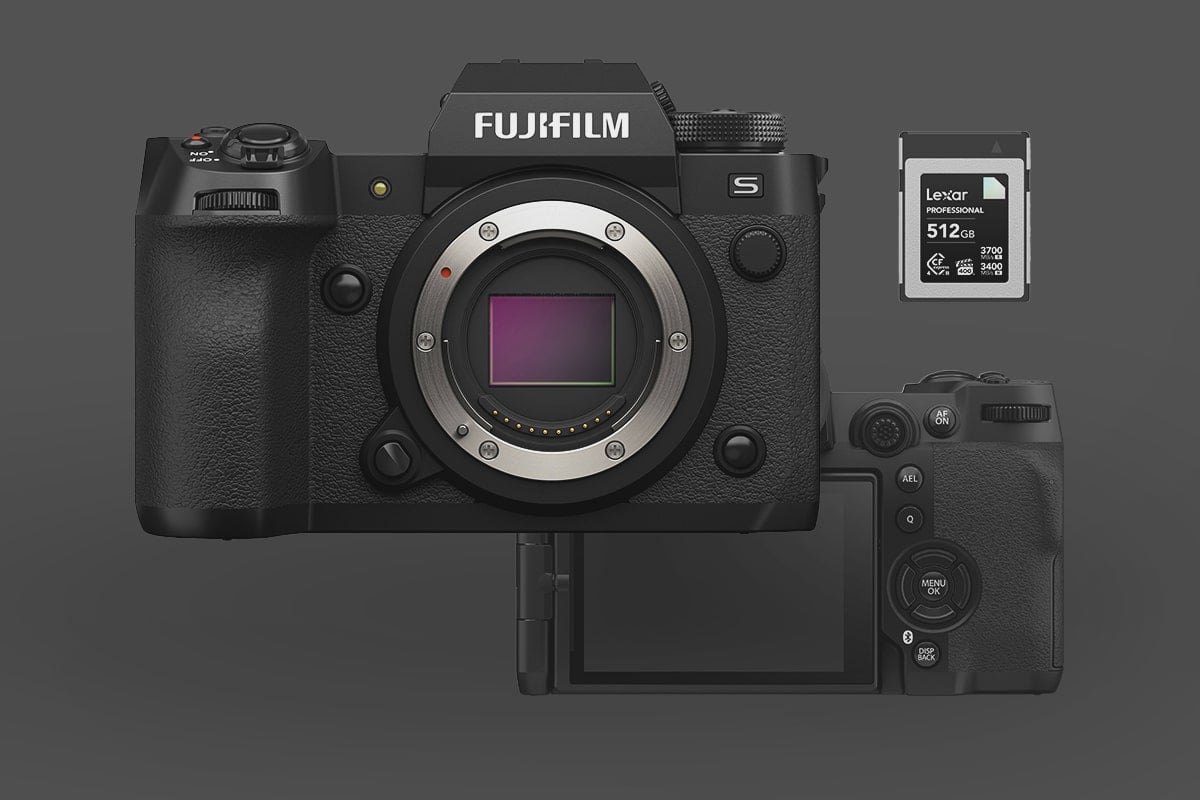
The Fujifilm X-H2S remains a powerhouse for hybrid shooters, but to unlock its full potential—especially for 6.2K Open Gate ProRes HQ video and 40fps bursts—you need the right media. Since the camera’s launch, the memory card market has shifted. CFexpress 4.0 cards are now common, and prices have dropped significantly.
This guide is based on in-camera testing of over 50 memory cards to determine which ones offer the best reliability, sustained write speeds, and thermal management for the X-H2S.
Note: This guide covers the High-Speed X-H2S (26MP, 40fps). If you have the high-resolution Fujifilm X-H2 (40MP, 8K Video), please check our dedicated guide: Best Memory Cards for Fujifilm X-H2 (8K & High Res Optimized)
Table of Contents
Quick Recommendations: The Best Cards at a Glance
Key Constraint: To record the highest quality video (6.2K ProRes HQ) or clear the buffer instantly during 40fps bursts, you must use a CFExpress Type-B memory card in Slot 1. Slot 2, which uses SD-UHS-II cards, will physically bottleneck the camera if used for simultaneous backup.
Slot 1: CFexpress Type B. This is the performance slot.
- Role: Mandatory for ProRes video and 40fps uncompressed bursts.
Slot 2: SD UHS-II. This is the backup/overflow slot.
- Role: Best for JPEGs, H.265 video, and backups. Cannot record ProRes.
Max Capacity: Officially supports up to 2TB.
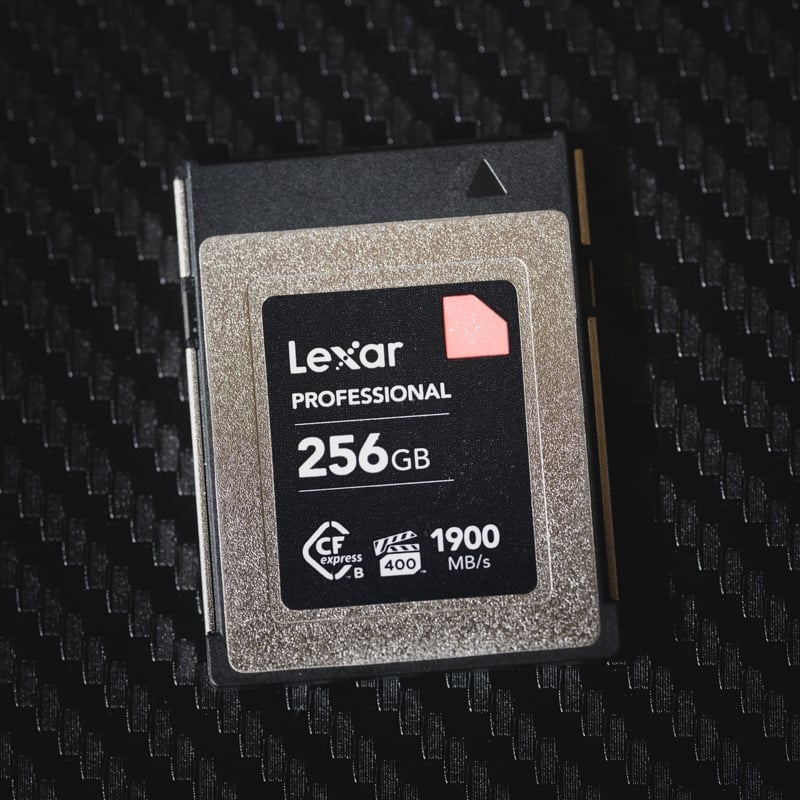
Important Spec: Look for the VGP 400 (video guarantee) logo. This certifies a minimum sustained write of 400 MB/s, which is critical for X-H2s ProRes recording to avoid dropped frames. When picking a memory card for video, it’s important to choose one with sustained read and write speeds that match or exceed your codec’s requirements. You can click the little + next to the card name to see more specs.
| Memory Cards | Speed Class | Rating | Sustained | USB Write | USB Read | Check Price |
|---|---|---|---|---|---|---|
| CFExpress Type-B | ||||||
| Lexar Diamond CF4.0 128GB-1TB | CFx-B 4.0 | VPG400 | 3200 | Amazon / B&H | ||
| Lexar Gold CF4.0 512/1TB/2TB | CFx-B 4.0 | 3000 | Amazon / B&H | |||
| Lexar Silver CF4.0 256/512GB/1/2TB | CFx-B 4.0 | Amazon | ||||
| Prograde Cobalt CF2.0 165/325/650GB | CFx-B | 1400 | 1429 | 1029 | Amazon / B&H | |
| ProGrade Gold CF4.0 256GB/512GB | CFX-B 4.0 | 850 | 2545 | 3203 | Amazon / B&H | |
| Delkin Black CF4.0 512GB/1/2TB | CFX-B 4.0 | 2040 | 1736 | 2476 | Amazon / B&H | |
| Delkin Power CF4.0 512GB | CFx-B 4.0 | 820 | Amazon / B&H | |||
| SD UHS-II V90 | Hide | |||||
| Lexar 2000x V90 32-256GB | UHS-II v90 | V90 | 90 | 228 | 256 | Amazon / B&H |
| Sony G Tough v90 32-256GB | UHS-II v90 | V90 | 90 | 258 | 296 | Amazon / B&H |
| Wise V90 Pro 128/256/512GB | UHS-II v90 | V90 | 90 | 256 | 275 | B&H |
Camera Configuration & Storage Architecture
For the X-H2s, CFexpress Type B is mandatory for professional workflows, not optional.
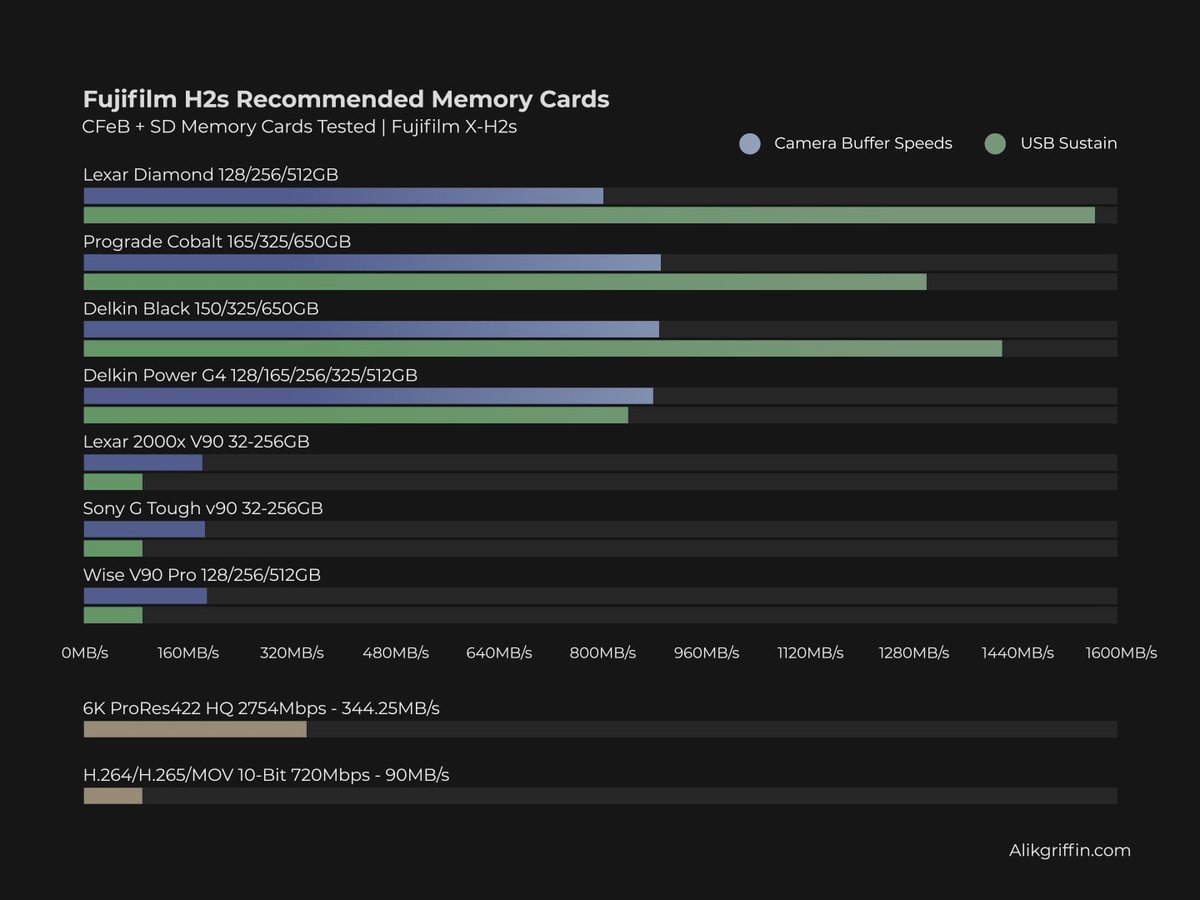
- ProRes Requirements: The X-H2s records 6.2K ProRes 422 HQ at a staggering 2754 Mbps (approx. 344 MB/s). Even the fastest V90 SD cards (which only guarantee 90 MB/s) cannot physically record this format.
- Buffer Clearing: With the stacked sensor shooting at 40 fps, a fast CFexpress card effectively provides an infinite buffer for JPEG/HEIF and clears RAW buffers in seconds.
SD Card Strategy: V60 vs. V90
Since Slot 2 is UHS-II, it should be relegated to backup, JPEGs, or standard video (H.265).
The maximum bitrate for H.265 (HEVC) is 720 Mbps, which will require a v90 card at a minimum.
- V90 (Required for Backup Bursting): If you must shoot redundancy, use a V90 card to minimize the bottleneck.
- V60 (Smart Choice for low bitrate H.265): If you use Slot 2 only for H.265 video with lower bitrates (anything under 480 Mbps), a V60 card is perfectly adequate and saves money.
- The Bottleneck Warning: If you set the camera to “Backup” mode (writing to both cards simultaneously), the entire camera slows down to the speed of the SD card. You lose the benefit of the CFexpress speed.
This chart gives you a visual of the performance differences between the card types.
CFExpress 4.0 Cards: Do You Need Them?
While CFexpress 4.0 is the new standard, using it in a camera like the Fujifilm X-H2S comes with some specific nuances regarding “forward compatibility” and actual real-world performance.
The Standard vs. The Camera
The Fujifilm X-H2S was built with CFexpress 2.0 (PCIe Gen 3) hardware. CFexpress 4.0 uses PCIe Gen 4, which doubles the theoretical bus speed. Because the 4.0 standard is backward compatible, a 4.0 card will work perfectly in your X-H2S, but it will be throttled to 2.0 speeds (roughly 1,750 MB/s).
Benefits of Using CF 4.0 in an X-H2S Workflow
Even though the camera can’t “unlock” the Gen 4 speeds for recording, there are three major reasons a professional editor would choose them:
Sustained Write Minimums: The sustained speeds on 4.0 cards are often much higher. To shoot 720Mbps (which is only 90MB/s), you don’t need a 4.0 card, but having a card with a sustained write speed of 1,500MB/s ensures you will never hit a buffer stall, even as the card fills up and slows down.
Offloading Speed: This is where you see the real gain. When you plug a CF 4.0 card into a CF 4.0 reader connected to a Thunderbolt 4 or USB4 port on your editing rig, you can offload that 720Mbps H.265 or ProRes footage at up to 3,500+ MB/s. It cuts your ingest time in half compared to 2.0 cards.
Thermal Efficiency: CF 4.0 cards are generally more efficient. Because they are designed to handle much higher speeds, they tend to run cooler when operating at the “lower” speeds required by the X-H2S. This can help reduce the “yellow/red temperature” warning icon during long 6.2K Open Gate or 4K/120p sessions.
More Fujifilm X-H2s Specs
| Sensor: APS-C 26.1MP X-Trans Stacked BSI Processor: X-Processor 5 Memory Controller: CFexpress 2.0 (PCIe Gen 3) Continuous Shoot: 15fps Mechanical, 40fps Electronic Est. Buffer Size: 5GB RAW Shots To Fill Buffer: 1000 Frames (Raw) @ 15fps / 140 Frames RAW @ 40fps Max Memory Card Capacity: Up to 2TB. 6.2k Datarate: 360 to 720 Mbps | 45MB/s to 90MB/s 4k Datarate: 360 to 720 Mbps| 45MB/s to 90MB/s |
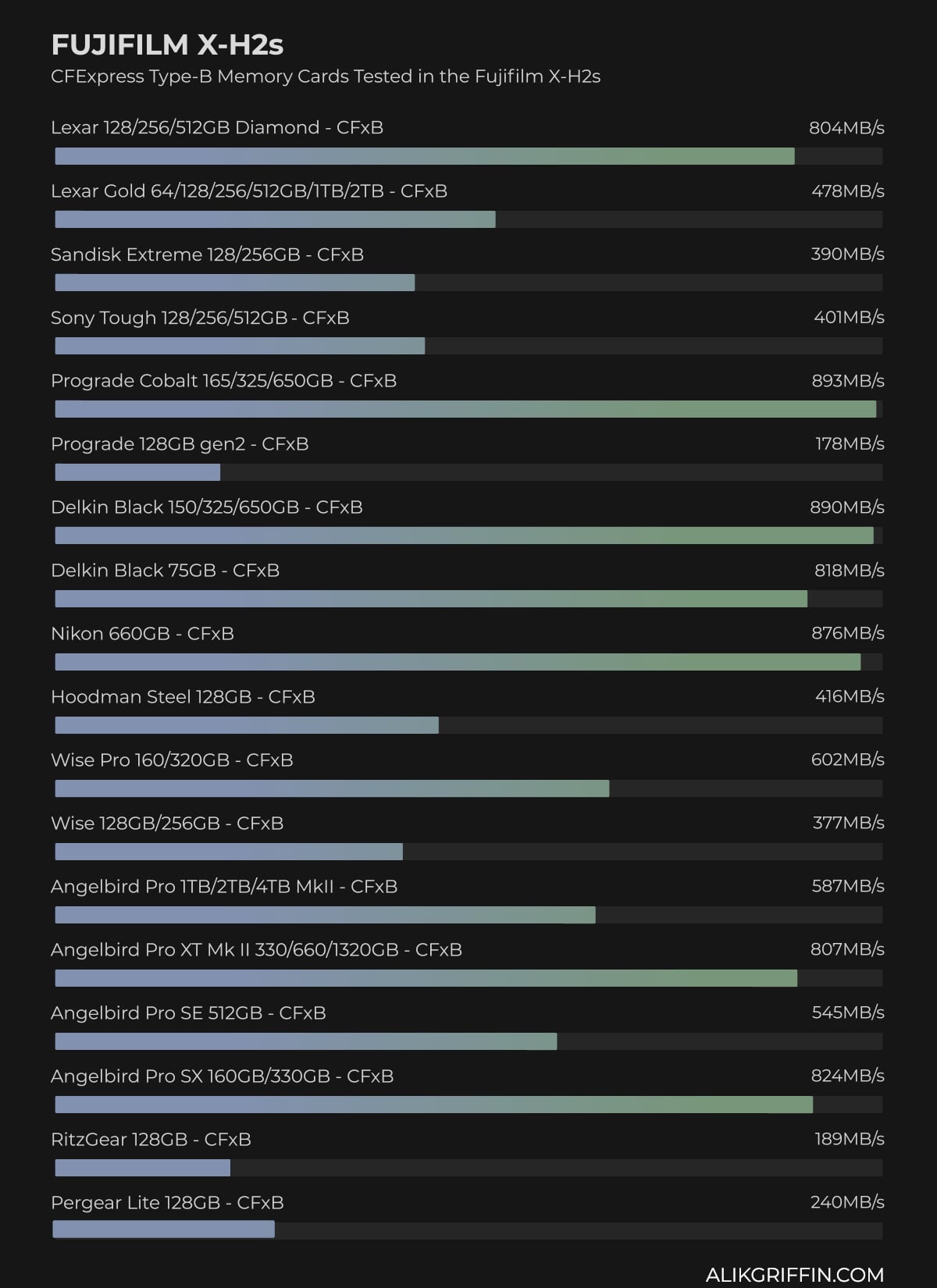
Fujifilm X-H2s Memory Card Benchmarks | Speed & Buffer Tests
Benchmarks are taken by running a continuous burst on each card in the camera, then comparing the data written to the time it takes to clear the buffer. This is done several times, and the best time is taken. These benchmarks are from cards that are a bit older now, but the chart still gives you an idea of the camera’s max speed.
*I kept having an issue with this camera where my UHS-II cards did not make firm contact with both rows of pins, which often ran at UHS-I speeds. Sometimes, this is just an initialization issue. Try turning off the camera, removing the battery, removing the memory card, putting the battery in, then the memory card in; this often fixes the issue.
Here are the tests with the SD UHS-II cards. Be careful with these cards; there were many compatibility issues. I’m not sure if it was the cards that the camera didn’t like or if the camera just had a card slot.

Fujifilm X-H2s Bitrates & Record Times
Choosing the right capacity is a balance between your shooting style, the risk of data loss, and your technical requirements (like ProRes). For a high-performance camera like the Fujifilm X-H2s, file sizes can grow quickly.
Key Technical Details
- Intra-frame (All-I) vs. LongGOP: To hit the 720Mbps ceiling, you generally need to select All-Intra. When shooting in LongGOP, bitrates are typically lower (often capping at 360 Mbps or 180 Mbps) because compression is more efficient across frames.
- Color Depth: These bitrates apply to 10-bit 4:2:2 internal recording, which is the standard for getting the most out of the F-Log2 dynamic range on that stacked sensor.
- File Wrapper: You can record these bitrates in either MOV or MP4 wrappers, though MOV is standard for professional workflows on the X-H2S.
720Mbps H.265 files can be absolute “computer melters” compared to ProRes. Even with a beefy rig, the hardware decoding for 10-bit 4:2:2 HEVC can be finicky depending on your GPU.
Remember that people often test and show that H.265 with good compression looks better than ProRes.
| ProRes | Megabits | Megabytes | 128GB | 256GB | 512GB |
| 6.2k ProRes 422 HQ 4:2:2 10-Bit | 2754Mbps | 344.25MB/s | 6min | 12min | 25min |
| 4k ProRes 422 HQ 4:2:2 10-Bit | 1877Mbps | 234.62MB/s | 9min | 18min | 36min |
| 2k ProRes 422 HQ 4:2:2 10-Bit | 440Mbps | 55MB/s | 39min | 78min | 155min |
| 6.2k ProRes 422 4:2:2 10-Bit | 1840Mbps | 230MB/s | 9min | 19min | 37min |
| 4k ProRes 422 4:2:2 10-Bit | 1254Mbps | 156.75MB/s | 14min | 27min | 54min |
| 2k ProRes 422 4:2:2 10-Bit | 294Mbps | 36.75MB/s | 58min | 116min | 232min |
| 6.2k ProRes 422LT 4:2:2 10-Bit | 1277Mbps | 159.62MB/s | 13min | 27min | 53min |
| 4k ProRes 422LT 4:2:2 10-Bit | 870Mbps | 108.75MB/s | 20min | 39min | 78min |
| 2k ProRes 422LT 4:2:2 10-Bit | 204Mbps | 25.5MB/s | 84min | 167min | 335min |
| H.265 | |||||
| 6.2k H.265 4:2:2 10-Bit | 360 – 720Mbps | 45-90MB/s | 47 – 24min | 95 – 47min | 190 – 95min |
| 4k H.265 4:2:2 10-Bit | — | — | — | — | — |
| 2k H.265 4:2:2 10-Bit | — | — | — | — | — |
| 6.2k H.265 4:2:0 10-Bit | — | — | — | — | — |
| 4k H.265 4:2:0 10-Bit | — | — | — | — | — |
| 2k H.265 4:2:0 10-Bit | — | — | — | — | — |
Tips For Using Memory Cards For Backup
Photographers—To run a dual memory card setup with backup, you will need both CFexpress Type B and SD UHS-II cards. A slower UHS-II card in slot two will bottleneck performance to the UHS-II SD card’s speed.
Shooting with a dual memory card configuration won’t require buying the fastest CFexpress cards, but you should buy the fastest UHS-II SD cards. CFexpress and UHS-II cards are roughly priced similarly, so it’s not a huge loss either way.
When shooting backup, you may have to run just JPGs to UHS-II cards to minimize performance impact, since JPGs are smaller. However, JPGs are often harder on the processor and aren’t much smaller than Fujifilm RAW files. So, you’ll still take a hit in buffer-clearing speeds when bursting, especially if you have effects like clarity turned on – so be careful here and do plenty of testing, especially if you use a lot of the film simulator options.
Videographers—If you want to shoot ProRes, you cannot shoot video redundantly since the second card slot does not support those speeds. However, if you need redundancy with the X-H2s while shooting ProRes, you might be able to record internally simultaneously as recording externally to a Ninja recorder.
Beyond Storage: Essential Accessories for the Fujifilm X-H2s
Choosing the right memory card is the first step in unlocking the X-H2s’s high-speed potential, but storage is only one part of the equation. To truly round out your setup—from managing the heat during long 6.2K takes to finding the best glass and cages for that stacked sensor—you’ll need the right supporting gear.
Check out my full guide to the Best Fujifilm X-H2s Accessories for a deep dive into the top-rated batteries, grips, and rigging essentials I’ve tested with this body













Leave a Reply