We use minimal analytics to improve the site. Is that okay?

Alik Griffin
San Clemente Sunset
Subscription Form
  • Reviews
    • Accessory Reviews
    • Calculators
      • Video Data Rate Calculator | Record Time Calculator
      • Diffraction Calculator
      • DoF Calculator | Lens Equivalent
      • Shutter Speed to Shutter Angle Calculator
    • Camera Reviews
    • Lens Reviews
    • Memory Cards Recommendations
      • Fastests SD Memory Cards
      • Fastest MicroSD Cards
      • Fastest CFExpress Type-B Card
      • Fastest CFExpress Type-A Cards
      • Best CFast Memory Card
    • List of Mics
      • Best Streaming & Podcast Mics
  • Camera Guides
    • List of all Blackmagic Cameras
    • List Of all Canon RF Cameras
    • List of all Fujifilm Cameras
    • List of all Nikon Z Cameras
    • List of all Panasonic Cameras
    • List Of all Sony E Cameras
  • List of Lenses
    • Canon RF Lenses
    • Fujifilm GFX Lenses
    • Fujifilm XF Lenses
    • L-Mount Lenses
    • Leica M Lenses
    • Micro Four Thirds Lenses
    • Nikon Z Lenses
    • PL Mount Cine Lenses
    • Sony E Lenses (FE and APS-C)
  • Store
  • My account
Alik Griffin
Alik Griffin
  • Reviews
    • Accessory Reviews
    • Calculators
      • Video Data Rate Calculator | Record Time Calculator
      • Diffraction Calculator
      • DoF Calculator | Lens Equivalent
      • Shutter Speed to Shutter Angle Calculator
    • Camera Reviews
    • Lens Reviews
    • Memory Cards Recommendations
      • Fastests SD Memory Cards
      • Fastest MicroSD Cards
      • Fastest CFExpress Type-B Card
      • Fastest CFExpress Type-A Cards
      • Best CFast Memory Card
    • List of Mics
      • Best Streaming & Podcast Mics
  • Camera Guides
    • List of all Blackmagic Cameras
    • List Of all Canon RF Cameras
    • List of all Fujifilm Cameras
    • List of all Nikon Z Cameras
    • List of all Panasonic Cameras
    • List Of all Sony E Cameras
  • List of Lenses
    • Canon RF Lenses
    • Fujifilm GFX Lenses
    • Fujifilm XF Lenses
    • L-Mount Lenses
    • Leica M Lenses
    • Micro Four Thirds Lenses
    • Nikon Z Lenses
    • PL Mount Cine Lenses
    • Sony E Lenses (FE and APS-C)
  • Store
  • My account
  • Pure Cinema
    Viltrox TCL-X100VI Review | A Budget-Friendly 50mm Upgrade
    • February 17, 2026
  • Thypoch Simera 75mm f1.4 Review
    Thypoch Simera 75mm f1.4 Review & Sample Photos
    • February 18, 2026
  • Kakurajima View
    Viltrox WCL-X100VI Review | A Budget-Friendly 28mm Upgrade
    • February 17, 2026
  • Viltrox 9mm f2.8 Air Review
    Viltrox 9mm f2.8 AIR Review & Sample Photos
    • February 18, 2026
  • Biker Bro
    Viltrox Spark Z3 Flash – Review & Sample Photos
    • February 16, 2026
  • Pure Cinema

    Viltrox TCL-X100VI Review | A Budget-Friendly 50mm Upgrade

    View Post
  • Thypoch Simera 75mm f1.4 Review

    Thypoch Simera 75mm f1.4 Review & Sample Photos

    View Post
  • Kakurajima View

    Viltrox WCL-X100VI Review | A Budget-Friendly 28mm Upgrade

    View Post
Trending Posts
  • Nikon Zf Official Announcement 1
    Nikon Zf – The Fujifilm Killer?
    • February 18, 2026
  • Nikon Z 50mm f1.8 S Lens Review 2
    Nikon Z 50mm f1.8 S Lens Review & Sample Photos
    • February 18, 2026
  • Kamlan 50mm f1.1 II Product Shot 3
    Kamlan 50mm f1.1 II Review & Sample Photos
    • January 18, 2025
0
  • Memory Card Buffer Tests

Best Memory Cards Panasonic S5

  • Alik Griffin
  • March 24, 2024
  • 4 comments

This website contains affiliate links. We will earn a small commission on purchases made through these links. Some of the links used in these articles will direct you to Amazon. As an Amazon Associate, I earn from qualifying purchases.

Panasonic S5 Memory Card Recommendations
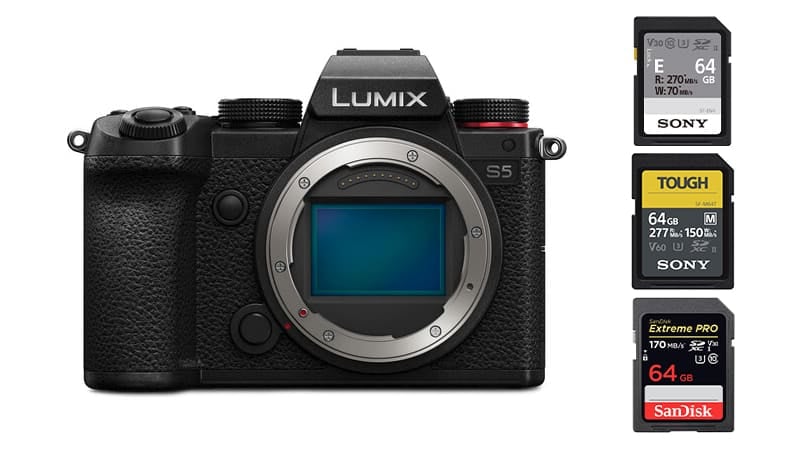
Best SD Card Panasonic S5

The Panasonic S5 has dual card slots with UHS-II as slot 1 and UHS-I as slot 2. The max video bitrate the camera shoots is 200Mbps or 25MB/s.

For Photographers, the S5 does not have any specs that require any card faster than UHS-I U3 cards but UHS-II cards are useful in a single card setup for bursting or for a RAW+JPG backup setup when bursting. 

Videographers only need UHS-I cards, but often like using UHS-II cards for faster files transfer speeds for offloading data to a computer.

For this camera, I would only recommend UHS-II v60 cards, or UHS-I cards and feel that v90 cards would be a waste of money.

Here is a list of some of the best cards for the Panasonic S5.

Recommended SD Cards In-Camera Speed (S1H) See Price
UHS-II Cards    
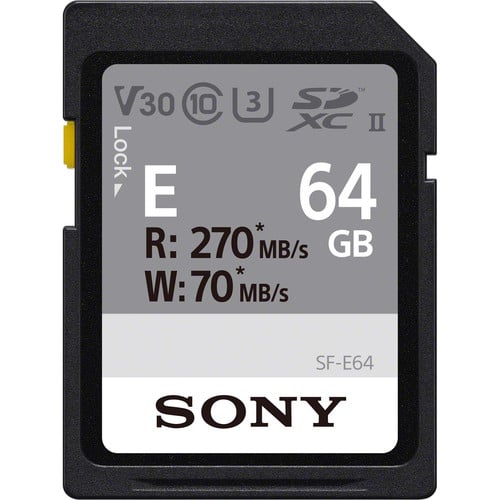
Sony E U3 75 MB/s (rated) Amazon
Sony M Tough v60 71.3 MB/s Amazon
ProGrade v60 53.3 MB/s Amazon
UHS-I U3    
Sandisk Extreme Pro 38.2 MB/s Amazon
Delkin Black Tough 37.7 MB/s B&H
Kingston Canvas Go! 37.6 MB/s B&H

Camera memory card speeds based on the Panasonic S1H memory card tests.

My #1 recommendation would be a Sony E-card. It’s only a little more expensive than a UHS-I card but you get the benefits of faster transfer speeds to your computer. If you want a tough card, the Sony M cards are nice, or you could go with the Delkin Black UHS-I card.


Best Memory Cards Panasonic S5

The Panasonic S5 has some interesting specs and capabilities and knowing its limitations could save you a lot of money on memory cards. So before we get into the list, here is what you need to know about buying memory cards for the Panasonic S5.

The S5 has dual memory card slots and you can record to two cards at the same time when shooting stills or video.

While the S5 is capable of using UHS-II memory cards, only slot 1 is capable of taking advantage of those speeds. Slot 2 is UHS-I only. 

This means, if you plan on shooting backup to both cards at the same time, you’ll be limited to UHS-I performance and there will be no benefit to spending money on high-end UHS-II cards.

Also, since the Panasonic video specs max out at 200Mbps, or 25MBs, this means the highest speed class you’ll need for video is U3 which is offered by most UHS-I memory cards.

Basically, the camera will support UHS-II memory cards, but if you plan on shooting video or shooting with dual memory card slots, UHS-I cards are all you need.


Panasonic S5 Specs

Sensor: Full Frame 24.2MP CMOS
Continuous Shoot: 7fps
Est. Buffer Size: ?
RAW Shots To Fill Buffer: 24 RAW
Max Memory Card Size: ?
4k Datarate: H.264 4:2:2 150Mbps / H.265 4:2:0 200Mbps
1080p Datarate: 100Mbps


Best Memory Cards For 4k Video

Video specs are a little confusing with the Panasonic S5. There are a few compression types to choose from with different bitrates, subsampling, and color depth.

In an ideal world, you’ll want to shoot 4k with 10-bit at 4:2:2. This will give you the best-looking image. Strangely Panasonic doesn’t offer that with the H.265 video codec, they only offer it with an H.264 codec at a lower bitrate of 150Mbps. To be fair, this is all most people really want that are casually shooting video, and having the internal 4:2:2 10-bit is a really nice feature.

If you want a better bitrate you the only way to get it is to shoot 50p or 60p which gives you 200Mbps, but it uses the H.265 coded which is also 50% more efficient, but only with a 4:2:0 subsampling.

For all the bitrates, you’ll only need a maximum of a U3 memory card which supports a minimum write speed of 30MB/s.


Minimum write speeds based on card speed ratings

U1 = 10MBs or 80Mbps

U3 = 30MBs or 250Mbps

V60 = 60MBs or 480Mbps

v90 = 90MBs or 720Mbps.


Panasonic S5 Video Specs & Recording Modes

If you need unlimited record time, the Panasonic S5 only offers unlimited with 4:2:0 8-bit.  All the other record modes have a 30 minute record time.

Record Limit: Unlimited for 4:2:0 8-bit. 30-min for 10-bit 4:2:2 and 10-bit 4:2:0
Audio FIle Format: AAC, Linear PCM

4k Recording Modes
UHD 4k H.265: 4:2:0 10-bit 50p-60p | 200Mbps
UHD 4k H.265: 4:2:0 10-bit 24-60p | 100Mbps
UHD 4k H.264: 4:2:2 10-bit 24p-30p | 150Mbps
UHD 4k H.264:
4:2:0 8-bit 24p-60p | 100Mbps

1080p Recording Modes
Full HD H.264: 4:2:2 10-bit 24p to 120p | 100Mbps


Panasonic S5 Record Times and Memory Card Capacity

This chart takes a few of the different bitrates and the record options listed above to show how much record time you can be expected to get out of each size card.

You can also use my record time calculator to see even more memory card sizes.

Keep in mind that the 200Mbps record-setting is for 50-60p, which can be played back in slow motion or at regular speed. If you confirm it to 25 or 30 then your clips would be twice as long.

Panasonic S5 Record Times 64GB 128GB 256GB 512GB
4k        
4k 200Mbps | 25MB/s 43min 85min 171min 341min
4k 150 Mbps | 18.75MB/s 57min 114min 228min 455min
4k 100 Mbps | 12.5MB/s 85min 171min 341min 683min
1080p        
1080p 100Mbps | 12.5MB/s 85min 171min 341min 683min


Best Memory Cards Panasonic S5 Bottom Line

Panasonic has put together quite a nice camera but that second SD card slot is only UHS-I which makes buying memory cards a bit tricky. This was always my big complaint about the Sony A7III. Even though you’ve put in a UHS-II card, you still only get UHS-I performance because of that backup slot adding a bottleneck to the whole system, so you have to decide if you want maximum speed with a single UHS-II card slot or redundancy with slower UHS-I speeds.

If you’re just ok using a single SD card, then you will get more than twice the performance using a UHS-II memory card.

I recommend you stick with slower UHS-II cards that come in at a more affordable price. The V60 cards or that Sony E card. UHS-I cards are also a great option.

0
0
0
0
0
Alik Griffin

A professional video editor, and photographer with a Bachelors in Film studies from UCSD. Based in Los Angeles, I have created commercials, trailers, and other video content for various clients and platforms since 2005. I also love to write about my passions and share my insights on my blog.

Related Topics
  • Memory Card Speed Tests
  • Panasonic S5
Previous Article
Canon R5 Mark I Accessories
  • Accessory Guides

7 Must-Have Accessories Canon R5

  • Alik Griffin
  • February 3, 2026
View Post
Next Article
  • Blog

ETERNA Film Simulator Recipe – Perfect For General Use

  • Alik Griffin
  • May 25, 2024
View Post

Subscribe

Subscribe now to our newsletter

You May Also Like
Ricoh GRIV Memory Cards
View Post
  • Memory Card Buffer Tests
  • MicroSD Memory Cards

Ricoh GRIV – Best Memory Cards & Recommendations

  • Alik Griffin
  • January 30, 2026
  • No comments
Canon R6 III Memory Cards
View Post
  • Memory Card Buffer Tests
  • Memory Cards Recommendations

Recommended Memory Cards Canon R6 III

  • Alik Griffin
  • November 24, 2025
  • No comments
Panasonic S9 Memory Card Guide
View Post
  • Memory Card Buffer Tests

Best Memory Cards For Panasonic S9 – Real Benchmarks

  • Alik Griffin
  • March 9, 2025
  • No comments
Best Panasonic GH7 Memory Cards
View Post
  • Memory Card Buffer Tests

Best Memory Cards For Panasonic GH7 – Real Benchmarks

  • Alik Griffin
  • February 11, 2026
  • No comments
4 comments
  1. Patrizia says:
    May 2, 2022 at 9:14 am

    Hello, using v60 card instead v90 for video is ok? Or using v60 I obtain dropped frames?

    Reply
    1. Alik Griffin says:
      November 13, 2022 at 10:21 pm

      v60 is totally fine for the S5.

      Reply
  2. manc65 says:
    June 9, 2022 at 1:07 pm

    Will a SanDisk Extreme128GB SD xc i card (90MB/S) U3 10) be enough to record 4K/60p 8bit ?

    Reply
    1. Alik Griffin says:
      June 9, 2022 at 9:17 pm

      Yes! U3 rating of the Sandisk card guarantees 30MB/s write speed. 4k60 with the S5 at the most hits 18.75MB/s. So it’s more than fast enough.

      Reply

Leave a Reply Cancel reply

Your email address will not be published. Required fields are marked *

San Clemente Sunset

Join The Newsletter

Featured
  • Mud Face
    Nikon Z 35mm f1.4 vs Nikon Z 35mm f1.8 S – Sample Images
    • 28 comments
  • Biker Bro
    Viltrox Spark Z3 Flash – Review & Sample Photos
    • 3 comments
  • Nikon Z 28mm f2.8 Review & Sample Photos
    • 18 comments
  • Zeiss Planar 50mm f2 on the Leica M11
    Zeiss Planar 50mm f2 Review & Sample Photos
    • 5 comments
  • TTArtisan 27mm f2.8 AF Front of Lens
    TTArtisan AF 27mm f2.8 Review & Sample Photos
    • 5 comments
  • TTArtisan 23mm f1.8 Product Shots
    TTArtisan AF 23mm f1.8 Lens Review & Sample Photos
    • 3 comments
  • Nikon Z 50mm f1.8 S Lens Review
    Nikon Z 50mm f1.8 S Lens Review & Sample Photos
    • 59 comments
  • Kalina Picking Sakura
    Nikon Z 85mm f1.8 S Review & Sample Photos
    • 20 comments

Subscribe

Subscribe now to our newsletter

Privacy Policy | Licensing | About Me | Contact

Copyright © Alik Griffin Inc. 2025

Input your search keywords and press Enter.












