
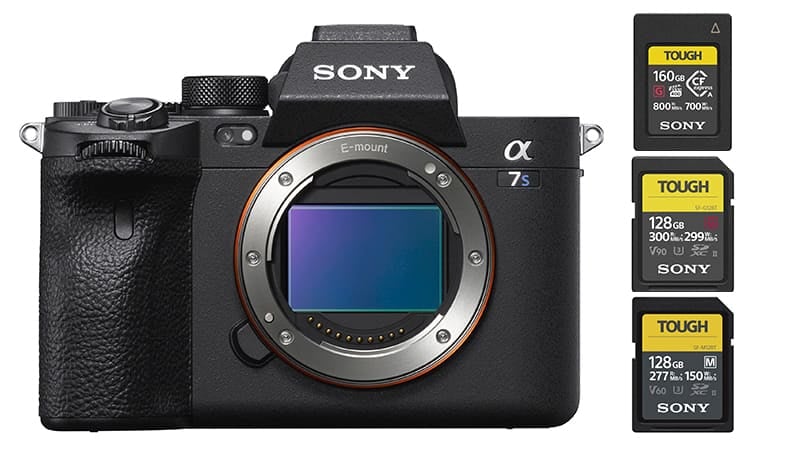
The Sony A7sIII has a unique setup with dual UHS-II SD card slots that can also take the CFexpress Type A cards. But you might not need CFexpress cards if you already have V90 UHS-II cards. This guide will help you find the best memory cards for the Sony A7sIII and hopefully save you some money.
Sony A7s III Memory Card Recommendations
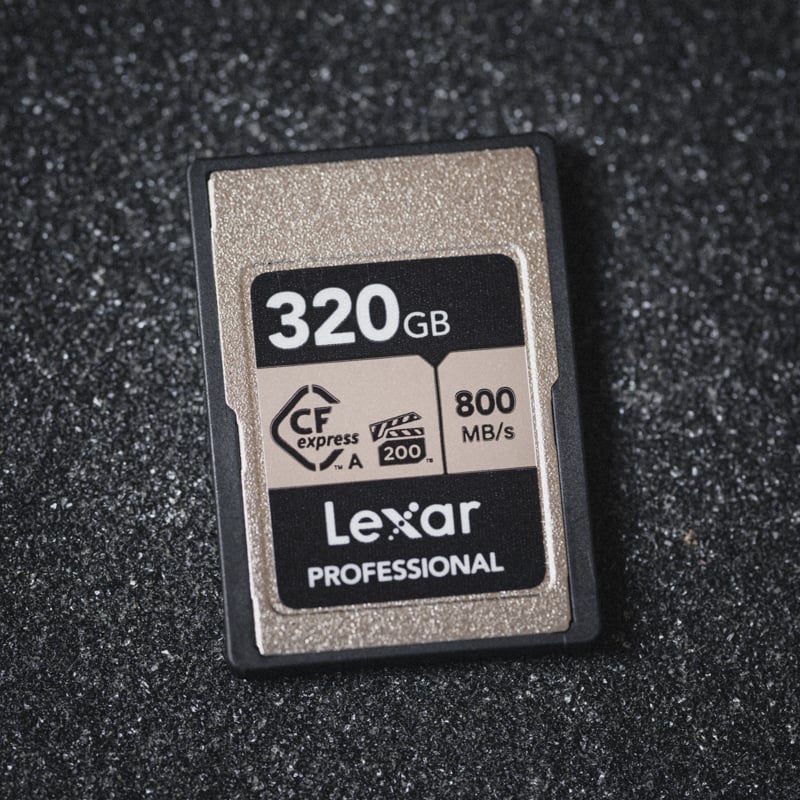
You won’t need CFexpress type A cards even if you record S&Q at fast frame rates with XAVC S-I. However, they will ensure smooth performance as most of them now guarantee a 200MB/s or even a 400MB/s minimum write speed. They’ve also come down a lot in price.
UHS-II SD Cards usually have two-speed classes associated with them, V90 and V60.
V90 UHS-II cards offer a minimum data rate of 90MB/s. The minimum requirement for 600Mbps ( 75MB/s ) H.264.
V60 UHS-II cards offer a minimum data rate of 60MB/s. Minimum requirement 280Mbps ( 35MB/s ) H.265.
If budget permits, I would recommend the Lexar Silver Type A which stands out as one of the top memory cards for the Sony FX3 when considering its performance to cost factor. It offers an impressive 200MB/s sustained guarantee and now its pricing aligns closely with that of UHS-II V90 cards. Considering this, upgrading to these faster cards could be the sensible choice.
| Recommended Memory Cards | A7sIII Speeds | USB-C Write | USB-C Read | See Price |
| CFe Type A – S & Q 120p All-I | — | |||
| Lexar Gold 160GB Type A | — | 825 MB/s | 886 MB/s | Amazon / B&H |
| Lexar Silver 320GB Type A | — | 776 MB/s | 861 MB/s | Amazon |
| Sony 80GB Type A | 241.79 MB/s* | 641 MB/s | 852 MB/s | Amazon / B&H |
| Prograde 160 Type A | 240.31 MB/s* | 691 MB/s | 845 MB/s | Amazon / B&H |
| UHS-II V90 – 600Mbps H.264 | ||||
| Sony G Tough | 243.32 MB/s | 229.1 MB/s | 270.6 MB/s | Amazon / B&H |
| Kingston Canvas React | 239.23 MB/s | 243.2 MB/s | 283.3 MB/s | Amazon |
| Angel Bird V90 II | 241.77 MB/s | 219.5 MB/s | 290.4 MB/s | Amazon / B&H |
| Delkin Black (Tough) | 242.25 MB/s | 225.4 MB/s | 259.9 MB/s | B&H |
| Kodak Ultra Pro V90 | 241.81 MB/s | 247.6 MB/s | 268.3 MB/s | Amazon |
| UHS-II V60 – 280Mbps H.265 | ||||
| Sony M Tough | 88.0 MB/s | 103.8 MB/s | 282.3 MB/s | Amazon |
| Sony E | 137.66 MB/s | 103.8 MB/s | 282.3 MB/s | B&H |
| Angel Bird V60 II | 136.13 MB/s | 104.5 MB/s | 166.5 MB/s | B&H |
Note*: CFexpres Type A card caps out at around 240 MB/s. The reason for this is because the Sony A7sIII pretty much gets a bottomless buffer with these cards and I can’t produce data faster than 250MB/s when doing a continuous burst. These cards will still record at more than twice the speed of UHS-II cards and will be required for S&Q 4k recording with intra-frame compressions.
Also, see my Sony A7s III List of Accessories.
Memory Card In-Camera Benchmarks
These benchmarks are measured by shooting a series of bursts in Uncompressed RAW until the buffer fills, how much data is written between the time it took to clear the buffer is then calculated.
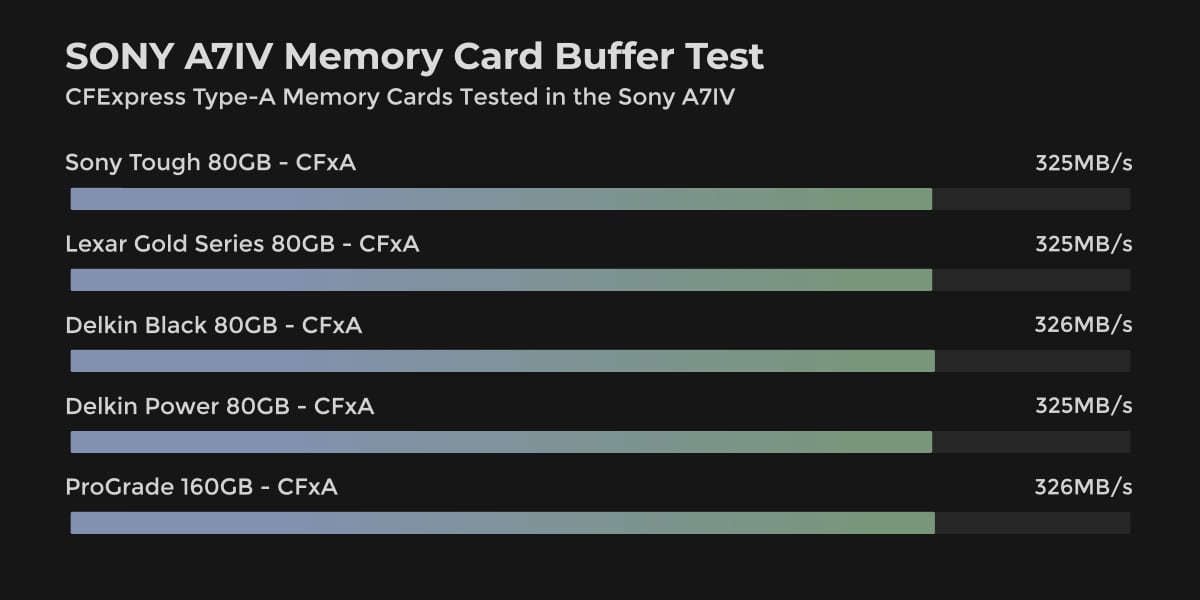
These benchmarks show the speed of cards in the Sony A7IV since the A7sIII will have a bottomless buffer with the CFxA cards so they are impossible to test. Using the A7IV tests gives you a better idea of how each card performs with Sony hardware. Although the A7IV speeds also cap out at 325MB/s.
Speeds are in MB/s. – You can see additional USB-C Benchmarks in the CFxA Memory Card Guide and the SD Memory Card Guide.
This chart shows the CFexpress Type-A performance of memory cards for the Sony A7IV.
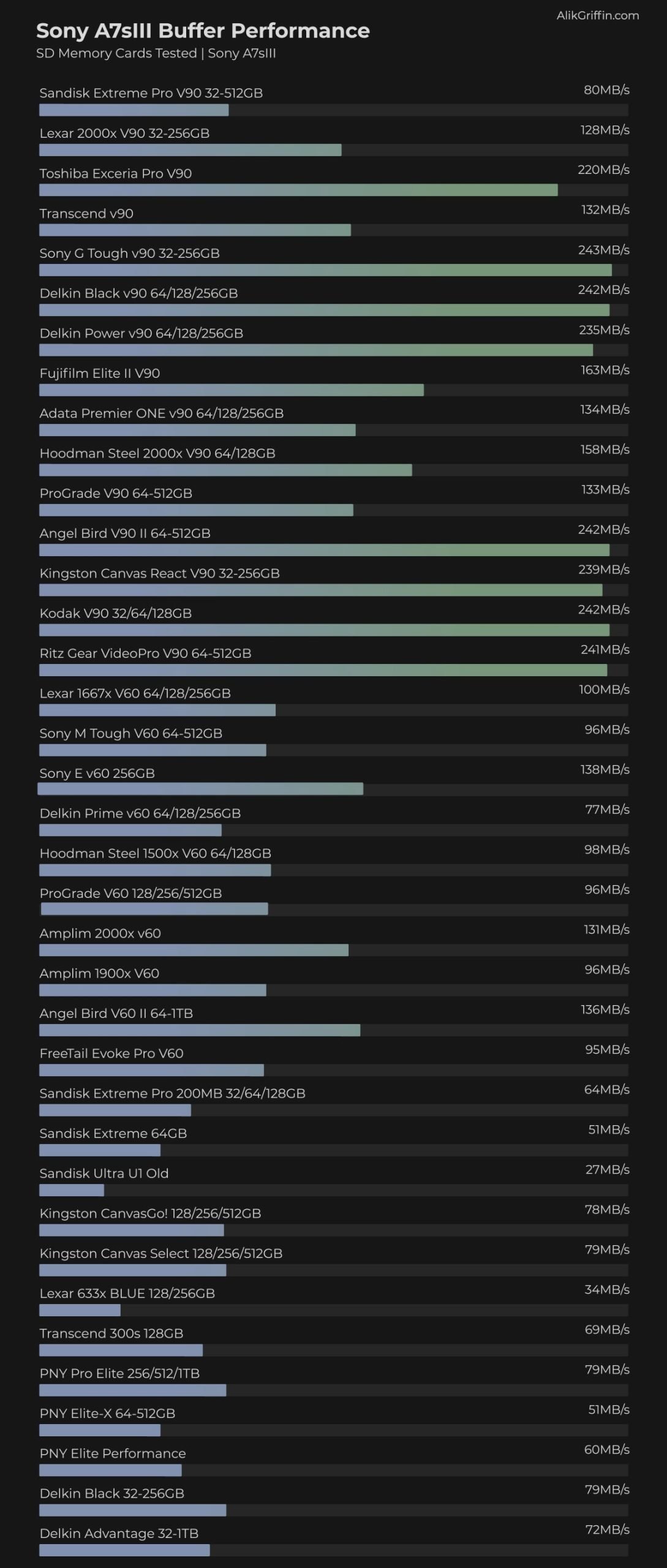
This chart shows the SD UHS-II memory card performance in the Sony A7sIII.
There were a few issues with cards initiating when I ran this test which I didn’t catch until later. If you have an issue with cards initiating as UHS-II cards, try inserting the card without a battery, insert the battery, wait a few seconds then turn the camera on. That often fixes the issue – However, I recommend staying away from those cards just in case.
Sony A7s III Memory Cards | What You Need To Know
The Sony A7sIII has a very interesting setup, it allows for two different types of memory cards in the same slot (not at the same time).
And since both memory card slots are UHS-II and CFe compatible, you can mix and match your setup.
What’s the difference between CFexpress Type A and SD Cards?
Quite a bit, but it mainly comes down to size and speed. CFexpress Type A cards are much faster and slightly smaller.
Do you need CFexpress Type A cards for the Sony A7s III?
No, the Sony A7sIII can use all the features with a good V90 UHS-II memory card.
What is the S & Q setting and why do you need it?
S & Q stands for slow and quick. It creates a file that will be played back in slow motion set to your base frame rate. Footage plays back in slow motion inside the camera or in your editing software without further conversion.
The advantage of S&Q mode is it records at a very high bitrate, and then dumps that to the set playback frame rate resulting in a much higher quality image compared to the standard high frame rate recordings.
For example with XAVC S-I 4k, you can get a 60fps file at 600Mbps, or a 24fps file at 240Mbps.
When shooting S & Q I would recommend using CFexpress Type A cards for XAVC S-I which is the All-I compression at H.264. For editing with slow-motion video, this will be the easiest file for your computer to handle.
Sound will not be recorded in the S & Q mode.
For now, the price of CFexpress Type-A cards on some cards is very competitive so it might make sense to jump up to these cards.
S&Q Bitrates & Modes
Use the table below to see the various bitrates of the different recording modes.
The base bitrate will be the same regardless of the Frame Rate the camera records at, but each column shows the bitrate for the Rec. Frame Rates. Meaning, what you should expect to see with the final file at the set frame rate.
| Frame Rate 24-120 | 24fps | 30fps | 60fps | 120fps |
| XAVC S-I 4k | ||||
| 240M 4:2:2 10bit | 240Mbps | 300Mbps | 600Mbps | — |
| XAVC S 4k | ||||
| 100M 4:2:2 10bit | 100Mbps | 140Mbps | 200Mbps | 280Mbps |
| 100M 4k 4:2:0 8bit | 100Mbps | 100Mbps | 150Mbps | 200Mbps |
| 60M 4k 4:2:0 8bit | 60Mbps | 60Mbps | — | — |
| XAVC HS 4k | ||||
| 100M 4:2:2 10bit | 100Mbps | — | 200Mbps | 280Mbps |
| 100M 4:2:0 10bit | 100Mbps | — | 150Mbps | 280Mbps |
| 50M 4:2:2 10bit | 50Mbps | — | 100Mbps | — |
| 50M 4:2:0 10bit | 50Mbps | — | 75Mbps | — |
| 30M 4:2:0 10bit | 30Mbps | — | 45Mbps | — |
Sony A7sIII Memory Card Capacity
The Sony A7sIII can take any size memory card. If you want to use a 1TB memory card, the camera will take it. Keep in mind, if you use 32GB cards, you’ll only be able to format the card in a 32-bit filesystem, and you won’t be able to record clips larger than 4GBs.
Sony A7sIII Specs
| Sensor: 12MP Full-Frame Exmor R BSI CMOS Sensor Processor: BIONZ XR Image Processor Memory Card Slots: 2 UHS-II / 2 CFe A Continuous Shoot: 10fps Est. Buffer Size: — RAW Shots To Fill Buffer: 1000 Frames Max Memory Card Capacity: Unlimited 4k Datarate: H.265 280Mbps / H.264 600Mbps |
Sony A7s III Video Specs & Recording Modes
There are a lot of different record modes with different Sony codecs.
What’s new to the Sony A7sIII is the XAVC HS and the XAVC S-I.
What’s the difference between XAVC HS, XAVC H-I, and XAVC S?
All three containers are capable of recording 10-bit 4:2:2. The main difference is H.265 vs H.264.
XAVC HS allows for H.265 recording but is Long GOP.
XAVC S and S-I still only record to H.264. The S-I variant is an all-intra recording – meaning there is a keyframe on every frame. XAVC S uses Long GOP.
H.265 offers better compression performance at a lower bandwidth which makes it a much more efficient file. H.265 can produce on average 50% better quality at a similar file size as H.264 depending on the scenes.
The disadvantage of H.265 is it is harder on the CPU to decode and it will often require you to work with proxies when editing, especially XAVC HS which is Long GOP.
H.264 is an older codec that was used by all the older Sony cameras. H.264 will support 10-bit at a 4:2:2 subsampling but it’s not as efficient as H.265. You can still get great quality out of H.264 since Sony increased the bitrate to 600Mbps with H.264.
This will give you a similar quality to H.265. Most computers will be able to edit these files without any issues, so you’ll have to test for yourself the advantages and disadvantages of each system. I personally just edited with H.265, using the proxies in Premiere.
Record Limit: Unlimited
Audio File Format: AAC, Linear PCM
4k Recording Modes |
Should You Use XAVS HS or XAVS S-I?
You should use XAVC HS with the H.265 recording when you can. It is a better codec and then you should develop a proxy post-production workflow in Premiere to speed up the editing process. It’s incredibly simple to do once you’ve got it all set up. It’s worth the file size advantage and image quality advantage.
If you need to get to editing quickly without proxies, you’ll likely want to shoot with XAVC S-I which records H.264. Keep in mind the file sizes will be much larger if you’re using the max quality of 600Mbps and you should technically use more expensive V90 cards – although so far in my tests the v60 cards are working well for 600Mpbs recordings and the camera will not reject them.
What Size Memory Card Is Best?
The size of the memory cards you’ll need depends on record settings and the type of video you’re shooting. You’ll probably want to start with a 128GB card which gives you 61 minutes when recording with the 280Mbps H.265 bitrates. This is going to be enough for short videos that take a few hours to shoot.
If you shoot 600Mbps with H.264 because you don’t want to deal with the additional post-processing labor involved with H.265, then you may want to start with a 256GB card.
On long shoot days or big projects, you may either want to go with a bigger card or clear off the cards midday, which means you have to bring some sort of computer and backup drives. So this all depends on your budget and workflow.
Sony A7s III Record Times – Memory Card Capacity
Here are the record times for 4k bitrates based on a few memory card sizes.
Use this table to see the memory card capacity with different record settings.
| Sony A7sIII Record Times | 64GB | 80GB | 128GB | 160GB | 256GB | 512GB |
| 4k | ||||||
| 4k 600Mbps | 75MB/s H.264 | 14min | 18min | 28Min | 36min | 57min | 114min |
| 4k 280Mbps | 35MB/s H.265 | 30min | 38min | 61min | 76min | 122min | 244min |
| 4k 200Mbps | 25MB/s | 43min | 53min | 85min | 107min | 171min | 341min |









Leave a Reply to Ruslan Schuh Cancel reply