We use minimal analytics to improve the site. Is that okay?

Alik Griffin
San Clemente Sunset
Subscription Form
  • Reviews
    • Accessory Reviews
    • Calculators
      • Video Data Rate Calculator | Record Time Calculator
      • Diffraction Calculator
      • DoF Calculator | Lens Equivalent
      • Shutter Speed to Shutter Angle Calculator
    • Camera Reviews
    • Lens Reviews
    • Memory Cards Recommendations
      • Fastests SD Memory Cards
      • Fastest MicroSD Cards
      • Fastest CFExpress Type-B Card
      • Fastest CFExpress Type-A Cards
      • Best CFast Memory Card
    • List of Mics
      • Best Streaming & Podcast Mics
  • Camera Guides
    • List of all Blackmagic Cameras
    • List Of all Canon RF Cameras
    • List of all Fujifilm Cameras
    • List of all Nikon Z Cameras
    • List of all Panasonic Cameras
    • List Of all Sony E Cameras
  • List of Lenses
    • Canon RF Lenses
    • Fujifilm GFX Lenses
    • Fujifilm XF Lenses
    • L-Mount Lenses
    • Leica M Lenses
    • Micro Four Thirds Lenses
    • Nikon Z Lenses
    • PL Mount Cine Lenses
    • Sony E Lenses (FE and APS-C)
  • Store
  • My account
Alik Griffin
Alik Griffin
  • Reviews
    • Accessory Reviews
    • Calculators
      • Video Data Rate Calculator | Record Time Calculator
      • Diffraction Calculator
      • DoF Calculator | Lens Equivalent
      • Shutter Speed to Shutter Angle Calculator
    • Camera Reviews
    • Lens Reviews
    • Memory Cards Recommendations
      • Fastests SD Memory Cards
      • Fastest MicroSD Cards
      • Fastest CFExpress Type-B Card
      • Fastest CFExpress Type-A Cards
      • Best CFast Memory Card
    • List of Mics
      • Best Streaming & Podcast Mics
  • Camera Guides
    • List of all Blackmagic Cameras
    • List Of all Canon RF Cameras
    • List of all Fujifilm Cameras
    • List of all Nikon Z Cameras
    • List of all Panasonic Cameras
    • List Of all Sony E Cameras
  • List of Lenses
    • Canon RF Lenses
    • Fujifilm GFX Lenses
    • Fujifilm XF Lenses
    • L-Mount Lenses
    • Leica M Lenses
    • Micro Four Thirds Lenses
    • Nikon Z Lenses
    • PL Mount Cine Lenses
    • Sony E Lenses (FE and APS-C)
  • Store
  • My account
  • Pure Cinema
    Viltrox TCL-X100VI Review | A Budget-Friendly 50mm Upgrade
    • February 21, 2026
  • Thypoch Simera 75mm f1.4 Review
    Thypoch Simera 75mm f1.4 Review & Sample Photos
    • February 18, 2026
  • Kakurajima View
    Viltrox WCL-X100VI Review | A Budget-Friendly 28mm Upgrade
    • February 17, 2026
  • Viltrox 9mm f2.8 Air Review
    Viltrox 9mm f2.8 AIR Review & Sample Photos
    • February 18, 2026
  • Biker Bro
    Viltrox Spark Z3 Flash – Review & Sample Photos
    • February 16, 2026
  • Pure Cinema

    Viltrox TCL-X100VI Review | A Budget-Friendly 50mm Upgrade

    View Post
  • Thypoch Simera 75mm f1.4 Review

    Thypoch Simera 75mm f1.4 Review & Sample Photos

    View Post
  • Kakurajima View

    Viltrox WCL-X100VI Review | A Budget-Friendly 28mm Upgrade

    View Post
Trending Posts
  • Nikon Zf Official Announcement 1
    Nikon Zf – The Fujifilm Killer?
    • February 18, 2026
  • Nikon Z 50mm f1.8 S Lens Review 2
    Nikon Z 50mm f1.8 S Lens Review & Sample Photos
    • February 18, 2026
  • Kamlan 50mm f1.1 II Product Shot 3
    Kamlan 50mm f1.1 II Review & Sample Photos
    • January 18, 2025
0
  • Blog

Capture One Better Than Lightroom? Check Out These Samples

  • Alik Griffin
  • April 15, 2024
  • 7 comments

This website contains affiliate links. We will earn a small commission on purchases made through these links. Some of the links used in these articles will direct you to Amazon. As an Amazon Associate, I earn from qualifying purchases.

All you hear about is how much better Capture One is than Lightroom, but is this true for every brand of camera? Does Capture One handle X-Trans better and are Capture One’s colors better?

I will summarize since I can’t get too deep into all the features of each program in a written review, it would take forever, but mainly we are going to look at some straight-out-of-camera samples and compare the default RAW converter process.

Capture One vs Lightroom | Best Raw Converter

I’ve been testing the two programs back and forth and I have to say the better program really depends on what you want. Both programs have very different strengths and weaknesses. Capture One has color wheels, color curves, and color levels, Lightroom just has one set of curves but it has camera calibration tools which are very powerful. Lightroom has that sweet super easy to use Catalog, although Capture One’s catalog isn’t so bad either. Lightroom does Collections, and Capture One does Albums.

Lightroom does HDR merging and Panorama Stitching, but Capture One does not.

They both do luminosity masks.

If you like grain (I do) Capture One gives you way more control over the grain style.

Lightroom gives you access to all the camera’s color profiles, and Capture One only gives you access to Fujifilm film simulators.

It used to be that Capture One did some things like highlight recovery better, but Adobe has improved here over the years.

What Is Capture One Better At?

Fujifilm X-Trans files mainly.

Since Fujifilm uses the X-Trans sensor, you often get a strange noise pattern in the images. Capture One corrects this noise pattern a little better and pulls out slightly more detail. It comes at the cost of slightly waxier skin tones but it does look a little nicer. You can tune Lightroom and Photoshop to get almost as good of an initial image here, but Capture One is doing some sort of noise reduction trick for the X-Trans files, I would say it’s not game-changing, but it will make your life easier, and save you time if you’re shooting high-end work with Fujifilm X-Trans cameras. Keep in mind their GFX cameras are not X-Trans, neither is the X-T200 or X-A7 so they will perform well in Lightroom.

I don’t see the difference as much with other camera brands and actually Capture One sometimes looks worse to me, but it depends on how much noise is in the image and what ISO you’re at. Capture One typically does a better default noise reduction with some nice sharpness applied. In Lightroom, you almost always have to tweak just a little to match results.

Capture One also will allow you to load the camera profiles for Fujifilm, but not for the other brands.

Some say the Capture One default look is better. Debatable of course.

What Lightroom Is Better At?

Lightroom gives you the camera colors for every brand. Lightroom also automatically loads in all the camera settings for the Nikon Z cameras.

I think that Lightroom is more intuitive and I like their catalog design more I like the different developer modules, for Library, Develop, Print, Web, etc. The Lightroom bundle with Photoshop is also priced very reasonably and the Lightroom + Photoshop bundle is more powerful, although Capture One standalone is more powerful than Lightroom since Capture One has more color controls.

I feel like Capture One applies this noise reduction to everything which can make the images slightly softer sometimes, but it does seem like the noise reduction retains a little more detail by default. You can get Lightroom matching pretty close, but you do have to noodle sharpness and noise reduction.

Let’s look at some comparisons between each brand. I’ll post these straight-out-of-camera RAW samples for those of you who are interested in batch processing.

Canon EOS R – Lightroom vs Capture One

Here is a straight-out of camera RAW samples at 100% crop.

The Capture One default noise reduction looks too aggressive and the EOS R image with Lightroom on the left looks much better. Keep in mind, that this is just one sample.
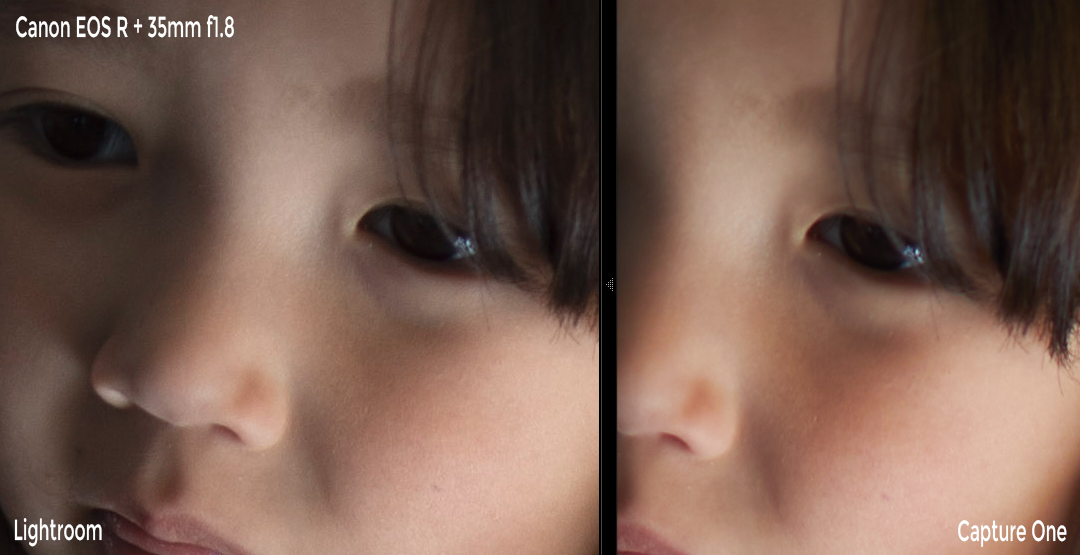
Capture One vs Lightroom Sample

Since the above sample was strange, here is another one in perfect lighting.
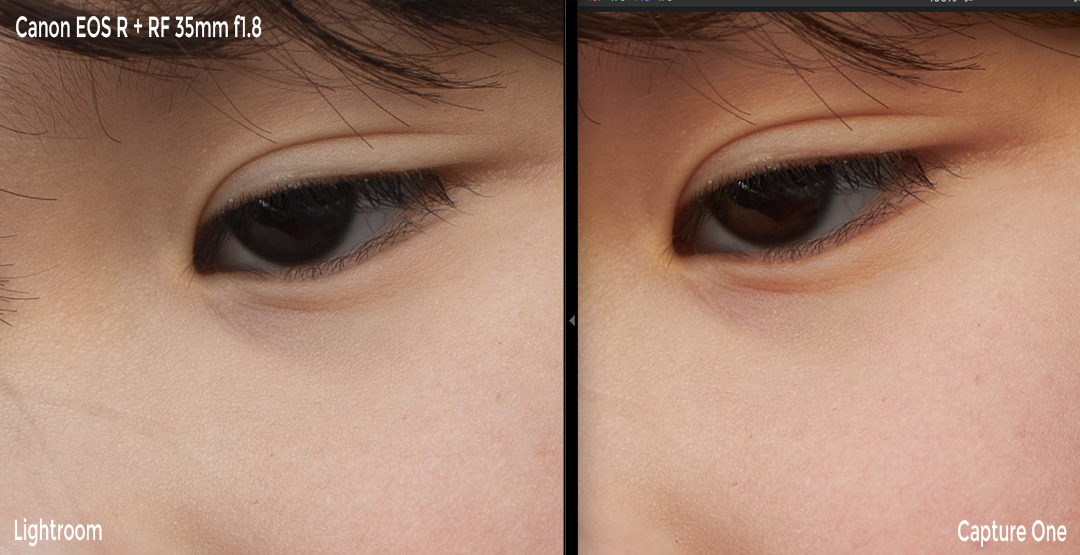
Capture One vs Lightroom Sample

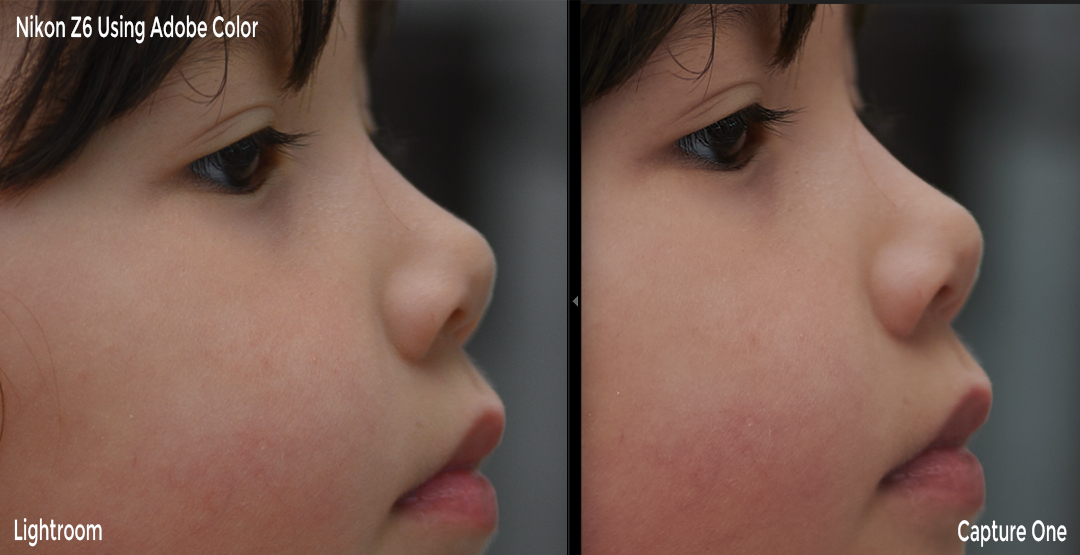
Nikon Z6 – Lightroom vs Capture One

Lightroom will automatically load your Nikon camera settings.

Here is one more using Nikon’s Camera Standard vs. Capture One defaults.
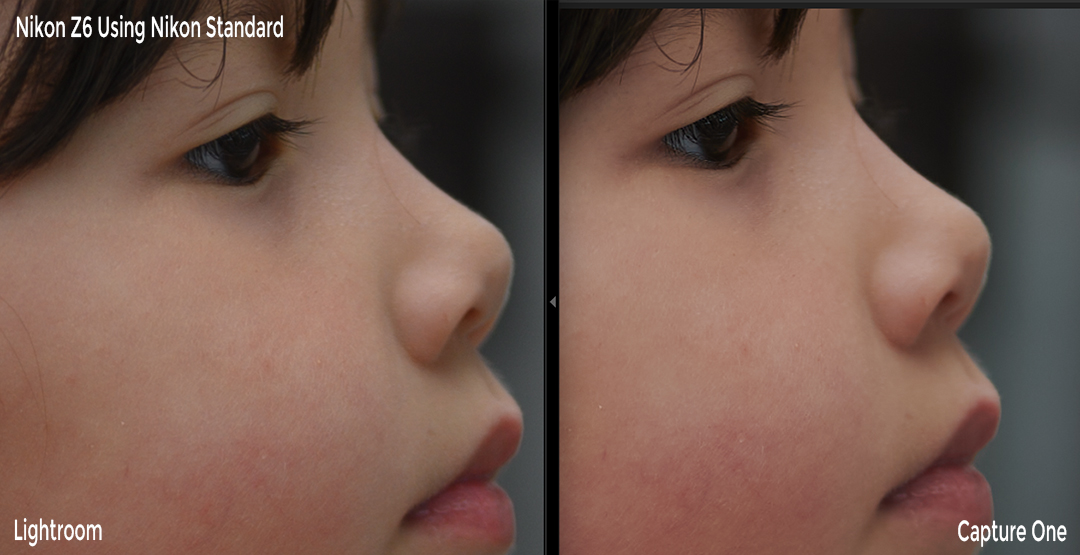
Capture One vs Lightroom Sample

Here is a sample using one of the default Adobe Color profiles (what I usually use) vs. Capture One defaults.
Capture One vs Lightroom Sample

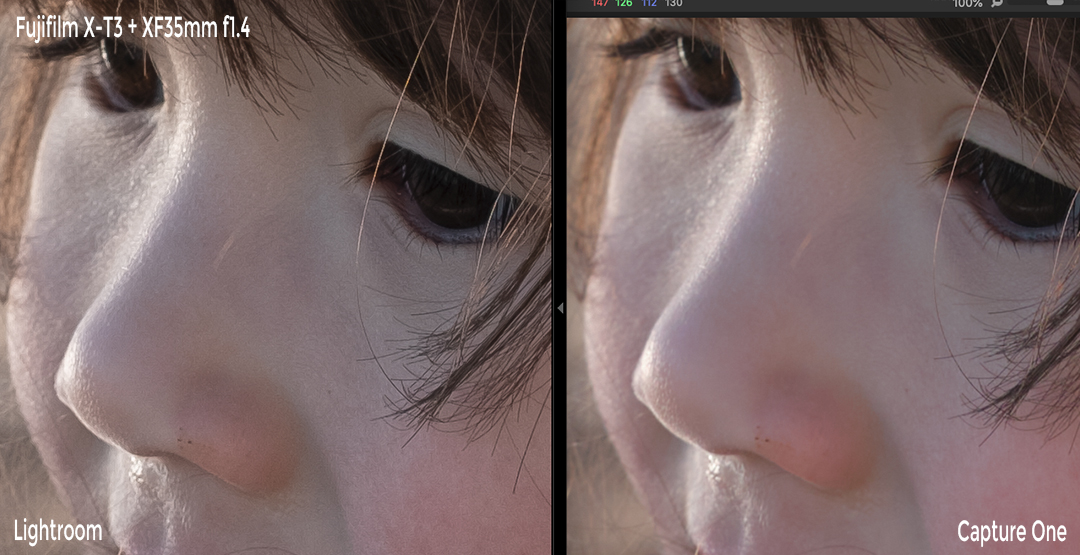
Fujifilm XT3 – Lightroom vs Capture One

Here you can see a slightly noisier image and a little bit better detail with Capture One on the Fujifilm file. 

Capture One vs Lightroom Sample

One more sample in good lighting with a better lens.
Capture One vs Lightroom Sample

If I noodle for a while I still can’t get Lightroom to give me the same level of detail. I get close, but there is a noise reduction that Capture One is doing that is just better. You will only see this at a 100% crop.

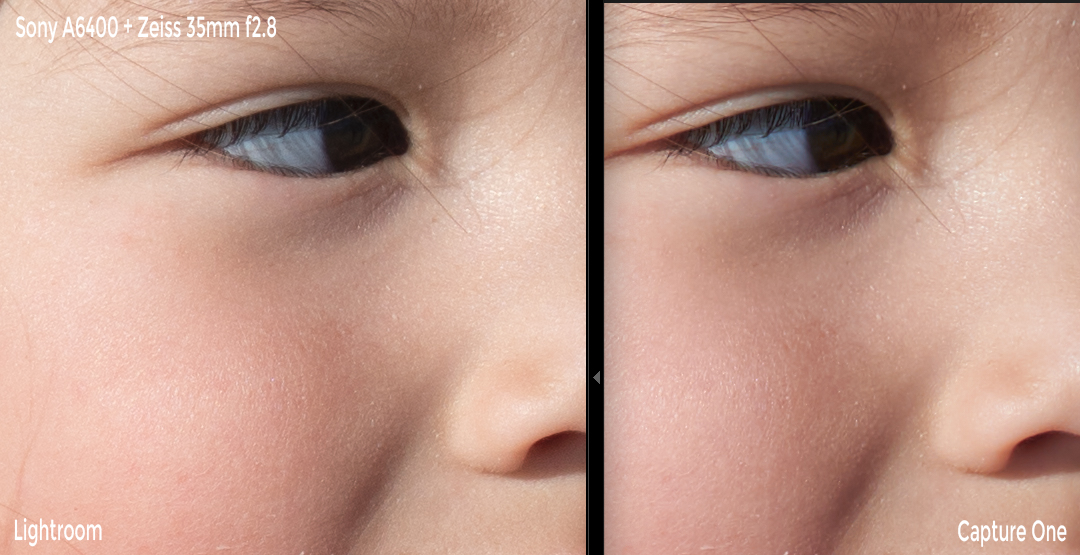
Sony A6400 – Lightroom vs Capture One

Here on the Sony A6400, there is almost no difference between Lightroom and Capture One. Maybe Capture One is just a touch sharper.
Capture One vs Lightroom Sample

Capture One Vs Lightroom Conclusions

Is Capture One better than Lightroom? It depends, it is more powerful but more complicated. If you bundle LR+Photoshop then Capture One loses that advantage. But again, you could always use Capture One with Photoshop. 

The default output of Capture One, in my opinion, is just a hair better by default with some of the camera brands. I like the Capture One color a little more with Nikon, with Canon, I prefer the Colors of LR, with Fujifilm I prefer the Colors of LR and with Sony, they are very similar. At least in these samples, but this is going to be a matter of taste.

Images come in a touch sharper with a touch more detail usually with Capture One, except for that Canon sample for some reason. Again, these are just default settings you can always batch-adjust the shots to look however you want.

Even though I mostly shoot Fujifilm, I still personally use Lightroom just because it comes with the whole Adobe package that I subscribe to and for me, those slightly more detailed but waxier skin tones Capture One produces aren’t enough of an improvement to justify switching especially when you can get very close to the same results if you noodle the noise reduction and sharpness settings just a little bit. I also heavily color most of the stuff I’m doing so the default look isn’t important to me. But, if you batch process photos for clients or something, then Capture One might be a better option with some camera brands like Fujifilm. Wither others like Canon, I prefer Lightroom.

It’s been a few years since I’ve used Capture One before this comparison and I do have to say, I’m impressed. It’s come a very long way and looks like a great program now. But I guess the same could be said about Lightroom now that it does Pano stitching and HDR merging.

0
0
0
0
0
Alik Griffin

A professional video editor, and photographer with a Bachelors in Film studies from UCSD. Based in Los Angeles, I have created commercials, trailers, and other video content for various clients and platforms since 2005. I also love to write about my passions and share my insights on my blog.

Related Topics
  • Capture One
  • Lightroom
Previous Article
  • Accessory Guides
  • Camera Guides

Best Accessories Fujifilm X-T200

  • Alik Griffin
  • February 13, 2026
View Post
Next Article
  • Accessory Guides
  • Camera Guides

Best Accessories Sony A6600

  • Alik Griffin
  • February 12, 2026
View Post

Subscribe

Subscribe now to our newsletter

You May Also Like
Pure Cinema
View Post
  • Blog
  • Featured
  • Lens Reviews
  • Reviews

Viltrox TCL-X100VI Review | A Budget-Friendly 50mm Upgrade

  • Alik Griffin
  • February 21, 2026
  • No comments
Thypoch Simera 75mm f1.4 Review
View Post
  • Blog
  • Featured
  • Lens Reviews

Thypoch Simera 75mm f1.4 Review & Sample Photos

  • Alik Griffin
  • February 18, 2026
  • No comments
Kakurajima View
View Post
  • Blog
  • Featured
  • Lens Reviews

Viltrox WCL-X100VI Review | A Budget-Friendly 28mm Upgrade

  • Alik Griffin
  • February 17, 2026
  • 2 comments
Sony A7V Announcement
View Post
  • Blog
  • What's New

Sony A7V – They’re Back In The Game

  • Alik Griffin
  • December 30, 2025
  • 4 comments
7 comments
  1. dan says:
    February 10, 2020 at 9:11 pm

    When it comes to landscapes with a lot of leaves/branches, I find that Capture One does a far better job than Lightroom (even better than Lightroom’s new Enhance Details function, and even after noodling around with the Sharpness settings in LR)
    I’m too used to the Lightroom way of editing and workflow to switch, though :). I settled on using X Transformer on images where it would make the most difference, and just living with LR’s default for the rest of them.

    Reply
    1. Alik Griffin says:
      February 10, 2020 at 9:16 pm

      Yeah, I use to use Iridient to do my RAW processing on Landscapes shot with Fujifilm cameras. But now days Iridient is just so slow. X-Transformer is probably the better option now.

      Reply
  2. Konrad Henrykowicz says:
    February 12, 2020 at 11:32 am

    The samples actually show opposite. Camera Raw is better.

    Reply
    1. Alik Griffin says:
      February 13, 2020 at 2:10 am

      For some of the cameras yeah, I agree. The main advantage seems like it’s with Fujifilm. But even then, you can get very close if you manually noodle in LR.

      Reply
  3. MassimoIT says:
    February 12, 2020 at 12:52 pm

    I’m very surprised about rendering of Sony raw files: skin tones look very realistic and also sharpening is very good. There is an enormous improvement with respect to my eight year old Sony whose raw are rendered far different in Lightroom (v.5) and Capture One (v.12) none of them being usable.

    Reply
    1. Alik Griffin says:
      February 13, 2020 at 2:04 am

      Yeah, Sony keeps improving. All the brands do. Sony’s main problem before was bad AWB which they cleaned up a lot around the release time of the A7rIII. Now their AWB is really nice.

      Reply
  4. MassimoIT says:
    February 12, 2020 at 1:19 pm

    I think that is very important for a third part raw converter to have color profiles that closely emulates those of the camera manufacturer. In fact these profiles are typically well balanced, so they are a solid point to start. In some cases they are actually very good (Canon and Fujifilm for example).
    Mainly for this reason I would consider Capture One only for Fujifilm (and maybe Sony).

    Reply

Leave a Reply to Alik Griffin Cancel reply

Your email address will not be published. Required fields are marked *

San Clemente Sunset

Join The Newsletter

Featured
  • Kakurajima View
    Viltrox WCL-X100VI Review | A Budget-Friendly 28mm Upgrade
    • 2 comments
  • Pure Cinema
    Viltrox TCL-X100VI Review | A Budget-Friendly 50mm Upgrade
    • No comments
  • What is Micro Contrast
    Micro-Contrast, Is It Real? – Samples With Lens Comparisons
    • 17 comments
  • Nikon Z 40mm f2 Review | The New Compact King
    • 26 comments
  • Thypoch Simera 75mm f1.4 Review
    Thypoch Simera 75mm f1.4 Review & Sample Photos
    • No comments
  • How To Edit Photos To Look Like Film
    • 4 comments
  • TTArtisan 23mm f1.8 Product Shots
    TTArtisan AF 23mm f1.8 Lens Review & Sample Photos
    • 3 comments
  • Mud Face
    Nikon Z 35mm f1.4 vs Nikon Z 35mm f1.8 S – Sample Images
    • 28 comments

Subscribe

Subscribe now to our newsletter

Privacy Policy | Licensing | About Me | Contact

Copyright © Alik Griffin Inc. 2025

Input your search keywords and press Enter.












