Alik Griffin
San Clemente Sunset
Subscription Form
  • Reviews
    • Accessory Reviews
    • Calculators
      • Video Data Rate Calculator | Record Time Calculator
      • Diffraction Calculator
      • DoF Calculator | Lens Equivalent
      • Shutter Speed to Shutter Angle Calculator
    • Camera Reviews
    • Lens Reviews
    • Memory Cards Recommendations
      • Fastests SD Memory Cards
      • Fastest MicroSD Cards
      • Fastest CFExpress Type-B Card
      • Fastest CFExpress Type-A Cards
      • Best CFast Memory Card
    • List of Mics
      • Best Streaming & Podcast Mics
  • Camera Guides
    • List of all Blackmagic Cameras
    • List Of all Canon RF Cameras
    • List of all Fujifilm Cameras
    • List of all Nikon Z Cameras
    • List of all Panasonic Cameras
    • List Of all Sony E Cameras
  • List of Lenses
    • Canon RF Lenses
    • Fujifilm GFX Lenses
    • Fujifilm XF Lenses
    • L-Mount Lenses
    • Leica M Lenses
    • Micro Four Thirds Lenses
    • Nikon Z Lenses
    • PL Mount Cine Lenses
    • Sony E Lenses (FE and APS-C)
  • Store
  • My account
Alik Griffin
Alik Griffin
  • Reviews
    • Accessory Reviews
    • Calculators
      • Video Data Rate Calculator | Record Time Calculator
      • Diffraction Calculator
      • DoF Calculator | Lens Equivalent
      • Shutter Speed to Shutter Angle Calculator
    • Camera Reviews
    • Lens Reviews
    • Memory Cards Recommendations
      • Fastests SD Memory Cards
      • Fastest MicroSD Cards
      • Fastest CFExpress Type-B Card
      • Fastest CFExpress Type-A Cards
      • Best CFast Memory Card
    • List of Mics
      • Best Streaming & Podcast Mics
  • Camera Guides
    • List of all Blackmagic Cameras
    • List Of all Canon RF Cameras
    • List of all Fujifilm Cameras
    • List of all Nikon Z Cameras
    • List of all Panasonic Cameras
    • List Of all Sony E Cameras
  • List of Lenses
    • Canon RF Lenses
    • Fujifilm GFX Lenses
    • Fujifilm XF Lenses
    • L-Mount Lenses
    • Leica M Lenses
    • Micro Four Thirds Lenses
    • Nikon Z Lenses
    • PL Mount Cine Lenses
    • Sony E Lenses (FE and APS-C)
  • Store
  • My account
  • Viltrox 9mm f2.8 Air Review
    Viltrox 9mm f2.8 AIR Review & Sample Photos
    • January 14, 2026
  • Biker Bro
    Viltrox Spark Z3 Flash – Review & Sample Photos
    • January 14, 2026
  • Kalina Flower FIeld
    Nikon Z 50mm f1.4 Review & Sample Photos
    • April 13, 2025
  • TTArtisan 27mm f2.8 AF Front of Lens
    TTArtisan AF 27mm f2.8 Review & Sample Photos
    • March 8, 2025
  • TTArtisan 23mm f1.8 Product Shots
    TTArtisan AF 23mm f1.8 Lens Review & Sample Photos
    • February 5, 2026
  • Thypoch Simera 75mm f1.4 Review

    Thypoch Simera 75mm f1.4 Review & Sample Photos

    View Post
  • Cool Street In Nakasu Fukuoka

    Viltrox WCL-X100VI Review | A Budget-Friendly 28mm Upgrade

    View Post
  • Sony A7V Announcement

    Sony A7V – They’re Back In The Game

    View Post
Trending Posts
  • Nikon Zf Official Announcement 1
    Nikon Zf – The Fujifilm Killer?
    • December 25, 2024
  • Nikon Z 50mm f1.8 S Lens Review 2
    Nikon Z 50mm f1.8 S Lens Review & Sample Photos
    • April 11, 2025
  • Kamlan 50mm f1.1 II Product Shot 3
    Kamlan 50mm f1.1 II Review & Sample Photos
    • January 18, 2025
0
  • Blog

How To Install ICC Printer Profiles In Lightroom

  • Alik Griffin
  • December 14, 2024
  • 4 comments
**This website contains affiliate links. We will earn a small commission on purchases made through these links. Some of the links used in these articles will direct you to Amazon. As an Amazon Associate, I earn from qualifying purchases.

As a landscape, wedding, or fine art photographer, you’re likely having your prints done at a color lab like Bay Photo or Loxly.

But did you know you can first check your photos against their printer’s ICC profile with the Soft Proof feature in Adobe Lightroom? Here’s how you can do it.

How To Set Up Lightroom To Soft Proof With ICC Printer Profiles

Bay Photo and many other places have technicians who will color correct your image to work with their printer if you give them an sRGB image, which is usually fine. But, if you want to see what colors and tones in your image are out of their printer range so you can correct them yourself, then soft proofing with their profile is what you’ll want to do.

Here’s how you can do it.

Step One – Download your color labs ICC printer profiles.

Here are some links to some popular color labs’ ICC printer profiles.

BayPhoto Printer Profile

Loxly ICC Printer Profile – Full Guide as well as their printer profiles.


Step Two – Install the color profile.

In Windows, it’s as easy as right-clicking and selecting Install.

On a Mac, you need to place the profile in /Library/Printers/ColorSync/Profiles

On OSX 10.12 and newer, you need to put them in /Library/ColorSync/Profiles

You must turn off hidden files if you don’t see the Library.

Step Three – Setting up the profiles with Lightroom.

Next, you must open and set Lightroom to view the profile.

The easiest way is to use the Soft Proof feature in the Develop Module.

Select Soft Proofing below your photo in the Develop Module.

Soft Proofing

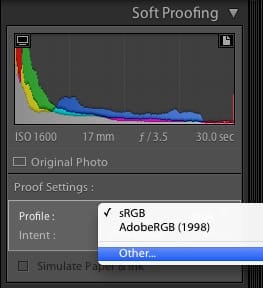
To the right, find the Soft Proofing panel.
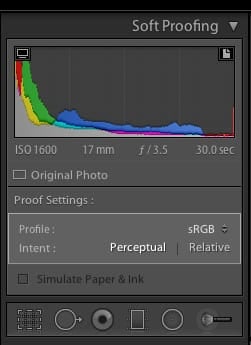
Soft Proofing Module
Soft Proofing Module Add New Printer

Select Profile to add a printer or profile, then choose your printer.
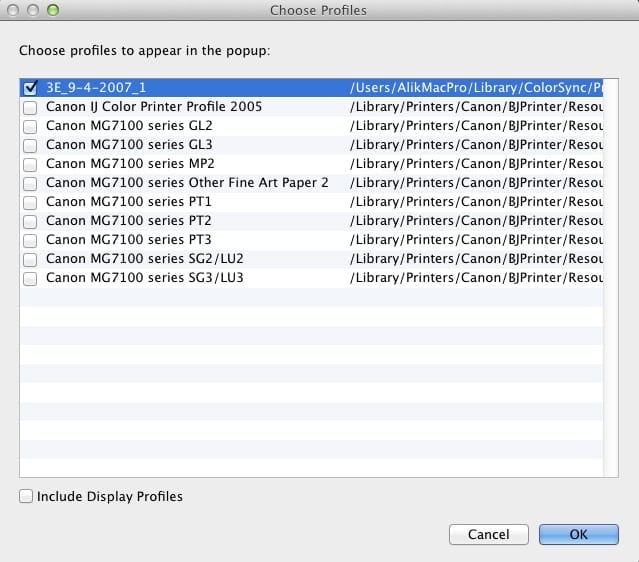
Soft Proofing Select Printer

And that’s it.

To the top of your histogram, you’ll see two icons, one that is a monitor and one that is a piece of paper.
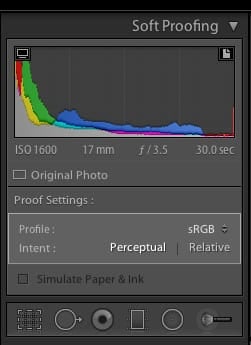
Soft Proofing Select Histograms

Selecting the Monitor allows you to proof your image against your monitor, highlighting what’s out of range and what you may not see. This is useful, especially if you do not have a wide-gamut monitor.

Selecting the Paper shows you what’s in range against the printer, allowing you to use the HSL tool to bring your colors back into that printer’s range.

A printer will likely do this for you, but if you want maximum control and minimize surprises, it won’t hurt you to do this manually.

Lightroom 4 Soft Proof In Depth

by Andrew Rodney

0
0
1
0
0
Alik Griffin

A professional video editor, and photographer with a Bachelors in Film studies from UCSD. Based in Los Angeles, I have created commercials, trailers, and other video content for various clients and platforms since 2005. I also love to write about my passions and share my insights on my blog.

Related Topics
  • Photography Tips
Previous Article
Nikon D810
  • Camera Guides
  • Memory Cards Recommendations

Best Memory Cards Nikon D810 – A Speed Comparison

  • Alik Griffin
  • February 12, 2026
View Post
Next Article
Metabones Speedbooster
  • Photo Tips

How To Reduce Rolling Shutter With The Sony A7s

  • Alik Griffin
  • April 14, 2024
View Post

Subscribe

Subscribe now to our newsletter

You May Also Like
Thypoch Simera 75mm f1.4 Review
View Post
  • Blog
  • Lens Reviews

Thypoch Simera 75mm f1.4 Review & Sample Photos

  • Alik Griffin
  • January 28, 2026
  • No comments
Cool Street In Nakasu Fukuoka
View Post
  • Blog
  • Lens Reviews

Viltrox WCL-X100VI Review | A Budget-Friendly 28mm Upgrade

  • Alik Griffin
  • January 18, 2026
  • 2 comments
Sony A7V Announcement
View Post
  • Blog
  • What's New

Sony A7V – They’re Back In The Game

  • Alik Griffin
  • December 30, 2025
  • 4 comments
Viltrox 9mm f2.8 Air Review
View Post
  • Blog
  • Featured
  • Lens Reviews
  • Reviews

Viltrox 9mm f2.8 AIR Review & Sample Photos

  • Alik Griffin
  • January 14, 2026
  • 2 comments
Subscribe
Notify of
guest
guest
4 Comments
Inline Feedbacks
View all comments
Christopher Ray Robertson
8 years ago

mac 10.12 now stores profiles under /Library/ColorSync/Profiles NOT /Library/Printers/ColorSync/Profiles

Reply
Alik Griffin
Alik Griffin
Reply to  Christopher Ray Robertson
8 years ago

Thanks, I’ll update. I actually just upgraded last week.

Reply
Christopher Ray Robertson
Reply to  Alik Griffin
8 years ago

Other places lightroom stores presets are here: Library/Application Support/Adobe/Lightroom . Plugins are stored here: Applications/Lightroom /Contents/Plugins (to show content you will need to right click lightroom in applications folder and choose show package content)

Reply
Alik Griffin
Alik Griffin
Reply to  Christopher Ray Robertson
8 years ago

Thanks Christopher!

Reply
San Clemente Sunset

Join The Newsletter

Featured
  • How To Edit Photos To Look Like Film
    • 4 comments
  • On Board
    Fujifilm X100VI Review & Sample Photo
    • 4 comments
  • Mud Face
    Nikon Z 35mm f1.4 vs Nikon Z 35mm f1.8 S – Sample Images
    • 28 comments
  • What is Micro Contrast
    Micro-Contrast, Is It Real? – Samples With Lens Comparisons
    • 17 comments
  • Nikon Z 26mm f2.8 Review – A Little Miracle
    • 24 comments
  • Zeiss Planar 50mm f2 on the Leica M11
    Zeiss Planar 50mm f2 Review & Sample Photos
    • 5 comments
  • Nikon Z 28mm f2.8 Review & Sample Photos
    • 18 comments
  • Tiffen Black Pro Mist Filter At Night. Streets Of Tenjin Japan
    Tiffen Black Pro Mist Review – Is This The One?
    • 10 comments

Subscribe

Subscribe now to our newsletter

Privacy Policy | Ethics Statement | Licensing | About Me | Contact

Copyright © Alik Griffin Inc. 2025

Input your search keywords and press Enter.

Manage Consent
To provide the best experiences, we use technologies like cookies to store and/or access device information. Consenting to these technologies will allow us to process data such as browsing behavior or unique IDs on this site. Not consenting or withdrawing consent, may adversely affect certain features and functions.
Functional Always active
The technical storage or access is strictly necessary for the legitimate purpose of enabling the use of a specific service explicitly requested by the subscriber or user, or for the sole purpose of carrying out the transmission of a communication over an electronic communications network.
Preferences
The technical storage or access is necessary for the legitimate purpose of storing preferences that are not requested by the subscriber or user.
Statistics
The technical storage or access that is used exclusively for statistical purposes. The technical storage or access that is used exclusively for anonymous statistical purposes. Without a subpoena, voluntary compliance on the part of your Internet Service Provider, or additional records from a third party, information stored or retrieved for this purpose alone cannot usually be used to identify you.
Marketing
The technical storage or access is required to create user profiles to send advertising, or to track the user on a website or across several websites for similar marketing purposes.
  • Manage options
  • Manage services
  • Manage {vendor_count} vendors
  • Read more about these purposes
View preferences
  • {title}
  • {title}
  • {title}