
As a landscape, wedding, or fine art photographer, you’re likely having your prints done at a color lab like Bay Photo or Loxly.
But did you know you can first check your photos against their printer’s ICC profile with the Soft Proof feature in Adobe Lightroom? Here’s how you can do it.
How To Set Up Lightroom To Soft Proof With ICC Printer Profiles
Bay Photo and many other places have technicians who will color correct your image to work with their printer if you give them an sRGB image, which is usually fine. But, if you want to see what colors and tones in your image are out of their printer range so you can correct them yourself, then soft proofing with their profile is what you’ll want to do.
Here’s how you can do it.
Step One – Download your color labs ICC printer profiles.
Here are some links to some popular color labs’ ICC printer profiles.
Loxly ICC Printer Profile – Full Guide as well as their printer profiles.
Step Two – Install the color profile.
In Windows, it’s as easy as right-clicking and selecting Install.
On a Mac, you need to place the profile in /Library/Printers/ColorSync/Profiles
On OSX 10.12 and newer, you need to put them in /Library/ColorSync/Profiles
You must turn off hidden files if you don’t see the Library.
Step Three – Setting up the profiles with Lightroom.
Next, you must open and set Lightroom to view the profile.
The easiest way is to use the Soft Proof feature in the Develop Module.
Select Soft Proofing below your photo in the Develop Module.

To the right, find the Soft Proofing panel.
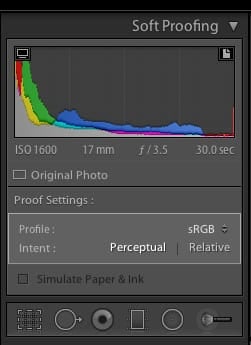
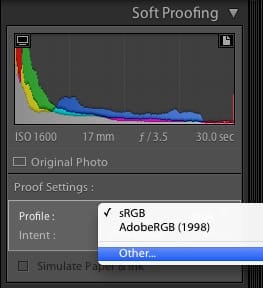
Select Profile to add a printer or profile, then choose your printer.
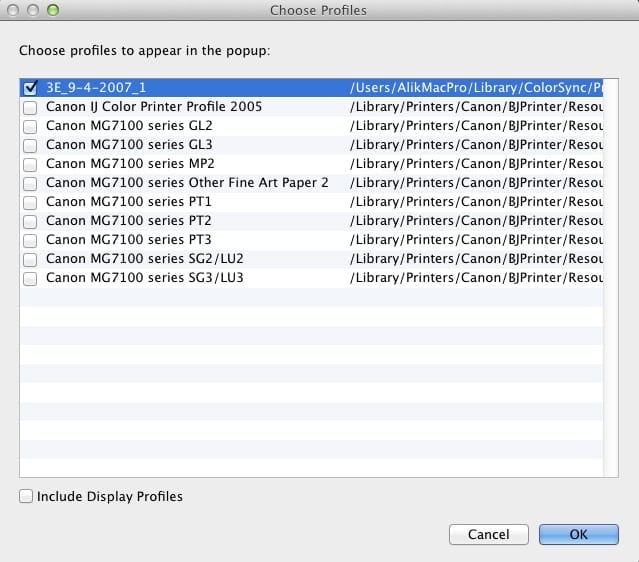
And that’s it.
To the top of your histogram, you’ll see two icons, one that is a monitor and one that is a piece of paper.
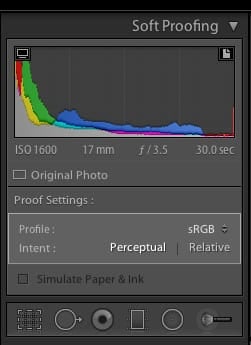
Selecting the Monitor allows you to proof your image against your monitor, highlighting what’s out of range and what you may not see. This is useful, especially if you do not have a wide-gamut monitor.
Selecting the Paper shows you what’s in range against the printer, allowing you to use the HSL tool to bring your colors back into that printer’s range.
A printer will likely do this for you, but if you want maximum control and minimize surprises, it won’t hurt you to do this manually.
Lightroom 4 Soft Proof In Depth
by Andrew Rodney














Leave a Reply to Alik Griffin Cancel reply