We use minimal analytics to improve the site. Is that okay?

Alik Griffin
San Clemente Sunset
Subscription Form
  • Reviews
    • Accessory Reviews
    • Calculators
      • Video Data Rate Calculator | Record Time Calculator
      • Diffraction Calculator
      • DoF Calculator | Lens Equivalent
      • Shutter Speed to Shutter Angle Calculator
    • Camera Reviews
    • Lens Reviews
    • Memory Cards Recommendations
      • Fastests SD Memory Cards
      • Fastest MicroSD Cards
      • Fastest CFExpress Type-B Card
      • Fastest CFExpress Type-A Cards
      • Best CFast Memory Card
    • List of Mics
      • Best Streaming & Podcast Mics
  • Camera Guides
    • List of all Blackmagic Cameras
    • List Of all Canon RF Cameras
    • List of all Fujifilm Cameras
    • List of all Nikon Z Cameras
    • List of all Panasonic Cameras
    • List Of all Sony E Cameras
  • List of Lenses
    • Canon RF Lenses
    • Fujifilm GFX Lenses
    • Fujifilm XF Lenses
    • L-Mount Lenses
    • Leica M Lenses
    • Micro Four Thirds Lenses
    • Nikon Z Lenses
    • PL Mount Cine Lenses
    • Sony E Lenses (FE and APS-C)
  • Store
  • My account
Alik Griffin
Alik Griffin
  • Reviews
    • Accessory Reviews
    • Calculators
      • Video Data Rate Calculator | Record Time Calculator
      • Diffraction Calculator
      • DoF Calculator | Lens Equivalent
      • Shutter Speed to Shutter Angle Calculator
    • Camera Reviews
    • Lens Reviews
    • Memory Cards Recommendations
      • Fastests SD Memory Cards
      • Fastest MicroSD Cards
      • Fastest CFExpress Type-B Card
      • Fastest CFExpress Type-A Cards
      • Best CFast Memory Card
    • List of Mics
      • Best Streaming & Podcast Mics
  • Camera Guides
    • List of all Blackmagic Cameras
    • List Of all Canon RF Cameras
    • List of all Fujifilm Cameras
    • List of all Nikon Z Cameras
    • List of all Panasonic Cameras
    • List Of all Sony E Cameras
  • List of Lenses
    • Canon RF Lenses
    • Fujifilm GFX Lenses
    • Fujifilm XF Lenses
    • L-Mount Lenses
    • Leica M Lenses
    • Micro Four Thirds Lenses
    • Nikon Z Lenses
    • PL Mount Cine Lenses
    • Sony E Lenses (FE and APS-C)
  • Store
  • My account
  • Pure Cinema
    Viltrox TCL-X100VI Review | A Budget-Friendly 50mm Upgrade
    • February 21, 2026
  • Thypoch Simera 75mm f1.4 Review
    Thypoch Simera 75mm f1.4 Review & Sample Photos
    • February 18, 2026
  • Kakurajima View
    Viltrox WCL-X100VI Review | A Budget-Friendly 28mm Upgrade
    • February 17, 2026
  • Viltrox 9mm f2.8 Air Review
    Viltrox 9mm f2.8 AIR Review & Sample Photos
    • February 18, 2026
  • Biker Bro
    Viltrox Spark Z3 Flash – Review & Sample Photos
    • February 16, 2026
  • Pure Cinema

    Viltrox TCL-X100VI Review | A Budget-Friendly 50mm Upgrade

    View Post
  • Thypoch Simera 75mm f1.4 Review

    Thypoch Simera 75mm f1.4 Review & Sample Photos

    View Post
  • Kakurajima View

    Viltrox WCL-X100VI Review | A Budget-Friendly 28mm Upgrade

    View Post
Trending Posts
  • Nikon Zf Official Announcement 1
    Nikon Zf – The Fujifilm Killer?
    • February 18, 2026
  • Nikon Z 50mm f1.8 S Lens Review 2
    Nikon Z 50mm f1.8 S Lens Review & Sample Photos
    • February 18, 2026
  • Kamlan 50mm f1.1 II Product Shot 3
    Kamlan 50mm f1.1 II Review & Sample Photos
    • January 18, 2025
0
  • Blog

How To Shoot Better Video On The Sony RX100 IV

  • Alik Griffin
  • May 1, 2024
  • 8 comments

This website contains affiliate links. We will earn a small commission on purchases made through these links. Some of the links used in these articles will direct you to Amazon. As an Amazon Associate, I earn from qualifying purchases.

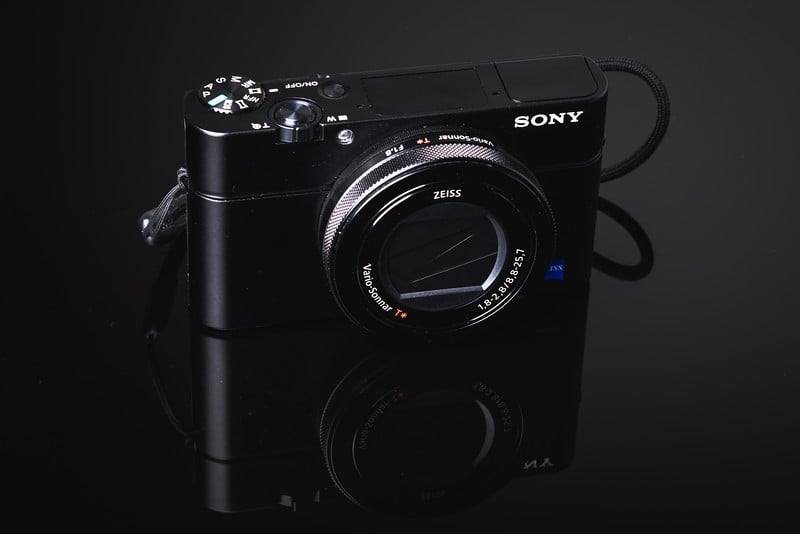
Setting up the Sony RX100 IV to shoot great-looking videos is not easy.

Sony has introduced so many new features and codecs, that it can be complicated for even someone with all the skills and knowledge.

In this guide, I’ll go over some of the best techniques for shooting great video on the Sony RX100 IV.

First And Foremost, Memory Cards – They Matter

See the Sony RX100 IV memory card guide to determine which card is best for you, but you really should get an SDXC U3 memory card.

Frame Rates And Frame Sizes – What You Should Use

The best setup for the average Joe who just wants to shoot for the web or make a short film is 24p and 4k 100M.

For example, when my child was born, I shot her at 4k, 24p 100M, and the video looked amazing.

Have some caution when choosing to shoot 4k. Make sure you have a post-production computer and hard drive setup that is fast enough to handle these massive video files.

One advantage we have to shooting 4k is the 100M data rate which gives you twice as much information as the 1080p 50M alternative. So you’re better off shooting 4k 100M and scaling down to 1080p if 1080p is what you need.


The Film Look

To get the film look you’ll want to shoot at 24p, and you’ll want to shoot at a shutter at 1/50.

If you can’t get 1/50 as a shutter, make sure you set the Exposure step to 0.3EV instead of 0.5EV. It’s found under the menu options, under the camera icon. 

Why Not Shoot 30p (25p) Instead of 24P?

Unless you’re shooting for broadcast, the main two reasons to shoot 24p is for the cinematic look and data rate.

With 100mb/s going into your data stream, at 30p each individual frame will have less data than a 24p data stream.

24p / 100mb/s = 4.16 mb/s per frame

30p / 100mb/s = 3.33 mb/s per frame

60p / 100mb/s = 1.66 mb/s per frame

So each frame will look nicer and your video at 24p should ultimately look nicer. This is also nice for uploading to the web, where data rates are limited.

File Formats / Codecs

You have four recording modes, each with several options.

AVCHD vs MP4

XAVC S 4k – 4k recording

– 30p 100M

– 30p 60M

– 24p 100M <- My favorite option

– 24p 60M

Location on Memory Card: MP_ROOT100ANV01

XAVC S HD – 1080p recording ( Just about 2k )

– 60p 50M

– 30p 50M

– 24p 50M <- My favorite option

– 120p 100M

– 120p 60M

Location on Memory Card: MP_ROOT100ANV01

AVCHD – 1080p An older Sony codec.

Sony made this back when they still hated the consumer. Now they like us, so avoid this unless you need to shoot interlaced for some strange reason.

– 60i 24M(FX) <- 1080p Broadcast standard

– 60i 17M(FH)

– 60p 28M(PS) <- A Broadcast standard for 720p. So you would have to scale down to 720p.

– 24p 24M(FX) – < – My favorite option for the web, or general usage.

– 24p 17M(FH)

Location on Memory Card: privateAVCHD

MP4 – This is a lower bit rate recording

Use MP4 only when quality isn’t really something you need and you’d rather take up less space. For example, I would use something like this for shooting my SD memory card speed tests, where I just need to capture how long it takes for a camera to write to a card in 60fps. Quality is still good, just not as good as XAVC S.

– 28M at 1080p60

– 16M at 1080p30

– 6M at 1280×720

Location on Memory Card: privateM4ROOTCLIP

High Frame Rate Recording

The Sony RX100 IV does something amazing. It allows us to shoot at extremely high frame rates.

I’ve seen other bloggers complain about how hard it is to record slow motion, but seriously, it takes two minutes to figure out, then once you do, it’s totally fine.

You just have to put the camera in the standby mode and once you’re there, you either start the recording or end the recording, since that point the camera is always buffering.

Be sure you still pick what base frame rate you need. If you’re producing something in 24p then select your base rate as 24 and your 960fps slow motion will play back at that frame rate.

Base Frame Rates

60p 50M

30p 50M

24p 50M

Slow Motion Frame Rates

240fps – Avg Clip Size 127.2MB

480fps – Avg Clip Size 252.6MB

960fps – Avg Clip Size 548.8MB

Location on Memory Card: privateM4ROOTCLIP

Priority Settings

You have two options for the quality of your slow motion on the RX100 IV.

Both shoot at a lower resolution then scale up to 1440 x 810.

Quality Mode

Higher quality recordings but less record time. 1316 x 384

Shoot Time Priority

Shoots at 800 x 270 but gives you longer recordings.

Rec Timing

You have a few options on how to shoot slow motion. You can set the start button to trigger the recording (Start Trigger), or the camera can buffer a slow-motion recording for you and the End Trigger will trigger the tail end of the slow motion.

End Trigger is nice for shooting something like a water balloon exploding and you want to make sure you get the entire action, so you end the recording when the action is finished.

Start Trigger – Starts the recording like normal.

End Trigger (I prefer this) – The camera will constantly stream a recording, and End Triggers tells the recording where to stop.

Optimizing Your Camera For The Best Results

I’ll go over a little on how you can maximize your camera performance to give you the best results.

DRO / Auto HDR

This works with Video as well as JPEG stills.

It works by throttling the camera’s ISO to maximize your dynamic range. I typically shoot videos with this set to Lv5 to ensure I’m capturing as many of my highlights and shadows as possible.

Picture Profiles

You now have the option to customize picture profiles for recording video.  This is sort of for experts only and is a very deep and complicated topic that I will have to go into a completely different post. I’m still learning this, but it allows you to shoot a very flat image to capture as much information as possible.

For a film I care about, I would probably shoot some sort of S-Log. Otherwise, I just use the standard Sony picture profiles. Either Standard or Neutral.

How To Shoot Better Video On The Sony RX100 IV Conclusions

Although the camera is by no means perfect, it’s an absolutely amazing tool for video. It shoots an amazing 960 frames per second and a great-looking 4k video. It just takes a little bit of getting used to. Sony really needs to streamline all the options and start dumping features nobody uses. It seems with every camera they introduce they add new features and codecs but never dump the old which only clutters the menus and confuses the users.

0
0
6
0
0
Alik Griffin

A professional video editor, and photographer with a Bachelors in Film studies from UCSD. Based in Los Angeles, I have created commercials, trailers, and other video content for various clients and platforms since 2005. I also love to write about my passions and share my insights on my blog.

Related Topics
  • Sony RX100 IV
Previous Article
  • Accessory Guides

Best Accessories Canon 5Ds/5Ds r

  • Alik Griffin
  • April 7, 2024
View Post
Next Article
Sony RX100 IV
  • Memory Cards Recommendations

Best Sony RX100 IV Memory Cards

  • Alik Griffin
  • April 15, 2024
View Post

Subscribe

Subscribe now to our newsletter

You May Also Like
Pure Cinema
View Post
  • Blog
  • Featured
  • Lens Reviews
  • Reviews

Viltrox TCL-X100VI Review | A Budget-Friendly 50mm Upgrade

  • Alik Griffin
  • February 21, 2026
  • No comments
Thypoch Simera 75mm f1.4 Review
View Post
  • Blog
  • Featured
  • Lens Reviews

Thypoch Simera 75mm f1.4 Review & Sample Photos

  • Alik Griffin
  • February 18, 2026
  • No comments
Kakurajima View
View Post
  • Blog
  • Featured
  • Lens Reviews

Viltrox WCL-X100VI Review | A Budget-Friendly 28mm Upgrade

  • Alik Griffin
  • February 17, 2026
  • 2 comments
Sony A7V Announcement
View Post
  • Blog
  • What's New

Sony A7V – They’re Back In The Game

  • Alik Griffin
  • December 30, 2025
  • 4 comments
8 comments
  1. Brandon Price says:
    February 28, 2017 at 3:07 pm

    Thanks so much for this information. I just bought the Sony RX100 IV and am working hard to figure out the difference in file size. I bought a SanDisk Extreme 60MB/s SDXC I U3 Class 10 card, and the camera never tells me it can’t shoot in 4K mode. All the modes seem to work. However, I only ever have .MP4 files on my card. Nothing is ever saved at “MP_ROOT100ANV01” or in another format. Is the camera just doing what it wants to do based on my card performance, or am I missing something?

    Reply
    1. Alik Griffin says:
      March 2, 2017 at 7:40 am

      MP4 is right. That’s always what I get when shooting 4k or the MP4 setting. If you shoot AVCHD it will be nested in another file, I think those are MP4s also but I can’t remember for sure.

      Reply
      1. Brandon Price says:
        March 2, 2017 at 6:13 pm

        Thanks!

        Reply
    2. Kevin Pfeifer says:
      May 19, 2017 at 6:56 pm

      When File Format is set to XAVC S 4K and HD:

      This records high-definition movies by converting them to MP4 file format using the MPEG-4 AVC/H.264 codec.

      Reply
  2. StateofIsrael says:
    June 23, 2017 at 8:35 am

    I shot a video using the above info, here it is :
    https://www.youtube.com/watch?v=BYBUHngvN6I

    Reply
    1. Alik Griffin says:
      June 24, 2017 at 4:58 pm

      Beautiful video, thanks for sharing!

      Reply
      1. StateofIsrael says:
        June 28, 2017 at 1:02 am

        Thanks so much for the approval 😉

        Reply
  3. theraywong says:
    July 27, 2017 at 7:30 am

    Hi all, I was just wondering in what situation you would choose 60p 50M in as the base rate when shooting High Frame Rate video. Nice guide by the way! Thanks!

    Reply

Leave a Reply to Alik Griffin Cancel reply

Your email address will not be published. Required fields are marked *

San Clemente Sunset

Join The Newsletter

Featured
  • Nikon Z 26mm f2.8 Review – A Little Miracle
    • 24 comments
  • Zeiss Planar 50mm f2 on the Leica M11
    Zeiss Planar 50mm f2 Review & Sample Photos
    • 5 comments
  • Kalina Picking Sakura
    Nikon Z 85mm f1.8 S Review & Sample Photos
    • 20 comments
  • TTArtisan 27mm f2.8 AF Front of Lens
    TTArtisan AF 27mm f2.8 Review & Sample Photos
    • 5 comments
  • Viltrox 9mm f2.8 Air Review
    Viltrox 9mm f2.8 AIR Review & Sample Photos
    • 2 comments
  • How To Edit Photos To Look Like Film
    • 4 comments
  • Nikon Z 28mm f2.8 Review & Sample Photos
    • 18 comments
  • Thypoch Simera 75mm f1.4 Review
    Thypoch Simera 75mm f1.4 Review & Sample Photos
    • No comments

Subscribe

Subscribe now to our newsletter

Privacy Policy | Licensing | About Me | Contact

Copyright © Alik Griffin Inc. 2025

Input your search keywords and press Enter.












