We use minimal analytics to improve the site. Is that okay?

Alik Griffin
San Clemente Sunset
Subscription Form
  • Reviews
    • Accessory Reviews
    • Calculators
      • Video Data Rate Calculator | Record Time Calculator
      • Diffraction Calculator
      • DoF Calculator | Lens Equivalent
      • Shutter Speed to Shutter Angle Calculator
    • Camera Reviews
    • Lens Reviews
    • Memory Cards Recommendations
      • Fastests SD Memory Cards
      • Fastest MicroSD Cards
      • Fastest CFExpress Type-B Card
      • Fastest CFExpress Type-A Cards
      • Best CFast Memory Card
    • List of Mics
      • Best Streaming & Podcast Mics
  • Camera Guides
    • List of all Blackmagic Cameras
    • List Of all Canon RF Cameras
    • List of all Fujifilm Cameras
    • List of all Nikon Z Cameras
    • List of all Panasonic Cameras
    • List Of all Sony E Cameras
  • List of Lenses
    • Canon RF Lenses
    • Fujifilm GFX Lenses
    • Fujifilm XF Lenses
    • L-Mount Lenses
    • Leica M Lenses
    • Micro Four Thirds Lenses
    • Nikon Z Lenses
    • PL Mount Cine Lenses
    • Sony E Lenses (FE and APS-C)
  • Store
  • My account
Alik Griffin
Alik Griffin
  • Reviews
    • Accessory Reviews
    • Calculators
      • Video Data Rate Calculator | Record Time Calculator
      • Diffraction Calculator
      • DoF Calculator | Lens Equivalent
      • Shutter Speed to Shutter Angle Calculator
    • Camera Reviews
    • Lens Reviews
    • Memory Cards Recommendations
      • Fastests SD Memory Cards
      • Fastest MicroSD Cards
      • Fastest CFExpress Type-B Card
      • Fastest CFExpress Type-A Cards
      • Best CFast Memory Card
    • List of Mics
      • Best Streaming & Podcast Mics
  • Camera Guides
    • List of all Blackmagic Cameras
    • List Of all Canon RF Cameras
    • List of all Fujifilm Cameras
    • List of all Nikon Z Cameras
    • List of all Panasonic Cameras
    • List Of all Sony E Cameras
  • List of Lenses
    • Canon RF Lenses
    • Fujifilm GFX Lenses
    • Fujifilm XF Lenses
    • L-Mount Lenses
    • Leica M Lenses
    • Micro Four Thirds Lenses
    • Nikon Z Lenses
    • PL Mount Cine Lenses
    • Sony E Lenses (FE and APS-C)
  • Store
  • My account
  • Pure Cinema
    Viltrox TCL-X100VI Review | A Budget-Friendly 50mm Upgrade
    • February 17, 2026
  • Thypoch Simera 75mm f1.4 Review
    Thypoch Simera 75mm f1.4 Review & Sample Photos
    • February 18, 2026
  • Kakurajima View
    Viltrox WCL-X100VI Review | A Budget-Friendly 28mm Upgrade
    • February 17, 2026
  • Viltrox 9mm f2.8 Air Review
    Viltrox 9mm f2.8 AIR Review & Sample Photos
    • February 18, 2026
  • Biker Bro
    Viltrox Spark Z3 Flash – Review & Sample Photos
    • February 16, 2026
  • Pure Cinema

    Viltrox TCL-X100VI Review | A Budget-Friendly 50mm Upgrade

    View Post
  • Thypoch Simera 75mm f1.4 Review

    Thypoch Simera 75mm f1.4 Review & Sample Photos

    View Post
  • Kakurajima View

    Viltrox WCL-X100VI Review | A Budget-Friendly 28mm Upgrade

    View Post
Trending Posts
  • Nikon Zf Official Announcement 1
    Nikon Zf – The Fujifilm Killer?
    • February 18, 2026
  • Nikon Z 50mm f1.8 S Lens Review 2
    Nikon Z 50mm f1.8 S Lens Review & Sample Photos
    • February 18, 2026
  • Kamlan 50mm f1.1 II Product Shot 3
    Kamlan 50mm f1.1 II Review & Sample Photos
    • January 18, 2025
0
  • Blog

How To Upgrade Your Mac Pro Graphics Card

  • Alik Griffin
  • April 15, 2024
  • No comments

This website contains affiliate links. We will earn a small commission on purchases made through these links. Some of the links used in these articles will direct you to Amazon. As an Amazon Associate, I earn from qualifying purchases.

This guide covers how you could upgrade an old Mac Pro graphics card to something more modern. Today, you would have to find an older version of OSX that still works on INTEL chips for this to be functional.

Upgrading Your Graphics Card On An Old Mac Pro

I once switched to Premiere CC on my home Mac Pro, but my old 2009 tower didn’t cut it. To use its Mercury Playback Engine, you need an Nvidia GPU with at least 1GB of video RAM. So, to get more life out of my old Mac Pro, I upgraded its graphics card.

Not only will a new graphics card give you support for the Mercury Playback Engine and CUDA, but it will also enhance many tools in Photoshop.

You couldn’t upgrade your graphics card on a Mac many years ago. You could only use very specific cards that were supported by the OS that sometimes used custom drivers. Or you had to buy the way overpriced Mac-specific EFI cards.

Apple and Nvidia have added support for most modern 3D cards with the new OS. You can get just about any card you want, considering that you have to power it.
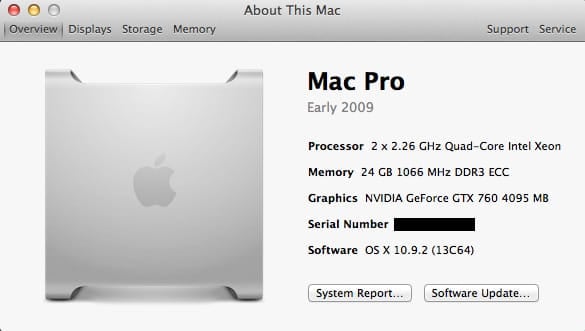
Mac Pro System Specs

Powering The Cards – What You Need To Know

A Mac Pro doesn’t have a traditional power supply unit like a PC does.

However, the motherboard has two 6-pin mini PCIe power plugs. As long as you get a graphics card with one or two six-pin PCIe power ports, you should be fine.
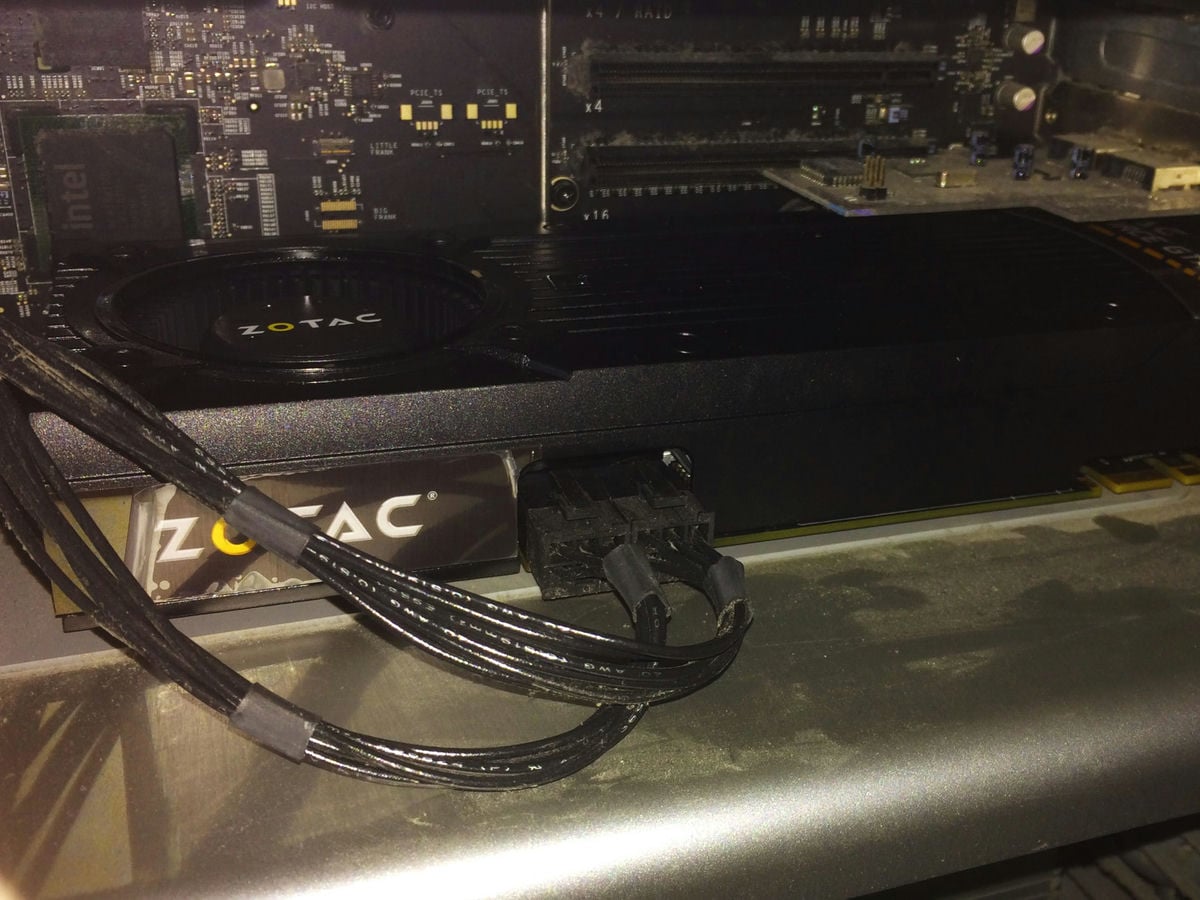
Zotac Graphics Card Installed

This only poses a problem if you want a faster Overclocked card. Many of them now have at least one 8-pin power port. I’ve seen many people get the 8-to-6-pin adapter, but that’s risky. You may pull too much power from your motherboard, resulting in damage to your Macpro or an underpowered graphics card.

Using 8pin PCIe Power
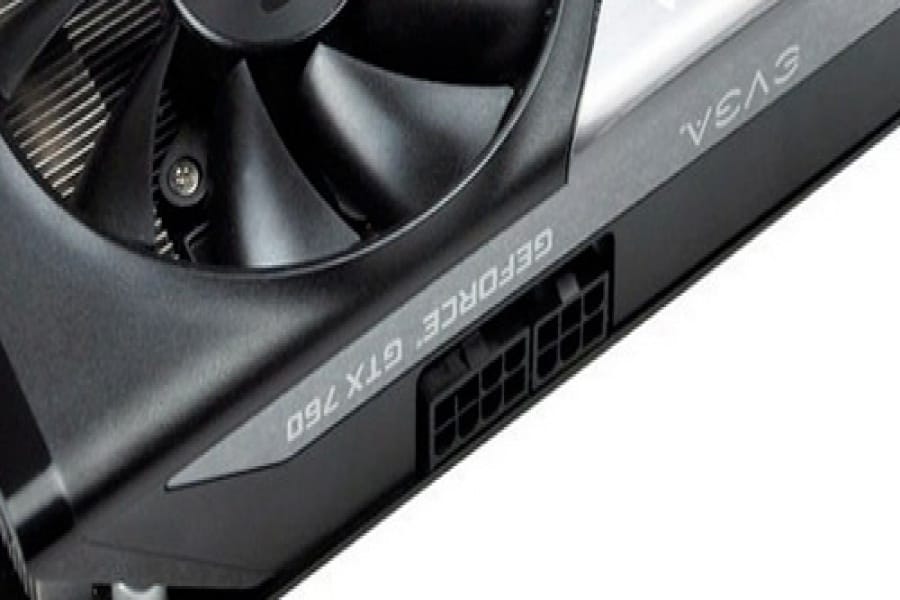
8pin to 6pin connector

There are a few solutions if you still want a more powerful card or one that is overclocked. You can order a Sata Power to Molex – Amazon,

Or PCIe adapter, and use one of the ports designed to power your internal hard drives or your second SuperDrive. You can run one of these into your 6-pin and run your 8-pin into a two 6-pin mini split. (which should come with your card)

Or, if you want to play with fire, get an 8-pin to 6-pin adapter. I’ve seen people do this without problems, but I wouldn’t.

Your card should come with a 6-pin Molex adapter.

The External PSU Method – The Feddy Way

I’ve also seen people buy external Power Supply Units or use an old one from an old PC (we all have one in storage somewhere). This works as well, and you’ll have to sit it outside your box and rig a few plugs to keep the power supply constantly on. Just make sure you get one with enough power.

In the comments, Freddy shared some information with us about how he did it this way.

Here is what he used.

PSU: BitFenix Power Supply ATX 750 Power Supply BFP-FUR-750G-KSXK-RP

GPU: XFX Black Edition Double D RADEON R9 290 980MHz 4GB DDR5 DP HDMI 2XDVI Graphics Cards R9290AEDBD

But you’ll need to bridge 2 wires from the main connector to get the PSU to work.

The Simple Method – What I Did

I personally just bought a card with two six-pins to save myself from trouble. I needed my SuperDrive sata power for my external USB 3.0 card but was out of hard drive ports.

I would recommend just getting a card with one or two 6-pin ports on it; save yourself a headache. Each 6-pin port will give you 75w, and the PCI slot is 225w.

How To Install

Installing it is simple: power your computer off and unplug it.

Then, you plug your 6-pin to 6-pin mini into the motherboard and card and install the card. That’s it.

Enable CUDA GPU in Premiere CS6 or CC

There are a couple of ways of doing this; you can check out the forum on Adobe here.

You can download a text file that has links to Adobe CS6 Files. If you’re on CC, replace the type “CS6” with “CC.”

With the new Adobe CC, you no longer need to do this, and you no longer need to use CUDA. Open CL works fine.

Only Draw Backs

The only drawback is you won’t get a boot screen. The machine won’t read the card until it loads Mavericks with the drivers since it’s a non-EFI card. (Extensible Firmware Interface) Mac-specific cards have special EFI firmware to talk directly to the hardware. Intel developed a firmware that was designed to replace Legacy Bios. Apple uses this technology, but Nvidia currently does not.


Using Bootcamp

This presents a problem if you’re using Bootcamp. You can no longer boot to different systems with the on-screen interface. You must go into your system settings and change your targeted boot drive whenever you want to boot into a different system. It’s not a huge deal, but it requires a little more work. And you must have the Bootcamp software installed on the PC side.


Additional Downloads You’ll Need

You’ll need nVidea drivers, which you’ll have to search for.

And the CUDA drivers found here. Only if you want to run CUDA over Open CL. I haven’t noticed a difference.

0
0
0
0
0
Alik Griffin

A professional video editor, and photographer with a Bachelors in Film studies from UCSD. Based in Los Angeles, I have created commercials, trailers, and other video content for various clients and platforms since 2005. I also love to write about my passions and share my insights on my blog.

Related Topics
  • Photography Tips
Previous Article
El Matador Beach Sample Landscape Photo using the Highpass Filter
  • Blog
  • Photo Tips

How To Sharpen Your Photos With The High Pass Filter

  • Alik Griffin
  • December 7, 2024
View Post
Next Article
  • Update

Instantly Remove Color Cast In Photoshop

  • Alik Griffin
  • April 10, 2024
View Post

Subscribe

Subscribe now to our newsletter

You May Also Like
Pure Cinema
View Post
  • Blog
  • Featured
  • Lens Reviews
  • Reviews

Viltrox TCL-X100VI Review | A Budget-Friendly 50mm Upgrade

  • Alik Griffin
  • February 17, 2026
  • No comments
Thypoch Simera 75mm f1.4 Review
View Post
  • Blog
  • Featured
  • Lens Reviews

Thypoch Simera 75mm f1.4 Review & Sample Photos

  • Alik Griffin
  • February 18, 2026
  • No comments
Kakurajima View
View Post
  • Blog
  • Featured
  • Lens Reviews

Viltrox WCL-X100VI Review | A Budget-Friendly 28mm Upgrade

  • Alik Griffin
  • February 17, 2026
  • 2 comments
Sony A7V Announcement
View Post
  • Blog
  • What's New

Sony A7V – They’re Back In The Game

  • Alik Griffin
  • December 30, 2025
  • 4 comments

Leave a Reply Cancel reply

Your email address will not be published. Required fields are marked *

San Clemente Sunset

Join The Newsletter

Featured
  • San Clemente Sunkiss
    Viltrox 15mm f1.7 Air Lens Review & Sample Photos
    • 6 comments
  • How To Edit Photos To Look Like Film
    • 4 comments
  • TTArtisan 23mm f1.8 Product Shots
    TTArtisan AF 23mm f1.8 Lens Review & Sample Photos
    • 3 comments
  • Nikon Z 28mm f2.8 Review & Sample Photos
    • 18 comments
  • On Board
    Fujifilm X100VI Review & Sample Photo
    • 5 comments
  • Pure Cinema
    Viltrox TCL-X100VI Review | A Budget-Friendly 50mm Upgrade
    • No comments
  • Viltrox 9mm f2.8 Air Review
    Viltrox 9mm f2.8 AIR Review & Sample Photos
    • 2 comments
  • Kakurajima View
    Viltrox WCL-X100VI Review | A Budget-Friendly 28mm Upgrade
    • 2 comments

Subscribe

Subscribe now to our newsletter

Privacy Policy | Licensing | About Me | Contact

Copyright © Alik Griffin Inc. 2025

Input your search keywords and press Enter.











