We use minimal analytics to improve the site. Is that okay?

Alik Griffin
San Clemente Sunset
Subscription Form
  • Reviews
    • Accessory Reviews
    • Calculators
      • Video Data Rate Calculator | Record Time Calculator
      • Diffraction Calculator
      • DoF Calculator | Lens Equivalent
      • Shutter Speed to Shutter Angle Calculator
    • Camera Reviews
    • Lens Reviews
    • Memory Cards Recommendations
      • Fastests SD Memory Cards
      • Fastest MicroSD Cards
      • Fastest CFExpress Type-B Card
      • Fastest CFExpress Type-A Cards
      • Best CFast Memory Card
    • List of Mics
      • Best Streaming & Podcast Mics
  • Camera Guides
    • List of all Blackmagic Cameras
    • List Of all Canon RF Cameras
    • List of all Fujifilm Cameras
    • List of all Nikon Z Cameras
    • List of all Panasonic Cameras
    • List Of all Sony E Cameras
  • List of Lenses
    • Canon RF Lenses
    • Fujifilm GFX Lenses
    • Fujifilm XF Lenses
    • L-Mount Lenses
    • Leica M Lenses
    • Micro Four Thirds Lenses
    • Nikon Z Lenses
    • PL Mount Cine Lenses
    • Sony E Lenses (FE and APS-C)
  • Store
  • My account
Alik Griffin
Alik Griffin
  • Reviews
    • Accessory Reviews
    • Calculators
      • Video Data Rate Calculator | Record Time Calculator
      • Diffraction Calculator
      • DoF Calculator | Lens Equivalent
      • Shutter Speed to Shutter Angle Calculator
    • Camera Reviews
    • Lens Reviews
    • Memory Cards Recommendations
      • Fastests SD Memory Cards
      • Fastest MicroSD Cards
      • Fastest CFExpress Type-B Card
      • Fastest CFExpress Type-A Cards
      • Best CFast Memory Card
    • List of Mics
      • Best Streaming & Podcast Mics
  • Camera Guides
    • List of all Blackmagic Cameras
    • List Of all Canon RF Cameras
    • List of all Fujifilm Cameras
    • List of all Nikon Z Cameras
    • List of all Panasonic Cameras
    • List Of all Sony E Cameras
  • List of Lenses
    • Canon RF Lenses
    • Fujifilm GFX Lenses
    • Fujifilm XF Lenses
    • L-Mount Lenses
    • Leica M Lenses
    • Micro Four Thirds Lenses
    • Nikon Z Lenses
    • PL Mount Cine Lenses
    • Sony E Lenses (FE and APS-C)
  • Store
  • My account
  • Pure Cinema
    Viltrox TCL-X100VI Review | A Budget-Friendly 50mm Upgrade
    • February 21, 2026
  • Thypoch Simera 75mm f1.4 Review
    Thypoch Simera 75mm f1.4 Review & Sample Photos
    • February 18, 2026
  • Kakurajima View
    Viltrox WCL-X100VI Review | A Budget-Friendly 28mm Upgrade
    • February 17, 2026
  • Viltrox 9mm f2.8 Air Review
    Viltrox 9mm f2.8 AIR Review & Sample Photos
    • February 18, 2026
  • Biker Bro
    Viltrox Spark Z3 Flash – Review & Sample Photos
    • February 16, 2026
  • Pure Cinema

    Viltrox TCL-X100VI Review | A Budget-Friendly 50mm Upgrade

    View Post
  • Thypoch Simera 75mm f1.4 Review

    Thypoch Simera 75mm f1.4 Review & Sample Photos

    View Post
  • Kakurajima View

    Viltrox WCL-X100VI Review | A Budget-Friendly 28mm Upgrade

    View Post
Trending Posts
  • Nikon Zf Official Announcement 1
    Nikon Zf – The Fujifilm Killer?
    • February 18, 2026
  • Nikon Z 50mm f1.8 S Lens Review 2
    Nikon Z 50mm f1.8 S Lens Review & Sample Photos
    • February 18, 2026
  • Kamlan 50mm f1.1 II Product Shot 3
    Kamlan 50mm f1.1 II Review & Sample Photos
    • January 18, 2025
0
  • Blog
  • Photo Tips
  • What's New

Lightroom 10.0 – New Features Are Game-Changing

  • Alik Griffin
  • April 15, 2024
  • 8 comments

This website contains affiliate links. We will earn a small commission on purchases made through these links. Some of the links used in these articles will direct you to Amazon. As an Amazon Associate, I earn from qualifying purchases.

Lightroom has just released a nice update that brings in a few new features and performance improvements.

Typically when Lightroom does their updates they are usually small little baby steps to a better product, which is great as it allows us to adjust and get used to the new features gradually, compared to if they were to overhaul everything completely in one go. But occasionally, Adobe will implement a small change that completely changes the way the software can be used, and sometimes it’s game-changing.

In this round of updates, they did two things that are already having a big impact on the way I work which I will explain in this article.
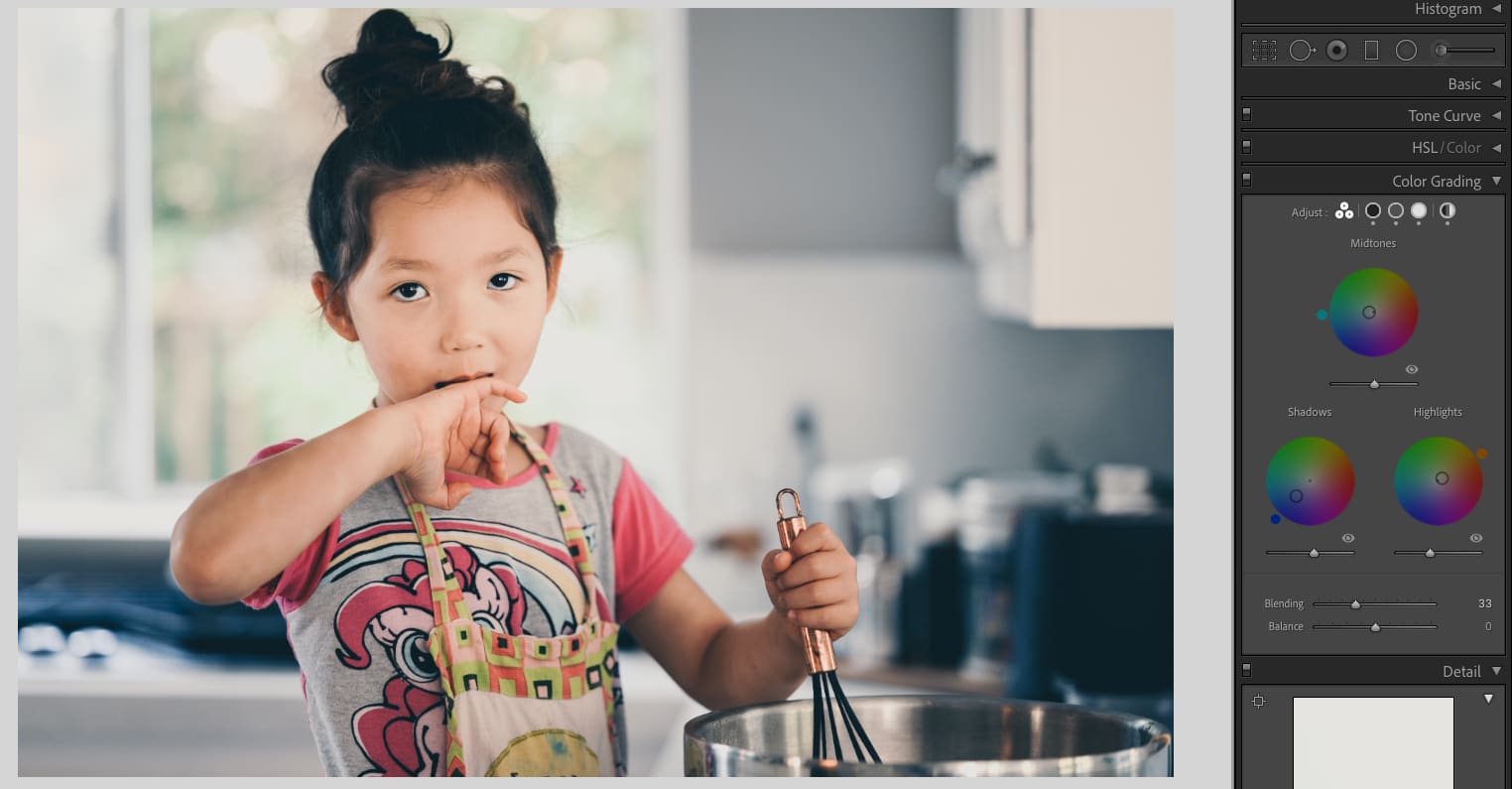
Sample of new Color Grading Tools in Lightroom 10


What’s New With Lightroom 10.0.

  1. The software is way snappier. Performance has improved and everything loads up and responds noticeably quicker. It’s the first time I’ve seen Lightroom really push this level of performance in an update that’s actually this noticeable.
  2. They’ve added new color controls which don’t seem significant, but they really are. And this is what I want to touch on.

The big thing here is the new tool Color Grading. If you’re looking for where your split tones went, they are gone, this replaces them.

A lot of what you get with the Split Tones is actually here, in fact, if you have made presets that use split tones, they will be applied to this new tool. 

You can still do everything with these new color wheels that you could do with split tones but they’ve added a new Midtone color wheel, a global hue adjustment, and the ability to adjust the blend, balance, and luminance of each wheel.

The reason I call this game-changing is that often you’ll get small shifts with some color balance and if they happen in the mid-tones, the only way to fix them was to fiddle with the curves, which makes it really hard to finesse the perfect colors since you have to adjust multiple curves to get those in-between colors, like orange, violet, or peach. Having the mid-tone color adjustment makes it so much easier and quicker to fix the colors that are off.

Even better, the global Hue adjustment is great for quick and dirty color fixes.
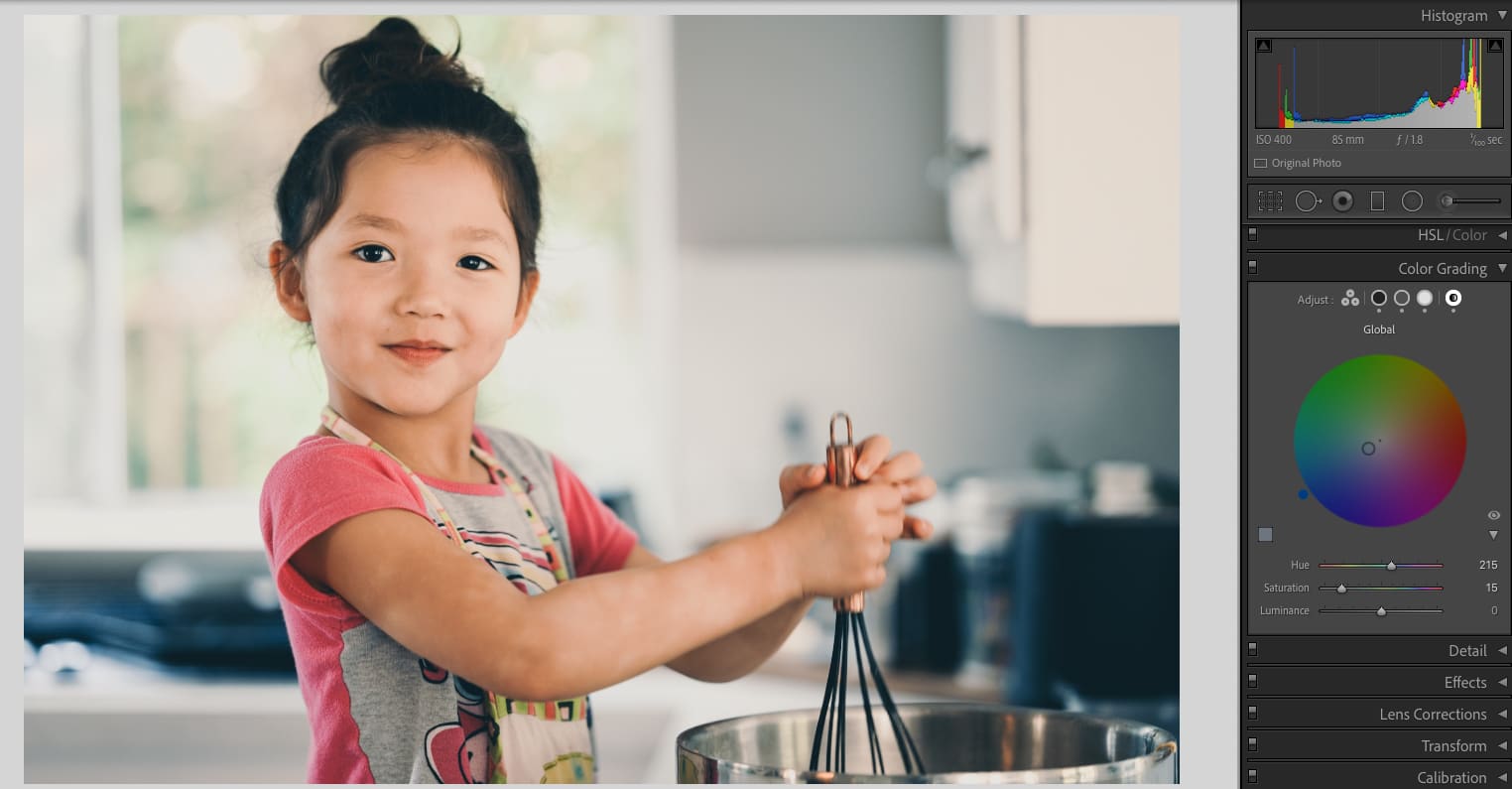
Sample of new Color Grading Tools in Lightroom 10

My Problem With Color Wheels In The Past & How Adobe Fixed It

Using color wheels in different programs has always been a hit-and-miss user experience. Sometimes they’re too sensitive, sometimes they’re not sensitive enough, and sometimes they’re sticky and have velocity controls. I’ve typically always hated them. If I want to drag the point in a color wheel,  I don’t want it to fight me. 

Lightroom fixed this and these color wheels are a breeze to use.

How it works is it’s a free control that works the same way your mouse works, you can adjust it however you want on the first pass, and it doesn’t fight you, it doesn’t mess with your mouse velocity, it’s just drag and drop. Once it clicks in place, it stays on that color value and you can slide it around to adjust the saturation of that color. Then if you want to adjust the HUE, a new controller appears at the outside of the color wheel that you slide around. It’s so easy and so quick, finally, I love using the color wheels.

Using Luminosity For A Filmmick Fade

We also now get blend controls and luminance controls. Basically, if you like that faded look,  or want to reduce your dynamic range for that film look, you can now do that here with a very simple slider.

Move the luminance slider up, and you lift those blacks. This is much easier and quicker than doing it with curves, although, you still have a bit more control when using the curves.
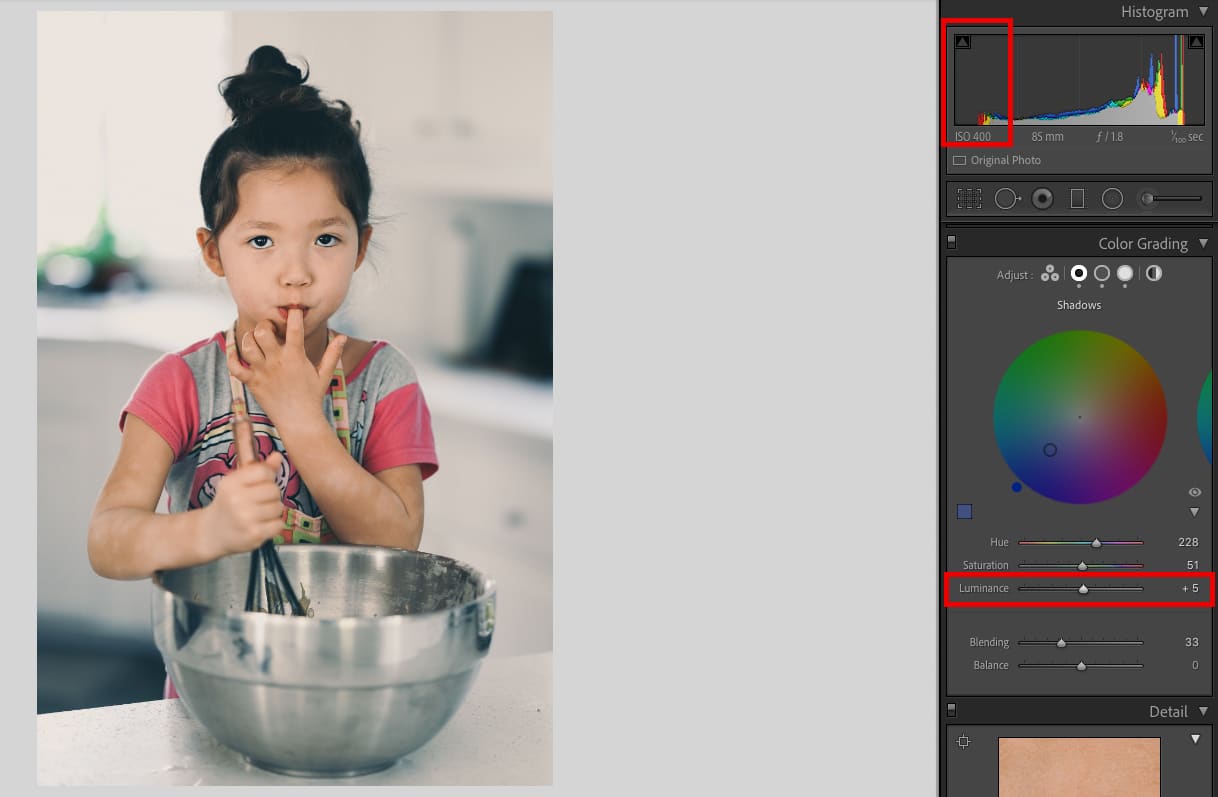
Sample of new Color Grading Tools in Lightroom 10

Samples Of Some New Color Grades With Lightroom 10.0

These are all shot with the Nikon Z6 using the 35mm or 85mm f1.8 with natural lighting. My first attempt at using the color wheels. 

Here I was trying to make the shadows a bit blue, keeping the mid-tones peachy, and I threw a little bit more warmth into the highlights, kinda a peachy blue which I think is fun for the context of this scene. I also brought down the highlights with the luminance, because the window outside had a lot of peak whites in it that were distracting.


Sample of new Color Effects from Lightroom 10
ISO 400, f1.8, 1/100
Sample of new Color Effects from Lightroom 10
ISO 640, f1.8, 1/100
Sample of new Color Effects from Lightroom 10
ISO 400, f1.8, 1/100
Kalina bakes Cake
ISO 400, f1.8, 1/100
Kalina bakes Cake
ISO 450, f1.8, 1/100
Kalina bakes Cake
ISO 450, f1.8, 1/100
Kalina bakes Cake
ISO 400, f1.8, 1/100
Luka drinking from giant cup.
ISO 400, f1.8, 1/100
0
0
2
0
0
Alik Griffin

A professional video editor, and photographer with a Bachelors in Film studies from UCSD. Based in Los Angeles, I have created commercials, trailers, and other video content for various clients and platforms since 2005. I also love to write about my passions and share my insights on my blog.

Related Topics
  • Lightroom
  • Nikon Z 35mm f1.8 S
  • Nikon Z 85mm f1.8 S
  • Nikon Z6
  • Photography Tips
Previous Article
  • Camera Guides
  • Memory Cards Recommendations

Best Memory Cards Sony A7c

  • Alik Griffin
  • February 12, 2026
View Post
Next Article
Nikon Z 6II AF Improvements
  • Blog

3 Big Improvements to the Nikon Z6 II Autofocus

  • Alik Griffin
  • November 8, 2020
View Post

Subscribe

Subscribe now to our newsletter

You May Also Like
Pure Cinema
View Post
  • Blog
  • Featured
  • Lens Reviews
  • Reviews

Viltrox TCL-X100VI Review | A Budget-Friendly 50mm Upgrade

  • Alik Griffin
  • February 21, 2026
  • No comments
Thypoch Simera 75mm f1.4 Review
View Post
  • Blog
  • Featured
  • Lens Reviews

Thypoch Simera 75mm f1.4 Review & Sample Photos

  • Alik Griffin
  • February 18, 2026
  • No comments
Kakurajima View
View Post
  • Blog
  • Featured
  • Lens Reviews

Viltrox WCL-X100VI Review | A Budget-Friendly 28mm Upgrade

  • Alik Griffin
  • February 17, 2026
  • 2 comments
Sony A7V Announcement
View Post
  • Blog
  • What's New

Sony A7V – They’re Back In The Game

  • Alik Griffin
  • December 30, 2025
  • 4 comments
8 comments
  1. AlexD says:
    October 25, 2020 at 8:27 am

    Hi! Adobe competes Phase one with there Capture One in my opinion. It’s their turn. Phase One started pre-order for C1 21 version.
    What’s your opinion about such wheels in C1 and LR?

    Reply
    1. Alik Griffin says:
      October 25, 2020 at 10:02 am

      I don’t use Capture One although did the demo awhile back. It’s a solid program probably still better in a few areas. At least LR has caught up with them on having color wheels and curves. But LR does does pano and HDR mergers which I like a lot. I also use LRs face detection in my catalogue to organize all people by face.

      Reply
  2. Jeremy S says:
    October 27, 2020 at 2:33 pm

    I’m curious, while split toning has just shadows and highlights, I always assumed that the color gradient the tool generates include the midtones. Now that you have manual control over that midtone range, would you set the midtones to match the shadow or highlights? Looking at a color gradient map how would you find out what that “middle” color tone would be as if you had just used normal split tones?

    Reply
    1. Alik Griffin says:
      October 27, 2020 at 5:53 pm

      You can actually use the Balance and Blend sliders to sort of adjust the gradient and location of what’s affected. So you could have it affect mostly the shadow-mids, or the high-mids. It’s very useful for for skin tones which is somewhere around 70-75% of the luminance. So you would just move the balance up a touch. So sometimes I’ll throw a little blues in the blacks, and push it down so it doesn’t affect the mid shows, then sometimes if I want a film look, I’ll do some teals in just the very peak highlights so it doesn’t effect anything else, then now I can use the mids to cleanup the general hue of the image if it’s off, or add some color style. So you can basically move around the target area of the gradient map. What else you could do is do some blues, in the highlights and shadows, and keep the mids (skin tones) warm. Of course you could have done this in the past with just the split-tones and curves but now it’s easier push around those mids a little more for more obvious color harmonies.

      Reply
      1. Jeremy S says:
        October 28, 2020 at 7:35 pm

        ahh i see. Thanks for the explanation.

        Reply
  3. Bernie Almanzar says:
    October 30, 2020 at 11:55 pm

    Hey Alik,

    Are you going to review the 7artisans 35mm f0.95 that just came out? Im curious to see if you will rank it as a better performer than their 35mm f1.2 or any of the Pergears you reviewed.

    Reply
    1. Alik Griffin says:
      October 31, 2020 at 10:49 am

      I will try. I’ll see if they can send me one. I have the new Pergear 35mm f1.2 I’m working on right now. I actually like it more than the 7art and Neewer 35mm f1.2. There is also a 7Artisans 35mm f1.2 II coming.

      Reply
      1. Bernie Almanzar says:
        November 1, 2020 at 11:56 am

        Sounds good. Interestingly enough, I ordered the Pergear 35mm 1.2 about two weeks back because I like the 25mm so much based off your review. The order was cancelled by Amazon, so I took it as a chance to explore some other options which is how I learned about the 7art 35mm .95 and 35mm 1.2 mkII coming out. No official date on the 35 1.2 mkII from what I’ve seen. I’ll wait for you to put up a review on the Pergear 35mm 1.2 with a referral link.

        Reply

Leave a Reply to Bernie Almanzar Cancel reply

Your email address will not be published. Required fields are marked *

Subscribe

Subscribe now to our newsletter

Privacy Policy | Licensing | About Me | Contact

Copyright © Alik Griffin Inc. 2025

Input your search keywords and press Enter.