
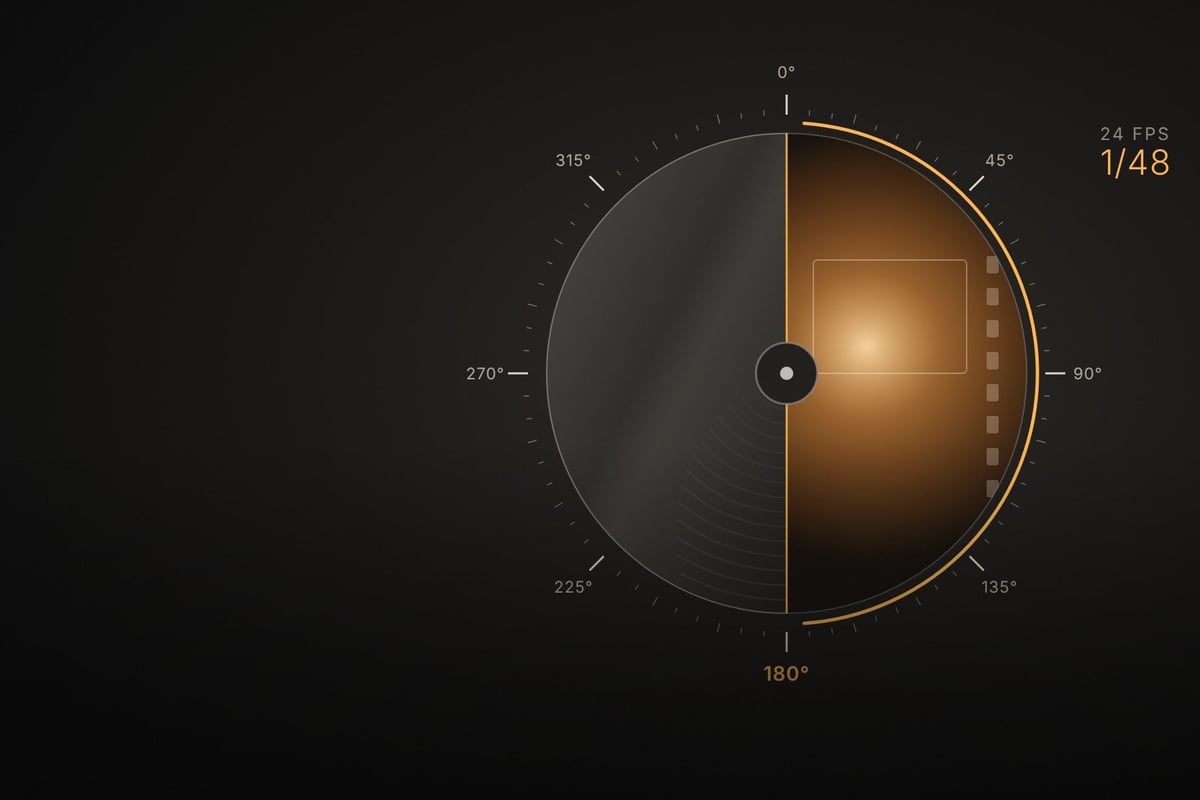
Shutter angle is just how cinema cameras describe shutter speed, looking at how much of each frame’s time the shutter is open instead of a fraction of a second. Since the two are tied together by your frame rate, changing one means you need to know what happens to the other. This calculator converts both ways and works with any frame rate, including 23.976 and 29.97, while telling you whether the result is safe from light flicker in 50Hz and 60Hz countries.
Shutter Angle to Shutter Speed
Shutter Speed to Shutter Angle
The Shutter Angle Formula
The math is simple if you’d rather do it in your head:
- Shutter speed = 1 / (frame rate × 360 ÷ shutter angle)
- Shutter angle = 360 × frame rate ÷ shutter speed denominator
The quick version for a 180° shutter is to just double your frame rate and that’s your shutter speed. Using the formula, at 24fps, a 180° shutter is 1/(24 × 360 ÷ 180) = 1/48, and at 30fps, a 1/50 shutter is 360 × 30 ÷ 50 = 216°.
180° Shutter at Common Frame Rates
| Frame rate | Exact 180° shutter | Closest camera setting |
|---|---|---|
| 23.976 fps | 1/47.95 | 1/48 or 1/50 |
| 24 fps | 1/48 | 1/48 or 1/50 |
| 25 fps | 1/50 | 1/50 |
| 29.97 / 30 fps | 1/60 | 1/60 |
| 48 fps | 1/96 | 1/100 |
| 50 fps | 1/100 | 1/100 |
| 59.94 / 60 fps | 1/120 | 1/120 or 1/125 |
| 120 fps | 1/240 | 1/240 or 1/250 |
1/50 is the standard stand-in at 24fps because mirrorless cameras that only offer photo-style shutter speeds often skip 1/48. That’s 172.8°, and nobody can see the difference.
Why Shutter Angle Matters
First, you need to get this old wives’ tale out of your head that the “film look” is just a 180° shutter angle. Shutter angle is just shutter speed expressed relative to your frame rate. What actually reads as “film” is the amount of motion blur in each frame, along with the frame rate itself.
High frame rates are where this gets confusing, because motion blur works in two different contexts: what’s actually recorded in each frame, and what you see when the footage plays.
Motion Blur in Playback vs a Single Frame
A single frame. Slowing footage down never adds blur to a frame, because the blur is set by the shutter speed and nothing else. Shoot 60fps at 1/120 and every frame has 1/120 worth of blur. Pull a still from that footage, slowed down or not, and it’s 1/120, which is crisper than a 1/48 frame from a 24fps film camera.
Motion in playback. When footage plays, your eye judges blur relative to how far things move between frames. That’s where the illusion comes in, and it depends on how the footage is played back:
- Real time, frames dropped: If you deliver 60fps footage at 24fps or 30fps by dropping frames, it plays like a 72° or 90° shutter. It’s crisp and choppy, not like film, because each frame still only has 1/120 of blur but now things move further between frames.
- Slow motion: In motion, the 1/120 blur reads like 1/48 does at normal speed when you play 60fps back at 24fps. Everything moves 2.5 times slower on screen, so the blur is now in proportion to that smaller movement (1/120 × 2.5 = 1/48).
| Shot at 60fps, 1/120 (180°) | Blur in each frame | How the motion reads |
|---|---|---|
| Played at 60fps | 1/120 | Like a 180° shutter at 60p (the smooth “video” look) |
| Delivered at 30fps, real time | 1/120 | Like a 90° shutter: crisp, choppy |
| Delivered at 24fps, real time | 1/120 | Like a 72° shutter: crisp, choppy |
| Played at 30fps, 2x slow motion | 1/120 | Like 1/60 at 30fps (180°) |
| Played at 24fps, 2.5x slow motion | 1/120 | Like 1/48 at 24fps (180°) |
| Any still pulled from the footage | 1/120 | A 1/120 still, crisper than a 1/48 film frame |
The 180° rule still matters for slow motion because it keeps the blur in proportion when the footage is slowed down. Shoot slow motion at 360° for the extra stop of light and the motion looks blurrier than it should, but shoot it at a very narrow angle and the slow motion looks stuttery and hyper-sharp.
A faster shutter gives you cleaner frame grabs, even if the motion looks a bit choppier in playback. That single-frame context is the one that matters if you plan to pull stills from video for thumbnails, posters, or social posts, so it’s a trade-off you have to decide on per shoot.
Get your shutter speed close to 1/48 if you want the motion blur of a 24fps film camera, or use a 225° shutter angle if you’re shooting 30fps and still want that 1/48 look (just watch out for flicker, below).
Narrow vs Wide Shutter Angles
Shooting below 180° means faster shutter speeds, giving you less motion blur and a choppier, more staccato feel. A 90° or 45° shutter is the classic choice for action and battle scenes where every frame looks sharp and frantic, like the famous opening of Saving Private Ryan.
Above 180° (slower shutter speeds), you get an extra bit of exposure, along with more motion blur and a smeary, dreamy feel. Shooting at 270° to 360° is handy in very low light, as long as the extra blur suits the shot.
Shutter Angle and Light Flicker (50Hz vs 60Hz)
You get flicker or rolling bands when your shutter isn’t open for a whole number of light pulses, meaning each frame catches a different amount of light. This happens because mains-powered lights, especially fluorescents and cheaper LEDs, pulse at twice the power frequency: 100 times a second on 50Hz power and 120 times a second on 60Hz power.
The flicker-safe shutter speeds are 1/50, 1/100 (and 1/25) on 50Hz power, and 1/40, 1/60, 1/120 on 60Hz power, which the calculator above checks for you. Here are the settings I’d use:
| Frame rate | 50Hz power (Europe, most of Asia, eastern Japan) | 60Hz power (US, Canada, western Japan) |
|---|---|---|
| 24 fps | 172.8° (1/50) | 144° (1/60) or 216° (1/40) |
| 25 fps | 180° (1/50) | 150° (1/60) |
| 30 fps | 216° (1/50) | 180° (1/60) |
| 60 fps | 216° (1/100) | 180° (1/120) |
While 1/48 isn’t technically flicker-safe on 60Hz power, you won’t see it with most modern lights. If you do see flicker at 24fps in a 60Hz country, just switch to 1/60 (144°), or use the flicker-reduction or variable shutter settings on many cinema cameras and some mirrorless bodies to dial in the exact value.
Shooting in Japan: Two Power Grids
Japan is a tricky one because it has both, and it’s easy to get caught out since video in Japan still uses NTSC-style frame rates of 29.97 and 59.94. Eastern Japan (Tokyo, Tohoku and Hokkaido) runs on 50Hz, and western Japan (Nagoya, Osaka, Hiroshima, Fukuoka) runs on 60Hz.
At 24fps in Tokyo, a 172.8° shutter (1/50) will usually clear up any flicker you see at 180°. If you’re shooting 30fps, use about 216° (1/50) in Tokyo, but 180° (1/60) is the safe choice in Fukuoka. While 225° gives you 1/48 motion blur, it isn’t flicker-safe on either grid.
How Shutter Angle Works in Cinema Cameras
The term comes from film cameras, which use a spinning disc in front of the film gate. That disc spins once per frame and has an open section measured in degrees. A 180° shutter is just a half-open disc, exposing the film for half of each frame’s time and covering it for the other half while the next frame is pulled into place. At 24fps, that works out to 1/48 of a second.
Digital cinema cameras kept the angle system because it stays consistent when you change frame rates, meaning 180° always gives you the same amount of motion blur per frame whatever fps you shoot. A 360° shutter would be open the entire time, giving 1/24 at 24fps. That’s possible on digital cameras but not on a film camera, which needs some closed time to advance the film.
Try my video bitrate and record time calculator if you’re working out how much card space your frame rate and codec need.






Leave a Reply