
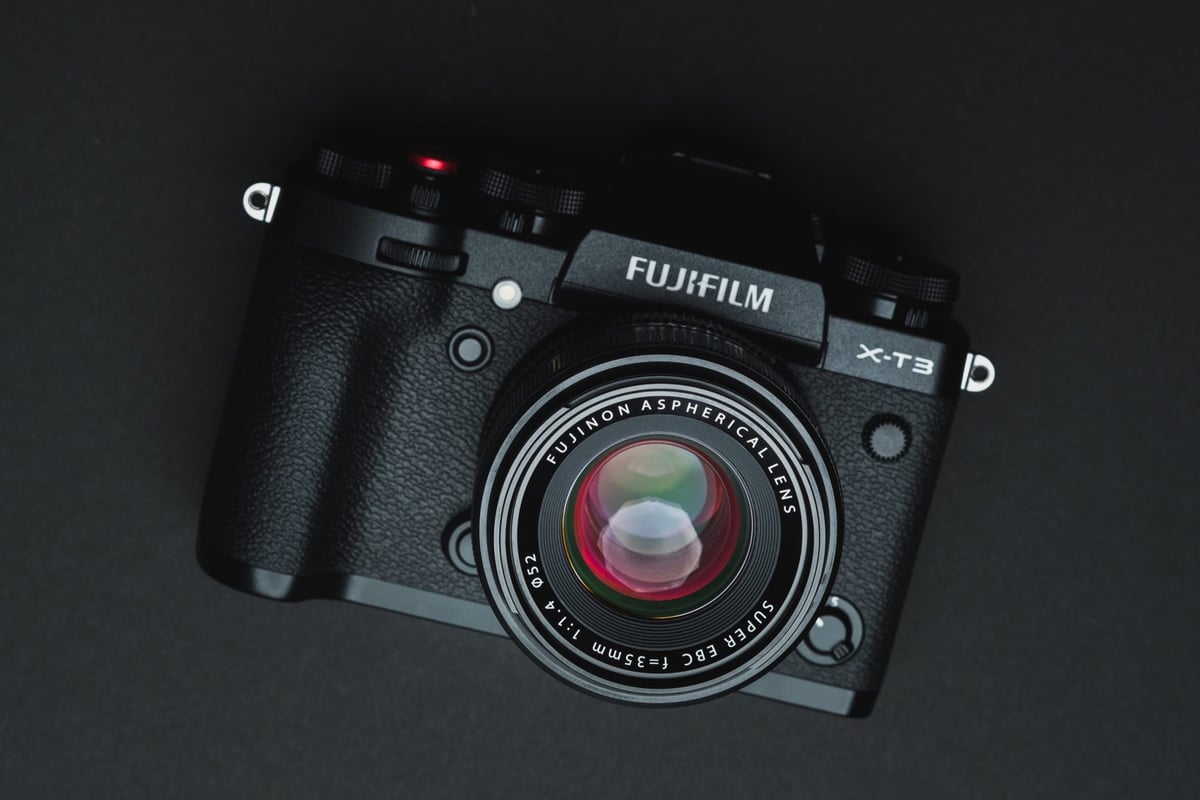
The Fujifilm X-T3 can take two UHS-II memory cards. The camera performs very well with UHS-II cards, so you will see a significant improvement with V90 cards compared to V60 cards. You can set up the camera to run RAW with backup or RAW+JPG backup. If you’re backing up to JPG, you don’t need as fast a card for slot 2, and I’d run a V90+V60 in that setup.
If you’re shooting video, you cannot run a backup, so you can only write to one card at a time. Keep that in mind when buying massive cards; however, with 400Mbps video recording, you can get by with good v60 cards like the Sony M cards.
Memory Card Recommendations For The Fujifilm X-T3
When choosing UHS-II memory cards for the Fujifilm X-T3, there are two speed classes that benefit different users. V90 is ideal for shootings that require a lot of bursting and fast speeds.
Video shooters or casual photographers will benefit from V60 cards due to their better price-to-storage ratio. V60 UHS-II cards are more than fast enough for the 4 K video the Fujifilm X-T3 outputs.
Here is a list of the top recommended cards, ranked by In-camera performance and USB read and write speeds.
| Memory Cards | Speed Class | USB-C Write | USB-C Read | Links |
|---|---|---|---|---|
| SD UHS-II V90 | Hide | |||
| Lexar 2000x V90 32-256GB | UHS-II v90 | 228 | 256 | Amazon / B&H |
| Sony G Tough v90 32-256GB | UHS-II v90 | 258 | 296 | Amazon / B&H |
| PNY EliteX-Pro90 V90 64/128/256GB | UHS-II v90 | 276 | 293 | Amazon / B&H |
| OWC Atlas Ultra V90 64-512GB | UHS-II v90 | 270 | 289 | Amazon / B&H |
| Kingston Canvas React V90 32-256GB | UHS-II v90 | 274 | 292 | Amazon / B&H |
| Wise V90 Pro 128/256/512GB | UHS-II v90 | 256 | 275 | B&H |
| SD UHS-II V60 | Hide | |||
| Sandisk Extreme Pro v60 256/512/1TB | UHS-II v60 | 189 | 279 | Amazon / B&H |
| Lexar ARMOR Gold V90 256GB-1TB | UHS-II v60 | 191 | 258 | Amazon / B&H |
| Sony M Tough V60 64-512GB | UHS-II v60 | 153 | 269 | Amazon / B&H |
| PNY EliteX-Pro60 V60 256GB | UHS-II v60 | 183 | 280 | Amazon / B&H |
Memory Card Speed Test | In-Camera Test Results
If you don’t like the cards listed above and want to try something else, you can use this chart to compare each card’s performance and price out what you need based on performance.
In-camera speed tests were obtained by measuring buffer-clearing speed, and USB results were collected with CrystalDiskMark using a USB-C memory card reader.
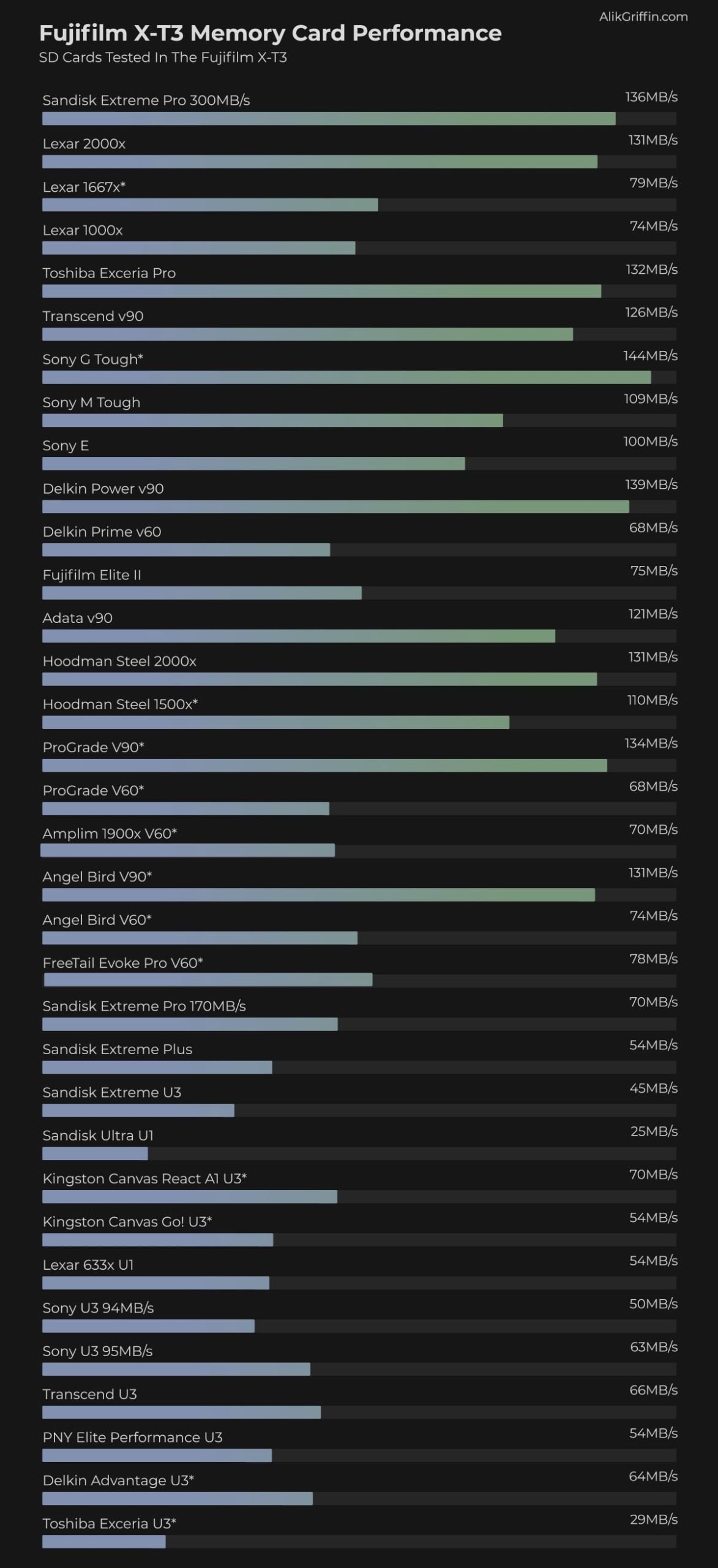
Fujifilm X-T3 Memory Card-Related Specs
| Sensor: 26.1MP APS-C X-Trans IV BSI CMOS Processor: X-Processor 4 with Quad CPU Continuous Shoot: 30fps Cont. Shooting Est. Buffer Size: 2GB Memory Card Compatibility: Dual Card Slots – UHS-II / UHS-II Time To Clear Buffer: 11.35 seconds (Sandisk Extreme Pro UHS-II 300) Memory Card Capacity: 512GB Shots To Fill Buffer RAW UNC: 35 (Sandisk Extreme Pro UHS-II 300) |
Best Accessories & Deals Fuji X-T3
Fujifilm X-T3 Best Memory Cards 4k Video
All of the UHS-II cards will let you record 4k 400mbps; even a lot of the UHS-I cards on the top of the chart record 4k 400, but you will be encountering problems if you try to use UHS-I cards.
Even though the 4k clips will record, I’m getting a lot of issues playing back 4K 400 Mbps footage with many of the slower UHS-II cards. I frequently get “Read Errors.”
400 Mbps is a massive data stream, and you need a card with a minimum write speed of 50 MB/s. This means U3 or v30 cards do not qualify, and you’ll need V60 cards, preferably V90, for flawless playback and recording.
SanDisk is still sticking to the U3 rating on their UHS-II cards, but they are showing results more than fast enough to handle video on the X-T3, and so far, nobody has reported any issues. But in theory, it is best to stick with the faster speed classes, like v60 or v90.
ExFat vs. Fat 32
Fujifilm cameras have been upgraded via firmware to support ExFAT-formatted video. This means you’ll be able to record video clips longer than 4GB if you’re using 64GB or larger memory cards.
If you’re using a 32GB card, the camera will be forced to use FAT32, and you will have a 4GB file-size limit.
Fujifilm X-T3 Memory Card Sound Chirping Phenomenon
When recording a video with an attached mic, you will hear a very quiet chirping or chattering. With some cards, it’s louder than others.
I can only hear the beeping when I set my RODE-powered external mic to -10dB. With the Sony G card it’s a clear zzeep … zzzeep … zzeep. I also tested a Lexar 1000x under the same conditions, and it produced a similar sound: a long, quiet hiss for about 20 seconds, then went into the same pulsing pattern.
I tested the Sandisk Extreme Pro 300MB card, and I got hard, loud beeps and chirping at the beginning of the clip, then silence, and then I heard what sounded like little crickets moving around. Chip chip chip … chip chip chip.
To rule out UHS-II as the problem, I tested the SanDisk Extreme 170 MB/s UHS-I card. I get a pulsing hiss. hisss … hiss …. hiss.
Nobody would probably hear this if they were using a powered mic with +20dB or 0dB, and I don’t hear it with the internal camera mic. But I definitely hear it with -10dB on the RODE mic, loud and clear.
If this is a concern for you, go with the SanDisk UHS-II memory card, since it has the least noticeable effect for me, and it also seems to work best for others experiencing this issue.
Be sure to test this with your cards, and use a powered mic or an external recorder if you have to.
Using Dual Memory Card Slots
Backup Mode
If you plan to use both memory card slots, you will need to use fast cards in each slot to shoot in backup mode.
When shooting in backup mode, using a slow card will bottleneck the entire system to the speed of that card.
Also, if you shoot RAW+JPG, you will not get as good a performance as you would when shooting RAW alone. This is because the camera has to do extra work when processing the JPG files.
Overflow
If you’re shooting with a second card in slot two and you’re set to overflow, your performance will be limited to the speed of the card in use at that time.
Memory Cards Fujifilm X-T3 | Bottom Line
The three recommended memory cards from Sony, SanDisk, and Toshiba are really the way to go for the Fujifilm X-T3. However, if you’re not planning on using the camera for 4 K 400 Mbps video shooting and you don’t do a lot of burst shooting, you can get away with a Sandisk Extreme Pro or any of the UHS-I cards on the top of the test chart as long as they are not Lexar or Prograde.















Leave a Reply