We use minimal analytics to improve the site. Is that okay?

Alik Griffin
San Clemente Sunset
Subscription Form
  • Reviews
    • Accessory Reviews
    • Calculators
      • Video Data Rate Calculator | Record Time Calculator
      • Diffraction Calculator
      • DoF Calculator | Lens Equivalent
      • Shutter Speed to Shutter Angle Calculator
    • Camera Reviews
    • Lens Reviews
    • Memory Cards Recommendations
      • Fastests SD Memory Cards
      • Fastest MicroSD Cards
      • Fastest CFExpress Type-B Card
      • Fastest CFExpress Type-A Cards
      • Best CFast Memory Card
    • List of Mics
      • Best Streaming & Podcast Mics
  • Camera Guides
    • List of all Blackmagic Cameras
    • List Of all Canon RF Cameras
    • List of all Fujifilm Cameras
    • List of all Nikon Z Cameras
    • List of all Panasonic Cameras
    • List Of all Sony E Cameras
  • List of Lenses
    • Canon RF Lenses
    • Fujifilm GFX Lenses
    • Fujifilm XF Lenses
    • L-Mount Lenses
    • Leica M Lenses
    • Micro Four Thirds Lenses
    • Nikon Z Lenses
    • PL Mount Cine Lenses
    • Sony E Lenses (FE and APS-C)
  • Store
  • My account
Alik Griffin
Alik Griffin
  • Reviews
    • Accessory Reviews
    • Calculators
      • Video Data Rate Calculator | Record Time Calculator
      • Diffraction Calculator
      • DoF Calculator | Lens Equivalent
      • Shutter Speed to Shutter Angle Calculator
    • Camera Reviews
    • Lens Reviews
    • Memory Cards Recommendations
      • Fastests SD Memory Cards
      • Fastest MicroSD Cards
      • Fastest CFExpress Type-B Card
      • Fastest CFExpress Type-A Cards
      • Best CFast Memory Card
    • List of Mics
      • Best Streaming & Podcast Mics
  • Camera Guides
    • List of all Blackmagic Cameras
    • List Of all Canon RF Cameras
    • List of all Fujifilm Cameras
    • List of all Nikon Z Cameras
    • List of all Panasonic Cameras
    • List Of all Sony E Cameras
  • List of Lenses
    • Canon RF Lenses
    • Fujifilm GFX Lenses
    • Fujifilm XF Lenses
    • L-Mount Lenses
    • Leica M Lenses
    • Micro Four Thirds Lenses
    • Nikon Z Lenses
    • PL Mount Cine Lenses
    • Sony E Lenses (FE and APS-C)
  • Store
  • My account
  • Pure Cinema
    Viltrox TCL-X100VI Review | A Budget-Friendly 50mm Upgrade
    • February 21, 2026
  • Thypoch Simera 75mm f1.4 Review
    Thypoch Simera 75mm f1.4 Review & Sample Photos
    • February 18, 2026
  • Kakurajima View
    Viltrox WCL-X100VI Review | A Budget-Friendly 28mm Upgrade
    • February 17, 2026
  • Viltrox 9mm f2.8 Air Review
    Viltrox 9mm f2.8 AIR Review & Sample Photos
    • February 18, 2026
  • Biker Bro
    Viltrox Spark Z3 Flash – Review & Sample Photos
    • February 16, 2026
  • Pure Cinema

    Viltrox TCL-X100VI Review | A Budget-Friendly 50mm Upgrade

    View Post
  • Thypoch Simera 75mm f1.4 Review

    Thypoch Simera 75mm f1.4 Review & Sample Photos

    View Post
  • Kakurajima View

    Viltrox WCL-X100VI Review | A Budget-Friendly 28mm Upgrade

    View Post
Trending Posts
  • Nikon Zf Official Announcement 1
    Nikon Zf – The Fujifilm Killer?
    • February 18, 2026
  • Nikon Z 50mm f1.8 S Lens Review 2
    Nikon Z 50mm f1.8 S Lens Review & Sample Photos
    • February 18, 2026
  • Kamlan 50mm f1.1 II Product Shot 3
    Kamlan 50mm f1.1 II Review & Sample Photos
    • January 18, 2025
0
  • Camera Guides
  • Memory Cards Recommendations

Best Memory Cards Fujifilm X-T3 – In-Camera Tests

  • Alik Griffin
  • February 13, 2026
  • 30 comments

This website contains affiliate links. We will earn a small commission on purchases made through these links. Some of the links used in these articles will direct you to Amazon. As an Amazon Associate, I earn from qualifying purchases.

The Fujifilm X-T3 can take two UHS-II memory cards. The camera performs very well with UHS-II cards, so you will see a significant improvement with V90 cards compared to V60 cards. You can set up the camera to run RAW with backup or RAW+JPG backup. If you’re backing up to JPG, you don’t need as fast a card for slot 2, and I’d run a V90+V60 in that setup.

If you’re shooting video, you cannot run a backup, so you can only write to one card at a time. Keep that in mind when buying massive cards; however, with 400Mbps video recording, you can get by with good v60 cards like the Sony M cards.

Memory Card Recommendations For The Fujifilm X-T3

When choosing UHS-II memory cards for the Fujifilm X-T3, there are two speed classes that benefit different users. V90 is ideal for shootings that require a lot of bursting and fast speeds.

Video shooters or casual photographers will benefit from V60 cards due to their better price-to-storage ratio. V60 UHS-II cards are more than fast enough for the 4 K video the Fujifilm X-T3 outputs.

Here is a list of the top recommended cards, ranked by In-camera performance and USB read and write speeds.

Memory CardsSpeed ClassUSB-C WriteUSB-C ReadLinks
SD UHS-II V90Hide
Lexar 2000x V90 32-256GBUHS-II v90228256Amazon / B&H
Sony G Tough v90 32-256GBUHS-II v90258296Amazon / B&H
PNY EliteX-Pro90 V90 64/128/256GBUHS-II v90276293Amazon / B&H
OWC Atlas Ultra V90 64-512GBUHS-II v90270289Amazon / B&H
Kingston Canvas React V90 32-256GBUHS-II v90274292Amazon / B&H
Wise V90 Pro 128/256/512GBUHS-II v90256275B&H
SD UHS-II V60Hide
Sandisk Extreme Pro v60 256/512/1TBUHS-II v60189279Amazon / B&H
Lexar ARMOR Gold V90 256GB-1TBUHS-II v60191258Amazon / B&H
Sony M Tough V60 64-512GBUHS-II v60153269Amazon / B&H
PNY EliteX-Pro60 V60 256GBUHS-II v60183280Amazon / B&H

Memory Card Speed Test | In-Camera Test Results

If you don’t like the cards listed above and want to try something else, you can use this chart to compare each card’s performance and price out what you need based on performance.

In-camera speed tests were obtained by measuring buffer-clearing speed, and USB results were collected with CrystalDiskMark using a USB-C memory card reader.
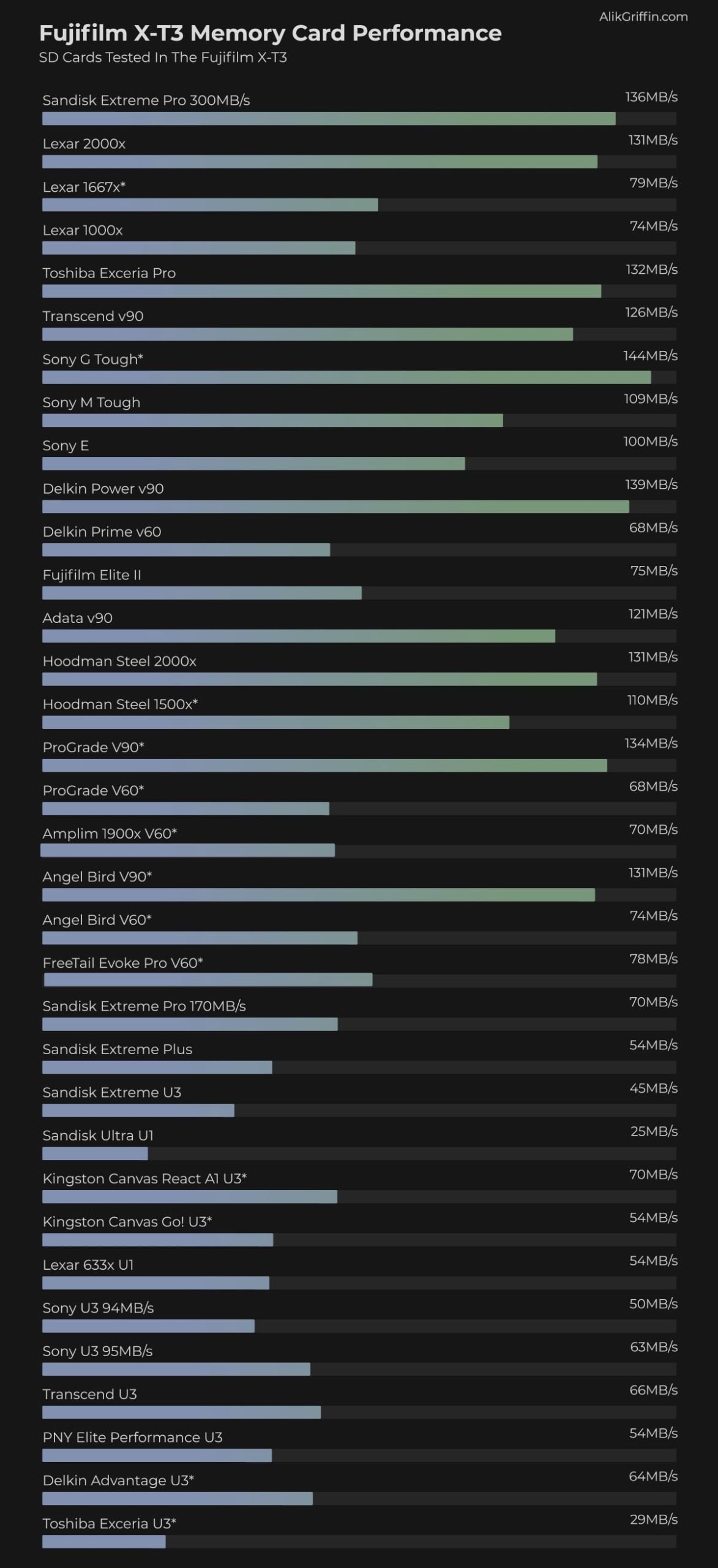
Fujifilm X-T3 Memory Card Speed & Buffer Tests

 Fujifilm X-T3 Memory Card-Related Specs

Sensor: 26.1MP APS-C X-Trans IV BSI CMOS
Processor: X-Processor 4 with Quad CPU
Continuous Shoot: 30fps Cont. Shooting
Est. Buffer Size: 2GB
Memory Card Compatibility: Dual Card Slots – UHS-II / UHS-II
Time To Clear Buffer: 11.35 seconds (Sandisk Extreme Pro UHS-II 300)
Memory Card Capacity: 512GB
Shots To Fill Buffer RAW UNC: 35 (Sandisk Extreme Pro UHS-II 300)

Best Accessories & Deals Fuji X-T3

Fujifilm X-T3 Review

Fujifilm X-T3 Best Memory Cards 4k Video

All of the UHS-II cards will let you record 4k 400mbps; even a lot of the UHS-I cards on the top of the chart record 4k 400, but you will be encountering problems if you try to use UHS-I cards.

Even though the 4k clips will record, I’m getting a lot of issues playing back 4K 400 Mbps footage with many of the slower UHS-II cards. I frequently get “Read Errors.”

400 Mbps is a massive data stream, and you need a card with a minimum write speed of 50 MB/s. This means U3 or v30 cards do not qualify, and you’ll need V60 cards, preferably V90, for flawless playback and recording.

SanDisk is still sticking to the U3 rating on their UHS-II cards, but they are showing results more than fast enough to handle video on the X-T3, and so far, nobody has reported any issues. But in theory, it is best to stick with the faster speed classes, like v60 or v90.

ExFat vs. Fat 32

Fujifilm cameras have been upgraded via firmware to support ExFAT-formatted video. This means you’ll be able to record video clips longer than 4GB if you’re using 64GB or larger memory cards.

If you’re using a 32GB card, the camera will be forced to use FAT32, and you will have a 4GB file-size limit.

Fujifilm X-T3 Memory Card Sound Chirping Phenomenon

When recording a video with an attached mic, you will hear a very quiet chirping or chattering. With some cards, it’s louder than others.

I can only hear the beeping when I set my RODE-powered external mic to -10dB. With the Sony G card it’s a clear zzeep … zzzeep … zzeep. I also tested a Lexar 1000x under the same conditions, and it produced a similar sound: a long, quiet hiss for about 20 seconds, then went into the same pulsing pattern.

I tested the Sandisk Extreme Pro 300MB card, and I got hard, loud beeps and chirping at the beginning of the clip, then silence, and then I heard what sounded like little crickets moving around. Chip chip chip … chip chip chip.

To rule out UHS-II as the problem, I tested the SanDisk Extreme 170 MB/s UHS-I card. I get a pulsing hiss. hisss … hiss …. hiss.

Nobody would probably hear this if they were using a powered mic with +20dB or 0dB, and I don’t hear it with the internal camera mic. But I definitely hear it with -10dB on the RODE mic, loud and clear.

If this is a concern for you, go with the SanDisk UHS-II memory card, since it has the least noticeable effect for me, and it also seems to work best for others experiencing this issue.

Be sure to test this with your cards, and use a powered mic or an external recorder if you have to.

Using Dual Memory Card Slots

Backup Mode

If you plan to use both memory card slots, you will need to use fast cards in each slot to shoot in backup mode.

When shooting in backup mode, using a slow card will bottleneck the entire system to the speed of that card.

Also, if you shoot RAW+JPG, you will not get as good a performance as you would when shooting RAW alone. This is because the camera has to do extra work when processing the JPG files.

Overflow

If you’re shooting with a second card in slot two and you’re set to overflow, your performance will be limited to the speed of the card in use at that time.

Memory Cards Fujifilm X-T3 | Bottom Line

The three recommended memory cards from Sony, SanDisk, and Toshiba are really the way to go for the Fujifilm X-T3. However, if you’re not planning on using the camera for 4 K 400 Mbps video shooting and you don’t do a lot of burst shooting, you can get away with a Sandisk Extreme Pro or any of the UHS-I cards on the top of the test chart as long as they are not Lexar or Prograde.

0
0
0
0
0
Alik Griffin

A professional video editor, and photographer with a Bachelors in Film studies from UCSD. Based in Los Angeles, I have created commercials, trailers, and other video content for various clients and platforms since 2005. I also love to write about my passions and share my insights on my blog.

Related Topics
  • Fujifilm X-T3
  • Memory Card Speed Tests
Previous Article
Depth of Field Calculator
  • Calculators

Camera Depth of Field Calculator

  • Alik Griffin
  • April 13, 2025
View Post
Next Article
  • Memory Cards Recommendations

Best SD Memory Cards: Mavic 2 Pro & Zoom

  • Alik Griffin
  • April 22, 2024
View Post

Subscribe

Subscribe now to our newsletter

You May Also Like
Sony A7V Accessories
View Post
  • Accessory Guides
  • Camera Guides

Must-Have Sony A7V Accessories: Maximize Your Hybrid Setup

  • Alik Griffin
  • February 12, 2026
  • No comments
Nikon Z6 III Accessories
View Post
  • Accessory Guides
  • Camera Guides

Best Nikon Z6 III Accessories: Must-Have Hybrid Gear

  • Alik Griffin
  • February 12, 2026
  • No comments
Canon R5 II Accessories
View Post
  • Accessory Guides

Best Canon R5 II Accessories: Building the Ultimate Hybrid Rig

  • Alik Griffin
  • February 4, 2026
  • No comments
Ricoh GRIV Accessories
View Post
  • Accessory Guides

The Ultimate Stealth Kit: Ricoh GR IV Accessories

  • Alik Griffin
  • February 1, 2026
  • No comments
30 comments
  1. Ariel says:
    April 30, 2019 at 7:39 am

    These Angelbird cards are just being released. Not sure what makes them specific for the XT-3 but they’re the v60 verisons. https://www.bhphotovideo.com/c/product/1452854-REG/angelbird_mp_xt3_256sdv60x2_match_pack_for_fujifilm.html

    Reply
    1. Alik Griffin says:
      April 30, 2019 at 3:25 pm

      I’ve been testing these in all the newest cameras, the Angel Bird v90 actually ended up being the fastest card in the Olympus EM1X. Their cards have been performing very well and I’ve started recommending them for various cameras.

      I think they use similar flash to what Lexar use to use (so Micron), because they have similar issues with the Panasonic GH5 that Lexar had.

      As soon as I finish posting the results for the other cameras I’ll test a bunch of the new cards in the X-T3.

      Reply
  2. Jesse Nash says:
    May 2, 2019 at 9:07 pm

    I just stumbled upon this post while scouring online for an answer to the “which cheap card will record 4k 10bit?” and I’m feeling a tad discouraged/confused. Technically, if speed were the only factor, any card with V60 would be able to handle it right? So, there are some weird compatibility problems with some cards. When you had with the Delikin V60 and the ProMaster v60 cards, what kind of issues were they and are they still issues with firmware 3.0? Is it possible/likely that Fuji worked out some kinks in newer firmware revisions and just filed those changes under the vague “Fix of slight defects” section of the release notes? *fingers crossed

    Reply
    1. Alik Griffin says:
      May 2, 2019 at 9:23 pm

      I haven’t tested the v60 cards with firmware 3 yet, but there seemed to be an issue with continuous burst using v60 cards. Not so much video, they were not serious issues for the most part, just some freezes when pulling the camera out of sleep, things like that. I did have the Adata card once wipe my user preferences but that’s back when the camera was new so maybe that was some glitch with the internal battery.

      I have been shooting with the X-T3 a lot lately though with a Lexar 2000x card and a Delkin v90 card without any issues. I’ll switch them out to those v60 cards that gave me issues and see if I still have problems. Fujifilm has fixed a lot of bugs since firmware v1, things like stuck pixels in the EVF or color glitches. Hopefully they’ve included better compatibility to v60 and v90 cards.

      Reply
      1. Jesse Nash says:
        May 6, 2019 at 9:31 pm

        So, I took a chance and purchased a Delkin 256GB V60 and gave it a whir. I didn’t do a full and proper test but I recorded about 17minutes without any issue before I stopped the recording myself. I’m actually only running firmware 2.0 as well. I could have just got lucky with the card.

        Reply
        1. Alik Griffin says:
          May 7, 2019 at 3:31 pm

          That’s good to hear! The only issue I ever got with Delkin cards was occasional lockups, usually when the camera came out of sleep.

          Reply
  3. GERMARDOU MEDIA GROUP says:
    May 7, 2019 at 6:12 pm

    Will Lexar pro 1000x V60 do the job in 4k 400mb/s ???

    Reply
    1. Alik Griffin says:
      May 8, 2019 at 3:14 pm

      I just tested the latest version of the Lexar 1000x by longsys for you. It works great! I tested burst shots, 4k 400mbps with both 10-bit and 8-bit H.265 and H.264.

      Reply
      1. GERMARDOU MEDIA GROUP says:
        May 11, 2019 at 8:19 am

        Thank you Mr. Alik
        I can now safely do my purchasing

        Reply
  4. Rodrigo Garcia says:
    June 24, 2019 at 1:23 pm

    Hey Alik, nice test! What do you tell me about the LEXAR SDXC 1667x V60 250Mb/s 64GB for 4k DCI / 4k 400mb/s? I’m thinking of getting an XT3.

    Reply
    1. Alik Griffin says:
      June 25, 2019 at 2:26 am

      I actually don’t have that card yet so I just ordered it. All the cards have been working great lately, I think Fujifilm fixed all the issues they were having. I’ve been cycling through the different brands as I shoot and haven’t had a single issue lately.

      One thing that has been discovered, If you’re shooting video with a quiet mic, some cards cause a louder chirp, or clicks than others. So try to use a powered mic if you’re going into camera. Lexar cards were actually one of the quieter brands in my last test.

      I’ll test this card when it arrives in a day or two. I just tested the Lexar 1000x again to see how it does with 400mbps and it’s working fine so I would think the 1667x would work as well.

      Reply
      1. Rodrigo Garcia says:
        June 25, 2019 at 8:19 am

        Thank you, Alik. Your precise information is very powerful for help us to build a solid budget. I leaving Canon and see in Fujifilm a new work tool. I waiting for your results. Have a nice day!

        Reply
        1. Alik Griffin says:
          June 28, 2019 at 5:51 pm

          I tested 400mbps video in the 1667x and it works great. No Issues.

          Reply
          1. Rodrigo Garcia says:
            June 28, 2019 at 6:00 pm

            I was thinking about it right now hahaha
            Thanks for testing, Fuji really seems to have made some firmware updates that help solve potential problems.
            I’m looking for XT3 lenses now (or adapters).

            Thank you very much!

          2. Alik Griffin says:
            June 28, 2019 at 6:10 pm

            No Prob!

          3. Rodrigo Garcia says:
            July 4, 2019 at 4:58 pm

            Hi Alik. There was a doubt. How this card worked with
            4096 x 2160 @ 60p (or 50p) / 200 Mbps H.265?

          4. Alik Griffin says:
            July 4, 2019 at 4:58 pm

            Let’s find out, one sec. Everything just so happens to be sitting in front of me.

          5. Alik Griffin says:
            July 4, 2019 at 5:08 pm

            Ok, I let it roll for awhile against my monitor which should max out that bitrate. It’s working fine.

          6. billss says:
            August 18, 2019 at 1:30 pm

            Lots of bad reviews on Amazon though…seems like quality control issues.

  5. Jeff Jensen says:
    July 6, 2019 at 5:51 pm

    Hi Alik. Just bought an x-T3. Splurged, so looking to save some money now. I am thinking of buying a SanDisk 64GB Extreme Pro SDXC UHS-I/U3 V30 Class 10 Memory Card, Speed Up to 170MB/s (SDSDXXY-064G-GN4IN). You have some great experience and was wondering if I should wait and go UHS II? Thanks, Jeff

    Reply
    1. Alik Griffin says:
      July 6, 2019 at 6:07 pm

      Go with the UHS-II if you plan on shooting 4k 400Mbps video. UHS-I will be fine for everything else. A lot of people are shooting 200Mbps video on this camera because it gives them 60fps in 4k and 400Mbps can be a little overkill with file sizes.

      Reply
      1. Jeff Jensen says:
        July 6, 2019 at 7:00 pm

        Thanks Alik. Will a UHS-I do 200Mbps? Most of what I do will be portraits and landscape but want to get into video at an amateur level. Thanks, Jeff

        Reply
        1. Alik Griffin says:
          July 6, 2019 at 7:20 pm

          Yes they will. They can sometimes do 400Mbps, but as the cards age they can slow down and UHS-I is just at the limit of 400Mbps performance. The Sandisk Extreme Pro UHS-I might do 400Mbps. Mine actually do but it’s probably better to do 200 just so it doesn’t cut out mid recording from a slow down. Try to still record with the HEVC or H.265 though. You’ll get a lot nicer compression even at 200. Most cameras (Except the Canon EOSR and Panasonic GH5) only record 4k at 100mbps and only H.264, so even at 200mbps with h.265, you’ll completely blowing away the competition with performance.

          Reply
  6. David Lustrup says:
    November 16, 2019 at 10:34 pm

    im using 2 lexar x1677 256gig sd cards with a write speed of 78MB/Sec tested on crystal disk…ill be in the middle of shooting 4k 24fps 200mbit and the camera will just…stop recording 10-15 mins into recording ……go to “storing” then give me a “write error” …sometimes ittl record for the whole 30 mins..sometimes it wont….its driving me crazy, and now i hear that lexar is the worst card you can buy for fuji xt3…..my cards are more than fast enough to record 4k at 400 mbit…so why does it keep stopping and storing and giving me write errors when trying to record only 4k 24fps 200mbit??? both cards do this….and also, why am i having such a hard time to find a 256gig capacity v60 card that has a write speed over 120 that will
    work without stopping all the time in the x-t3? i see 64, 128, 32, but those arent nearly big enough…this shouldn’t BE this hard =(

    Reply
    1. Alik Griffin says:
      November 17, 2019 at 9:58 am

      When I tested that Lexar in the X-T3 it had a low 57MB/s and a high of 75MB/s which is pretty extreme. It should be fast enough for 200Mbps though.
      I’m seeing a lot more issues from people with Lexar as a brand since Micron sold them off to Longsys. Likely some quality control issues with the flash they are getting. The new Lexar is pretty much ProGrade, some of the same guys that ran Lexar, but even Prograde has issues sometimes with Fujifilm and are usually not the top performers.

      Right now I would say the best UHS-II memory cards brands are Sandisk, Sony, Delkin, Toshiba. They are always the top performers and always have the least issues and always seem to work in no mater what camera I test them in.

      Look at how much better they run in the Sony A7rIV than everything else: https://alikgriffin.com/best-memory-cards-sony-a7riv/

      Look at replacing your cards with a Sandisk Extreme Pro (the 300MB/s), Sony G Tough, or standard G, a Delkin Power, or a Toshiba Exceria the UHS-II. The Sony M should be able to get the job done for 200Mbps video as well and they just released a Tough M now.

      In general there is a certain type of flash or memory controller in some cards that some cameras do not like. The Lexar cards won’t even work in some Panasonic cameras and firmware v1.00 of the X-T3 or even X-H1 had so many issues with so many cards.

      All the cards still cause audio chirping during writing while recording video so it seems like there is possibly some sort of frequency interference or bad ground going on inside the X-T3. Some of the power is maybe surging and it just causes the data signal to get interrupted. I use to get a lot of lockups and other weird issues. Since they released a firmware fixing early 2019, I’ve noticed all the cards run a little slower, so likely they’re throttling some things to alleviate this issue. Totally just my guess.
      I’m going to retest everything one more time, hopefully soon. I didn’t post the data from my last retest because it came in so much slower and I only tested my new cards. So I need to restest everything to get a good comparison.

      Also, it’s hard to find these issues because not everyone has the same problems. Since cameras source different little chips from different factories during different product runs, it could be some chips they’re getting from Tawian, or where ever, just aren’t performing well. So some people have a perfect camera and some people have a camera with little bugs. The X-H1 was really bad with this. There was a product run of the camera that just had so many lockup issues no matter what you did. You had to use the perfect battery with the perfect cards.

      One last thing, try using your official fujifilm battery when recording video instead of anything third-party. Sometimes that helps.

      Reply
  7. Daniel says:
    November 18, 2019 at 2:47 am

    Hi Alik, greetings from Mexico, I recently purchased a X-T3, specially for video, I would like to shoot in 4K 60fps 10bit 4:2:0 and I’m looking for an SD card to handle that, I saw the Adata V90 256gb in a good price (around $120 dollars) but I saw many bad comments about this memory, so I’m able to buy the Lexar X2000 (128gb) or the Sony G (64gb) but they are more expensive, so, could you please help me? Adata is really that bad? Which one should I buy? Thanks a lot.

    Reply
    1. Alik Griffin says:
      November 18, 2019 at 10:53 am

      I had lockups with the Adata card with XT3 firmware 1.0. But I haven’t had issues since. I just recorded the spec you mentioned for the duration of a 64GB card to see if there was any issues and everything was fine.
      I would take Adata over Lexar right now since I’ve been seeing a lot of people having issues with Lexar.

      If you can, go with Sony G, Delkin Power, Sandisk or Toshiba.

      Or, some of the slower UHS-II cards can handle the 400mbps. Look at Sony M, Delkin Prime, even ProGrade v60, but for some reason those slower UHS-II cards make the camera always takes a few extra seconds to boot up as it tries to initialize the card, however recording 400Mbps still works fine. This drives me nuts when trying to shoot street photography though.

      $120 for a 256 card seems a little too good to be true. Make sure it’s not counterfeit. Maybe bring your camera to the store and test it at the store. Check for bootup times when the card is in the camera, also you need to max that capacity of that card right when you get it to make sure it’s not counterfeit.

      I hope this helps.

      Reply
  8. Matt Prince says:
    March 26, 2020 at 2:52 pm

    Hi, Just got an XT3 to use for video and bought the Lexar 1667 256gb v60 and I couldn’t get 4k 400mbits to work at all. Was just greyed out. I connected the memory card to my computer and ran a speed test and it was peaking at 17mb/s read. I bought it direct from Amazon so didn’t think it would be a fake. Seen the Sony M 256gb card pretty cheap so would this do 4k 24 or 60 at 400mbits?

    Reply
    1. Alik Griffin says:
      March 27, 2020 at 9:32 am

      Hey Matt, You know, I’m not sure what’s going on with those Lexar cards these days. They are not owned by the same company ‘micron’ and it seems their quality may have slipped. It could just be a dead card? Even a counterfeit card should perform better than that. Go with the Sony M cards if you can they can do 400Mbps.

      Reply
    2. Alik Griffin says:
      March 27, 2020 at 9:32 am

      Also, I rewrote the memory card suggestions for the X-Pro3 based on the X-T3 tests, I haven’t updated this article yet but there is some good information there that applies to the X-T3 based on the T3 test results. https://alikgriffin.com/best-memory-cards-fujifilm-x-pro-3/

      Reply

Leave a Reply to Alik Griffin Cancel reply

Your email address will not be published. Required fields are marked *

San Clemente Sunset

Join The Newsletter

Featured
  • Kakurajima View
    Viltrox WCL-X100VI Review | A Budget-Friendly 28mm Upgrade
    • 2 comments
  • Thypoch Simera 75mm f1.4 Review
    Thypoch Simera 75mm f1.4 Review & Sample Photos
    • No comments
  • Tiffen Black Pro Mist Filter At Night. Streets Of Tenjin Japan
    Tiffen Black Pro Mist Review – Is This The One?
    • 10 comments
  • TTArtisan 27mm f2.8 AF Front of Lens
    TTArtisan AF 27mm f2.8 Review & Sample Photos
    • 5 comments
  • On Board
    Fujifilm X100VI Review & Sample Photo
    • 5 comments
  • Pure Cinema
    Viltrox TCL-X100VI Review | A Budget-Friendly 50mm Upgrade
    • No comments
  • How To Edit Photos To Look Like Film
    • 4 comments
  • Kalina Picking Sakura
    Nikon Z 85mm f1.8 S Review & Sample Photos
    • 20 comments

Subscribe

Subscribe now to our newsletter

Privacy Policy | Licensing | About Me | Contact

Copyright © Alik Griffin Inc. 2025

Input your search keywords and press Enter.












