
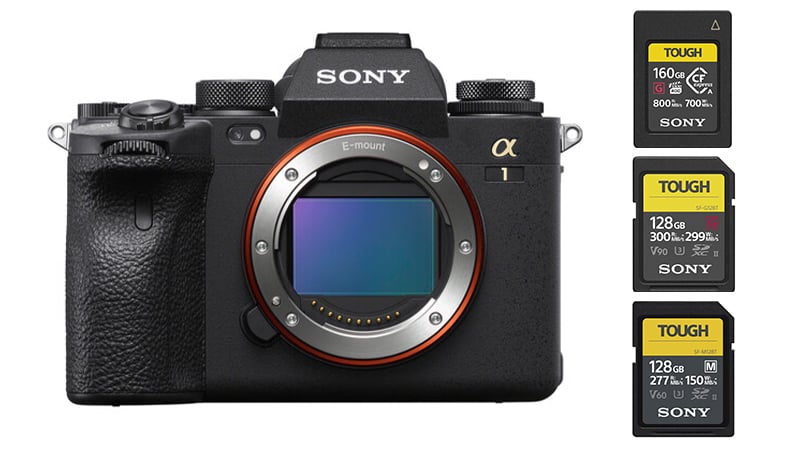
The Sony A1, with its dual memory card slots, can take two types of Memory Cards: SD cards and CFexpress Type A cards.
Recommended Memory Cards Sony A1
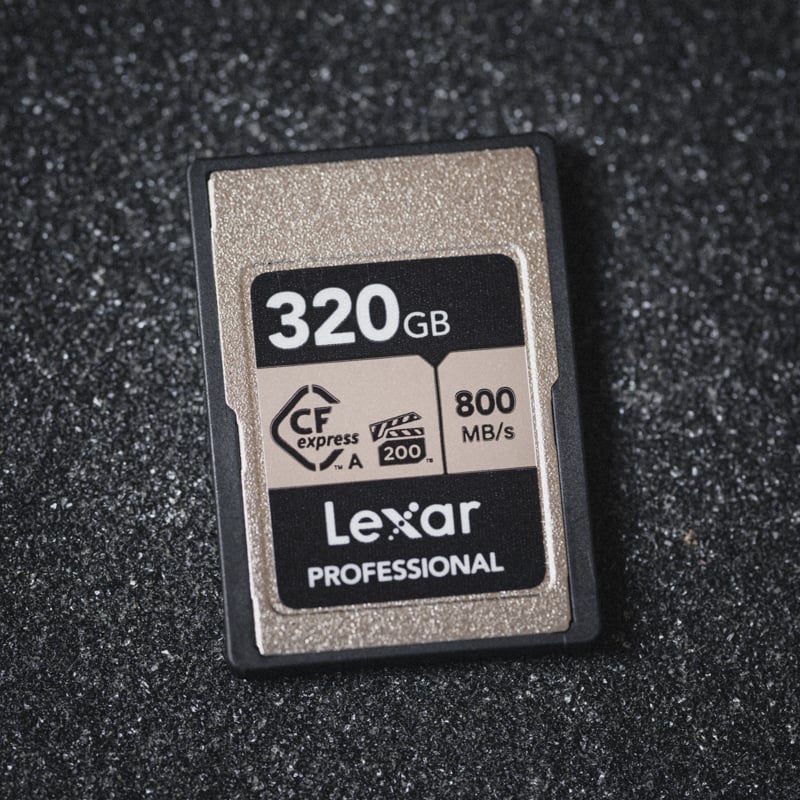
Professional sports shooters will want the CFexpress Type A cards for improved speeds. Hobbyists can get by with the UHS-II v90 cards, allowing you to use all the camera features, but you just won’t be able to clear the buffer as quickly when bursting.
With many CFexpress Type-A memory cards now priced very competitively with SD UHS-II V90 cards, I recommend using CFexpress Type-A cards for the Sony A1.
The best CFExpress Type-A memory cards for the Sony A1
There are new CF4.0 Type-A cards that are significantly faster than the previous generation; however, the Sony A1 does not have the hardware to take advantage of them. CF4.0 isn’t needed for the Sony A1, but it is a good option if you want something a little future-proof or faster transfer speeds to your computer with the appropriate reader and SSD setup.
| Recommended For Sony | USB Write | USB Read | Check Price | |
|---|---|---|---|---|
| CFExpress Type-A | Hide | |||
| Sony G Tough CF4.0 240/480/960/1920GB | B&H | |||
| Sony M Tough 960GB | Sony M Tough CFExpress Type-A Review | Amazon / B&H | ||
| Sony G Tough 80/160/320/640GB | Sony G Tough CFExpress Type-A Review | 658 | 847 | Amazon / B&H |
| Lexar Gold 80/160GB/320GB | 825 | 886 | Amazon / B&H | |
| Delkin Black 80GB | 654 | 845 | Amazon / B&H | |
| ProGrade Iridium CF4.0 480-960GB | 1272 | 1532 | Amazon / B&H | |
| Pergear Standard 256GB | Pergear Standard 256GB CFxA Review | 768 | 812 | Amazon |
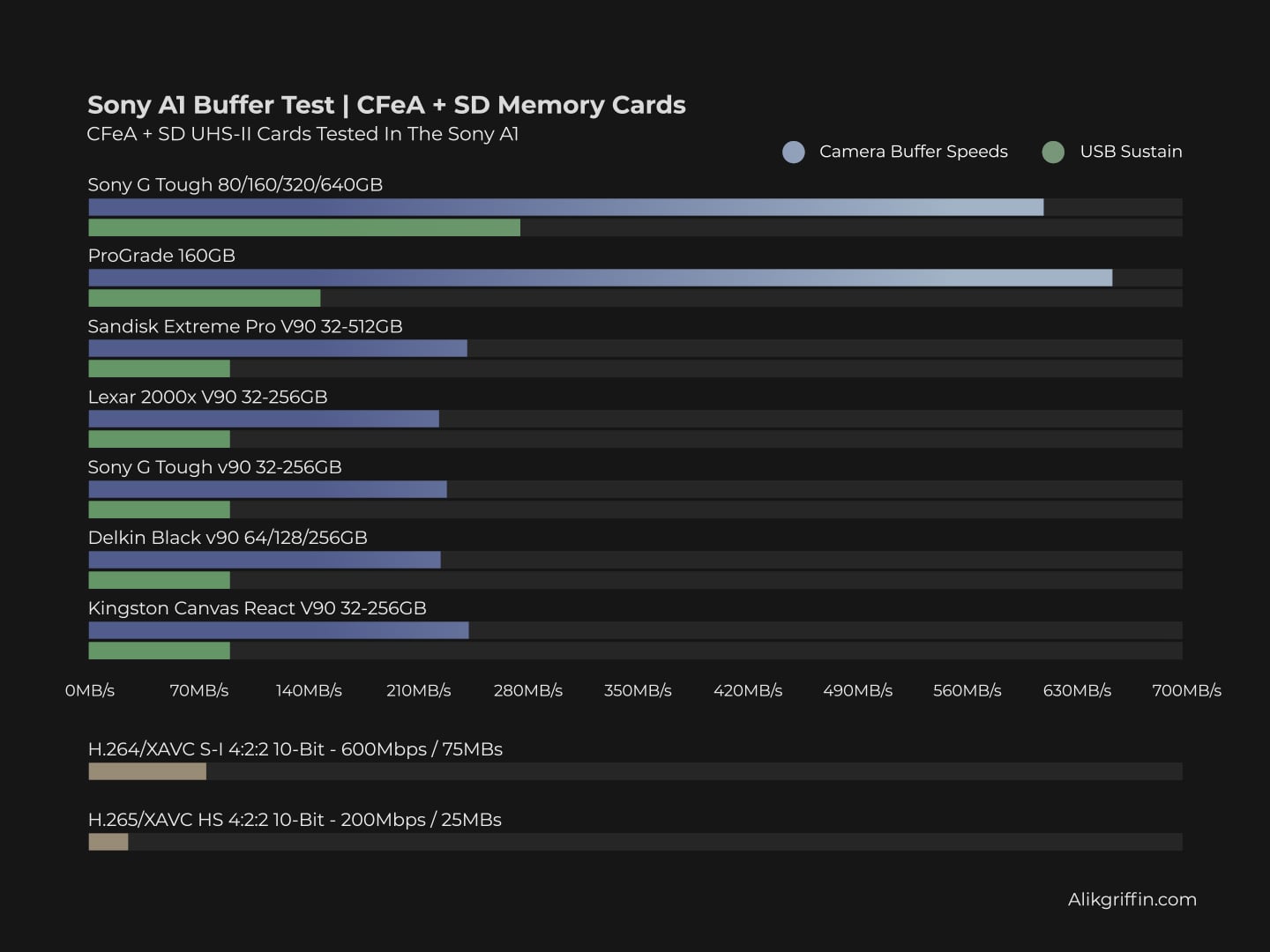
This chart visually illustrates how much faster CFexpress Type-A cards are than UHS-II memory cards at continuous burst speeds.
The Best SD UHS-II memory cards for the Sony A1
The Sony Tough G SD V90 UHS-II cards are among the best UHS-II memory cards and are my top recommendation for high-performance cameras like the Sony A1.
However, it’s essential to consider the price. Nowadays, CFexpress cards offer significantly higher speeds and are often priced similarly to, or even lower than, v90 cards.
| Recommended For Sony | Review Links | USB Write | USB Read | Check Price |
|---|---|---|---|---|
| SD UHS-II V90 | Hide | |||
| Sandisk Extreme Pro V90 32-512GB | Sandisk Extreme Pro V90 UHS-II Review | 268 | 293 | Amazon / B&H |
| Sony G Tough v90 32-256GB | Sony G Tough V90 UHS-II Review | 258 | 296 | Amazon / B&H |
| Delkin Black v90 64/128/256GB | 253 | 278 | B&H | |
| Kingston Canvas React V90 32-256GB | Kingston Canvas React Plus V90 | 274 | 292 | Amazon / B&H |
| Kodak V90 32/64/128GB | 260 | 272 | Amazon | |
| Ritz Gear VideoPro V90 64-512GB | 258 | 273 | Amazon | |
| SD UHS-II V60 | Hide | |||
| Lexar ARMOR Gold V90 256GB-1TB | 191 | 258 | Amazon / B&H | |
| Sony M Tough V60 64-512GB | Sony M V60 UHS-II Review | 153 | 269 | Amazon / B&H |
| Sony E v60 256GB | Sony E Series V60 256GB Review | Amazon / B&H |
Memory Card Benchmarks
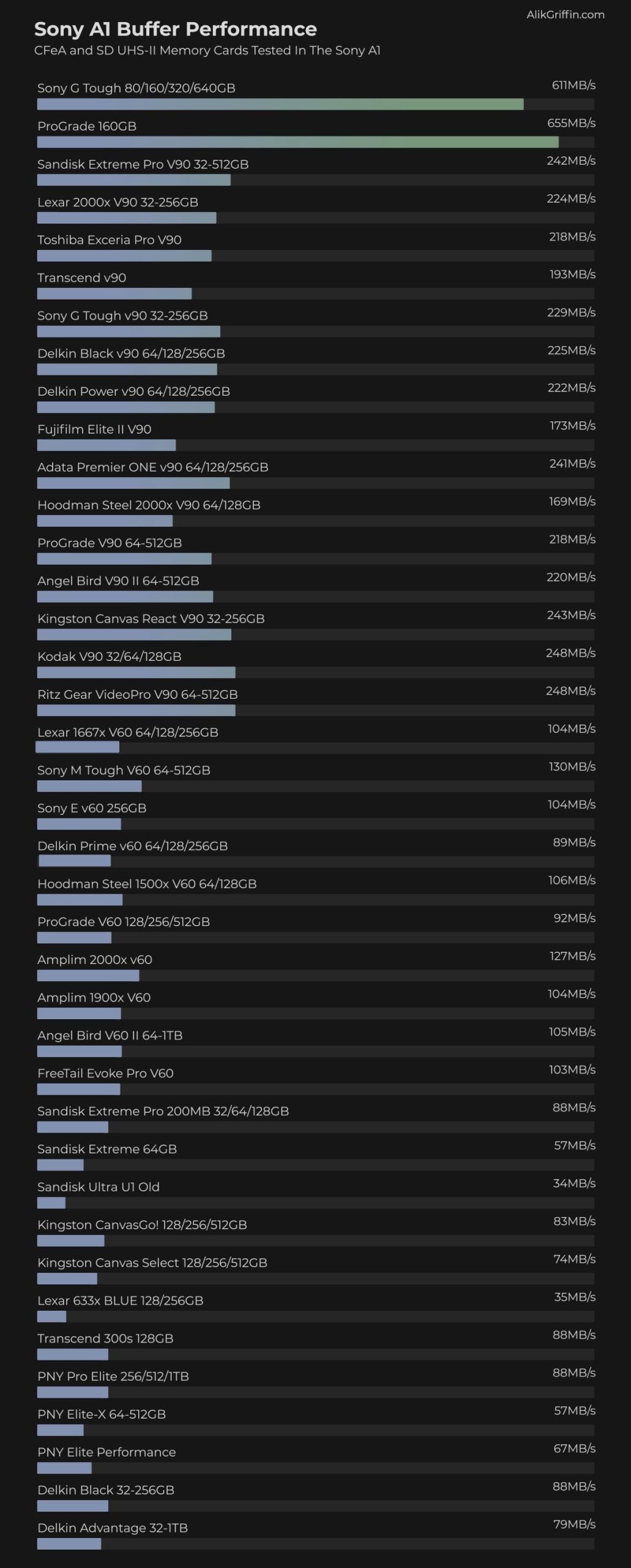
These benchmarks are measured by shooting a series of bursts in Uncompressed RAW until the buffer fills, then measuring the amount of data written per second. Learn more information about CFexpress Type-A Memory Cards in this guide or this one. Best SD Memory Cards
Do You Need CFexpress Cards?
CFexpress Type A will clear the buffer twice as fast as UHS-II memory cards.
After benchmarking the camera, the difference between CFexpress and UHS-II cards was significant. With the Sony CFx Type A card, I got write speeds of around 600 MB/s in-camera. With the fastest UHS-II card, I could only write at around 250 MB/s; this will make a big difference when shooting long bursts.
UHS-II cards will work for all types of video recording, including 600Mbps H.264 and S&Q slow-motion modes, as long as they are rated at the v90 speed class.
Camera Specs Related To Memory Card Performance
| Sensor: 50MP Full-Frame, Exmor RS BSI CMOS Processor: BIONZ XR Image Processor Memory Card Slots: 2 UHS-II / 2 CFe A Continuous Shoot Electronic: 30fps Continuous Shoot Mechanical: 10fps Est. Buffer Size: 7GB RAW Shots To Fill Buffer: 155 Frames @ 30fps Max Memory Card Capacity: Unlimited 4k Datarate: H.265 280Mbps / H.264 600Mbps 8k Datarate: H.265 520Mbps / No 8k With H.264 |
Best Memory Cards For 8k Video
The maximum bitrate for 8K on the Sony A1 is 520 Mbps (65 MB/s) with the XAVC HS 8K codec. If you want to shoot at this max data stream of 65MB/s, you must use a v90 UHS-II memory card at a minimum to guarantee performance.
Also, the XAVC S-I H.264 All-I codec can record up to 600 Mbps, which translates to 75 MB/s. Again, V90 UHS-II SD memory cards will be required at a minimum to guarantee performance.
8k & 4k Record Times Based On Memory Card Sizes
What memory card size is best for the Sony A1?
Remember that 8k maxes out at 520Mbps with XAVC HS H.265 encoding, and 4k with XAVC S-I H.264 encoding runs at 600Mbps.
This chart shows the maximum record times achievable at each bitrate, based on memory card size. The information is taken from the record time bitrate calculator.
Editing With H.264 vs H.265
You cannot record 8k at H.264 or 8k at 4:2:2.
When a camera records in H.265 and H.264, it uses hardware that Sony buys and installs in its cameras. Usually, it’s a custom part of the ARM Architecture licensed from third parties, so these specs are often locked in and can’t be changed with firmware.
You must be careful when using hardware accelerators for exporting and editing 4:2:2 10-bit content. Many computers and graphics cards, including Nvidia and AMD, still don’t support 4k 4:2:2 10-bit; often, it’s only 4:2:0 10-bit, and they don’t give you any warning that you’re out of spec. They will just export an inferior image to what you recorded.
Test this, and consider exporting your video with Software encoding only. If you’re in Premiere, this also means switching your sequence settings to software only before encoding.
If you’re on a new Intel (2021 Alder Lake, I think even Tiger Lake) or M1 Mac, you may not need to worry about this as long as you’re using the native encoders. Avoid anything that uses Nvidia and AMD accelerators for now, as of early 2022.
Also, M1 and new Intel processors will be able to handle H.265 much more easily than older computers, as they now have improved H.265 encoders and decoders. But again, be careful when using hardware encoders for your final output or testing to ensure your hardware supports 4:2:2 at 10-bit, not just 4:2:0 at 10-bit.
| Bitrates | 80GB | 120GB | 160GB | 256GB |
| 200Mbps | 53min | 80min | 107min | 171min |
| 280Mbps | 38min | 57min | 76min | 122min |
| 520Mbps | 21min | 31min | 42min | 67min |
| 600Mbps (4k h.264) | 18min | 27min | 36min | 57min |
Using a Second Card For Backup
For photographers, using a slower second card for backup, like UHS-II or UHS-I, will slow down the whole system to that speed, so ensure you get identical cards if you want redundancy without losing performance.
In other words, do not buy CFeA cards and use UHS-II or UHS-I cards in the second slot as a backup. Use cards with equal ratings in both slots so the slower card does not bottleneck the camera’s speed.
If you shoot RAW+JPG, can you use a slower card in slot two? The JPGs are smaller, but still not that much smaller, and can still slow the system down. Plus, the camera slows down a bit when writing the JPGs with the processor. So expect a minor performance hit when writing RAW+JPG. It would be best to use RAW+RAW with cards of equal rating.













Leave a Reply