
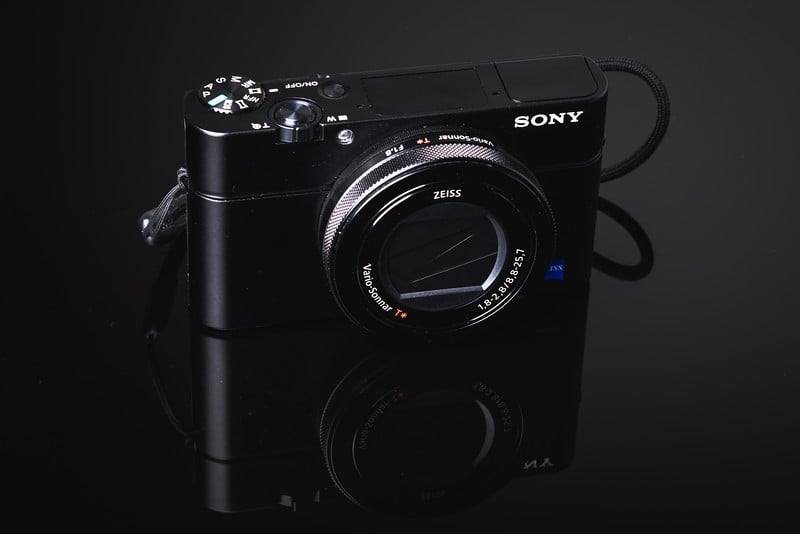
A speed comparison testing all the most popular SD memory cards in the Sony RX100 IV.
Use this guide to find the best memory cards for your shooting style and budget.
Note: I’ve tested all the latest cards in the Sony RX100 VI which is internally almost the same camera and the cards are performing very similar to the RX100 V.
If you want to see how all the latest memory cards perform, check out the Sony RX100 VI memory card speed tests. It has a much better list.
Best SD Memory Cards For The Sony RX100 IV
Testing the Sony RX100 IV was tricky since there are no record light indicators. But I have figured out a way and it seems to be in line with the results I’m getting on other cameras. Which is not good.
Sony cameras are by far the slowest cameras to record to memory cards on the market right now, but some of the biggest buffers. You’ll see it when you shoot 960fps video and have to wait a few minutes for it to process and write to the card.
Sony RX100 IV Memory Card Speed Chart
I tested the camera at ISO 640, f2.8, at 1/160 shutter in speed priority continuous shooting mode.
| SD Memory Cards | USB 3.0 Read | USB 3.0 Write | 4K Video | Sony RX100IV Write |
| UHS-II | ||||
| Sandisk Extreme Pro 32GB UHS-II | 257.3 MB/s | 109.9 MB/s | No | 39.40 MB/s |
| Lexar 32GB 2000x UHS-II | 280.9 MB/s | 181.4 MB/s | No | 36.87 MB/s |
| Delkin 32GB UHS-II | 245.1 MB/s | 164.6 MB/s | No | 35.51 MB/s |
| Lexar 32GB 1000x UHS-II | 145.0 MB/s | 60.7 MB/s | No | 35.44 MB/s |
| UHS-I | ||||
| Sandisk Extreme Pro 64GB SDXC U3 | 89.0 MB/s | 84.7 MB/s | Yes | 35.86 MB/s |
| Kingston 64GB SDXC U3 | 88.1 MB/s | 74.3 MB/s | Yes | 35.29 MB/s |
| Sandisk Extreme Plus 64GB SDXC U3 | 88.9 MB/s | 62.0 MB/s | Yes | 35.23 MB/s |
| Sandisk Extreme 64GB SDXC U3 | 71.3 MB/s | 52.1 MB/s | Yes | 35.02 MB/s |
| Samsung Pro 64GB SDXC U1 | 86.8 MB/s | 77.2 MB/s | No | 34.67 MB/s |
| PNY 64GB SDXC U1 | 86.1 MB/s | 54.5 MB/s | No | 34.49 MB/s |
| PNY 64GB SDXC U3 | 87.9 MB/s | 61.6 MB/s | Sometimes | 34.48 MB/s |
| Lexar 600x 64GB SDXC U1 | 85.6 MB/s | 60.1 MB/s | No | 33.47 MB/s |
| Sony 64GB SDXC U3 | 87.2 MB/s | 71.9 MB/s | Yes | 33.85 MB/s |
| Transcend 64GB SDXC U3 | 87.7 MB/s | 64.1 MB/s | Yes | 33.26 MB/s |
| Samsung 64GB SDXC EVO U1 | 43.9 MB/s | 22.7 MB/s | No | 25.52 MB/s |
Camera Write Speed Stats
(With the Sandisk Extreme Pro 64GB UHS-I SDXC U3)
Shots Taken To Fill Buffer: 29
Time Taken To FIll Buffer: 3.36secs approx.
Frames Per Second To Fill Buffer: 8.6
Frames Per Second After Buffer: 3.2 approx.
Best Performing Cards
Taking Into Consideration USB 3.0 write speeds these are the best-performing UHS-I cards.
Best Value
I’ll list the Sony again here since it is a great performing card with this camera. I also like the PNY cards for performance, price, and cost.
Sony RX100 IV Speed Tests Summary
Speed tests seem almost identical across all cards. However, USB 3.0 speeds can vary significantly.
Also, even though the speeds seem to be the same, choosing the right card still matters so that you can record XAVC S 4k Video.
Shooting 4k On The Sony RX100 IV – Stick with Sony Brand!
Recording 4K video requires SDXC U3 memory cards!
If you want to shoot 4k on any Sony camera right now I recommend only using Sony brand cards. A lot of people have problems with other brands right now, and it’s actually not the card’s fault, it’s the camera’s fault. One card will work fine in one camera but not in others.
Best SD Memory Card For 4K
Sony 64GB SDXC U3 – Amazon
Why Some Cards Don’t Work
Even though all the cards run at about the same speed when shooting RAW images, the camera will notice if you do not have a U3 SDXC card and not allow you to shoot 4k 100M video.
This is weird to me because I’ve tested it with cards of the same speed. When I format a U3 card, then shoot the video and immediately replace it with a U1 card without formatting, the camera will let me shoot the video on the U1 card. But when I freshly format a U1 card I get this message –
“Cannot record this recording setting, Either switch to a UHS-I U3 compatible memory card or change the file format.”
So to make your life simpler, get a U3 card and it must be SDXC to shoot XAVC S 4k video. And it should be Sony brand simply because Sony cameras are not tuned properly to consistently see other cards. They seriously need a firmware fix for this.
You can still shoot AVCHD 1080 video on an SDHC U1 card. If you don’t mind working in that codec and at a lower bitrate.
UHS-II Cards With The Sony RX100 IV
The Sony RX100 IV does not have a UHS-II interface on it. So any UHS-II card you put into the camera will be clocked down to UHS-I. It’s fine if you want to use UHS-II cards for fast USB 3.0 transfer speeds, but you won’t see any real benefit in the camera.
Best SD Memory Cards Sony RX100 IV Conclusions
Based on all the tests, the speeds, and the video requirements, the best card you can get is a UHS-I SDXC U3 memory card. It seems brand doesn’t matter so much as they all perform almost the same. You can look at the USB 3.0 speeds and see if spending more money on a more expensive card is worth it to you. Personally, I would just get a PNY or Sony or one of the less expensive brands.
More On The Sony RX100 IV
Need accessories? See the Sony RX100 IV Accessories Page.
Shoot better video with The Sony RX100 IV Video Guide.









Leave a Reply to Alik Griffin Cancel reply