We use minimal analytics to improve the site. Is that okay?

Alik Griffin
San Clemente Sunset
Subscription Form
  • Reviews
    • Accessory Reviews
    • Calculators
      • Video Data Rate Calculator | Record Time Calculator
      • Diffraction Calculator
      • DoF Calculator | Lens Equivalent
      • Shutter Speed to Shutter Angle Calculator
    • Camera Reviews
    • Lens Reviews
    • Memory Cards Recommendations
      • Fastests SD Memory Cards
      • Fastest MicroSD Cards
      • Fastest CFExpress Type-B Card
      • Fastest CFExpress Type-A Cards
      • Best CFast Memory Card
    • List of Mics
      • Best Streaming & Podcast Mics
  • Camera Guides
    • List of all Blackmagic Cameras
    • List Of all Canon RF Cameras
    • List of all Fujifilm Cameras
    • List of all Nikon Z Cameras
    • List of all Panasonic Cameras
    • List Of all Sony E Cameras
  • List of Lenses
    • Canon RF Lenses
    • Fujifilm GFX Lenses
    • Fujifilm XF Lenses
    • L-Mount Lenses
    • Leica M Lenses
    • Micro Four Thirds Lenses
    • Nikon Z Lenses
    • PL Mount Cine Lenses
    • Sony E Lenses (FE and APS-C)
  • Store
  • My account
Alik Griffin
Alik Griffin
  • Reviews
    • Accessory Reviews
    • Calculators
      • Video Data Rate Calculator | Record Time Calculator
      • Diffraction Calculator
      • DoF Calculator | Lens Equivalent
      • Shutter Speed to Shutter Angle Calculator
    • Camera Reviews
    • Lens Reviews
    • Memory Cards Recommendations
      • Fastests SD Memory Cards
      • Fastest MicroSD Cards
      • Fastest CFExpress Type-B Card
      • Fastest CFExpress Type-A Cards
      • Best CFast Memory Card
    • List of Mics
      • Best Streaming & Podcast Mics
  • Camera Guides
    • List of all Blackmagic Cameras
    • List Of all Canon RF Cameras
    • List of all Fujifilm Cameras
    • List of all Nikon Z Cameras
    • List of all Panasonic Cameras
    • List Of all Sony E Cameras
  • List of Lenses
    • Canon RF Lenses
    • Fujifilm GFX Lenses
    • Fujifilm XF Lenses
    • L-Mount Lenses
    • Leica M Lenses
    • Micro Four Thirds Lenses
    • Nikon Z Lenses
    • PL Mount Cine Lenses
    • Sony E Lenses (FE and APS-C)
  • Store
  • My account
  • Pure Cinema
    Viltrox TCL-X100VI Review | A Budget-Friendly 50mm Upgrade
    • February 21, 2026
  • Thypoch Simera 75mm f1.4 Review
    Thypoch Simera 75mm f1.4 Review & Sample Photos
    • February 18, 2026
  • Kakurajima View
    Viltrox WCL-X100VI Review | A Budget-Friendly 28mm Upgrade
    • February 17, 2026
  • Viltrox 9mm f2.8 Air Review
    Viltrox 9mm f2.8 AIR Review & Sample Photos
    • February 18, 2026
  • Biker Bro
    Viltrox Spark Z3 Flash – Review & Sample Photos
    • February 16, 2026
  • Pure Cinema

    Viltrox TCL-X100VI Review | A Budget-Friendly 50mm Upgrade

    View Post
  • Thypoch Simera 75mm f1.4 Review

    Thypoch Simera 75mm f1.4 Review & Sample Photos

    View Post
  • Kakurajima View

    Viltrox WCL-X100VI Review | A Budget-Friendly 28mm Upgrade

    View Post
Trending Posts
  • Nikon Zf Official Announcement 1
    Nikon Zf – The Fujifilm Killer?
    • February 18, 2026
  • Nikon Z 50mm f1.8 S Lens Review 2
    Nikon Z 50mm f1.8 S Lens Review & Sample Photos
    • February 18, 2026
  • Kamlan 50mm f1.1 II Product Shot 3
    Kamlan 50mm f1.1 II Review & Sample Photos
    • January 18, 2025
0
  • Blog
  • Hardware Reviews
  • Reviews
  • What's New

Sony Improves Camera UHS-II Speeds to Match XQD

  • Alik Griffin
  • November 24, 2019
  • 11 comments

This website contains affiliate links. We will earn a small commission on purchases made through these links. Some of the links used in these articles will direct you to Amazon. As an Amazon Associate, I earn from qualifying purchases.

So you are not misled by the title, this article is about buffer speeds in mirrorless cameras and mainly, what I’m seeing from the Sony A7rIV memory card speeds compared to the Nikon Z7. This information is based on my in-camera memory card benchmarks.


UHS-II vs XQD

I’ve just wrapped up some of my memory card benchmarks in the Sony A7rIV and noticed something very interesting and exciting.

Sony has dramatically improved the speed of UHS-II memory cards in their mirrorless cameras.

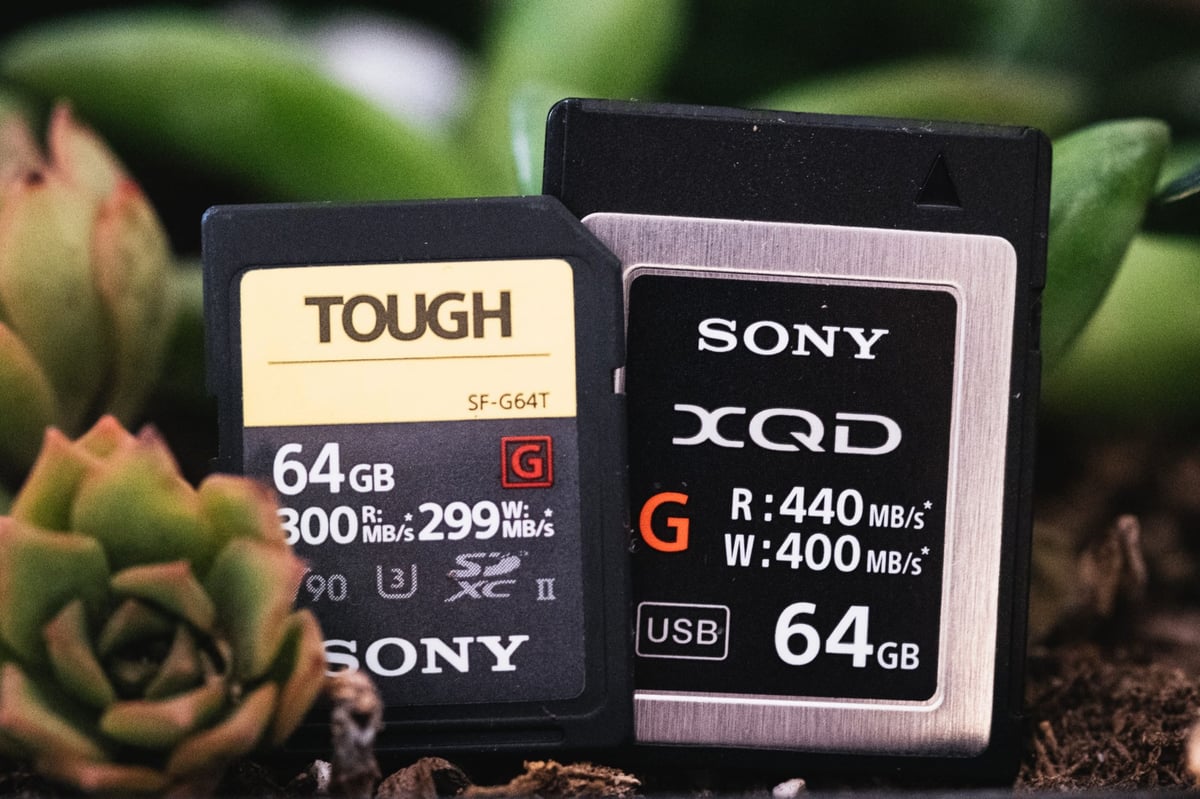
A few UHS-II SD cards in the Sony A7rIV are now clearing the buffer at a rate of about 200MB/s which is very similar to the XQD speeds in the Nikon Z7.

  Est. Buffer Memory Card Speed 
Sony A7rIV 4GB 200.08MB/s
Nikon Z7 2GB 207.96MB/s

This is an unknown improvement we’re seeing out of the new Sony cameras that isn’t really a feature listed on any sort of spec sheet. People think UHS-II is UHS-II, but some cameras run UHS-II cards at slower speeds of about 100MB/s like the Canon EOS R, and some run them at faster speeds like the Nikon D850 and now the Sony A7rIV and most likely the Sony A9 II.

It may not seem like that big of a deal but it’s actually a huge quality of life improvement, especially considering the 61MP sensor inside the Sony A7rIV, and the workload that the Sony A9 II was built for.

This tells us that unless Nikon is capable of getting more speed out of CFexpress cards in their Z cameras, it was an epic mistake to go with a single XQD card since UHS-II is showing that it can match the speed Nikon is getting with XQD. Based on these results, I think just about everyone would take dual UHS-II over XQD.


The History of Sony UHS-I and UHS-II

Sony has a history of actually being the worst performing cameras when it came to memory cards. For years, actually, up until the Sony A7III and A7rIII their camera barely matched UDMA 4 speeds.

For whatever reason, Sony would not put a faster bus in their cameras, instead, they compensated by increasing the size of the buffer. Today they have the largest buffer in any mirrorless cameras at around 4GB in the Sony A7rIV.

  Est. Buffer Size Memory Card Speed
Sony A7r 700MB 35.46MB/s
Sony A7rII 900MB 35.27MB/s
Sony A7rIII 2.7GB 128.04MB/s
Sony A7rIV 4GB 200.08MB/s

The problem with the big buffer is that the A7rII memory cards with that 42MP sensor could only read from the buffer at a speed of about 35MB/s. This made the camera painful to use because you were pretty much locked out of your camera until that buffer cleared.

With the latest release of the Sony A7rIV and the Sony A9 II, Sony has overhauled the guts of the cameras by adding dual UHS-II cards with actual competitive performance.

UHS-II specs are theoretically capable of going up to 299MB/s, although realistically they max out write speeds somewhere around 220MB/s in PCs with UHS-II readers. In my in-camera speed tests, I’ve yet to see them break 205MB/s which is probably maxing the capacity of the cards.

The cameras are actually writing faster than what I can measure because there is always a small processing delay before each shot gets to the card.

I could get more accurate results by testing with data from after the buffer filled which would use fewer shots, but I like to see more real-world performance so I can compare the processing impact on the writing process between cameras and brands.


Mirrorless Finally Match DSLR Tech . . . Sort Of

Today small UHS-II and XQD mirrorless cameras are still not capable of matching even older DSLRs when it comes to memory card write speeds and overall buffer performance with the more advanced memory cards like CFast and XQD.

While UHS-II speeds are very fast in the Sony A7rIV and as fast as XQD in the mirrorless space, the Nikon D850 still shows significant performance gains with XQD. However, the Sony A7rIV has finally caught up to the Nikon D850 with UHS-II performance.

It would seem like the bigger designs of the DSLRs do have some significant advantages of being able to push the electronics harder, faster and hotter.

It will be interesting to see what sort of performance gains we see when Nikon adds CFexpress support to their Z6 and Z7.

I personally doubt we’ll see very significant gains since it’s very likely Nikon only included single-lane PCIe 2.0 tech in their cameras and we are already seeing some sort of throttling in the Z7 compared to the D850 with XQD.

What I am wondering now is, will we see a push for Type-A CFexpress cards which are about the same size of SD cards, or will we see UHS-III memory cards soon?

Would it make sense to pair up the Type-B CFexpress cards with smaller Type-A CFexpress cards as the backup?

I would imagine memory card manufacturers would love for camera companies to yet again adopt another new format so we would all have to buy all new cards.

0
0
1
0
0
Alik Griffin

A professional video editor, and photographer with a Bachelors in Film studies from UCSD. Based in Los Angeles, I have created commercials, trailers, and other video content for various clients and platforms since 2005. I also love to write about my passions and share my insights on my blog.

Related Topics
  • Memory Card Speed Tests
  • Nikon Z7
  • Sony A7rIV
Previous Article
Best Memory SD Memory Card Canon 90D
  • Memory Card Buffer Tests

Best SD Cards Canon 90D | Speed and Buffer Tests

  • Alik Griffin
  • April 20, 2024
View Post
Next Article
  • SD Memory Cards

Kingston Canvas React Plus V90 SD Memory Card Review

  • Alik Griffin
  • March 6, 2025
View Post

Subscribe

Subscribe now to our newsletter

You May Also Like
Pure Cinema
View Post
  • Blog
  • Featured
  • Lens Reviews
  • Reviews

Viltrox TCL-X100VI Review | A Budget-Friendly 50mm Upgrade

  • Alik Griffin
  • February 21, 2026
  • No comments
Thypoch Simera 75mm f1.4 Review
View Post
  • Blog
  • Featured
  • Lens Reviews

Thypoch Simera 75mm f1.4 Review & Sample Photos

  • Alik Griffin
  • February 18, 2026
  • No comments
Kakurajima View
View Post
  • Blog
  • Featured
  • Lens Reviews

Viltrox WCL-X100VI Review | A Budget-Friendly 28mm Upgrade

  • Alik Griffin
  • February 17, 2026
  • 2 comments
Sony A7V Announcement
View Post
  • Blog
  • What's New

Sony A7V – They’re Back In The Game

  • Alik Griffin
  • December 30, 2025
  • 4 comments
11 comments
  1. Dave Burbank says:
    November 15, 2019 at 1:51 pm

    Thanks for this. I have the a9ii. How can I test the a9ii to see if, in fact, it shows the same advantages as the a7rIV? I can tell you this:

    Writing to a Sony G SDXC II 64GB card with the a9ii
    With settings to replicate the fastest shooting environment
    The buffer fills after around 230 compressed RAW exposures
    It takes 1 minute 17 seconds to write the full buffer to the card

    Is this meaningful or is there a better way to test?

    Reply
    1. Alik Griffin says:
      November 15, 2019 at 2:43 pm

      It’s a little complicated but I’ll do my best to explain it.

      The camera needs to be set to ISO 100 to avoid any slowdown from noise reduction in the analogue to digital conversion process. Then shoot burst with continuous burst shooting uncompressed until the buffer fills, record this with another camera recording at 60fps. I do it a few times for each card tested so I can see if there are any issues.

      You’re then going to take the number of shots and calculate the total MB of the burst sequence against the time it took from the moment the shutter engaged to when the red buffer light turns off, this will give you the MB/s.

      Shooting compressed will slow things down with these cameras because the camera has to do extra processing on each shot before it can leave the buffer. But you get more shots in the buffer because the files are smaller. The time the camera actually takes to write to the card should be the same, it’s just there is always little delays as each shot leaves the buffer, and those delays are longer with compressed, but sometimes that is offset by the time it takes to write since the files are a lot smaller.

      Since the Sony A7rIV and A9II both now have dual UHS-II card slots, they are likely using identical hardware. That was the case with the A9 and A7rIII.

      The results will likely not match up exactly between the A9II and the A7rIV though since they both produce radically different file sizes. I would imagine we would see a difference in performance somewhere around +-20MB/s.

      Just be sure you’re using one of the fast cards from my A7rIV benchmarks in your A9II to get the maximum performance. Not that many cards performed near the 200MB/s mark and it looks like the Sony cameras are favoring a certain type of flash. Sony also just released a Tough M card, so if you’re a video shooter, those might be a solid option.

      Reply
      1. Dave Burbank says:
        November 16, 2019 at 6:11 am

        Thank you for taking the time to share your methodology. If I get meaningful data testing my a9ii I’ll share it here.

        Reply
        1. Alik Griffin says:
          November 16, 2019 at 8:33 am

          Thanks. I’m going to try to see if I can rent it before going back to Japan in two weeks.

          Reply
      2. trident says:
        November 25, 2019 at 5:04 pm

        There is a trick to record the time. Shoot the screen with a stop watch running. Then every frame will have time recorded.

        Reply
      3. rlmv says:
        January 23, 2020 at 10:34 pm

        Thanks for taking the time to do this! I tried to reproduce your results, but I’m not getting close to 200mb/s with a UHS-II Sandisk Extreme Pro 300mb/s card. I timed from when I depress the shutter to when the buffer clears to 0. The card records 32 uncompressed raws in ~26 seconds, which comes out to ~151mb/s. A UHS-I Sandisk Extreme Pro 95mb/s card ~51 seconds or 77mb/s. What do you think is different?

        Reply
        1. Alik Griffin says:
          January 24, 2020 at 7:42 pm

          And you shot Uncompressed? And make sure you’re ISO 100. It makes a difference.

          Reply
          1. rlmv says:
            January 24, 2020 at 8:25 pm

            Yes, uncompressed, ISO100.

          2. Alik Griffin says:
            January 24, 2020 at 8:53 pm

            That’s odd, I wonder if there is a different model of UHS-II card you have. Mine is getting close to being 2 years old now. It’s also the 64GB model, it use to be that those were slightly faster than the bigger ones.

          3. rlmv says:
            January 24, 2020 at 10:34 pm

            I’m running a 64GB as well. CG64G1935TR3N003501683. Here’s a video with timing – https://photos.smugmug.com/photos/i-Dv2f3Rs/0/248a20bf/640/i-Dv2f3Rs-640.mp4

            Now here’s the really bizarre part, I’m not able to get more than 80mb/s with this same UHS-II card anymore. Even though I formatted prior to testing, it’s now taking nearly twice as long to record and clear the buffer on 32 uncompressed files. Also, when I try to do a file transfer on either a Windows 10 or OSX, it’s peaking at ~80mb/s. When I run Crystal Disk, it also peaks at 80mb/s. Have you ever seen that before? It’s like somehow it’s locked itself at UHS-I speeds.

          4. Alik Griffin says:
            January 24, 2020 at 11:42 pm

            I’ve seen that with bad card readers. Also, try the second card slot to make sure you didn’t bend a pin or something inside the camera.

Leave a Reply to rlmv Cancel reply

Your email address will not be published. Required fields are marked *

San Clemente Sunset

Join The Newsletter

Featured
  • Mud Face
    Nikon Z 35mm f1.4 vs Nikon Z 35mm f1.8 S – Sample Images
    • 28 comments
  • Kalina Flower FIeld
    Nikon Z 50mm f1.4 Review & Sample Photos
    • 24 comments
  • Viltrox 9mm f2.8 Air Review
    Viltrox 9mm f2.8 AIR Review & Sample Photos
    • 2 comments
  • What is Micro Contrast
    Micro-Contrast, Is It Real? – Samples With Lens Comparisons
    • 17 comments
  • Nikon Z 26mm f2.8 Review – A Little Miracle
    • 24 comments
  • Zeiss Planar 50mm f2 on the Leica M11
    Zeiss Planar 50mm f2 Review & Sample Photos
    • 5 comments
  • Kalina Picking Sakura
    Nikon Z 85mm f1.8 S Review & Sample Photos
    • 20 comments
  • Thypoch Simera 75mm f1.4 Review
    Thypoch Simera 75mm f1.4 Review & Sample Photos
    • No comments

Subscribe

Subscribe now to our newsletter

Privacy Policy | Licensing | About Me | Contact

Copyright © Alik Griffin Inc. 2025

Input your search keywords and press Enter.












