
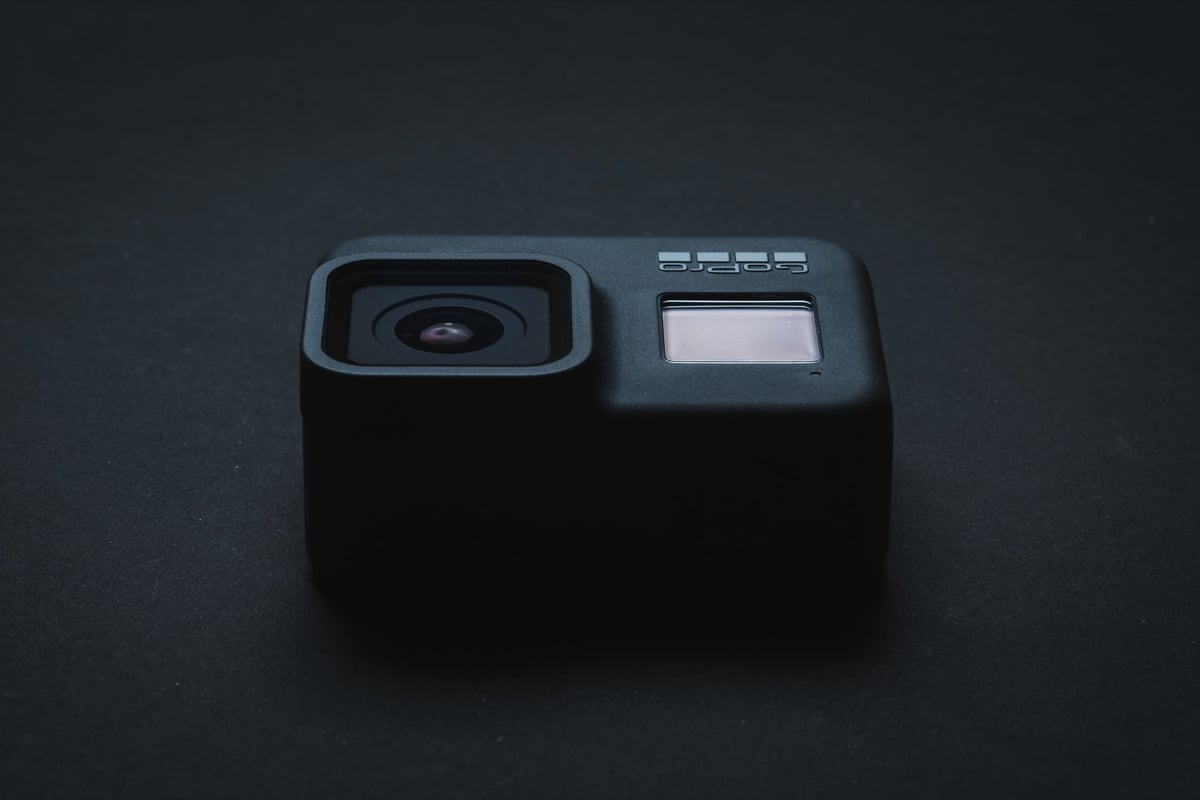
 When considering a memory card for your GoPro Hero 8 Black, there are several important features to remember. This camera can shoot 4K at 60 frames per second, with a high bitrate of 100 Mbps and 8-bit color support. For this reason, you’ll want to ensure your memory card is up to the task in speed and capacity.
The GoPro Hero 8 requires a U3 UHS-I micro SD card to support the max bitrate of 100 Mbps.
Recommended Micro SD Cards For GoPro Hero 8
Here are the latest official memory card recommendations from GoPro. For the Hero 8, do not order any cards larger than 256GB from this list, as they may cause compatibility issues.
| Recommended Cards | Speed Class | Check Price | ||
|---|---|---|---|---|
| MicroSD Express | ||||
| Lexar PLAY PRO EX 256/512GB / 1TB | EX | Amazon | ||
| Sandisk EX 128GB/512GB | EX | Amazon | ||
| Samsung EX 256GB | EX | Amazon | ||
| PNY EX 128GB/256GB | EX | Amazon | ||
| Adata Premier Extreme EX U3 | EX | Amazon | ||
| Addlink EX U3 | EX | Amazon | ||
| Dato EX V30 A1 | EX | Amazon | ||
| Gigastone EX V30 A1 256GB | EX | Amazon | ||
| Patriot EP EX V30 | EX | Amazon | ||
| TeamGroup APEX EX V30 A1 256GB | EX | Amazon | ||
| UHS-II | ||||
| Lexar 1800x V60 | UHS-II | |||
| Lexar 1000x V60 | UHS-II | Amazon | ||
| Lexar Gold V60 A1 | UHS-II | Amazon / B&H | ||
| ProGrade V60 | UHS-II | Amazon / B&H | ||
| Delkin Power V90 | UHS-II | Amazon / B&H | ||
| Angel Bird A1 V60 | UHS-II | Amazon / B&H | ||
| UHS-I | ||||
| Sandisk Extreme Pro U3 A2 | UHS-I | Amazon | X | |
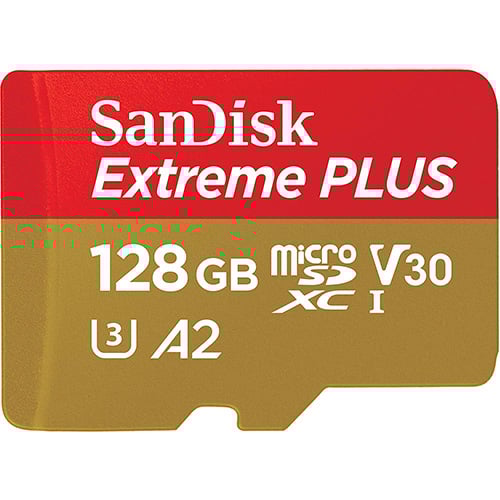
| Sandisk Extreme Plus U3 A2 | UHS-I | Amazon / B&H | X | |
| Sandisk Outdoors 4k V30 A2 | UHS-I | Amazon / B&H | ||
| Sandisk Extreme U3 A2 256GB-1TB | UHS-I | Amazon / B&H | ||
| Sandisk Extreme U3 A2 128GB | UHS-I | Amazon / B&H | X | |
| Sandisk Ultra U1 A1 – 0ld | UHS-I | B&H | ||
| Sandisk Nintendo Switch V30 A1 | UHS-I | Amazon / B&H | ||
| Sandisk High Endurance V30 | UHS-I | Amazon / B&H | ||
| Sandisk Max Endurance V30 | UHS-I | Amazon / B&H | ||
| Samsung Pro Ultimate v30 A2 | UHS-I | Amazon / B&H | ||
| Samsung Pro Plus V30 A2 | UHS-I | Amazon / B&H | X | |
| Samsung EVO Plus V30 A2 | UHS-I | Amazon / B&H | X | |
| Samsung EVO Select V30 A2 | UHS-I | Amazon / B&H | ||
| Samsung Pro Endurance V30 | UHS-I | Amazon / B&H | ||
| Kingston Canvas Go! Plus V30 A2 | UHS-I | Amazon / B&H | X | |
| Kingston Canvas Select Plus V30 A1 | UHS-I | Amazon / B&H | ||
| Kingston Industrial V30 A1 | UHS-I | X | Amazon / B&H | |
| Lexar Silver Plus V30 A2 | UHS-I | Amazon / B&H | X | |
| Lexar Silver1066x A2 | UHS-I | Amazon / B&H | ||
| Lexar Blue 633x V30 A1/A2 | UHS-I | Amazon / B&H | ||
| Lexar FLY V30 A2 | UHS-I | Amazon / B&H | ||
| Lexar PLAY U3 A2 512GB-1TB | UHS-I | Amazon / B&H | ||
| Lexar PLAY U3 A1 256GB | UHS-I | Amazon / B&H | ||
| Lexar PLAY U1 A1 128GB | UHS-I | Amazon / B&H | ||
| Lexar E-Series Plus U3 A2 | UHS-I | Amazon | ||
| Lexar E-Series U3 A1 | UHS-I | Amazon | ||
| Delkin Black V30 | UHS-I | B&H | ||
| Delkin Hyperspeed V30 | UHS-I | Amazon / B&H | ||
| Delkin Select V30 64GB | UHS-I | Amazon / B&H | ||
| Delkin Dashcard V30 | UHS-I | Amazon / B&H | ||
| Transcend 500S U3 | UHS-I | X | Amazon / B&H | |
| Transcend 350V High Endurance U3 | UHS-I | X | Amazon / B&H | |
| Transcend 340S Ultra Performance V30 A2 | UHS-I | X | Amazon / B&H | |
| Transcend 330S High Performance V30 A2 | UHS-I | X | Amazon / B&H | |
| Transcend 300s V30 A1 | UHS-I | Amazon / B&H | ||
| PNY Premier-X A2 V30 | UHS-I | Amazon / B&H | X | |
| PNY PRO Elite U3 A2 | UHS-I | Amazon / B&H | X | |
| PNY PRO Elite U3 | UHS-I | Amazon / B&H | ||
| PNY Elite-X V30 A1 | UHS-I | Amazon / B&H | ||
| Amplim 667X V30 A1 | UHS-I | Amazon | ||
| Netac Pro A1 U3 | UHS-I | X | ||
| Patriot EP PRO U3 | UHS-I | Amazon | ||
| Patriot EP A1 V30 | UHS-I | Amazon / B&H | ||
| Patriot High Endurance U3 | UHS-I | X | ||
| Silicon Power Superior Pro | UHS-I | X | B&H | |
| Silicon Power Superior V30 A2 | UHS-I | Amazon / B&H | ||
| Silicon Power Superior V30 A1 | UHS-I | |||
| Silicon Power 3D NanD V30 A1 | UHS-I | Amazon / B&H | ||
| Silicon Power GAME V30 A1 | UHS-I | Amazon / B&H | ||
| Silicon Power High Endurance U3 | UHS-I | Amazon / B&H | ||
| Ritz Gear V30 A1 | UHS-I | Amazon | ||
| Gigastone 4k Camera Extreme Max | UHS-I | X | Amazon | |
| Gigastone 4k Camera Extreme | UHS-I | X | Amazon | |
| Gigastone 4k Camera Pro Max V30 A2 | UHS-I | X | Amazon | |
| Gigastone 4k Camera Pro V30 A2 | UHS-I | X | Amazon | |
| Gigastone Camera Plus V30 A1 | UHS-I | X | Amazon | |
| Gigastone 4k Game Turbo A2 U3 | UHS-I | X | Amazon | |
| Gigastone Game Pro Max V30 A2 | UHS-I | X | ||
| Gigastone 4k Game Pro V30 A2 | UHS-I | X | Amazon | |
| Gigastone Gaming Plus A1 V30 | UHS-I | X | Amazon | |
| Gigastone 10x High Endurance V30 | UHS-I | X | Amazon | |
| TeamGroup A2 Pro+ 256GB-1TB | UHS-I | X | Amazon | |
| TeamGroup A2 Pro+ 128GB | UHS-I | X | Amazon | |
| TeamGroup Go V30 A1 | UHS-I | X | Amazon | |
| TeamGroup High Endurance V30 | UHS-I | X | Amazon | |
| Amazon Basics V30 A2 | UHS-I | Amazon |
Camera Firmware Issues To Look Out For
GoPro’s track record with memory card compatibility has been shaky. While most cards perform admirably in the latest GoPro cameras, a few remain to avoid. We like to recommend cards that are compatible with most GoPro camera models.
GoPro Hero 8 Capacity
Were you wondering about the max memory card size for the GoPro Hero 8 Black?
The GoPro Hero 8 has a maximum memory card capacity of 256GB. For a sweet spot in terms of battery life and the camera’s 100Mbps bitrate, most users will find the 128GB to 256GB range just right. This camera records at a rate of 12.5MB/s, so keep that in mind.
GoPro Hero 8 Memory Card Compatibility
For the GoPro Hero 8 Black, aim for a U3-speed micro SD memory card. These cards guarantee a minimum write speed of 30MB/s, which gives plenty of headroom for the camera’s recording speed of 100Mbps or 12.5MB/s.
To avoid technical troubles, stick to memory cards that cooperate seamlessly with this device, as recommended above. Avoid specialty cards tailored for Nintendo Switch, as they can sometimes be finicky.
If you encounter issues like rapid battery drain or lost clips, even with a compatible card, consider swapping or downsizing from 256GB to 128GB. That’s done the trick for me in the past.
Can You Use UHS-II cards?
You can use UHS-II cards in the GoPro Hero 8, but here’s the deal: they won’t turbocharge the camera’s performance since it sports only a single UHS-I memory card slot. To hit GoPro’s peak speeds of 100mbps or 12.5MB/s, a UHS-I U3 memory card is all you need.
If you’re interested in faster footage transfers with a UHS-II card, you can use a UHS-II micro SD memory card reader with the UHS-II card for improved transfer speeds.
Micro SD Card Related Camera Specs
Sensor Size: 12 MP 4:3 1/2.3 inch CMOS |
GoPro Hero 8 Micro SD Card Capacity & Sizes
If you’re wondering what SD card size to get for your GoPro, I’ve compiled a short guide to help you decide.
The maximum Micro SD card size for the GoPro Hero 8 is 256GB. Using cards larger than this could cause issues.
I recommend you get a 128GB card, but if you’re on the fence or want an even bigger card, here are a few tips.
When recording at the max bitrate, you will burn through two batteries before you burn through a 64GB memory card in a GoPro. I don’t usually carry more than two batteries to keep the camera recording long enough to last through 64GB of data.
So why not just get a 64GB card?
Sometimes, you forget to clear off my card from the day before going out again, so having the extra space allows for at least another few hours of recording.
Should you get two 64GB or one 128GB card?
The memory cards are small and easy to lose, so the fewer micro SD cards there are, the better.
GoPro Hero 8 Bitrates
The GoPro Hero 8 can record two codecs, H.264 and H.265, also known as HEVC.
It can record H.265 or HEVC up to 100Mbps, but I captured the rates in the various record settings.
| Hero 8 Recording Options | Standard HEVC | High HEVC |
| 4k | ||
| 60p | 58Mbps | 96Mbps |
| 24p, 30p | 58Mbps | 95Mbps |
| 2.7k | ||
| 240p | 57Mbps | 75Mbps |
| 1080p | ||
| 120p | 58Mbps | 95Mbps |
GoPro Hero 8 Black Issues
There are a few issues or Micro SD card errors that you might experience with the GoPro cameras.
Camera Shuts Off: These GoPro cameras are very small and need many open airflows to stay cool. If you find that your camera stops recording or just turns off, it might be overheating. Try placing your camera in the open air or cooler to fix this issue.
I struggled to get a 30-minute record time with my Hero7 last year when the camera was sitting, but it always worked fine on my bike. I thought something was wrong with it, so I put it in the refrigerator, and all my recording issues disappeared.
Startup or recording issues: If you experience strange boot issues or inconsistent record issues, the memory card can sometimes be to blame. Last year, we had these types of issues when using the GoPro in the Karma Grip. The only way we got reliable performance was to drop down to a 64GB card. The larger cards still worked fine with standard use.
Lag After Recording: If you notice a long delay after you stop recording video, this is not a problem with the camera but the card. Some cards do this.
Long Delay After Shooting Burst: If you experience a very long delay after shooting a 10-shot burst, this is because the GoPro has a very slow buffer. It feels worse in the Hero 8 than it does in the Hero 7 because the new 8 allows you to shoot bursts in RAW+JPG. If you need to burst faster, switch to Standard instead of RAW, which produces only JPG files.
When just shooting burst JPG, the Hero 8 appears faster than the Hero 7.
Strange Power On And Off Problems: There is another issue that sometimes happens with GoPro cameras, and I especially saw this with the new GoPro Hero 9, where a new camera will behave funny, with issues almost like there is a problem with the battery, then as time goes on these issues subside. I think this may be due to an internal battery not having power. Fujifilm and many other cameras will often reset the user settings if the internal battery loses its charge, and often, when you first buy the camera, it takes a day or two before your settings are saved after a long power down. So for the first day or two, if you have any weird power issues, just let the camera run for a while, keep it on, and use it as much as possible to let that internal battery get charged, if that is what’s happening.
Best Micro SD Card GoPro Hero 8 | Conclusions
There is no need to stress about memory cards for your GoPro Hero 8. Most of the bumps in the road come from using off-brand or specialized cards, such as the Sandisk Nintendo Switch and high-endurance cards.
GoPro cameras are finely tuned to perform exceptionally well with Sandisk and Samsung micro SD cards. The Sandisk Extreme cards are your top pick, but I’ve had solid experiences with Extreme Pro and cards too.
If you’re still wrestling with odd issues like camera hiccups or freezes, it’s almost certainly tied to your memory card. The initial move to address it is always switching to a different card than the one you used.
Related Articles
Best Micro SD Cards GoPro Hero 12
Best Micro SD Cards GoPro Hero11
Best Micro SD Cards GoPro Hero 10
Best Micro SD Cards GoPro Hero 9
Have an even older camera? Check out this guide to the Best Micro SD Cards For GoPro Cameras.















Leave a Reply