
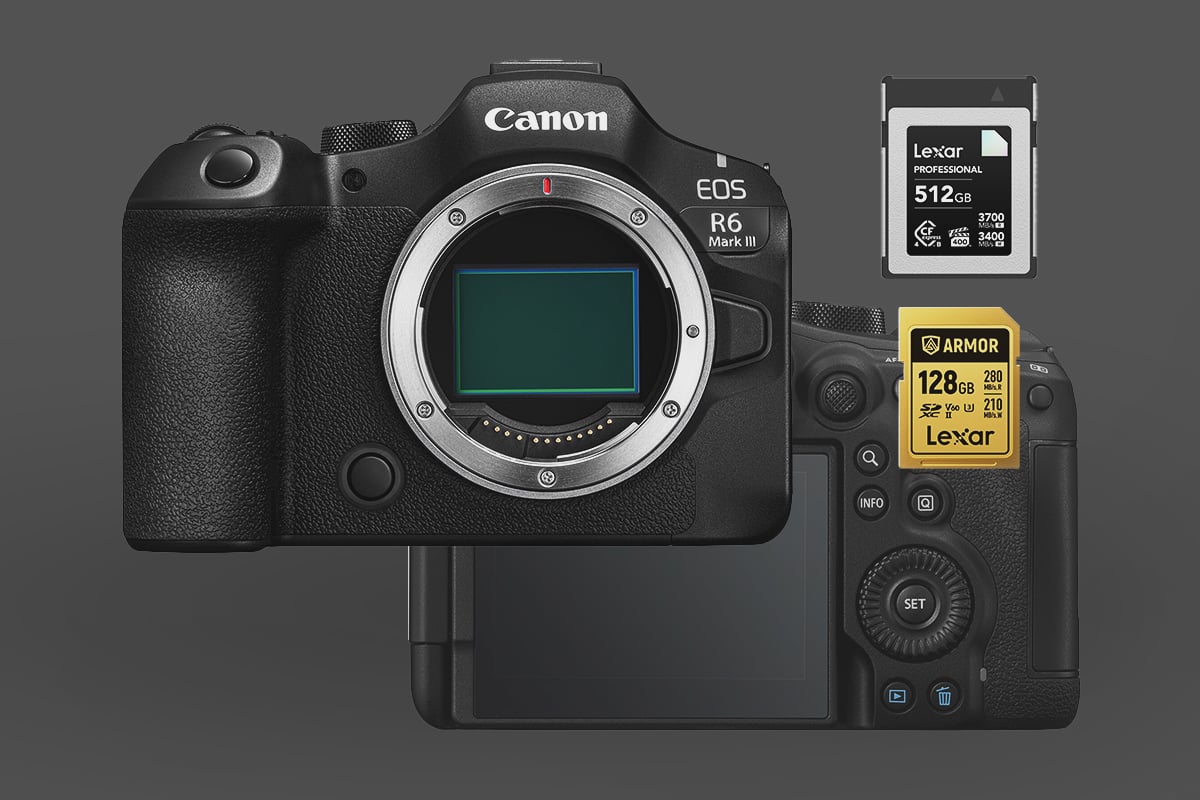
The Canon EOS R6 Mark III stands out as a versatile hybrid mirrorless camera, featuring a dual-slot design that supports CFexpress Type B cards in the primary slot and SD UHS-II cards in the secondary slot. This setup provides photographers and videographers with flexible options for high-performance storage.
Note: This is very different from the previous Canon R6 Mark II, which used dual SD cards. This camera is much more in line with the Canon R5 Mark II due to its CFexpress + SD card configuration, which allows it to take advantage of high-end video codecs.
Capacity Note: The camera supports memory cards up to 8 TB.
Canon R6 Mark III – B&H
Top CFexpress Type B Memory Cards for the Canon R6 Mark III
When selecting the best CFexpress Type B cards for your Canon R6 Mark III, prioritize reliability and speed to handle demanding bursts and video workflows. VPG400-rated cards are ideal for professional video applications, though they’re not essential for all users.
The VGP400 rating means it is guaranteed to sustain a write speed of 400 MB/s.
For most people shooting mostly photography and a little video, I would recommend something like a Lexar Gold or Silver series, or a similar class from another brand like Prograde Gold or Delkin Power. While they aren’t VGP400-rated, they still easily sustain these speeds from my tests.
For really high-end video, I would go with the higher-end cards with the VGP400 rating, such as Prograde Iridium and Lexar Diamond. If you’re just shooting H.265 or H.264, this won’t be as necessary as slower cards can handle those codecs without issue.
| CFExpress Type-B Memory Cards | Review Links | Rating | RatedW | RatedR | Sustained | Minimum | USBW | USBR | Tested Sustain | Check Price |
|---|---|---|---|---|---|---|---|---|---|---|
| CFExpress Type-B | ||||||||||
| Lexar Diamond CF4.0 128GB-1TB | VPG400 | 3400 | 3700 | 3200 | 400 | Amazon / B&H | ||||
| Lexar Gold CF4.0 512/1TB/2TB | 3300 | 3600 | 3000 | Amazon / B&H | ||||||
| Lexar Gold 128/256GB | Lexar Gold 128-512GB CFeB Review | 1500 | 1750 | 1000 | 1410 | 1525 | 1382 | Amazon / B&H | ||
| Lexar Silver CF4.0 256/512GB/1/2TB | 1650 | 1750 | 200 | Amazon | ||||||
| Prograde Iridium CF4.0 400GB | VPG400 | 3000 | 3550 | 850 | 2704 | 3212 | 808 | Amazon / B&H | ||
| ProGrade Gold CF4.0 256GB/512GB | 3,000 | 3,400 | 850 | 2545 | 3203 | 844 | Amazon / B&H | |||
| Delkin Black CF4.0 512GB/1/2TB | 3200 | 3600 | 2040 | 400 | 1736 | 2476 | 1693 | Amazon / B&H | ||
| Delkin Power CF4.0 512GB | 3240 | 3650 | 820 | Amazon / B&H | ||||||
| Wise Pro MkII CF4.0 660GB/1.3TB | 3600 | 3700 | 3400 | B&H | ||||||
| Wise Advance Mk II CF4.0 512GB | 2600 | 3400 | 800 | B&H | ||||||
| Nextorage B2 Pro CF4.0 660/1330GB | VPG400 | 3600 | 3700 | 3400 | 400 | B&H | ||||
| Nextorage B2 Pro CF4.0 165/330GB | VPG400 | 3600 | 3900 | 3400 | 400 | B&H |
Essential SD UHS-II Memory Cards for Backup and Redundancy
To enable in-camera redundancy for photo backups, you’ll need a compatible SD card in the secondary slot. Keep in mind that the overall buffer-clearing performance of the R6 Mark III will be constrained by the speed of this SD card, so opting for a V90-rated option is advisable for critical shoots where speed matters.
I keep v60 cards on the list because they offer amazing value for lower-bitrate video recording and are totally fine for slower-paced shooters doing landscape, portrait, lifestyle, and street photography.
Note: There are a few brands making Tough cards now, such as Sony Tough, Delkin Black and now Lexar ARMOR. The Sony and Lexar cards are very robust, but they exclude the write protection switch, which might be important for some shooting applications.
| SD Memory Card Recommendations | Review Links | USB Write | USB Read | Check Price |
|---|---|---|---|---|
| SD UHS-II V90 | Hide | |||
| Sandisk Extreme Pro V90 32-512GB | Sandisk Extreme Pro V90 UHS-II Review | 268 | 293 | Amazon / B&H |
| Sony G Tough v90 32-256GB | Sony G Tough V90 UHS-II Review | 258 | 296 | Amazon / B&H |
| Delkin Black v90 64/128/256GB | 253 | 278 | B&H | |
| Delkin Power v90 64/128/256GB | Delkin Power v90 | 240 | 275 | Amazon / B&H |
| Adata Premier ONE v90 64/128/256GB | Adata v90 | 229 | 268 | Amazon |
| Amplim 2000x V90 32-128GB | 275 | 287 | Amazon | |
| Kingston Canvas React V90 32-256GB | Kingston Canvas React Plus V90 | 274 | 292 | Amazon / B&H |
| Kodak V90 32/64/128GB | 260 | 272 | Amazon | |
| SD UHS-II V60 | Hide | |||
| Sandisk Extreme Pro v60 256/512/1TB | 189 | 279 | Amazon / B&H | |
| Lexar ARMOR Gold V90 256GB-1TB | 191 | 258 | Amazon / B&H |
Optimized Memory Card Choices for Videographers Using the Canon R6 Mark III
Your choice of memory card plays a pivotal role in determining the achievable video resolution, frame rates, and overall bitrate on the Canon R6 Mark III. Here’s a breakdown of key recording modes and their storage requirements:
| Recording Mode | Maximum Bitrate (MB/s) | Required Card Type | Rationale |
|---|---|---|---|
| RAW Standard | Up to 325 MB/s (2600 Mb/s) | CFexpress Type B | Essential for managing the intense data demands of internal 7K RAW video. |
| High Bitrate Video | Above 90 MB/s (720 Mb/s) | CFexpress Type B | Required for premium codecs, elevated frame rates, and professional-grade output. |
| Medium Bitrate Video | Under 90 MB/s (720 Mb/s) | SD UHS-II V90 | Suitable for standard compressed formats with moderate data throughput. |
SD Card Options: Striking a Balance Between Affordability and Performance on the R6 Mark III
You’ll mostly want to use the SD Card slot for backups; however, for video, you can save yourself some money with V60 or even V30 SD cards by recording at a lower bitrate, especially if you are recording under 60MB/s (480Mbps) or 30MB/s (240Mbps). Which is a lot of people. I don’t know many people recording on YouTube at super-high bitrates, especially for talking-head or travel-style videos.
Achieving Peak SD Speeds (V90 Rating). V90 cards generally offer less bang for the buck than what you can get from CFExpress cards. The only reason I would use one for video over CFexpress Cards is if I were having severe heat issues, since SD cards, from my experience, have a smaller heat footprint. For example, on my Nikon Z8, I often got a hot card warning when shooting video for a long time with CFexpress cards, whereas I never got that warning with SD cards.
Affordable Options for Lighter Workloads (V60 Rating) If your video projects involve bitrates below 60 MB/s (480 Mbps), a V60 UHS-II SD card will work without compromising reliability and often saves you a lot of money while reducing the card’s heat output (from my experience).
Should You Upgrade to CFexpress 4.0 Cards for the Canon R6 Mark III?
The R6 Mark III is optimized for the CFexpress 2.0 protocol, meaning newer 4.0 cards work seamlessly but won’t boost in-camera burst or video recording speeds. There’s no downside to grabbing a 4.0 card if the deal is right, but hunting for discounted older models can yield big savings. Any speed benefits from 4.0 will only apply during file transfers via a compatible reader on a compatible computer.
Key Advice for Canon R6 Mark III Users
The R6 Mark III’s adaptability shines, but to fully tap into its prowess for rapid-fire photography and pro-level video, start with a VPG400 CFexpress Type B card—it’s non-negotiable for peak results. The SD UHS-II slot, while versatile, caps redundancy scenarios at lower speeds overall, so pair it with a V90 card to minimize performance dips and keep your workflow smooth.













Leave a Reply