
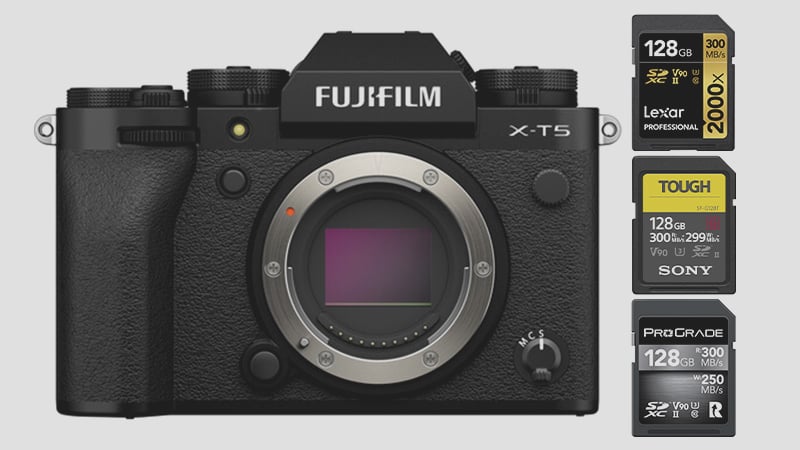
The Fujifilm X-T5 features a dual SD memory card configuration, supporting two UHS-II SD cards. You can still use UHS-I SD cards, which are suitable for casual photography or shooting at lower video bit rates of 200 Mbps and below. The best memory cards for the Fujifilm X-T5 are those with the UHS-II V90 card class.
Key Details You Should Know
- Max Bitrate: Shooting at the highest bitrate of 720Mbps will require UHS-II v90 SD cards.
- Moderate Bitrate: Shooting at the lower 360Mbps bitrate will only require UHS-II v60 cards – this is a more practical bitrate for most people.
- Photographers: Choose the fastest memory card that suits your shooting style. If you burst a lot and need that buffer cleared as quickly as possible, opt for the v90 cards; otherwise, v60 cards are sufficient, or even U3 UHS-I cards for more casual photography or landscape photography.
- Memory Card Capacity: No limit to memory card size in the Fujifilm X-T5.
Top 7 Recommended SD Cards for Fujifilm X-T5

The above chart provides a visual representation and compares the top two video bitrates on the Fujifilm X-T5 with the speeds of the best cards. These are the best-performing cards with the current X-Processor 5 series of Fujifilm cameras. I’ve included both v90 and v60 cards in the chart.
The blue line represents their in-camera performance, and the green line indicates their minimum sustained speed.
Here is additional information about each memory card listed in the chart. I’ve also included some new cards that have been upgraded, such as the Lexar ARMOR v60 UHS-II, which features a steel casing for added durability.
| Memory Cards | Speed Class | USB-C Write | USB-C Read | Links |
|---|---|---|---|---|
| SD UHS-II V90 | Hide | |||
| PNY EliteX-Pro90 V90 64/128/256GB | UHS-II v90 | 272 | 287 | Amazon / B&H |
| OWC Atlas Ultra V90 64-512GB | UHS-II v90 | 271 | 287 | Amazon / B&H |
| SD UHS-II V60 | Hide | |||
| Sandisk Extreme Pro v60 256/512/1TB | UHS-II v60 | 191 | 270 | Amazon / B&H |
| Lexar ARMOR Gold V60 256GB-1TB | UHS-II v60 | 179 | 252 | Amazon / B&H |
| Kingston Canvas React Plus V60 128GB | UHS-II v60 | 101 | 276 | Amazon |
| Sony M Tough V60 64-512GB | UHS-II v60 | 155 | 277 | Amazon / B&H |
| PNY EliteX-Pro60 V60 256GB | UHS-II v60 | 185 | 277 | Amazon / B&H |
To compare the USB read and write speeds of different cards, see All The SD Memory Cards Benchmarks in this guide.
This chart illustrates the buffer performance with each card.

Fujifilm X-T5 Memory Card-Related Specs
| Sensor: 40MP APS-C X-Trans 5 HR CMOS Processor: X-Processor 5 with Quad CPU Continuous Shoot: 20fps Cont. Shooting Record Limit: 90Min Est. Buffer Size: untested Memory Card Capacity: Unspecified by the manufacturer. This often means no limit. Memory Card Compatibility: Dual Card Slots – UHS-II / UHS-II Maximum Memory Card Size: no limit. Video: 6k 29.97 10-bit 4:2:2 360Mbps / DCI 4k 59.94 360Mbps / UHD 4k 59.94 720Mbps |
See my list of some of the Must-Have Accessories for the Fujifilm X-T5.
Best Memory Cards For Video
Cameras using bitrates refer to speeds in megabits per second, whereas memory cards refer to speeds in megabytes.
There is a difference between H.265 and H.264. H.265 files have better compression, so you’ll get better colors and compression with the same bitrate as H.264, but many computers can struggle with the H.265 codec. H.264 is a lot easier to work with on older or mid-range editing machines.
If running at the same bitrate, there is no difference in file size between 4 K, 8 K, and 1080p. The size of the files and the recording time are entirely based on the bitrate.
Additionally, if you can shoot All-I at H.265, that will be the best codec to use with this camera. Fujifilm is one of the few brands to offer All-I H.265.
| Video Rates | Megabytes | 128GB | 256GB | 512GB |
| H.265 720Mbps | 90MB/s V90 | 24min | 47min | 95min |
| H.265 360Mbps | 45MB/s V60 | 47min | 95min | 190min |
| H.265 200Mbps | 25MB/s U3 | 85min | 171min | 341min |
| H.265 50Mbps | 6.25MB/s U1 | 341min | 683min | 1365min |
Alternatively, you can use the bitrate calculator.
Best SD Card Fujifilm X-T5
Choosing the best memory card for the Fujifilm X-T5 is relatively straightforward. Opt for UHS-II (V90) cards if you want to take full advantage of the camera’s capabilities. If you want to save a little money on higher-capacity cards and don’t need the absolute best, go with the V60 cards. If you’re still building out your X-T5 kit, the complete Fujifilm X-mount lens guide covers every option — from affordable primes to professional zooms.
Full In-Camera Benchmark Results
The speeds below are measured directly in the Fujifilm X-T5 across a full burst sequence — from first frame through buffer drain. The X-T5 has dual UHS-II slots; cards were tested in slot 1.
UHS-II V90 Results
| Card | Speed |
| PNY EliteX-Pro90 V90 | 195 MB/s |
| OWC Atlas Ultra V90 | 190 MB/s |
| Lexar 2000x V90 | 180 MB/s |
| Adata V90 | 154 MB/s |
| Ritz Gear V90 | 147 MB/s |
| Wise Pro V90 | 146 MB/s |
| Transcend V90 | 136 MB/s |
| Delkin Power V90 | 136 MB/s |
| Delkin Black V90 | 132 MB/s |
| Kodak V90 | 123 MB/s |
| Amplim V90 | 123 MB/s |
| Kingston Canvas React V90 | 121 MB/s |
| AngelBird V90 II | 115 MB/s |
UHS-II V60 Results
| Card | Speed |
| Sandisk Extreme Pro V60 256GB+ | 154 MB/s |
| PNY EliteX-Pro60 V60 256GB | 153 MB/s |
| PNY EliteX-Pro60 V60 512GB | 153 MB/s |
| Lexar 1800x V60 | 142 MB/s |
| Sony M Tough V60 | 130 MB/s |
| AngelBird V60 II | 126 MB/s |
| Sony E V60 | 126 MB/s |
| Amplim V60 | 122 MB/s |
| Ritz Gear V60 64–256GB | 95 MB/s |
| OWC Atlas Pro V60 | 91 MB/s |
| Wise V60 | 90 MB/s |
| Hoodman Steel 1500x V60 | 85 MB/s |
| Sandisk Extreme Pro V60 64–128GB | 78 MB/s |
| Lexar 1667x V60 | 71 MB/s |
| Sony E V30 | 68 MB/s |
| Delkin Prime V60 | 50 MB/s |
What the Speed Numbers Mean
The top V90 cards hit 180–195 MB/s in the X-T5. For 720 Mbps video (90 MB/s required), any V90 card in this list covers it comfortably. For 360 Mbps (45 MB/s), even the slowest V60 cards exceed the requirement — V90 isn’t strictly necessary for most video work on this camera. The gap between top V90 and top V60 matters most for stills burst shooting at 20fps with 40MP files, where faster cards recover the buffer noticeably sooner.
UHS-I vs UHS-II — Does It Matter for the X-T5?
More so than on most APS-C cameras. The X-T5’s 40MP sensor produces noticeably larger files than previous X-T bodies — a compressed RAW runs roughly 40–50MB compared to 25–30MB from the X-T3. At 20fps burst shooting, that buffer fills fast regardless of card speed. What changes is how quickly it drains.
UHS-I cards top out around 65–70 MB/s in the X-T5. The fastest UHS-II V90 cards hit 180–195 MB/s. For burst-heavy shooting — wildlife, events, sports — the recovery time difference is real and noticeable. For landscape, travel, or anything where you’re not regularly emptying the buffer, UHS-I U3 works fine and costs considerably less per gigabyte.
Can I Use microSD Cards in the X-T5?
The X-T5 uses a full-size SD card slot. MicroSD cards work with an adapter, but from experience they can lose connection inside the adapter — I wouldn’t use one for anything critical. See the microSD memory card guide if you need to use one.
Frequently Asked Questions
Do I need a V90 card for the X-T5?
Only if you’re shooting 720Mbps video at the maximum bitrate, which requires 90 MB/s sustained write — that’s what V90 guarantees. For 360Mbps video or stills, V60 cards cover it comfortably and cost less. For most hybrid shooters, V60 is the practical sweet spot.
What is the fastest memory card for the Fujifilm X-T5?
Based on my in-camera tests, the PNY EliteX-Pro90 V90 tops the chart at 195 MB/s, followed by the OWC Atlas Ultra V90 at 190 MB/s and the Lexar 2000x V90 at 180 MB/s. Among V60 cards, the SanDisk Extreme Pro V60 (256GB+) and PNY EliteX-Pro60 both measured 153–154 MB/s — faster in-camera than several V90 options from other brands.
Can I use UHS-I cards in the X-T5?
Yes. Both slots accept UHS-I cards. For casual photography, landscapes, or video at 200Mbps and below, UHS-I U3 cards perform adequately. The limitation is buffer recovery — UHS-I takes noticeably longer to drain after a sustained burst compared to UHS-II.
How does the X-T5’s 40MP sensor affect card choice?
Larger files mean the buffer fills faster and drains slower than on lower-resolution cameras. If you’re upgrading from the X-T3 or X-T4 and keeping the same cards, you’ll notice the buffer behaves differently under sustained shooting. It’s the main reason a fast UHS-II card is more impactful on the X-T5 than it was on earlier X-T bodies. But you may also notice more processing delays if you’re shooting JPG or RAW+JPG, since effects like clarity and grain can eat up a lot of processor time and battery life when enabled. The X-T5’s faster processor should help, but expect some processing bottlenecks and reduced performance when recording with these film-simulator effects.













Leave a Reply