
This website contains affiliate links. We will earn a small commission on purchases made through these links. Some of the links used in these articles will direct you to Amazon. As an Amazon Associate, I earn from qualifying purchases.
The Sony A7III features a dual SD memory card slot configuration. Slot one can take V90 UHS-II cards, and slot two is limited to UHS-I cards. Due to this setup, selecting the right memory cards can be challenging, and you must decide which cards to use when running two cards simultaneously.
This guide will walk you through some great choices with in-camera benchmarks.
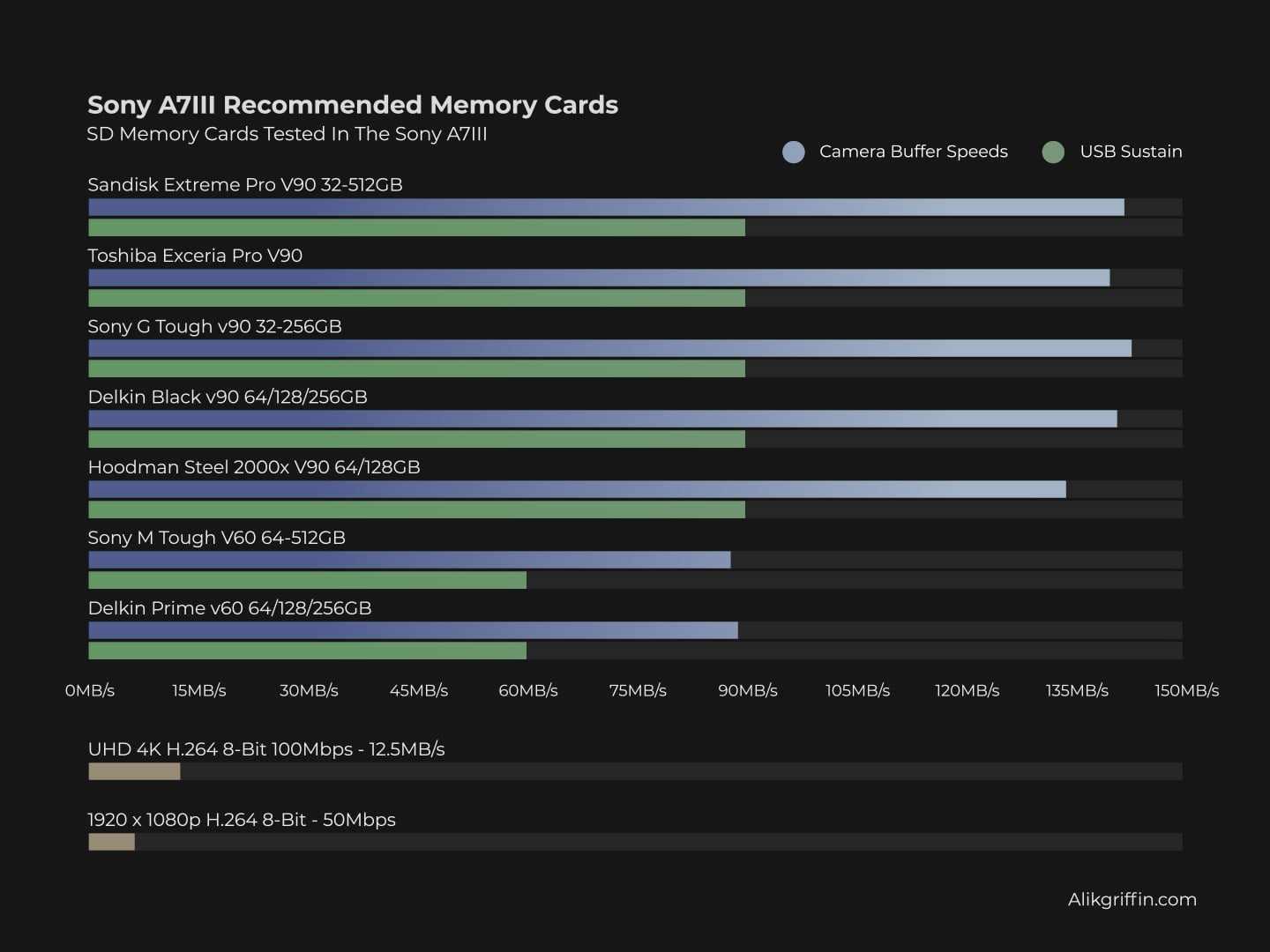
Recommended SD Cards for Sony A7 III
You will only need a UHS-I U3 card to shoot video, as the camera has a maximum bitrate of only 100Mbps, even at 4 K.
V90 UHS-II cards are best for running a single memory card set up with the maximum speed. The Sony A7III has good performance as long as you don’t use the second UHS-I memory card slot as a backup.
V60 UHS-II cards are a great compromise for speed and performance. They still run fast but cost a lot less.
Several new cards have been added to the list that I’ve found to work well when testing memory cards for the Sony A7IV. I’ve also updated with a few new cards, which have not been benchmarked yet.
| Recommended For Sony | Review Links | USB Write | USB Read | Check Price |
|---|---|---|---|---|
| SD UHS-II V90 | Hide | |||
| Sandisk Extreme Pro V90 32-512GB | Sandisk Extreme Pro V90 UHS-II Review | 268 | 293 | Amazon / B&H |
| Sony G Tough v90 32-256GB | Sony G Tough V90 UHS-II Review | 258 | 296 | Amazon / B&H |
| Delkin Black v90 64/128/256GB | 253 | 278 | B&H | |
| Kingston Canvas React V90 32-256GB | Kingston Canvas React Plus V90 | 274 | 292 | Amazon / B&H |
| Kodak V90 32/64/128GB | 260 | 272 | Amazon | |
| Ritz Gear VideoPro V90 64-512GB | 258 | 273 | Amazon | |
| SD UHS-II V60 | Hide | |||
| Lexar ARMOR Gold V90 256GB-1TB | 191 | 258 | Amazon / B&H | |
| Sony M Tough V60 64-512GB | Sony M V60 UHS-II Review | 153 | 269 | Amazon / B&H |
| Sony E v60 256GB | Sony E Series V60 256GB Review | Amazon / B&H |
If I were buying cards today and wanted the absolute best, I would opt for the Sony G Tough or Sony M Tough in Slot 1, and the Sony E in Slot 2. But only if I wasn’t shooting backup. If I were shooting backup with both cards, I would go with two Sony E cards.
Alternatively, you could opt for the Lexar ARMOR v60 cards, which are similar to the Sony Tough cards but slightly stronger, paired with a UHS-I Lexar card for the second slot.
Also, check out some of the Best Accessories For The Sony A7III
I also keep an up-to-date list of Every Lens For The Sony A7III
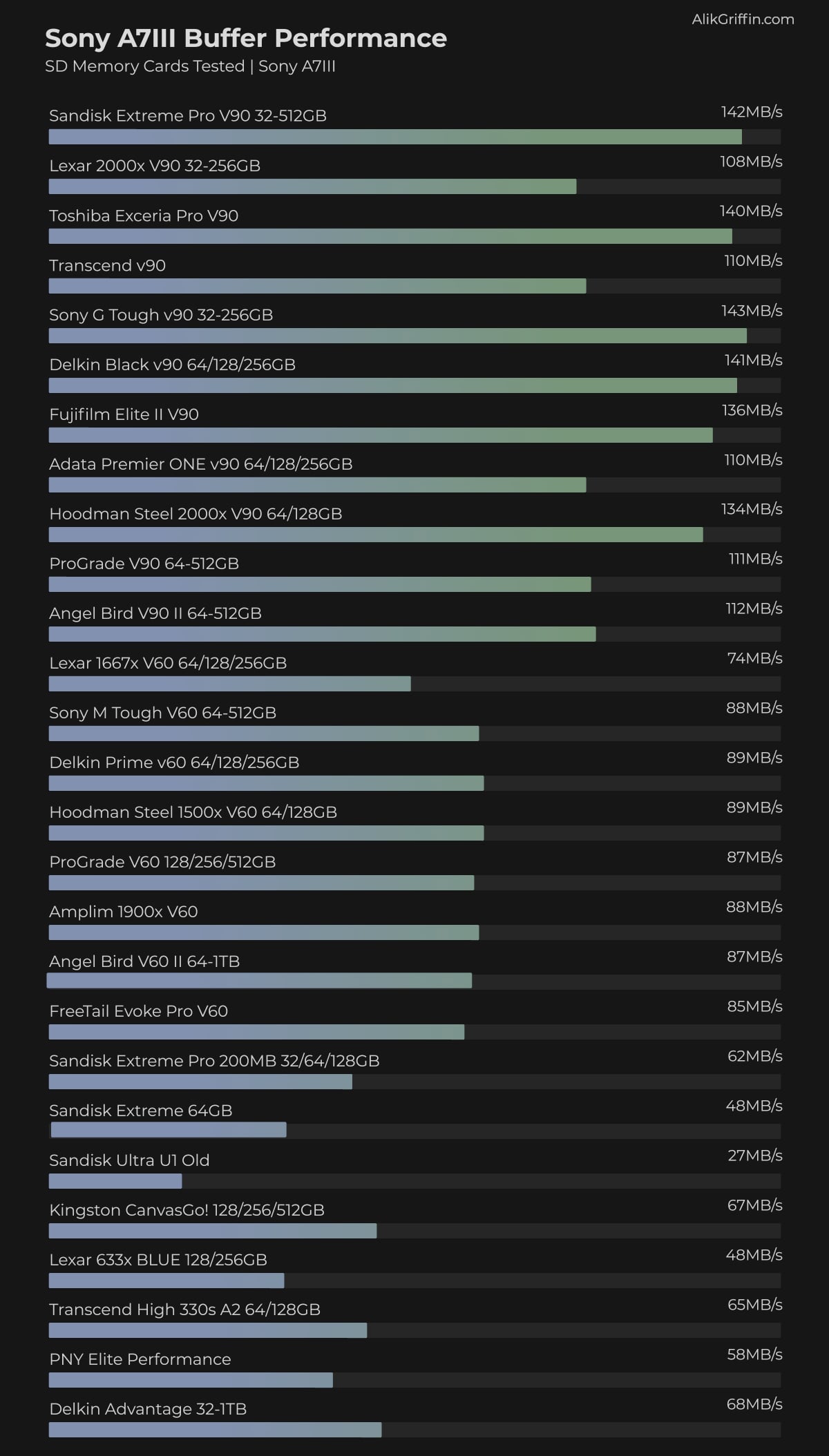
In-Camera Speed Test
This chart displays the SD card speeds tested in the Sony A7III camera.
Since I last tested the A7III, there have been numerous new memory cards, so I used the previous generation speed for some of them. It should be at least the same or faster.
For the tests, I shoot a continuous burst using uncompressed RAW at ISO 100 with a shutter speed of 1/100th of a second.
I also test each card to verify its compatibility with 4 K recording. Sony cameras are not compatible with certain cards. For example, many old Samsung cards, even though they are U3 and SDXC, are rejected by the camera with an error message stating that they are not U3 cards.
Sony A7III Camera Specs Buffer Questions
Sensor: 24MP Full-Frame Exmor R BSI CMOS Sensor
Processor: BIONZ X Image Processor & Front-End LSI
What Size Is The Buffer? 1.5GB estimated
What Memory Cards Are Compatible? UHS-I / UHS-II
Max Memory Card Capacity: Up to 1TB or larger.
How Long To Clear Buffer? 9:36
How Many Uncompressed Shots To Fill Buffer? 46
UHS-II vs. UHS-I Memory Cards In The Sony A7rIII
While the Sony A7 III utilizes UHS-II memory cards, the camera’s speed will be bottlenecked by the slowest memory card in the system, depending on how you utilize slots 1 and 2 with the recording modes.
Recording Mode Standard | Slot 1 | Auto Switch On
If you’re using Slot 2 as an overflow, you will achieve UHS-II memory card speeds in Slot 1 until the card is full. Then, once the camera switches to Slot 2, speeds will slow down to the speed of the card in Slot 2, and that slot will only be able to produce UHS-I speeds.
With the Sony A7 III, Auto Switch is turned off by default, so you will need to enable it yourself to gain this benefit.
Record Mode Simult. RAW+RAW
If you’re shooting in Slot 1 and Slot 2 as a backup, then memory card write speeds will be throttled to the speed of the slowest card. If you shoot like this often, you may not see any benefit to using UHS-II cards.
Record Mode Simult. RAW+JPEG
We no longer test RAW+JPEG, but since JPEG files are smaller, you don’t see the same bottleneck as when you’re backing up with RAW to slot 2.
However, shooting RAW+JPEG does significantly slow down the buffer’s performance. It requires more processing as the cards are written to, and this task is usually not multithreaded.
Shooting Uncompressed RAW will produce massive files and fill your buffer much quicker, but it won’t slow down your memory card write speeds.
What Size Memory Card for Sony A7 III?
The Sony A7III can take memory cards of any size, from 32GB or smaller all the way up to 1TB or larger. You’ll want to start with a 64GB card to use the SDXC file system.
For Stills
I recommend 128GB.
For photographers shooting only still, I recommend buying a 128GB card. While I never use more than 128GB in a day of shooting, I occasionally forget to clear my camera’s memory before going out to shoot again, and having the extra memory is nice.
Additionally, if you decide to record video, the 128GB cards will allow you to record without breaking the video files into 4GB chunks, as 32GB cards can only be formatted with a 32-bit file system.
For Video
The memory card size for the Sony A7 III when recording video depends on your recording format and how you plan to use the camera.
There are a few details you should note. Take a look at the max bitrates.
4k 24p / 30p Max Bitrate: 100Mbps
1080 24p / 25p / 30p / 50p / 60p Max Bitrate: 50Mbps
To achieve the maximum quality of 100Mbps at 24fps or 30fps with the Sony A7III, you will need to record in 4K. Unless you want 100fps or 120fps, then you can record 1080p with 100Mbps.
If you only want 1080p at 24fps or 30fps, you will only get half the bitrate of 50 Mbps. So, even if you need 1080p, it’s better to record 4 K and then scale down, which, if done correctly in a 16-bit sequence, will result in 4:2:2 sampling.
Maximum Video Record Times by Memory Card Size
Here is a handy chart you can use to find the best-sized memory card for your recording format or to determine the number of minutes you can record with different formats on various-sized cards.
For video shooters and filmmakers, I recommend 128GB cards or higher. Now that 1TB SD cards are available on the market, filmmakers who need to record a lot of video without needing to clear their cards might find these larger cards useful.
| Resolution | Format | Bitrate | 32GB | 64GB | 128GB | 256GB |
| 4k30p, 24p | XAVC S 4K | 100Mbps | 43min | 85min | 171min | 341min |
| 4k30p, 24p | XAVC S 4K | 60Mbps | 71min | 142min | 284min | 569min |
| 1080 120p, 100p | XAVC S HD | 100Mbps | 43min | 85min | 171min | 341min |
| 1080 120p, 100p | XAVC S HD | 60Mbps | 71min | 142min | 284min | 569min |
| 1080 24p, 25p, 30p, 50p, 60p | XAVC S HD | 50Mbps | 85min | 171min | 341min | 683min |
| 1080 25p, 30p | XAVC S HD | 16Mbps | 267min | 533min | 1067min | 2133min |
| 1080 60i | AVCHD | 24Mbps | 178min | 356min | 711min | 1422min |
| 1080 60i | AVCHD | 17Mbps | 251min | 502min | 1004min | 2008min |