
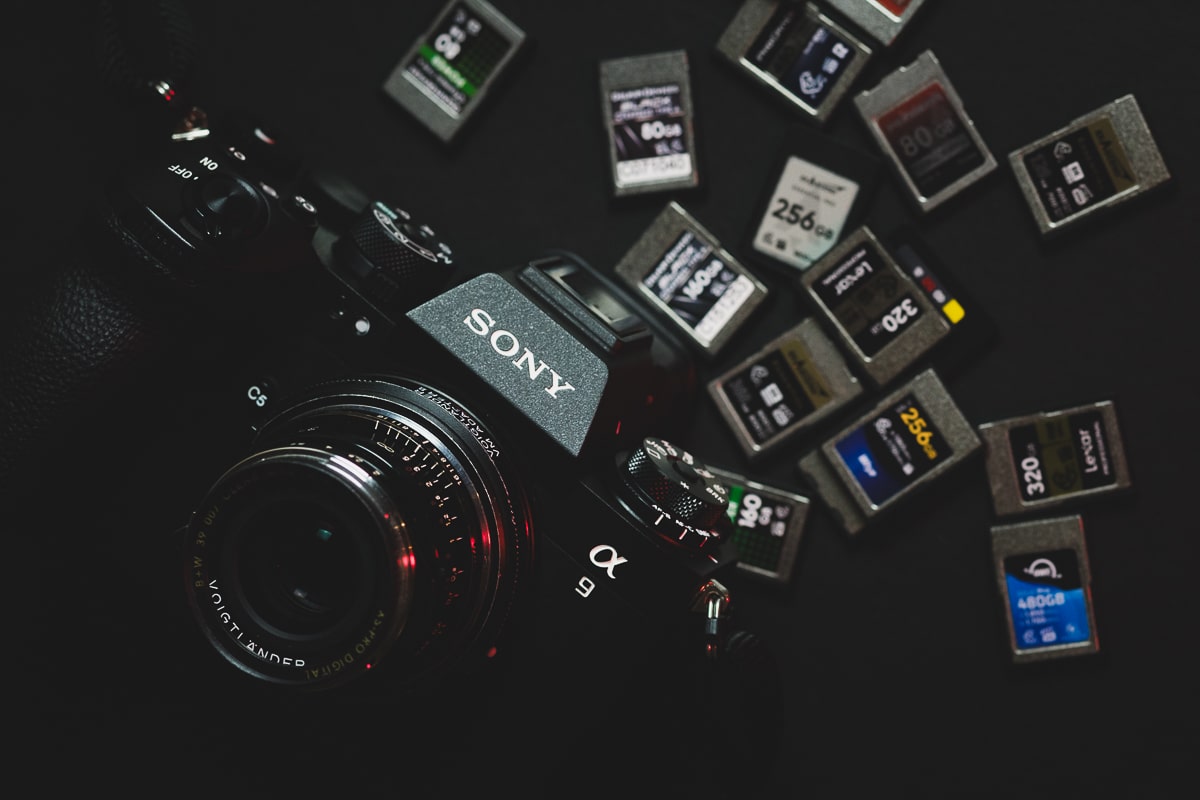
The Sony A9 III is a speed demon, capable of shooting at 120 fps in RAW. However, this incredible speed creates two major problems for memory cards: buffer clearing times and storage capacity.
If you shoot at 120fps, you can fill a standard memory card in seconds. Furthermore, while the camera supports both CFexpress Type A and SD UHS-II cards, SD cards will leave you stuck waiting for the buffer to clear while the action passes you by.
To help you choose, I have tested 52 memory cards in the Sony A9 III.
- For Video: If you plan to shoot XAVC S-I 4K (Slow Motion), look for cards with VPG200 or VPG400 certification to ensure compliance with Sony’s bitrate requirements.
- For 120fps Burst Shooting: You absolutely need CFexpress Type A cards. They clear the buffer significantly faster than SD cards, allowing you to get back to shooting instantly.
- For Capacity: Because 120 fps generates massive amounts of data, I recommend 160GB cards as a minimum, with 320GB or 640GB as the ideal sweet spot for sports and wildlife professionals.
Sony A9 III Recommended Memory Cards
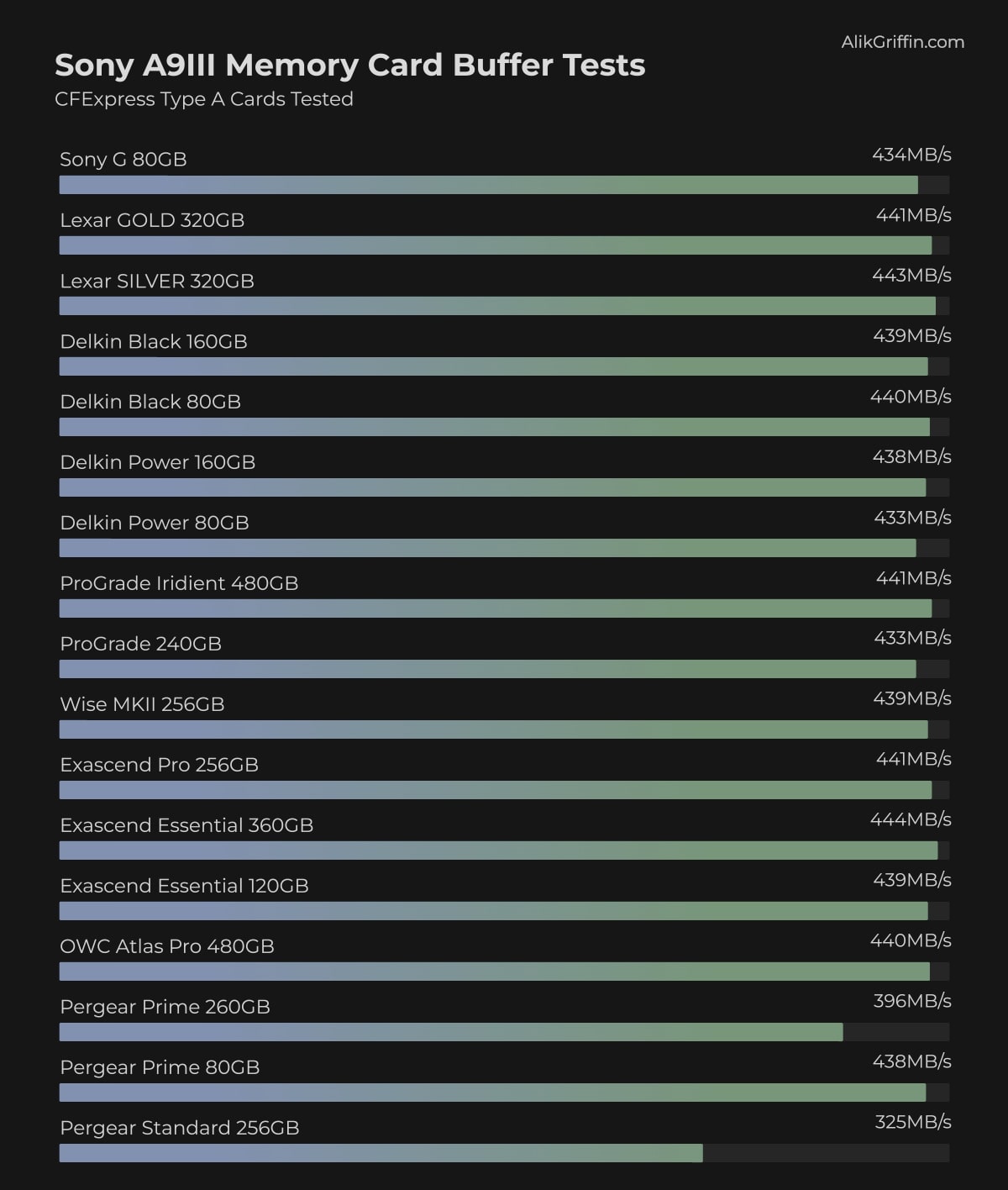
The CFexpress Type A cards hit a bottleneck of around 445 MB/s, so switching brands will not significantly improve performance.
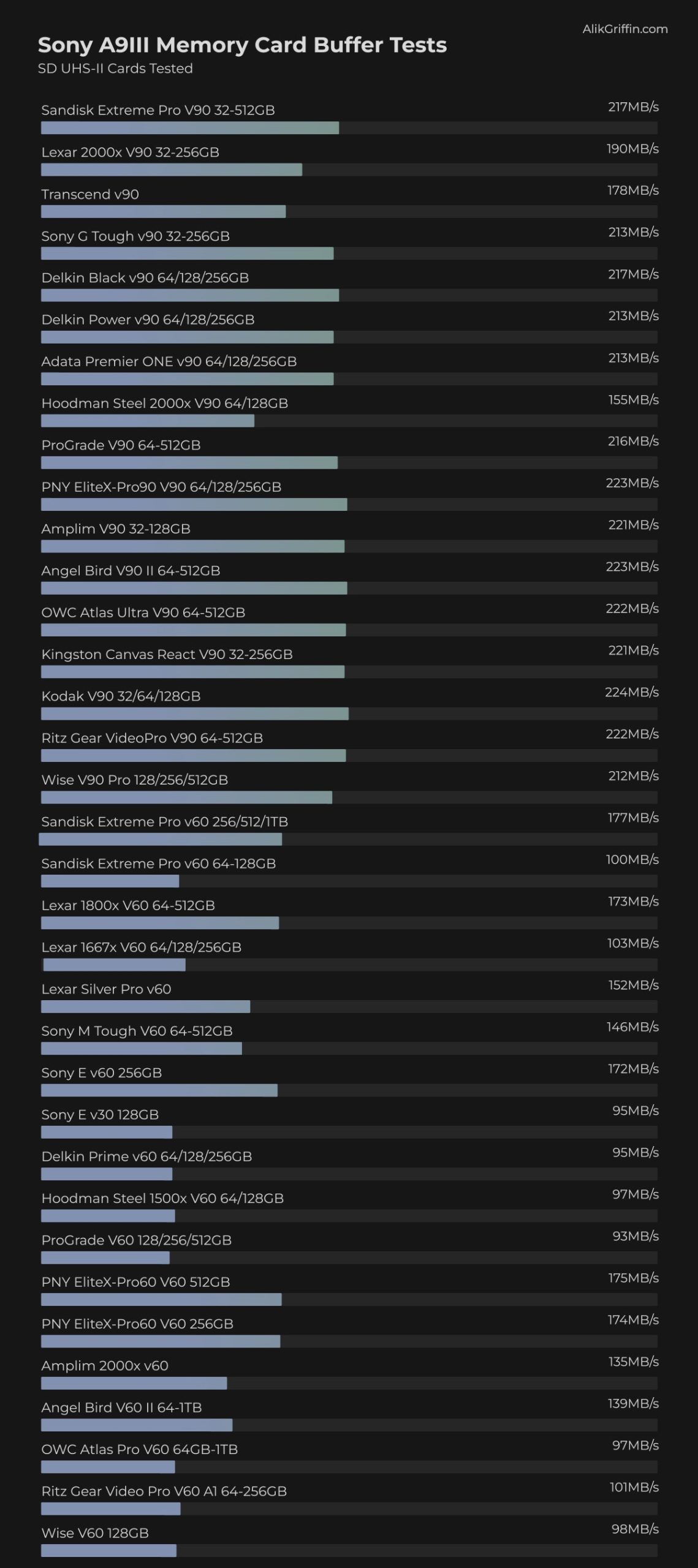
I wouldn’t buy any V90 SD UHS-II cards since you can find CFexpress Type-A cards at a better price and run significantly faster. Here are all the cards I’ve tested; they all run well.
There are two really good value cards. The Lexar Silver is the best bang for the buck, but the Pergear Standard card runs a little slower but is less expensive.
For me, the Lexar Silver card is the no-brainer option for a casual photographer/videographer. For a pro, you might want a higher-end card with better specs and warranties, like a Lexar Gold, Delkin Black, or Sony G card.
| Memory Cards for Sony A9III | Speed Class | Rating | Minimum Write Speed | USB-C Write | USB-C Read | A9III | Check Price | ||
|---|---|---|---|---|---|---|---|---|---|
| Sony G Tough 80/160/320/640GB | Sony G Tough CFExpress Type-A Review | CFx-A | VPG400 | 658 | 847 | 434 | X | Amazon / B&H | |
| Lexar Gold 80/160GB/320GB | CFx-A | VPG400 | 825 | 886 | 441 | X | Amazon / B&H | ||
| Lexar Silver Series 160/320GB | CFx-A | 776 | 861 | 443 | Amazon | ||||
| Delkin Black 160GB | CFx-A | 701 | 793 | 439 | Amazon / B&H | ||||
| Delkin Black 80GB | CFx-A | 654 | 845 | 440 | X | Amazon / B&H | |||
| Delkin Power 160GB | CFx-A | 705 | 843 | 438 | Amazon / B&H | ||||
| Delkin Power 80GB | CFx-A | 641 | 847 | 443 | Amazon / B&H | ||||
| ProGrade Iridium CF4.0 480-960GB | CFx-A 4.0 | 1272 | 1532 | 441 | X | Amazon / B&H | |||
| ProGrade Gold 240-480GB | CFx-A | 618 | 837 | 433 | Amazon / B&H | ||||
| Exascend Essential Pro CF4.0 256/512GB | CFx-A 4.0 | 850 | 1425 | 1635 | 441 | Amazon / B&H | |||
| Exascend Essential 360GB-1TB | CFx-A | 704 | 821 | 444 | Amazon / B&H | ||||
| Exascend Essential 120-240GB | CFx-A | 681 | 842 | 439 | Amazon / B&H | ||||
| OWC Atlas Pro CF4.0 480/960GB | CFx-A 4.0 | 1507 | 1624 | 440 | Amazon / B&H | ||||
| Pergear Prime 260GB/520GB | CFx-A | 400 | 588 | 837 | 396 | Amazon | |||
| Pergear Prime 80GB | CFx-A | 600 | 738 | 840 | 438 | Amazon | |||
| Pergear Standard 256GB | Pergear Standard 256GB CFxA Review | CFx-A | 380 | 768 | 812 | 325 | X | Amazon | |
| Sandisk Extreme Pro V90 32-512GB | Sandisk Extreme Pro V90 UHS-II Review | UHS-II v90 | V90 | 90 | 268 | 293 | 217 | Amazon / B&H | |
| Lexar 2000x V90 32-256GB | Lexar 2000x V90 UHS-II Review | UHS-II v90 | V90 | 90 | 228 | 256 | 190 | Amazon / B&H | |
| Transcend v90 | UHS-II v90 | V90 | 90 | 175 | 263 | 178 | Amazon / B&H | ||
| Sony G Tough v90 32-256GB | Sony G Tough V90 UHS-II Review | UHS-II v90 | V90 | 90 | 258 | 296 | 213 | Amazon / B&H | |
| Delkin Black v90 64/128/256GB | UHS-II v90 | V90 | 90 | 253 | 278 | 217 | B&H | ||
| Delkin Power v90 64/128/256GB | Delkin Power v90 | UHS-II v90 | V90 | 90 | 240 | 275 | 213 | Amazon / B&H | |
| Adata Premier ONE v90 64/128/256GB | Adata v90 | UHS-II v90 | V90 | 90 | 229 | 268 | 213 | Amazon | |
| Hoodman Steel 2000x V90 64/128GB | Hoodman Steel 2000x | UHS-II v90 | V90 | 90 | 155 | 249 | 155 | Amazon / B&H | |
| ProGrade V90 64-512GB | ProGrade V90 | UHS-II v90 | V90 | 90 | 229 | 270 | 216 | Amazon / B&H | |
| PNY EliteX-Pro90 V90 64/128/256GB | UHS-II v90 | V90 | 90 | 276 | 293 | 223 | Amazon / B&H | ||
| Amplim 2000x V90 32-128GB | UHS-II v90 | V90 | 90 | 275 | 287 | 221 | Amazon | ||
| Angel Bird V90 II 64-512GB | Angel Bird V90 II | UHS-II v90 | V90 | 90 | 257 | 271 | 223 | Amazon / B&H | |
| OWC Atlas Ultra V90 64-512GB | UHS-II v90 | V90 | 90 | 270 | 289 | 222 | Amazon / B&H | ||
| Kingston Canvas React V90 32-256GB | Kingston Canvas React Plus V90 | UHS-II v90 | V90 | 90 | 274 | 292 | 221 | Amazon / B&H | |
| Kodak V90 32/64/128GB | UHS-II v90 | V90 | 90 | 260 | 272 | 224 | Amazon | ||
| Ritz Gear VideoPro V90 64-512GB | UHS-II v90 | V90 | 90 | 258 | 273 | 222 | Amazon | ||
| Wise V90 Pro 128/256/512GB | UHS-II v90 | V90 | 90 | 256 | 275 | 212 | B&H | ||
| Sandisk Extreme Pro v60 256/512/1TB | UHS-II v60 | V60 | 60 | 189 | 279 | 177 | Amazon / B&H | ||
| Sandisk Extreme Pro v60 64-128GB | UHS-II v60 | V60 | 60 | 102 | 283 | 100 | Amazon / B&H | ||
| Lexar 1800x V60 64-512GB | UHS-II v60 | V60 | 60 | 188 | 255 | 173 | Amazon / B&H | ||
| Lexar 1667x V60 64/128/256GB | Lexar 1000x | UHS-II v60 | V60 | 60 | 100 | 257 | 103 | Amazon / B&H | |
| Lexar Silver Pro v60 | UHS-II v60 | V60 | 60 | 162 | 255 | 152 | Amazon | ||
| Sony M Tough V60 64-512GB | Sony M V60 UHS-II Review | UHS-II v60 | V60 | 60 | 153 | 269 | 146 | Amazon / B&H | |
| Sony E v60 256GB | Sony E Series V60 256GB Review | UHS-II v60 | V60 | 60 | 172 | Amazon / B&H | |||
| Sony E v60 128GB | Sony E Series V60 128GB Review | UHS-II v60 | V60 | 60 | 142 | 252 | 95 | Amazon / B&H | |
| Delkin Prime v60 64/128/256GB | Delkin Prime v60 | UHS-II v60 | V60 | 60 | 98 | 275 | 95 | Amazon / B&H | |
| Hoodman Steel 1500x V60 64/128GB | Hoodman Steel 1500x | UHS-II v60 | V60 | 60 | 99 | 273 | 97 | Amazon / B&H | |
| ProGrade V60 128/256/512GB | ProGrade V60 | UHS-II v60 | V60 | 60 | 98 | 155 | 93 | Amazon / B&H | |
| PNY EliteX-Pro60 V60 512GB | UHS-II v60 | V60 | 60 | 180 | 278 | 175 | Amazon / B&H | ||
| PNY EliteX-Pro60 V60 256GB | UHS-II v60 | V60 | 60 | 183 | 280 | 174 | Amazon / B&H | ||
| Amplim 2000x v60 | Amplim 2000x v60 | UHS-II v60 | V60 | 60 | 136 | 253 | 135 | Amazon | |
| Angel Bird V60 II 64-1TB | Angel Bird V60 II | UHS-II v60 | V60 | 60 | 144 | 243 | 139 | Amazon / B&H | |
| OWC Atlas Pro V60 64GB-1TB | UHS-II v60 | V60 | 60 | 100 | 281 | 97 | Amazon / B&H | ||
| Ritz Gear Video Pro V60 A1 64-256GB | UHS-II v60 | V60 | 60 | 103 | 280 | 101 | Amazon | ||
| Wise V60 128GB | UHS-II v60 | V60 | 60 | 102 | 269 | 98 | B&H |
Sony A9 III Memory Card Benchmarks
Here are the benchmarks for all the cards I’ve tested. I fill the camera buffer with a fast burst, then calculate the amount of data written per unit time as the card clears.
The Sony A9 III has a buffer of about 5GB.
The Reality of 120fps & Capacity
Best Memory Card Size for Sony A9 III (The 120fps Problem)
When shooting at 120 fps, the Sony A9 III generates roughly 5-8GB of data every few seconds, depending on your compression settings. This changes the math on what memory card size you should buy.
640GB+ Cards: Ideal for hybrid shooters who want to switch between high-bitrate video and high-speed bursts without managing multiple cards.
160GB – 320GB Cards: This is the new standard for the A9 III. A 160GB card offers a safe balance, but if you are shooting an all-day event, a 320GB card will save you from constantly swapping cards in the field.
80GB Cards: In 120fps burst mode, an 80GB card can fill up in under a minute of continuous shooting. These are generally too small for dedicated sports photographers.
CFexpress 4.0 vs 2.0
Can you use CFexpress 4.0 Cards in the Sony A9 III?
Yes, you can use CFexpress 4.0 Type A cards in the Sony A9 III, and they are fully backward compatible.
However, it is important to note that the Sony A9 III utilizes a CFexpress 2.0 interface. This means you will not see a write-speed benefit in the camera when using a 4.0 card versus a fast 2.0 card; both will hit the camera’s internal bottleneck.
Why buy CFexpress 4.0? The main advantage is offloading speed. If you use a CFexpress 4.0 card reader, you can transfer your footage to your computer twice as fast as with a 2.0 card reader. When you are dumping 500GB of 120fps burst shots after a shoot, this can save you 20-30 minutes of waiting time.
Video Specs & VPG Requirements
Video Specs: When Do You Need VPG200 or VPG400?
For most video modes, including standard 4K 60p, the Sony A9 III is very forgiving. However, if you want to shoot the highest quality slow motion, you will hit a hard wall with SD cards.
1. XAVC S-I 4K (Standard 60p Recording)
- Bitrate: 600Mbps (approx. 75MB/s)
- Compatible Cards: CFexpress Type A OR SD Cards (V90 Only)
- The Reality: You can use a high-quality V90 SD card for the A9 III’s highest-quality “standard” recording modes (All-Intra 600 Mbps). The camera will not stop you. However, V60 cards are not fast enough for this mode.
2. S&Q Mode (The “Trap” for SD Users)
The rules change when you switch the dial to S&Q (Slow & Quick) to shoot 4K at 120 fps in XAVC S-I for slow motion.
- Bitrate: 1200Mbps (approx. 150MB/s)
- Requirement: CFexpress Type A (VPG200)
- Why: 1200Mbps exceeds the theoretical maximum of even the best V90 SD cards. If you try to select this mode with an SD card inserted, the option will be grayed out in the menu.
3. Do You Need VPG400?
You will see many newer cards (especially CFexpress 4.0 cards like the OWC Atlas or ProGrade Gold) sporting a VPG400 logo.
Should you get it? Yes. VPG400 guarantees sustained write speeds of 400 MB/s. This offers significantly more “headroom” than VPG200, ensuring your camera never stops recording due to thermal throttling or card fragmentation during long takes.
Is it required? No. The Sony A9 III currently only requires VPG200 to unlock all recording modes.
Sony A9 III Memory Cards Bottom Line
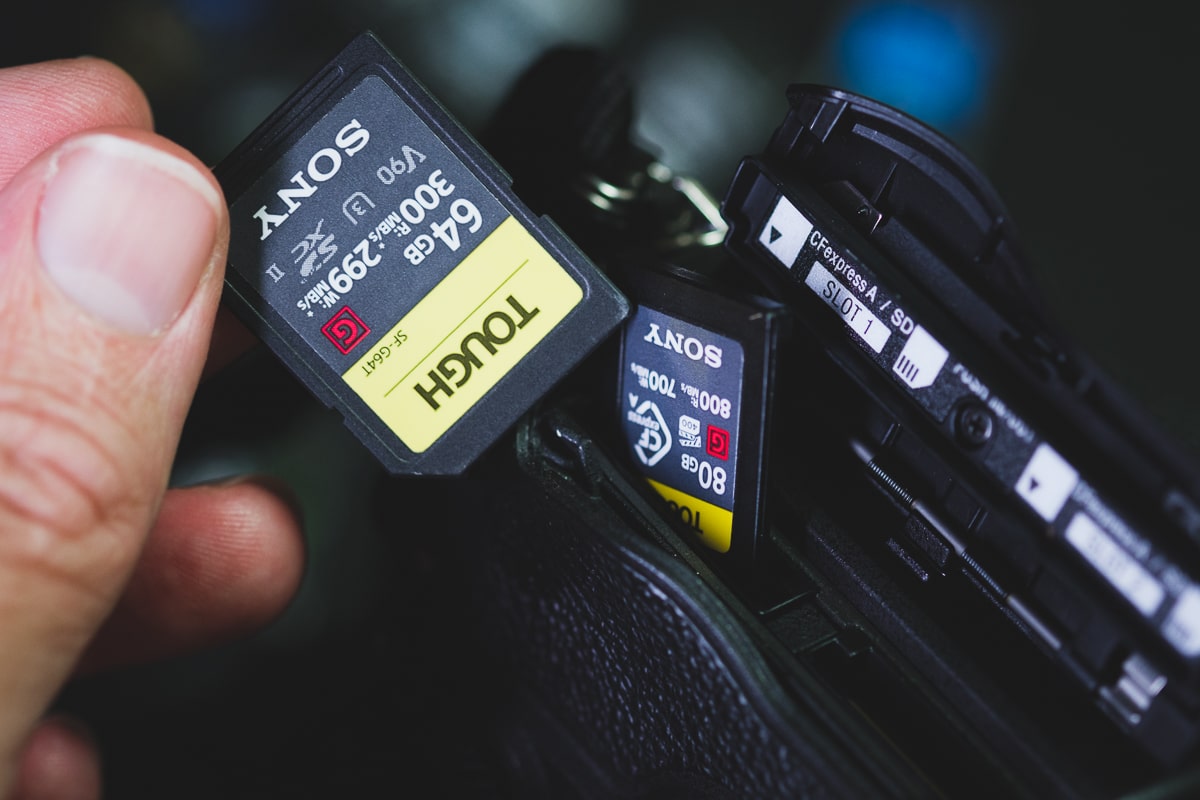
Choosing memory cards for the Sony A9 III is pretty straightforward. It’s a high-end camera, so go with high-end cards. The CFexpress Type-A cards have now come down in price to the point where SD UHS-II no longer makes sense unless you need a v60 card for casual video at lower bitrates. You cannot use a v60 card for the 600Mbps H.264 bitrate, but they work great for the HEVC recording modes.
Some great budget cards, like the Lexar Silver CFexpress Type A, can also be a great option for video or casual shooting.













Leave a Reply