
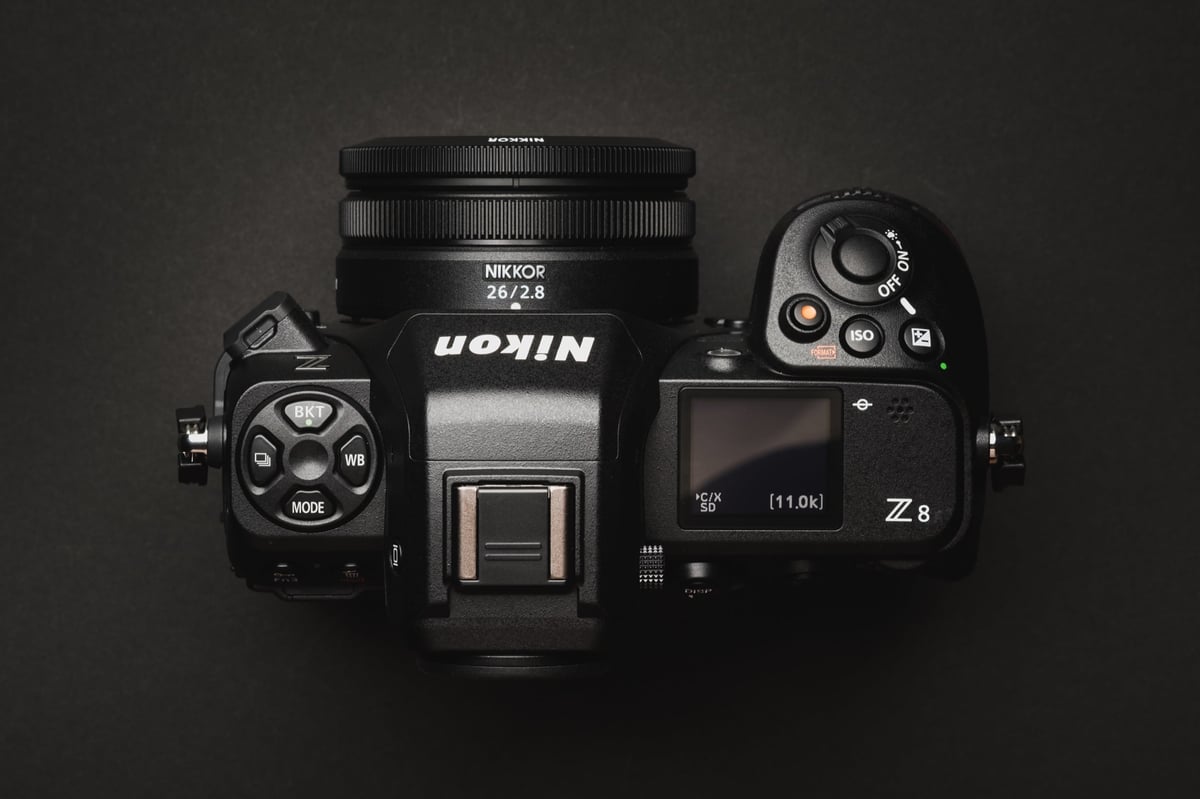
The Nikon Z8 is a high-performance powerhouse capable of 8K60p N-RAW video and 20fps RAW bursts. To unlock its full potential, you need memory cards that can handle massive data rates without overheating or bottlenecking the buffer.
The Z8 features two slots: Slot 1 (CFexpress Type B) and Slot 2 (SD UHS-II). For the best experience, I recommend using a CFexpress Type B card as your primary storage and a V90 SD card for backup or overflow.
Many great memory cards are out there, but not all have everything you need to function flawlessly in the Nikon Z8. This camera, after all, can record NRAW at over 722.5MB/s.
Quick Recommendations: Top 3 CFexpress Cards for the Z8
If you want to skip the technical specs, here are the best cards currently on the market for the Z8:
Slot 1: CFexpress Type B (Primary)
- Best Performance: Lexar Professional Diamond CFexpress 4.0 – The industry standard for speed and durability. Perfect for 8K N-RAW. – Amazon / B&H
- Best for Wildlife/Sports: Delkin Devices BLACK 4.0 – Known for incredible sustained write speeds and a “48-hour replacement” warranty. – Amazon / B&H
- Best Value: Lexar Professional Gold 4.0 – Offers modern CFexpress 4.0 speeds for offloading at a fraction of the price of ‘high-end’ cards. – Amazon / B&H
Slot 2: SD UHS-II (Backup/Overflow)
- Best SD Performance: Sony SF-G Tough V90 – The most durable and fastest SD card available. Highly recommended if you shoot at both slots simultaneously. – Amazon / B&H
- Best SD Value: Kingston Canvas React Plus V90 – Exceptional performance-to-price ratio. It’s one of the few affordable V90 cards that actually keeps up with fast bursts. – Amazon / B&H
Note: I find 128GB cards work great for general photography with my Z8 unless I’m shooting video.
The Lexar Silver cards and the Delkin Power cards are also great options. Also, consider Nextorage and Prograde as solid options. The cards above are just the cards I like to use. Look for the VPG400 rating if you’re primarily shooting video.
Recommended CFExpress Type- B Memory Cards
I’ve created a much larger recommendation list from the above, with some of the new 4.0 cards. Be careful with this idea of ‘buying a CFexpress 4.0 card today, thinking it will last a decade.’ Many cards use thermal paste and other components that degrade over time. Realistically, expect about 5 great years out of your cards, and things could start performing out of spec. So I recommend always going for the best deals, even if they are CF2.0 cards.
Pro Tip: Always look for cards with the VPG-400 rating if you are a heavy video shooter; this guarantees a minimum sustained write speed of 400 MB/s, which is the safety net for high-end video.
Here is what I recommend, based on price-to-performance and long-term testing from these brands:
| Memory Cards | Review Links | Rating | USB-C Write | USB-C Read | Tested Sustain Speeds | Check Price |
|---|---|---|---|---|---|---|
| CFExpress Type-B | ||||||
| Lexar Diamond CF4.0 128GB-1TB | VPG400 | Amazon / B&H | ||||
| Lexar Diamond 128/256/512GB | Lexar Diamond CFeB Review | VPG400 | 1621 | 1700 | 1565 | Amazon / B&H |
| Lexar Gold CF4.0 512/1TB/2TB | Amazon / B&H | |||||
| Lexar Gold 2TB | Lexar Gold 1TB-2TB CFeB Review | 1642 | 1695 | 1582 | B&H | |
| Lexar Gold 128/256GB | Lexar Gold 128-512GB CFeB Review | 1410 | 1525 | 1382 | Amazon / B&H | |
| Lexar Silver CF4.0 256/512GB/1/2TB | Amazon | |||||
| Prograde Iridium CF4.0 400GB | VPG400 | 2704 | 3212 | 808 | Amazon / B&H | |
| ProGrade Gold CF4.0 256GB/512GB | 2545 | 3203 | 844 | Amazon / B&H | ||
| Delkin Black CF4.0 512GB/1/2TB | 1736 | 2476 | 1693 | Amazon / B&H | ||
| Delkin Power G4 128/165/256/325/2TB | Delkin Power 128-512GB G4 CFeB Review | 920 | 1226 | 842 | Amazon / B&H | |
| Hoodman Steel 1TB | Hoodman Steel 1TB CFeB Review | 1528 | 1121 | 1502 | Amazon / B&H | |
| Angelbird Pro XT Mk II 330/660/1320GB | 1595 | 1597 | 1583 | Amazon / B&H | ||
| Nextorage B2 Pro CF4.0 660/1330GB | VPG400 | B&H | ||||
| Nextorage B2 Pro CF4.0 165/330GB | VPG400 | B&H |
CFexpress Type B 2.0 vs. 4.0: What You Need to Know
Since mid-2024, the industry has transitioned to CFexpress 4.0. While the Nikon Z8 is a CFexpress 2.0 camera and cannot utilize the 4.0 speeds in-camera, these new cards are fully backward compatible.
Why buy 4.0 for a 2.0 camera?
- Future Proofing: These cards will work at full speed in your next camera.
- Thermal Management: 4.0 cards often run cooler, which is vital for the Z8’s internal RAW recording.
- Workflow: Offload your 8K footage to your computer at up to 3,500 MB/s (with a 4.0 reader).

Recommended SD Memory Cards
You’ll want to use the fastest SD UHS-II cards available when buying for the Nikon Z8. The V90 is your ideal option because shooting with redundancy or JPG backup to the SD card slot can bottleneck the entire system.
Video Tip: If you’re recording at a lower bitrate (400 Mbps), v60 SD cards can save you a lot of money, and they produce less heat during long recordings, so you won’t get the ‘hot card’ warning. A premium option I really like is the Lexar ARMOR series (Amazon / B&H), but there are definitely less expensive options for higher-capacity cards. V60 cards can get as expensive as a good CFexpress card when you get into large-capacity cards like 1TB.
| Memory Cards for Nikon Z8 | Rating | Minimum Write Speed | USB-C Write | USB-C Read | Z9/Z8 | Check Price | |||
|---|---|---|---|---|---|---|---|---|---|
| Lexar Diamond 128/256/512GB | Lexar Diamond CFeB Review | CFx-B | VPG400 | 1600 | 1621 | 1700 | 697 | Amazon / B&H | |
| Lexar Gold 2TB | Lexar Gold 1TB-2TB CFeB Review | CFx-B | 1300 | 1642 | 1695 | 699 | B&H | ||
| Lexar Gold 128/256GB | Lexar Gold 128-512GB CFeB Review | CFx-B | 1000 | 1410 | 1525 | 680 | Amazon / B&H | ||
| Lexar Silver 512GB | CFx-B | 850 | 1141 | 1624 | 678 | Amazon | |||
| Lexar Silver 128/258GB | CFx-B | 480 | 749 | 1719 | 528 | Amazon | |||
| Sandisk Pro-Cinema 256GB | CFx-B | VPG400 | 755 | 1177 | 632 | Amazon / B&H | |||
| Sandisk Extreme 128/256GB | CFx-B | 429 | 1144 | 500 | Amazon / B&H | ||||
| Sony Tough 128/256/512GB | CFx-B | 1334 | 1603 | 693 | Amazon | ||||
| Prograde Cobalt CF2.0 165/325/650GB | CFx-B | 1400 | 1429 | 1029 | 698 | Amazon / B&H | |||
| Prograde 256GB CF2.0 | CFx-B | 300 | 1334 | 835 | 391 | Amazon / B&H | |||
| Prograde 1TB/2TB gen3 | CFx-B | 1300 | 634 | ||||||
| Prograde 512GB gen3 | CFx-B | 850 | 1569 | 1707 | 629 | ||||
| Delkin Black G4 325GB | CFx-B | 1450 | 1396 | 1538 | 700 | ||||
| Delkin Black 75GB | CFx-B | 1195 | 1573 | 698 | |||||
| Delkin Black 128GB | CFx-B | 1431 | 1035 | 719 | |||||
| Delkin Power G4 650/1TB/1.3TB/2TB | Delkin Power G4 650-2000GB CFeB Review | CFx-B | 1490 | 1588 | 1710 | 640 | Amazon | ||
| Delkin Power G4 128/165/256/325/2TB | Delkin Power 128-512GB G4 CFeB Review | CFx-B | 805 | 920 | 1226 | 638 | Amazon / B&H | ||
| Delkin Power 128/256/512/1TB/2TB | CFx-B | 1429 | 1037 | 723 | B&H | ||||
| Delkin Prime 64GB | CFx-B | 974 | 1023 | 724 | |||||
| Nikon 660GB | CFx-B | 1397 | 1574 | 698 | Amazon / B&H | ||||
| Hoodman Steel 1TB | Hoodman Steel 1TB CFeB Review | CFx-B | 1650 | 1528 | 1121 | 614 | Amazon / B&H | ||
| Hoodman Steel 128GB | CFx-B | 580 | 969 | 447 | Amazon / B&H | ||||
| Wise Pro 160/320GB | CFx-B | 1300 | 1257 | 1536 | 593 | ||||
| Wise 1TB/2TB Mk II | CFx-B | 1300 | 1525 | 1121 | 637 | ||||
| Wise 512GB Mk II | CFx-B | 850 | 936 | 1236 | 637 | ||||
| Wise 128GB/256GB | CFx-B | 140 | 190 | 1023 | 496 | B&H | |||
| Angelbird Pro 1TB/2TB/4TB MkII | CFx-B | 1300 | 852 | 969 | 638 | Amazon / B&H | |||
| Angelbird Pro Mk I 256GB | CFx-B | 844 | 961 | 349 | |||||
| Angelbird Pro XT Mk II 330/660/1320GB | CFx-B | 1480 | 1595 | 1597 | 699 | Amazon / B&H | |||
| Angelbird Pro SE 512GB | CFx-B | 800 | 789 | 958 | 616 | Amazon / B&H | |||
| Angelbird Pro SX 160GB/330GB | CFx-B | 1480 | 1521 | 1688 | 684 | Amazon / B&H | |||
| OWC Atlas Ultra 165/325/650GB | CFx-B | 1300 | 1402 | 1579 | 698 | Amazon | |||
| OWC Atlas Pro 512GB/1TB/2TB | CFx-B | 400 | 514 | 1632 | 351 | Amazon / B&H | |||
| OWC Atlas Pro 256GB | CFx-B | 300 | 430 | 1212 | 511 | Amazon | |||
| OWC Atlas Pro 128GB | CFx-B | 140 | 232 | 1300 | 273 | ||||
| Sabrent Rocket 512GB/1TB/2TB | CFx-B | 1300 | 856 | 1183 | 633 | Amazon / B&H | |||
| Sabrent Rocket 512GB/1TB | CFx-B | 400 | 438 | 1632 | 426 | Amazon / B&H | |||
| RitzGear 256/512/1TB | CFx-B | 481 | 1302 | 419 | Amazon | ||||
| RitzGear 128GB | CFx-B | 236 | 1323 | 273 | Amazon | ||||
| Pergear Pro 512GB | CFx-B | 700 | 687 | 1085 | 559 | Amazon | |||
| Pergear Pro 256GB | CFx-B | 360 | 346 | 1131 | 319 | Amazon | |||
| Pergear Lite 128GB | CFx-B | 200 | 404 | 997 | 305 | Amazon | |||
| Silicon Power Cinema 256GB | CFx-B | 300 | 379 | 1221 | 421 | ||||
| Transcend 820 512GB | CFx-B | 985 | 1660 | 543 | Amazon / B&H | ||||
| Transcend 820 256GB | CFx-B | 1200 | 1644 | 542 | Amazon / B&H | ||||
| Sandisk Extreme Pro V90 32-512GB | Sandisk Extreme Pro V90 UHS-II Review | UHS-II v90 | V90 | 90 | 268 | 293 | X | 199 | Amazon / B&H |
| Lexar 2000x V90 32-256GB | Lexar 2000x V90 UHS-II Review | UHS-II v90 | V90 | 90 | 228 | 256 | X | 80 | Amazon / B&H |
| Transcend v90 | UHS-II v90 | V90 | 90 | 175 | 263 | 165 | Amazon / B&H | ||
| Sony G Tough v90 32-256GB | Sony G Tough V90 UHS-II Review | UHS-II v90 | V90 | 90 | 258 | 296 | X | 204 | Amazon / B&H |
| Delkin Black v90 64/128/256GB | UHS-II v90 | V90 | 90 | 253 | 278 | X | 199 | B&H | |
| Delkin Power v90 64/128/256GB | Delkin Power v90 | UHS-II v90 | V90 | 90 | 240 | 275 | 194 | Amazon / B&H | |
| Adata Premier ONE v90 64/128/256GB | Adata v90 | UHS-II v90 | V90 | 90 | 229 | 268 | 193 | Amazon | |
| Hoodman Steel 2000x V90 64/128GB | Hoodman Steel 2000x | UHS-II v90 | V90 | 90 | 155 | 249 | 139 | Amazon / B&H | |
| ProGrade V90 64-512GB | ProGrade V90 | UHS-II v90 | V90 | 90 | 229 | 270 | 193 | Amazon / B&H | |
| PNY EliteX-Pro90 V90 64/128/256GB | UHS-II v90 | V90 | 90 | 276 | 293 | 214 | Amazon / B&H | ||
| Amplim 2000x V90 32-128GB | UHS-II v90 | V90 | 90 | 275 | 287 | 213 | Amazon | ||
| Angel Bird V90 II 64-512GB | Angel Bird V90 II | UHS-II v90 | V90 | 90 | 257 | 271 | 200 | Amazon / B&H | |
| OWC Atlas Ultra V90 64-512GB | UHS-II v90 | V90 | 90 | 270 | 289 | 208 | Amazon / B&H | ||
| Kingston Canvas React V90 32-256GB | Kingston Canvas React Plus V90 | UHS-II v90 | V90 | 90 | 274 | 292 | X | 209 | Amazon / B&H |
| Kodak V90 32/64/128GB | UHS-II v90 | V90 | 90 | 260 | 272 | 211 | Amazon | ||
| Ritz Gear VideoPro V90 64-512GB | UHS-II v90 | V90 | 90 | 258 | 273 | 211 | Amazon | ||
| Wise V90 Pro 128/256/512GB | UHS-II v90 | V90 | 90 | 256 | 275 | 207 | B&H | ||
| Sandisk Extreme Pro v60 256/512/1TB | UHS-II v60 | V60 | 60 | 189 | 279 | X | 165 | Amazon / B&H | |
| Sandisk Extreme Pro v60 64-128GB | UHS-II v60 | V60 | 60 | 102 | 283 | 94 | Amazon / B&H | ||
| Lexar 1800x V60 64-512GB | UHS-II v60 | V60 | 60 | 188 | 255 | 163 | Amazon / B&H | ||
| Lexar 1667x V60 64/128/256GB | Lexar 1000x | UHS-II v60 | V60 | 60 | 100 | 257 | 149 | Amazon / B&H | |
| Lexar Silver Pro v60 | UHS-II v60 | V60 | 60 | 162 | 255 | 78 | Amazon | ||
| Sony M Tough V60 64-512GB | Sony M V60 UHS-II Review | UHS-II v60 | V60 | 60 | 153 | 269 | X | 135 | Amazon / B&H |
| Sony E v60 256GB | Sony E Series V60 256GB Review | UHS-II v60 | V60 | 60 | X | 128 | Amazon / B&H | ||
| Sony E v60 128GB | Sony E Series V60 128GB Review | UHS-II v60 | V60 | 60 | 142 | 252 | 68 | Amazon / B&H | |
| Delkin Prime v60 64/128/256GB | Delkin Prime v60 | UHS-II v60 | V60 | 60 | 98 | 275 | 91 | Amazon / B&H | |
| Hoodman Steel 1500x V60 64/128GB | Hoodman Steel 1500x | UHS-II v60 | V60 | 60 | 99 | 273 | 92 | Amazon / B&H | |
| ProGrade V60 128/256/512GB | ProGrade V60 | UHS-II v60 | V60 | 60 | 98 | 155 | 73 | Amazon / B&H | |
| PNY EliteX-Pro60 V60 512GB | UHS-II v60 | V60 | 60 | 180 | 278 | 164 | Amazon / B&H | ||
| PNY EliteX-Pro60 V60 256GB | UHS-II v60 | V60 | 60 | 183 | 280 | 162 | Amazon / B&H | ||
| Amplim 2000x v60 | Amplim 2000x v60 | UHS-II v60 | V60 | 60 | 136 | 253 | 125 | Amazon | |
| Angel Bird V60 II 64-1TB | Angel Bird V60 II | UHS-II v60 | V60 | 60 | 144 | 243 | 129 | Amazon / B&H | |
| OWC Atlas Pro V60 64GB-1TB | UHS-II v60 | V60 | 60 | 100 | 281 | 78 | Amazon / B&H | ||
| Ritz Gear Video Pro V60 A1 64-256GB | UHS-II v60 | V60 | 60 | 103 | 280 | 95 | Amazon | ||
| Wise V60 128GB | UHS-II v60 | V60 | 60 | 102 | 269 | 93 | B&H |
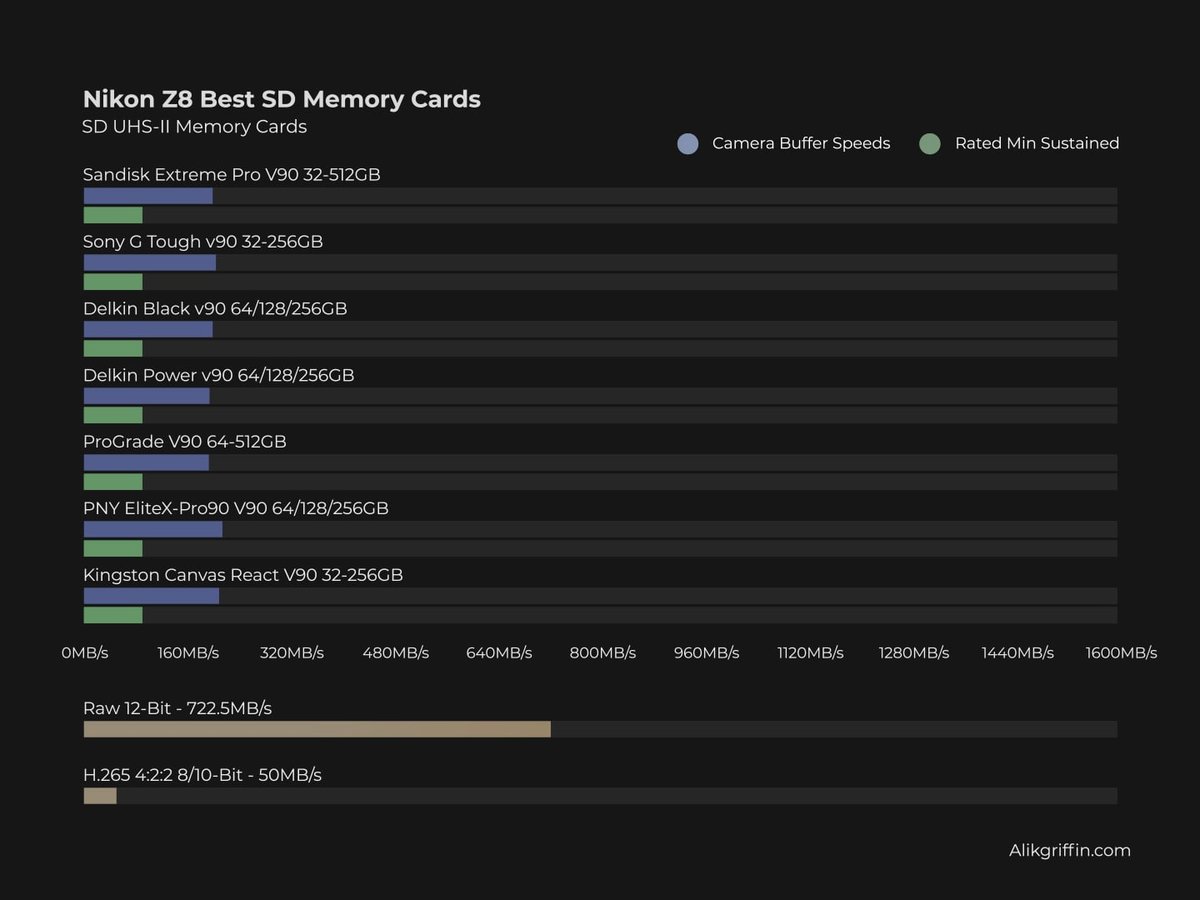
Nikon Z8 In-Camera Speed Test
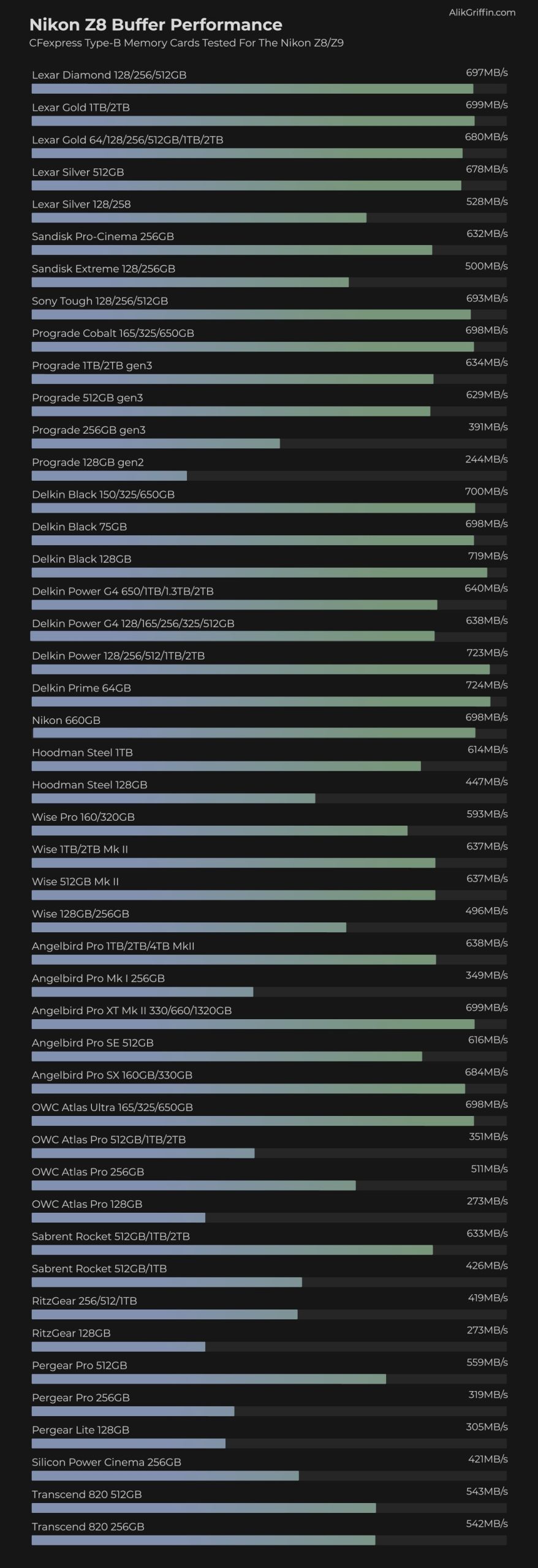
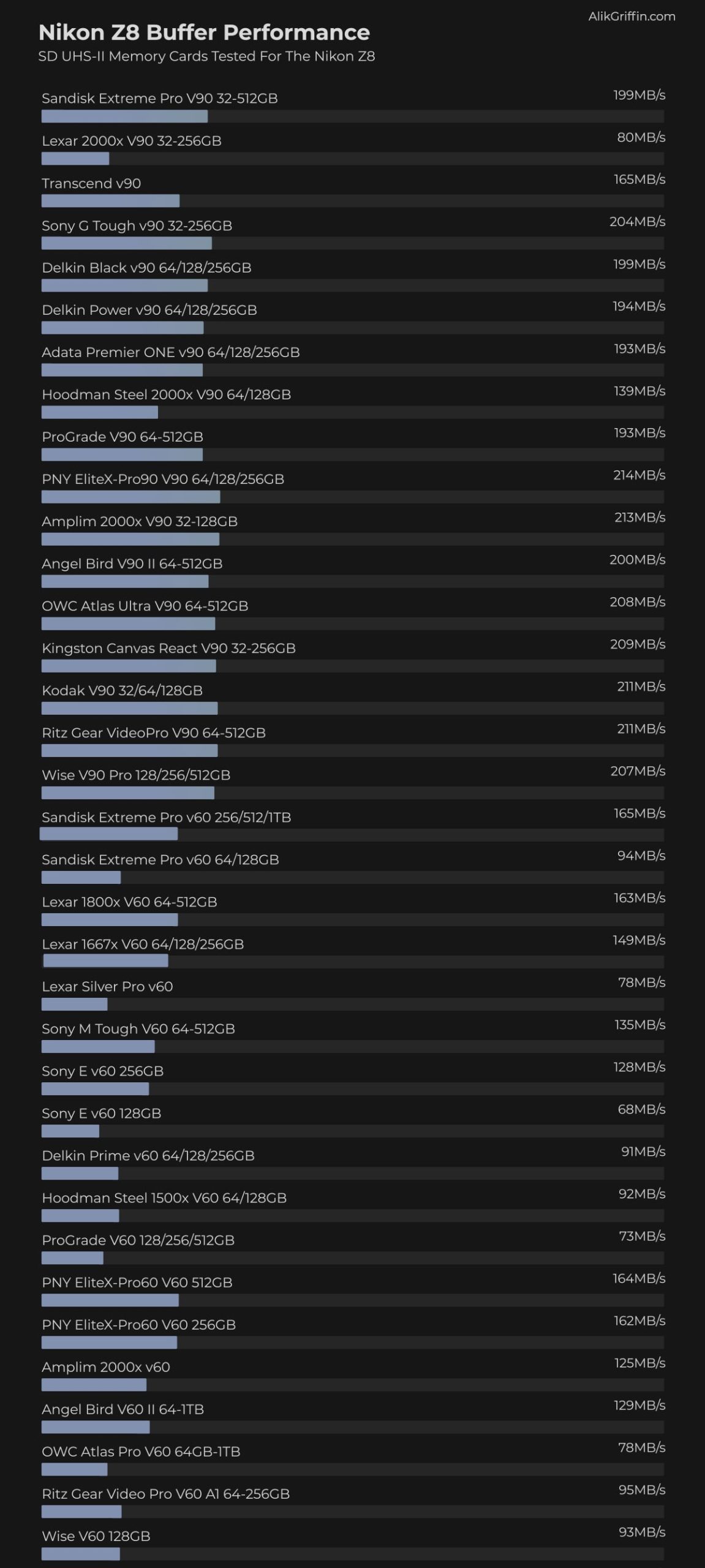
To test the camera, I ran each card in the Nikon Z8 until its 2GB buffer was filled. Then, I calculated the time required to clear the buffer as a function of the amount of data written.
An important spec to look out for is sustained speeds. Cards often have a fast SLC cache, but it’s not very big on some cards. Once this cache is exhausted, the cards can run very slowly. I test sustain speeds, which you can see in my Guide To The Best CFexpress Type B Memory Cards.
CFExpress Speed and Buffer Test
This chart shows how each CFexpress memory card performed in the Nikon Z8 buffer test.
SD UHS-II Speed and Buffer Test
This chart shows how each SD UHS-II memory card performed in the Nikon Z8 buffer test.
Shooting 8k Video: What You Need To Know
The Nikon Z8 has many very high-end video recording options. You can record in full NRAW, ProResRAW, ProRes, H.265, or H.264.
If you go to 12-bit RAW or ProRes, you will need very fast cards.
When ordering a CFExpress or UHS-II card, match the Sustained write speed (MB/s) to determine the speed card you need for the recording format you want to shoot in.
UHS-II V60 cards have a sustained write speed of 60MB/s, and UHS-II V90 cards have a sustained write speed of 90MB/s. Both are fast enough for H.265, which records at 50 MB/s on the Nikon Z8.
BitRate For N-RAW Nikon Z8
| Resolution | HQ N-RAW | Normal N-RAW | ||
| Mbps | MB/s | Mbps | MB/s | |
| 8256×4644 24-60fps FX | 2310 – 5780 | 288.75 – 722.5 | 1390 – 3470 | 173.75 – 433.75 |
| 5392×3032 50p-60p DX | 2470 – 2960 | 308.75 – 370 | 1240 – 1490 | 155 – 186.25 |
| 5392×3032 24p-30p DX | 1190 – 1480 | 148.75 – 185 | 600 – 750 | 75 – 93.75 |
| 4096×2160 100p-120p FX | 2900 – 3840 | 362.5 – 480 | 1460 – 1750 | 182.5 – 218.75 |
| 4096×2160 50p-60p FX | 1450 – 1740 | 181.25 – 217 | 730 – 880 | 91.25 – 110 |
| 4096×2160 24p-30p FX | 700 – 870 | 87.5 – 108.75 | 350 – 440 | 43.75 – 55 |
BitRate For H.265 10-Bit Nikon Z8
The Nikon Z8’s maximum bitrate when shooting H.265 is 400 Mbps (50 MB/s). This means a v60 UHS-II card is sufficient for these recording modes.
| Resolution | H.265 10-bit | H.265 8-bit | ||
| Mbps | MB/s | Mbps | MB/s | |
| 7680×4320 24-30p | 400 | 50 | 370 | 46.25 |
| 3840×2160 100-120p | 400 | 50 | 370 | 46.25 |
| 3840×2160 24-30p | 190 | 23.75 | 150 | 18.75 |
| 1920×1080 100-120p | 190 | 23.75 | 150 | 18.75 |
| 1920×1080 50-60p | 100 | 12.5 | 80 | 10 |
| 1920×1080 24-30p | 50 | 6.25 | 40 | 5 |
Don’t Forget the Card Reader: Unlocking CFexpress 4.0 Speeds
Even though the Nikon Z8 is limited to CFexpress 2.0 speeds in-camera, the real benefit of the newer CFexpress 4.0 cards is how fast you can get the footage onto your computer. To see those speeds (up to 3,500 MB/s), you must use a USB4 or Thunderbolt card reader – assuming you have a fast drive you’re transferring data to.
If you use an older USB 3.2 (10 Gbps) reader, your transfer speed will be capped at around 1,000 MB/s, regardless of how fast your card is. By the way, that’s still very fast.
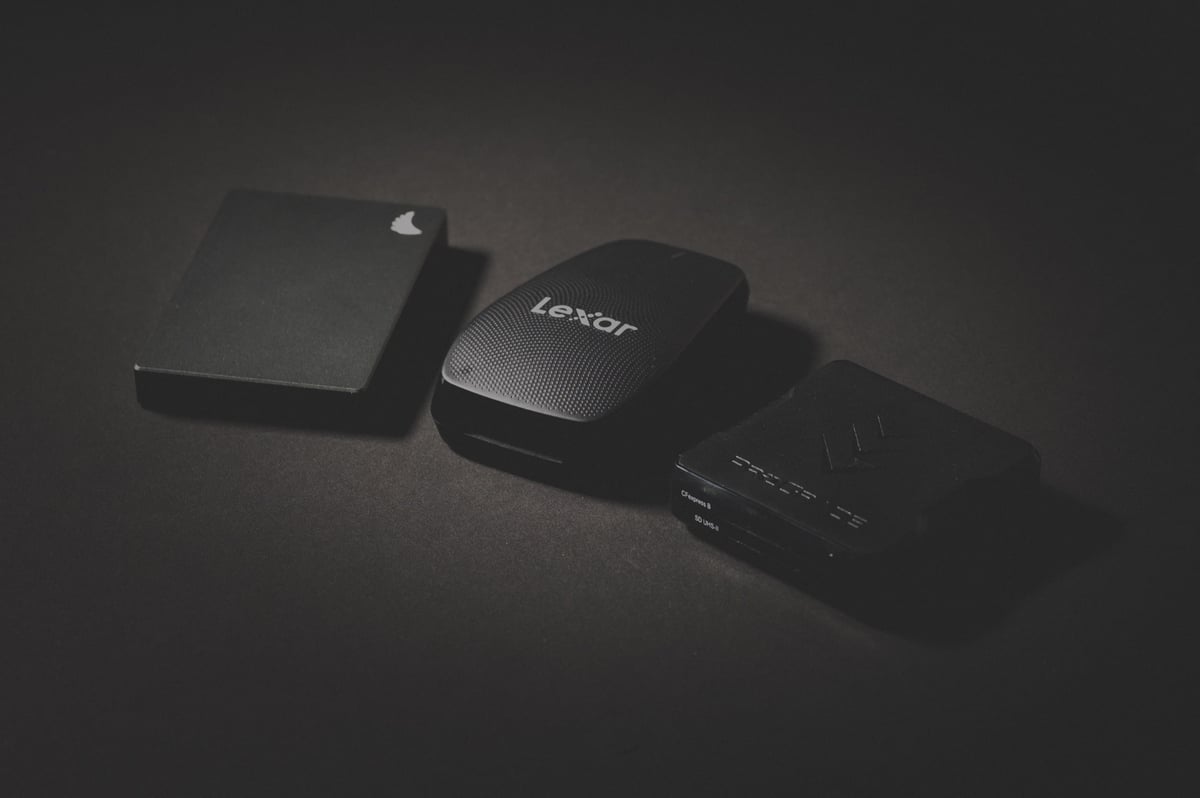
My personal situation as a professional video editor and photographer: I typically use the slower Dual-Slot Reader (even though I own all the readers) because I copy all my data to huge Hard Disk Drives, which are slow, and I like the convenience of having SD and CFx in a single unit. Professionally, when I’m editing, I edit off smaller SSD drives, usually with proxies. But for YouTubers, converting this might be too time-consuming, so you’ll likely want faster SSD drives with sustained high speeds or a RAID setup. In that case, the CF4.0 card readers can be beneficial.
Recommended Dual-Slot Readers (CFexpress + SD)
For most Z8 shooters, a dual-slot reader is the best choice because it lets you offload both CFexpress and SD cards from a single USB-C port.
I personally use the Prograde readers because of the magnetic base. It allows me to attach it to the side of my desk so it stays out of the way.
- ProGrade Digital Dual-Slot Reader (USB 3.2 Gen 2): The industry favorite. It’s magnetic (sticks to your laptop lid) and extremely reliable. – B&H
- Lexar Professional CFexpress Type B / SD Reader: A compact, high-performance option that includes both USB-C and USB-A cables. – B&H
Best High-Speed “Workflow” Readers
If you shoot high-volume 8K video and need the absolute fastest ingest speeds possible:
- ProGrade Digital USB4 Single-Slot Reader: The gold standard for CFexpress 4.0 cards. It utilizes the full 40 Gbps bandwidth of USB4 to offload 1TB of data in just a few minutes. – B&H
XQD AND CFexpress
While CFexpress cards are backward-compatible with XQD cameras, I have not found an XQD reader that will accept them, even though they are XQD-compatible. If you’re coming from a Nikon DSLR and have all these XQD readers and cards, you must upgrade your readers for the new CFexpress cards.













Comments
14 responses to “Best Memory Cards Nikon Z8 – Speed & Buffer Tests”
Thanks for the heads up about the Delkin Prime G4 1TB card for $100 from B&H. I happened upon your site this afternoon researching cards and am so glad I did. Thanks!
No problem, I”ll make sure the sight is properly plastered with that notification when it goes live.
Looks like the deal is already sold out.
I know what you tried to say about the readers but there is actually three that I know:
The first one is the Sony MRW-G1 CFexpress Type B/XQD Memory Card Reader that is $99, the second and third are from ATECH; a desktop Thunderbolt 3 that has been around for a couple of years already and with good reviews and a new one that I just saw while writing this reply. They are $119 and $79 respectively.
Thanks Will, I’m going to try to do a reader roundup pretty soon. I’ll have to check out that Atech reader, didn’t know about that one. I’m hoping we start seeing USB4 soon. All the sales on the external SSD drives would have me believe that tech is coming very soon to externals.
Thank you Alik! You are my go-to website when it comes to benchmarks; from my Z5 telling us to buy UHS-I and not II to my new Z8 with the Lexar Diamonds, Delkin Black and Angelbird that I purchased (really expensive indirect cost to upgrade if you ask me).
Back to the readers, I’m not excited because Apple implemented USB 3.2 Gen 1 (10Gbps) ports instead of the 3.2 Gen 2×2 (20 Gbps), not even 20Gbps to at least cap the speed of the media, and I don’t know if they really fixed or upgraded the ports to maximize the performance with the M2 machines. Reasons why I think the safest choice is Thunderbolt 3, honestly I don’t see manufacturers releasing USB4 readers without crippling the buses to manage heat and provide “pocketable” solutions. Let’s see what happens.
This was awesome, thank you. Have been looking all over trying to get an idea on how much space I’ll need for casual video recording.
What’s the difference between the sustain and Z9/Z8 columns? If I get a card that can do a sustained write of 1266 MB/s, will that actually make a difference in-camera? Or will the camera be limited to the Z9/Z8 speed of 699 MB/s?
There are a few things you should know here. I’ll do my best to explain.
The Z8/Z9 column is how fast the card works in the Nikon Z8 or Z9. That seems to be the limited speed of what the camera will output when clearing the buffer.
But it’s a little tricky because CFx cards typically have two types of flash in them that they use as a buffer. And a fast SLC buffer and a TLC or QLC storage flash.
Some cards like the Lexar Diamond look to be using a faster TLC flash throughout the whole card so it will always perform quickly, whereas a card like the Sandisk Extreme, seems to be using only a fast flash for a very short cache, and then a very slow storage flash. Fine for short bursts of speed only.
So be careful buying cards only when the sustained speed is lower than what the camera can output because it can affect your video performance.
If RAW video recording is important, I would try to grab a card with a higher sustained speed than where the camera tested.
The reason is, that the camera says it’s writing at around 699MB/s but sometimes the actual data is written faster since with some cameras there is sometimes a small delay (at least with older cameras I used to test) between the processing of each file before it is written. So I can only record the average speed of the whole process as the buffer clears to the card.
So I’m kind of guessing here, but it would be like “process file -> write file -> process next file -> write file.” That speed the camera produces is the average of the full process, so the card when it writes might actually be writing at a faster speed depending on how long the process delay is. I could be wrong here, but in the past with some cameras, shooting in lower light or at higher ISO or with some settings turned on like RAW+JPG, would decrease the speed the cameras wrote to cards which made me come up with this hypothesis that the processing happens to the file before it is written to the card.
So the very moment the camera writes to the card might be writing faster than 699MB/s, I am only able to take the average of the whole buffer clearing/camera working process to get a general idea of how cards perform between various brands.
So grabbing a card with a higher sustained speed, might not necessarily be overkill.
I also will be retesting the camera today, I need to figure out what’s going on with those Prograde cards.
Let me know if you have any more questions.
Is lexar 2000 v90 slower than 1800 v60? Is it typo, faulty card or manufacturer fail?
In this case I think it’s a compatibility issue. I couldn’t get the v90 working properly in the Z8. This happens sometimes, a miss match of memory controls.
It’s often more related to the camera and the hardware inside than it is a bad card. For example almost half the V90 cards out there don’t work in the Leica M11.
Thank You for clarification.
Great information, thanks. It seems you’ve put thought into the testing methods (I’m an engineer). Looks like the Lexar Silver 512GB CFx-B is a great deal for my Z8, only $170 at B&H and it seems to run the camera at full speed. Am I missing something? I’ll subscribe and see what else turns up.
oops… I see you basically pre-answered my question in a sidebar about purchase options and referring to that card 🙂 I do mostly photos and only some video and I don’t really need all the high speed stuff, but I’d like to equip the camera to its capabilities for when the opportunity comes up.