

The Nikon Zf has two card slots, one for UHS-II SD cards and one for microSD cards (UHS-I). In my in-camera tests, most V90 SD cards wrote 197–228 MB/s, while V60 cards ranged from 83 to 166 MB/s. Buy a V90 card if you shoot a lot of bursts; for video and normal shooting, a good V60 card like the Lexar 1800x (166 MB/s) is all you need. Both slots are on the bottom of the camera, right next to the battery.
For my full take on the camera itself, see the Nikon Zf review. Nikon Zf: Amazon / B&H
Table of Contents
How I Tested the Nikon Zf
I tested 35 UHS-II SD cards in the Zf in July 2024. Each test is a burst of Lossless Compressed RAW in Continuous H (extended) at 14 fps until the buffer fills. I time how long the camera takes to clear the buffer and divide the data written by that time, then take the fastest of several runs. It’s a simple scene, so files from more detailed scenes can be larger; treat the numbers as a comparison between cards. I don’t test RAW+JPEG, since JPEG processing muddies the card comparison. The results cover the SD slot; for microSD speeds, see my microSD memory card guide.
Quick Picks: Best Memory Cards for the Nikon Zf
Not sure what capacity to get? Check what size memory card you need before you buy. The Zf’s Lossless Compressed RAW files are about 25.9 MB each, so if you’re coming from an older or lower-resolution camera, you’ll fill cards faster than you might expect.
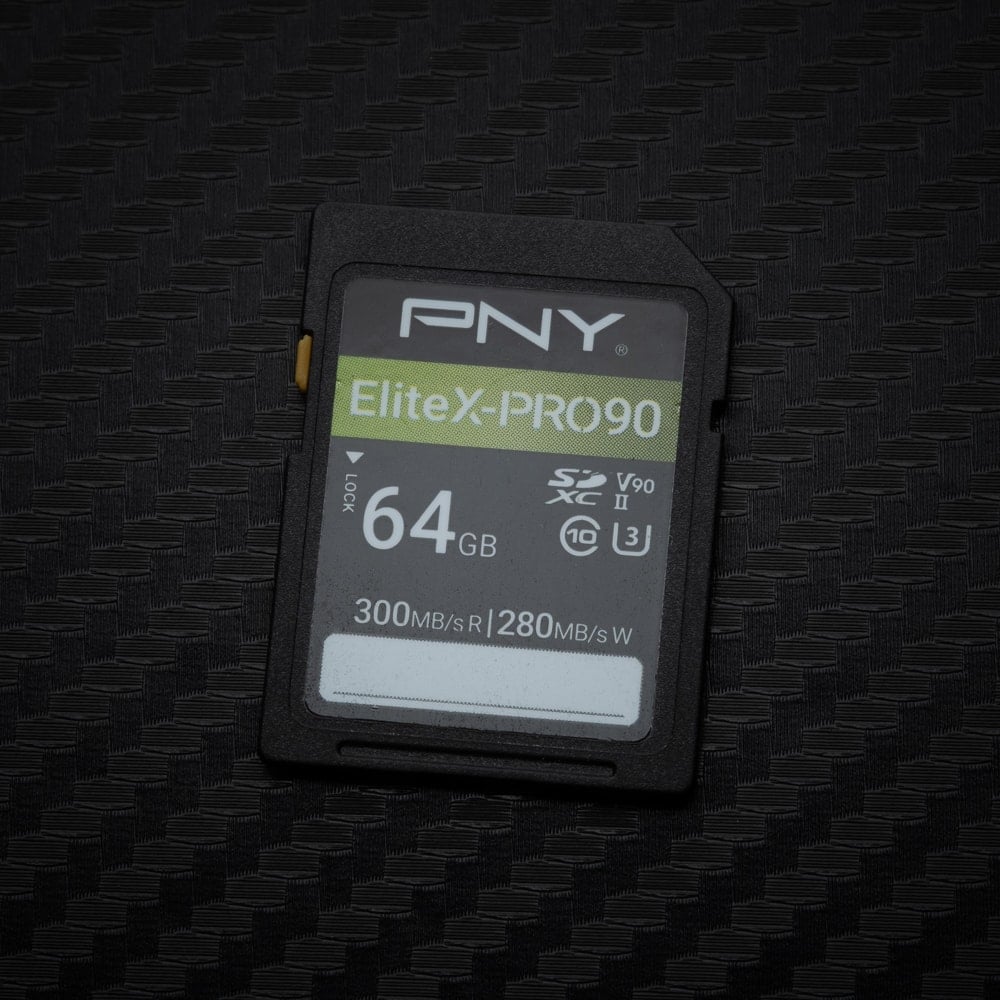 | Fastest in the Zf: PNY EliteX-PRO90 V90. 228 MB/s in the Zf, the fastest card I tested. In my reader it wrote 272 MB/s and read 287 MB/s. |
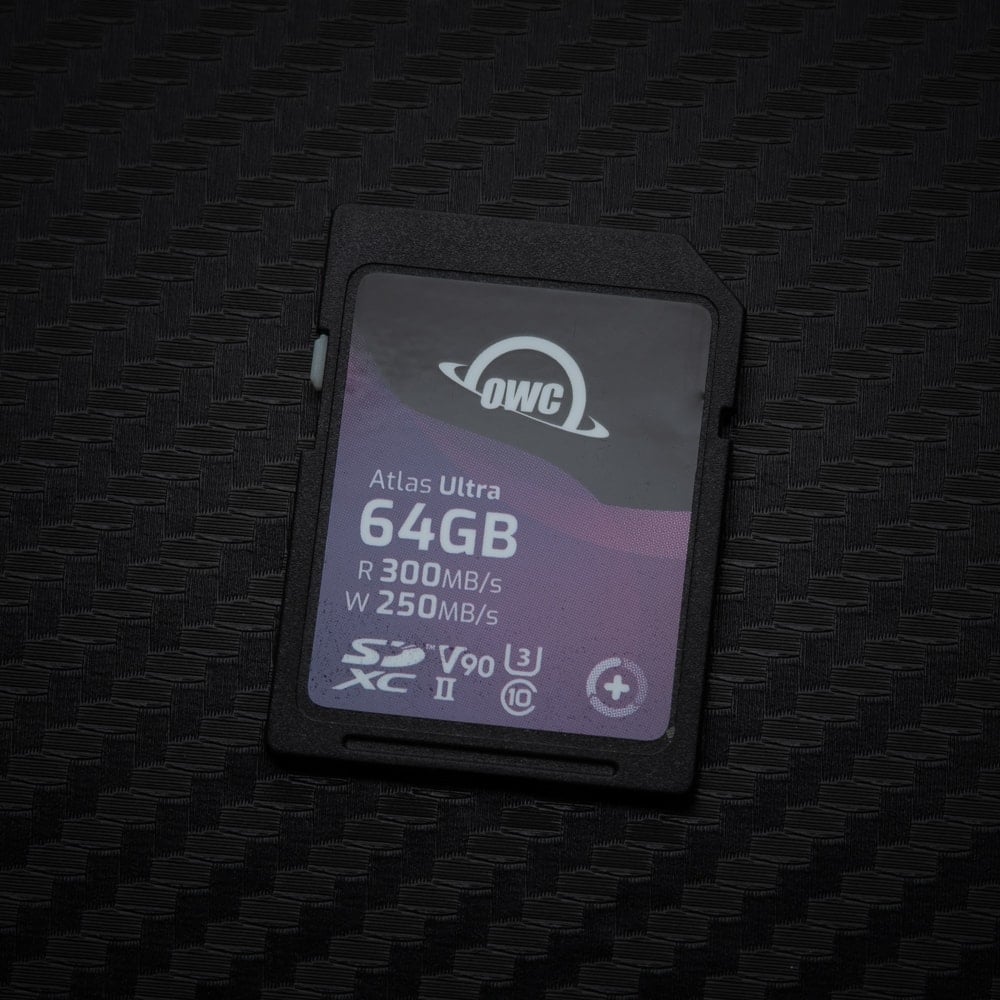 | Also near the top: OWC Atlas Ultra V90. 225 MB/s in the Zf, a few MB/s behind the PNY. It wrote 271 MB/s and read 287 MB/s in my reader. |
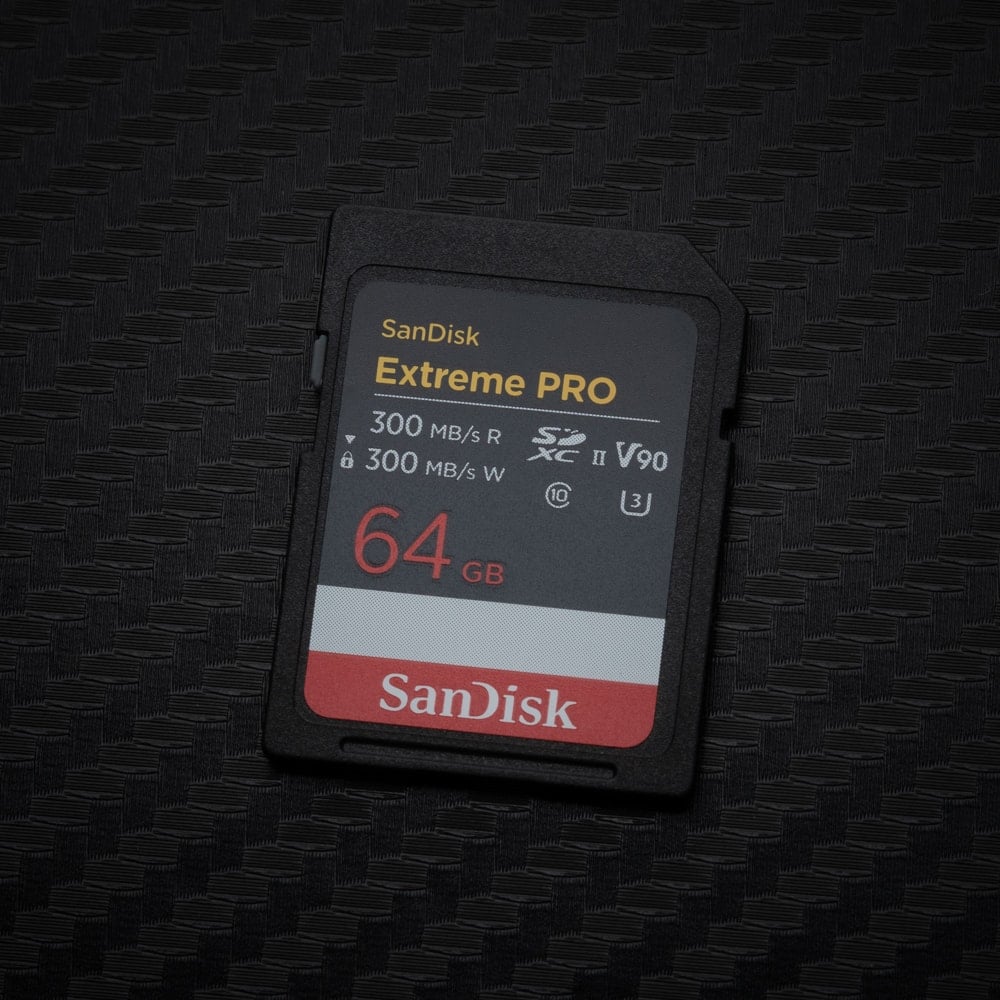 | Easy-to-find V90: SanDisk Extreme PRO V90. The previous version wrote 219 MB/s in the Zf. The current card wrote 260 MB/s and read 278 MB/s in my reader, so expect it to sit with the fastest cards here. |
 | Best V60: Lexar Professional 1800x V60. 166 MB/s in the Zf, the fastest V60 card I tested. In my reader it wrote 192 MB/s and read 251 MB/s. A good card for video and normal shooting. |
 | For the microSD slot: Lexar SILVER PLUS V30 A2 microSD. Wrote 151 MB/s and read 177 MB/s in my reader. The Zf’s microSD slot is UHS-I, so use it for JPEGs, overflow, or backup in critical situations. |
Nikon Zf Card Slots: UHS-II SD and microSD
Slot 1 takes SD cards, UHS-I or UHS-II. Slot 2 takes microSD cards, which Nikon lists as UHS-I compliant, so the microSD slot is always the slower of the two. Nikon lets you use the second slot in a few ways:
- Overflow: the camera only writes to the microSD card when the SD card fills.
- Backup: every picture goes to both cards, so the camera waits for the slower microSD card and your buffer clears more slowly.
- RAW + JPEG/HEIF: RAW files go to the SD card and JPEG or HEIF files to the microSD card.
- JPEG/HEIF + JPEG/HEIF: duplicate JPEG or HEIF copies at different sizes.
MicroSD cards will perform slower than V60 or V90 UHS-II SD cards, so you might want to send only JPEGs to the microSD card, or set the camera to record a backup only in critical situations. If you use a microSD card as a backup, the buffer will be slower, so don’t pair it with a UHS-II V90 card, or you will waste money on speeds you can’t take advantage of.
V90 vs V60 SD Cards in the Nikon Zf
In the Zf, 15 of the 17 V90 cards I tested wrote 197–228 MB/s and filled a full burst of about 5.2GB. The V60 cards varied a lot: the best (Lexar 1800x, PNY EliteX-PRO60, Lexar SILVER PRO) wrote 148–166 MB/s, while eight V60 cards wrote only 83–96 MB/s.
It looks like there were some UHS-II initialization issues with those slower UHS-II V60 memory cards, so you might want to avoid those. However, these initialization issues sometimes occur due to improperly power cycling the camera after formatting and changing to new cards, but not always. Sometimes, some cameras don’t like some cards. For example, three of my Lexar 2000x cards from different generations always give me problems with my Nikon Z8. Stick with the V60 cards on the list that did well, and you’ll likely have no issues. There were no issues with V90 cards in the Nikon Zf.
Current SD Cards I Recommend
I update this list as new cards come out. The speeds are from my card reader tests, plus the manufacturer’s rated and sustained speeds.
| Memory Cards for Nikon Zf | Speed Class | Minimum Write Speed | USB-C Write | USB-C Read | Check Price | ||
|---|---|---|---|---|---|---|---|
| SD UHS-II V90 | X | Hide | |||||
| Sandisk Extreme Pro V90 128GB-2TB | UHS-II v90 | 90 | 260 | 278 | X | Amazon / B&H | |
| Sandisk Extreme Pro V90 64GB | UHS-II v90 | 90 | 282 | 285 | X | Amazon / B&H | |
| Lexar 2000x V90 64-512GB | UHS-II v90 | 90 | 228 | 238 | Amazon / B&H | ||
| Kingston Canvas React Plus V90 32GB-256GB | UHS-II v90 | 270 | 287 | X | Amazon / B&H | ||
| Sony G Tough v90 64-256GB | UHS-II v90 | 90 | 255 | 284 | Amazon / B&H | ||
| Delkin Black v90 64-512GB | UHS-II v90 | 90 | 253 | 278 | |||
| Delkin Power v90 64GB-2TB | Delkin Power v90 | UHS-II v90 | 90 | 248 | 287 | Amazon / B&H | |
| ProGrade V90 Iridium 256GB-1TB | UHS-II v90 | 90 | Amazon | ||||
| ProGrade V90 Iridium 128GB | UHS-II v90 | 90 | 195 | 284 | Amazon | ||
| PNY EliteX-Pro90 V90 64/128/256GB | UHS-II v90 | 90 | 272 | 287 | X | Amazon / B&H | |
| Angel Bird V90 II 64-512GB | Angel Bird V90 II | UHS-II v90 | 90 | 271 | 288 | X | Amazon / B&H |
| OWC Atlas Ultra V90 64-512GB | UHS-II v90 | 90 | 271 | 287 | X | Amazon / B&H | |
| Nextorage NX-F2PRO V90 64-256GB | UHS-II v90 | 90 | 282 | 286 | X | Amazon | |
| Nextorage NX-F2AE V90 256GB-1TB | UHS-II v90 | 90 | Amazon | ||||
| SD UHS-II V60 | X | Hide | |||||
| Sandisk Extreme Pro v60 2TB | UHS-II v60 | ||||||
| Sandisk Extreme Pro v60 256/512/1TB | UHS-II v60 | 60 | 191 | 270 | Amazon / B&H | ||
| Sandisk Extreme Pro v60 64-128GB | UHS-II v60 | 60 | 103 | 284 | X | Amazon / B&H | |
| Lexar ARMOR Gold V60 256GB-1TB | UHS-II v60 | 60 | 179 | 252 | Amazon / B&H | ||
| Lexar ARMOR Gold V60 128GB | UHS-II v60 | 60 | 195 | 253 | Amazon / B&H | ||
| Lexar ARMOR Silver V60 256/512GB | UHS-II v60 | 60 | Amazon | ||||
| Lexar ARMOR Silver V60 128GB | UHS-II v60 | 60 | Amazon | ||||
| Lexar Silver Pro v60 128GB-1TB | UHS-II v60 | 60 | 158 | 248 | X | Amazon | |
| Lexar 1800x V60 256GB-1TB | UHS-II v60 | 60 | Amazon | ||||
| Lexar 1800x V60 64-128GB | UHS-II v60 | 60 | 192 | 251 | Amazon | ||
| Lexar 1667x V60 64/128/256GB | Lexar 1000x | UHS-II v60 | 60 | 109 | 254 | Amazon / B&H | |
| Kingston Canvas React Plus V60 256GB-1TB | UHS-II v60 | 60 | Amazon | ||||
| Kingston Canvas React Plus V60 128GB | UHS-II v60 | 60 | 101 | 276 | X | Amazon | |
| Sony M Tough V60 64-512GB | Sony M V60 UHS-II Review | UHS-II v60 | 60 | 155 | 277 | Amazon / B&H | |
| Sony E v60 256GB | Sony E Series V60 256GB Review | UHS-II v60 | 60 | 183 | 275 | X | Amazon / B&H |
| Sony E v60 128GB | Sony E Series V60 128GB Review | UHS-II v60 | 60 | 101 | 278 | Amazon / B&H | |
| Sony E v30 64GB | UHS-II v30 | 30 | 51 | 274 | Amazon / B&H | ||
| Delkin Black v60 128/256GB | UHS-II v60 | 60 | |||||
| Delkin Prime v60 256GB-1TB | UHS-II v60 | 60 | Amazon | ||||
| Delkin Prime v60 128GB | UHS-II v60 | 60 | 100 | 279 | Amazon | ||
| ProGrade V60 128/256/512GB/1TB | ProGrade V60 | UHS-II v60 | 60 | Amazon / B&H | |||
| PNY EliteX-Pro60 V60 512GB | UHS-II v60 | 60 | 185 | 272 | Amazon / B&H | ||
| PNY EliteX-Pro60 V60 256GB | UHS-II v60 | 60 | 185 | 277 | X | Amazon / B&H | |
| PNY EliteX-Pro60 V60 128GB | UHS-II v60 | 60 | 100 | 281 | Amazon / B&H | ||
| Angel Bird V60 II 64-1TB | Angel Bird V60 II | UHS-II v60 | 60 | 146 | 263 | X | Amazon / B&H |
| OWC Atlas Pro V60 64GB-1TB | UHS-II v60 | 60 | 102 | 274 | Amazon / B&H | ||
| Nextorage NX-F2SE V60 512GB | UHS-II v60 | 60 | Amazon | ||||
| Nextorage NX-F2SE V60 256GB | UHS-II v60 | 60 | Amazon | ||||
| Nextorage NX-F2SE V60 128GB | UHS-II v60 | 60 | 101 | 277 | Amazon |
Current microSD Cards I Recommend
Here are some of the best microSD cards for the Zf’s second slot. The speeds are from my card reader tests.
| Recommended Cards | USB-C Write | USB-C Read | Check Price | |
|---|---|---|---|---|
| MicroSD Express | ||||
| Lexar PLAY PRO EX 256/512GB / 1TB | Amazon | |||
| Sandisk EX 128GB/256GB/512GB | Amazon | |||
| Sandisk EX 1TB | ||||
| Samsung EX 256GB | Amazon | |||
| PNY EX 128GB/256GB/512GB | Amazon | |||
| Adata Premier Extreme EX U3 | Amazon | |||
| Patriot EP EX V30 | Amazon | |||
| TeamGroup APEX EX V30 A1 128GB-1TB | Amazon | |||
| Transcend USD710S EX V30 A1 256GB/512GB | ||||
| UHS-II | ||||
| Lexar Gold V60 A1 | 103 | 280 | Amazon / B&H | |
| ProGrade V60 | 137 | 198 | Amazon / B&H | |
| Delkin Power V90 | 275 | 287 | Amazon / B&H | |
| Angel Bird A1 V60 | 142 | 267 | Amazon / B&H | |
| UHS-I | ||||
| Sandisk Extreme Pro U3 A2 | 96 | 173 | Amazon | X |
| Sandisk Outdoors 4k V30 A2 | 97 | 175 | Amazon / B&H | |
| Sandisk Extreme U3 A2 256GB-1TB | 124 | 175 | Amazon / B&H | |
| Sandisk Extreme U3 A2 128GB | 96 | 160 | Amazon / B&H | X |
| Sandisk Ultra U1 A1 – 0ld | 50 | 93 | B&H | |
| Sandisk Nintendo Switch V30 A1 | 95 | 158 | Amazon / B&H | |
| Sandisk High Endurance V30 | 82 | 92 | Amazon / B&H | |
| Sandisk Max Endurance V30 | 49 | 92 | Amazon / B&H | |
| Samsung Pro Ultimate v30 A2 | 130 | 179 | Amazon / B&H | |
| Samsung Pro Plus V30 A2 | 127 | 176 | Amazon / B&H | |
| Samsung EVO Plus V30 A2 | 123 | 127 | Amazon / B&H | |
| Samsung EVO Select V30 A2 | 124 | 126 | Amazon / B&H | |
| Samsung Pro Endurance V30 | 61 | 93 | Amazon / B&H | |
| Kingston Canvas Go! Plus V30 A2 256GB-1TB | ||||
| Kingston Canvas Go! Plus V30 A2 64GB-128GB | ||||
| Kingston Canvas Select Plus V30 A1 | 80 | 93 | Amazon / B&H | |
| Kingston Industrial V30 A1 | Amazon / B&H | |||
| Lexar Silver Plus V30 A2 | 151 | 177 | Amazon / B&H | X |
| Lexar Silver1066x A2 | 118 | 146 | Amazon / B&H | |
| Lexar Blue 633x V30 A1/A2 | 82 | 94 | Amazon / B&H | |
| Lexar FLY V30 A2 | 124 | 152 | Amazon / B&H | |
| Lexar PLAY U3 A2 512GB-1TB | Amazon / B&H | |||
| Lexar PLAY U3 A1 256GB | 102 | 152 | Amazon / B&H | |
| Lexar PLAY U1 A1 128GB | 20 | 144 | Amazon / B&H | |
| Lexar E-Series Plus U3 A2 | Amazon | |||
| Lexar E-Series U3 A1 | Amazon | |||
| Delkin Black V30 | 86 | 93 | B&H | |
| Delkin Hyperspeed V30 | 80 | 93 | Amazon / B&H | |
| Delkin Dashcard V30 | Amazon / B&H | |||
| Transcend 500S U3 | Amazon / B&H | |||
| Transcend 350V High Endurance U3 | Amazon / B&H | |||
| Transcend 340S Ultra Performance V30 A2 | Amazon / B&H | |||
| Transcend 330S High Performance V30 A2 | Amazon / B&H | |||
| Transcend 300s V30 A1 | 47 | 94 | Amazon / B&H | |
| PNY Premier-X A2 V30 | 84 | 93 | Amazon / B&H | |
| PNY PRO Elite U3 A2 | 83 | 93 | Amazon / B&H | |
| PNY PRO Elite U3 | 31 | 91 | Amazon / B&H | |
| PNY Elite-X V30 A1 | 48 | 94 | Amazon / B&H | |
| Patriot EP PRO U3 | Amazon | |||
| Patriot EP A1 V30 | 49 | 94 | Amazon / B&H | |
| Patriot High Endurance U3 | ||||
| Silicon Power Superior Pro | B&H | |||
| Silicon Power Superior V30 A2 | 41 | 94 | Amazon / B&H | |
| Silicon Power Superior V30 A1 | 60 | 94 | ||
| Silicon Power 3D NanD V30 A1 | 54 | 94 | Amazon / B&H | |
| Silicon Power GAME V30 A1 | 89 | 94 | Amazon / B&H | |
| Silicon Power High Endurance U3 | 87 | 94 | Amazon / B&H | |
| TeamGroup A2 Pro+ 256GB-1TB | Amazon | |||
| TeamGroup A2 Pro+ 128GB | Amazon | |||
| TeamGroup Go V30 A1 | Amazon | |||
| TeamGroup High Endurance V30 | Amazon | |||
| TeamGroup Ultra A2 V30 512GB-1TB | ||||
| TeamGroup Ultra A2 V30 256GB | ||||
| TeamGroup Ultra A2 V30 128GB | ||||
| TeamGroup ACE 8K V30 A2 256GB-1TB | ||||
| TeamGroup ACE 8K V30 A2 128GB | ||||
| Third-Party / OEM | ||||
| Amazon Basics V30 A2 | Amazon | |||
| Ritz Gear V30 A1 | 82 | 93 | Amazon | |
| Gigastone 4k Camera Extreme Max | Amazon | |||
| Gigastone 4k Camera Extreme | Amazon | |||
| Gigastone 4k Camera Pro Max V30 A2 | Amazon | |||
| Gigastone 4k Camera Pro V30 A2 | Amazon | |||
| Gigastone Camera Plus V30 A1 | Amazon | |||
| Gigastone 4k Game Turbo A2 U3 | Amazon | |||
| Gigastone Game Pro Max V30 A2 | ||||
| Gigastone 4k Game Pro V30 A2 | Amazon | |||
| Gigastone Gaming Plus A1 V30 | Amazon | |||
| Gigastone 10x High Endurance V30 | Amazon | |||
| Amplim 667X V30 A1 | 86 | 92 | Amazon | |
| Netac Pro A1 U3 | 50 | 92 | ||
| Addlink EX U3 | Amazon | |||
| Dato EX V30 A1 | Amazon | |||
| Gigastone EX V30 A1 256GB | Amazon | |||
| Discontinued | ||||
| Lexar 1800x V60 | 120 | 290 | ||
| Lexar 1000x V60 | Amazon | |||
| Sandisk Extreme Plus U3 A2 | 107 | 174 | Amazon / B&H | |
| Delkin Select V30 64GB | 83 | 93 | Amazon / B&H | |
| Kingston Canvas Go! Plus V30 A2 | 128 | 173 | Amazon / B&H | X |
Nikon Zf Video Card Requirements
The Zf records 4K UHD at up to 60p in H.265 (10-bit or 8-bit); H.264 8-bit is limited to 1080p. Nikon recommends UHS Speed Class 3 or better SD cards for video, and UHS Speed Class 3 cards with a maximum transfer rate of at least 250 MB/s for high frame sizes and rates. A good V60 UHS-II card is the fastest card you’ll need for video; card speed matters mostly for stills bursts. Each clip can be up to 125 minutes long.
| Frame size / rate (H.265 8-bit) | Approx. time on a 256GB card |
|---|---|
| 4K UHD 60p / 50p | 93 minutes |
| 4K UHD 30p / 25p / 24p | 186 minutes |
| 1080p 120p / 100p | 186 minutes |
| 1080p 60p / 50p | 368 minutes |
| 1080p 30p / 25p / 24p | 719 minutes |
For other settings, use my bitrate-to-record-time calculator.
What Size Memory Card Do You Need for the Nikon Zf?
Nikon rates a 32GB card at about 654 Lossless Compressed RAW files, so a 128GB card holds about 2,600. If you mainly shoot photos and some video, a 128GB card should be enough. But for higher-quality video, you might need a 256GB card: Nikon rates 256GB at about 93 minutes of 4K 60p. I recommend sticking to 64GB cards as a minimum size, since cards smaller than 64GB use the older 32-bit (FAT32) file system. The memory card capacity you can use is otherwise not restricted.
Nikon Zf In-Camera Test Results: UHS-II SD Cards (Tested July 2024)
The SanDisk Extreme PRO V90, SanDisk Extreme PRO V60 (256GB+), and Angelbird V90 II here are earlier versions; the brands have updated them since, so the current cards will likely perform differently in the Zf. The ProGrade V90 is the older pre-Iridium card. Some of these cards are also really good and the only reason they didn’t make the recommendation list comes down to price or availability.

| Card | Class | In-camera write (MB/s) | Data per burst (GB) |
|---|---|---|---|
| PNY EliteX-PRO90 V90 | V90 | 228 | 5.23 |
| Angelbird V90 II (previous version) | V90 | 226 | 5.21 |
| Kodak V90 | V90 | 226 | 5.21 |
| OWC Atlas Ultra V90 | V90 | 225 | 5.20 |
| Ritz Gear VideoPro V90 | V90 | 225 | 5.20 |
| Wise PRO V90 | V90 | 225 | 5.21 |
| Kingston Canvas React V90 | V90 | 223 | 5.20 |
| Amplim V90 | V90 | 221 | 5.22 |
| SanDisk Extreme PRO V90 (previous version) | V90 | 219 | 5.22 |
| Delkin BLACK V90 | V90 | 219 | 5.22 |
| Sony TOUGH G V90 | V90 | 212 | 5.23 |
| Delkin POWER V90 | V90 | 209 | 5.22 |
| ADATA Premier ONE V90 | V90 | 200 | 5.22 |
| ProGrade V90 (pre-Iridium) | V90 | 200 | 5.22 |
| Lexar Professional 2000x V90 | V90 | 197 | 5.23 |
| Transcend V90 | V90 | 170 | 4.62 |
| Hoodman Steel 2000x V90 | V90 | 149 | 3.45 |
| Lexar Professional 1800x V60 | V60 | 166 | 4.06 |
| PNY EliteX-PRO60 V60 512GB | V60 | 165 | 3.90 |
| PNY EliteX-PRO60 V60 256GB | V60 | 164 | 3.93 |
| Lexar Professional SILVER PRO V60 | V60 | 148 | 3.41 |
| Sony TOUGH M V60 | V60 | 137 | 3.14 |
| Sony E V60 | V60 | 132 | 2.99 |
| Angelbird V60 II | V60 | 132 | 2.99 |
| Amplim 2000x V60 | V60 | 127 | 2.91 |
| OWC Atlas Pro V60 | V60 | 106 | 2.42 |
| SanDisk Extreme PRO V60 64–128GB | V60 | 96 | 2.42 |
| Ritz Gear Video Pro V60 | V60 | 96 | 2.44 |
| Hoodman Steel 1500x V60 | V60 | 95 | 2.42 |
| Wise V60 | V60 | 95 | 2.42 |
| ProGrade V60 | V60 | 88 | 2.34 |
| Lexar Professional 1667x V60 | V60 | 87 | 2.50 |
| Delkin PRIME V60 | V60 | 85 | 2.31 |
| SanDisk Extreme PRO V60 256GB+ (previous version) | V60 | 83 | 2.24 |
| Sony E V30 | V30 | 69 | 2.08 |
Nikon Zf Memory Card Specs
| Card slots | 1 × SD (UHS-II) and 1 × microSD (UHS-I) |
| Slot 2 options | Overflow, backup, RAW in one slot and JPEG/HEIF in the other, or duplicate JPEG/HEIF at different sizes |
| Continuous H (extended) | About 14 fps |
| Continuous H | About 7.8 fps |
| Lossless compressed RAW | About 25.9 MB; Nikon buffer rating about 186 frames |
| Buffer (my estimate) | About 1.5GB |
| 4K video | 3840×2160 up to 60p, H.265 (10-bit or 8-bit) |
| Full HD video | 1920×1080 up to 120p; H.264 8-bit up to 60p |
| Maximum clip length | 125 minutes |
Nikon Zf Memory Card Quick Answers
What is the fastest SD card for the Nikon Zf?
The PNY EliteX-PRO90 V90 clocked in as the fastest card in my tests at 228 MB/s. The Angelbird V90 II, Kodak V90, and OWC Atlas Ultra V90 were right behind it, hitting between 225 and 226 MB/s.
Does the Nikon Zf’s microSD slot support UHS-II?
Nikon lists that microSD slot as UHS-I, so it’s always going to be the slower of the two slots. I’d stick to using it for overflow, JPEGs, or backup in critical situations, but know that running it as a backup will slow down your buffer clearing while the camera waits on that slower card.
How big is the Nikon Zf’s buffer?
It’s about 1.5GB based on my testing. Nikon rates it at about 186 Lossless Compressed RAW frames with a fast SD card like the SanDisk Extreme PRO, and that’s possible because the camera keeps writing data to the card while you’re shooting.
More guides: Nikon Zf review, Nikon Zf accessories, Nikon Z6 III memory cards, Nikon Z8 memory cards, Nikon Z30 SD cards, best SD cards, and best microSD cards.










Leave a Reply