

This website contains affiliate links. We will earn a small commission on purchases made through these links. Some of the links used in these articles will direct you to Amazon. As an Amazon Associate, I earn from qualifying purchases.
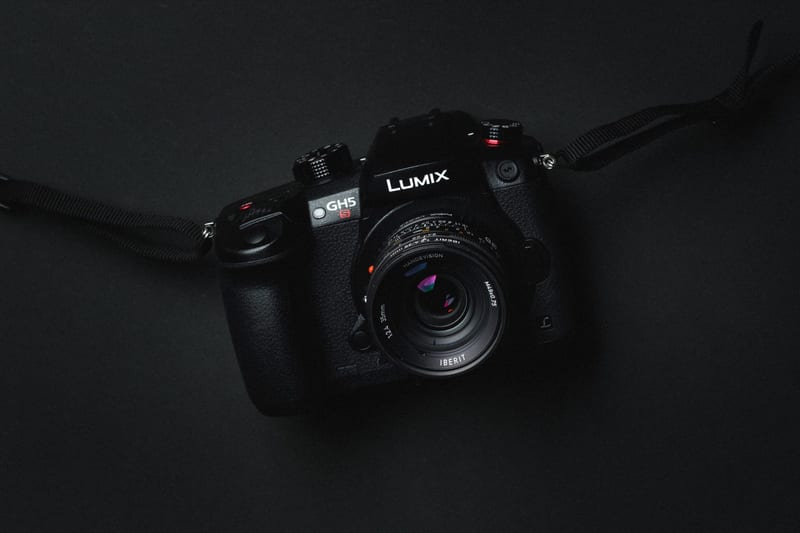
The Panasonic GH5s is very similar to the Panasonic GH5 in terms of memory performance. The main difference is the slightly larger sensor and the lack of in-body image stabilization. In tests, both cameras perform the same.
We put the Panasonic GH5s through memory card speed tests with both continuous burst and 400 Mbps 4K video recording to see which cards perform best in the camera.
Use this guide to find the fastest memory cards for your Panasonic GH5s.
Panasonic GH5s Specs
Sensor: 10.28MP Multi Aspect Ratio MOS Sensor
Processor: Venus Engine Image Processor 10
Continuous Shoot: 12 fps Cont. Shooting and 4K PHOTO Modes
Est. Buffer Size: 1.6GB
Memory Card Compatibility: UHS-I / UHS-II
Time To Clear Buffer: 14:23
Shots To Fill Buffer RAW: 163
Panasonic Lumix GH5s – Amazon / Adorama / BHphoto
Best Accessories Panasonic GH5 / GH6s
Panasonic GH5s Best Memory Cards
Panasonic GH5s Top Recommended Memory Cards
The Panasonic GH5s has two memory card slots that both support UHS-II memory cards. This will allow you to maintain high speeds while still recording backups to a second card or using it as overflow.
You can use V60 cards if you’re recording mostly just video.
| Memory Cards | Speed Class | USB-C Write | USB-C Read | Links |
|---|---|---|---|---|
| SD UHS-II V90 | Hide | |||
| Lexar 2000x V90 32-256GB | UHS-II v90 | 228 | 256 | Amazon / B&H |
| Sony G Tough v90 32-256GB | UHS-II v90 | 258 | 296 | Amazon / B&H |
| PNY EliteX-Pro90 V90 64/128/256GB | UHS-II v90 | 276 | 293 | Amazon / B&H |
| OWC Atlas Ultra V90 64-512GB | UHS-II v90 | 270 | 289 | Amazon / B&H |
| Kingston Canvas React V90 32-256GB | UHS-II v90 | 274 | 292 | Amazon / B&H |
| Wise V90 Pro 128/256/512GB | UHS-II v90 | 256 | 275 | B&H |
| SD UHS-II V60 | Hide | |||
| Sandisk Extreme Pro v60 256/512/1TB | UHS-II v60 | 189 | 279 | Amazon / B&H |
| Lexar ARMOR Gold V90 256GB-1TB | UHS-II v60 | 191 | 258 | Amazon / B&H |
| Sony M Tough V60 64-512GB | UHS-II v60 | 153 | 269 | Amazon / B&H |
| PNY EliteX-Pro60 V60 256GB | UHS-II v60 | 183 | 280 | Amazon / B&H |
Panasonic GH5s | The Speed Test
When we first tested the Panasonic GH5, there weren’t many UHS-II memory card options on the market, and the camera wasn’t yet capable of recording 400 Mbps 4K video internally. We planned to update the tests with that camera, but since the Panasonic GH5s came out, it makes sense to just test the new memory cards here. Most of the buffer hardware is the same in both cameras, and they perform similarly.
If you’re buying the Panasonic GH5 or GH5s to record 4K at 400 Mbps, you will need a UHS-II memory card. There is no getting around it. 400mbps record times will fail to record every time when shooting with UHS-I cards.
Also, like with the Panasonic G9 and the GH5, Lexar cards do not work correctly, so you will need to avoid them.
For each 4k test, I only recorded about a minute to see if the buffer could handle it.
Some of the slower cards, like the Sony M UHS-II and the Delkin 1900x, passed the test, but, to be honest, based on my experience with 500mbps in the Canon 5D IV, I would also avoid them. If they drop below 60 to 50MB/s in the data stream, they could potentially break the buffer.
Use the chart below to see which cards are best for your needs.
| SD Memory Cards | USB 3.0 Read | USB 3.0 Write | 4k | Panasonic GH5s |
| UHS-II | ||||
| Sony G | 259.2 MB/s | 234.5 MB/s | Y | 99.18 MB/s |
| Toshiba Exceria Pro | 258.8 MB/s | 226.5 MB/s | Y | 97.95 MB/s |
| Delkin V90 | 245.1 MB/s | 164.6 MB/s | Y | 96.56 MB/s |
| Fujifilm Elite II | 294.0 MB/s | 181.6 MB/s | Y | 95.75 MB/s |
| Transcend | 290.2 MB/s | 182.1 MB/s | Y | 95.55 MB/s |
| Hoodman Steel 2000x | 268.7 MB/s | 183.9 MB/s | Y | 94.64 MB/s |
| Adata V90 | 256.5 MB/s | 231.7 MB/s | Y | 93.02 MB/s |
| Sandisk Extreme Pro 300 | 263.2 MB/s | 233.4 MB/s | Y | 82.55 MB/s |
| Sandisk Extreme Pro 280 | 260.5 MB/s | 214.8 MB/s | Y | 76.52 MB/s |
| Delkin 1900X v60 | 273.3 MB/s | 97.3 MB/s | Y | 64.44 MB/s |
| Sony M | 253.2 MB/s | 91.62 MB/s | Y | 64.03 MB/s |
| Lexar 2000x | 272.7 MB/s | 244.5 MB/s | N | 37.68 MB/s |
| Lexar 1000x | 147.4 MB/s | 78.4 MB/s | N | 35.86 MB/s |
| UHS-I | ||||
| Samsung Pro U3 | 97.7 MB/s | 78.6 MB/s | N | 37.49 MB/s |
| Samsung Pro+ U3 | 97.5 MB/s | 87.3 MB/s | N | 37.25 MB/s |
| Sandisk Extreme U3 | 72.43 MB/s | 54.1 MB/s | N | 37.19 MB/s |
| Kingston U3 | 98.1 MB/s | 90.4 MB/s | N | 36.47 MB/s |
| Sandisk Extreme Plus U3 | 99.0 MB/s | 64.4 MB/s | N | 36.38 MB/s |
| Sandisk Extreme Pro U3 | 98.6 MB/s | 90.8 MB/s | N | 36.33 MB/s |
| Samsung Pro U1 | 96.3 MB/s | 82.2 MB/s | N | 35.95 MB/s |
| Delkin 633x U3 | 98.3 MB/s | 88.7 MB/s | N | 35.69 MB/s |
| Lexar 633x U3 | 93.3 MB/s | 67.3 MB/s | N | 35.69 MB/s |
| PNY Elite Performance U3 | 96.5 MB/s | 66.1 MB/s | N | 35.55 MB/s |
| Transcend U3 | 96.7 MB/s | 84.9 MB/s | N | 35.51 MB/s |
| Lexar 600x U1 | 95.4 MB/s | 64.8 MB/s | N | 35.37 MB/s |
| PNY Elite Performance U1 | 96.5 MB/s | 66.5 MB/s | N | 35.05 MB/s |
| Sony U3 – New Model | 96.7 MB/s | 56.2 MB/s | N | 34.39 MB/s |
| Sony U3 – Old Model | 96.5 MB/s | 84.5 MB/s | N | 33.88 MB/s |
| Samsung U1 EVO | 47.7 MB/s | 21.96 MB/s | N | 25.36 MB/s |
| Sandisk Ultra U1 | 99.3 MB/s | 36.1 MB/s | N | 22.67 MB/s |
Other Cards To Consider / Cards To Avoid
There are many brands making UHS-II memory cards now, but many are just white-label cards from other brands. For example, Hoodman and Fujifilm perform nearly identically to Transcend cards, which makes me think they all come from the same factory. So I wouldn’t ignore them if they go on sale since they are likely just rebranded Transcend cards or something similar.
The cards you do want to avoid are Lexar. Micron is making so much money now that they’ve decided the profits from Lexar are inconsequential, so they’ve killed the brand. Fine for Panasonic users since Lexar cards don’t perform well anyway. Today, Longsys acquired Lexar, so we’ll start seeing a new batch of cards soon. They will be made with Longsys flash memory, not Micron flash, and they will likely be very different.
Finding The Best SD Memory Cards for Panasonic GH5s
When buying memory cards, always make sure you buy from a trusted dealer. Adorama, BHPhoto, Bestbuy or Amazon are all good sources. If you buy from eBay, you have a very high risk of getting counterfeit memory cards. As a general rule, you should never buy memory cards off eBay.
Best Memory Card 4k Video Panasonic GH5s
To shoot 4K at 400 Mbps with the Panasonic GH5s, you will need to use the fastest UHS-II cards you can get to avoid buffer issues.
Lexar cards and even the slow Delkin and Sony M cards should be avoided.
UHS-II vs. UHS-I Memory Cards In The Panasonic GH5s
On the Panasonic GH5s, use UHS-I cards only for photography, unless you need larger cards for lower-bitrate video recording.
When shooting, the buffer will be set to the slowest memory card in a dual-card configuration, provided you’re using the second card slot as a backup.
When shooting with overflow, you get the proper speed for the card in use at the time of recording.
For 4K 400 Mbps video recording, you must use UHS-II memory cards.
Best Memory Cards Panasonic GH5s | Bottom Line
While the Panasonic GH5s is an amazing camera with some monster video specs, it would have been nice if the buffer speeds were better.
While UHS-II speeds of around 80-90MB/s are acceptable for 4k video and even burst photography, UHS-I cards were disappointingly slow. In other cameras, like the Fujifilm X-T2, UHS-I cards can reach speeds of 70 MB/s or higher. If the GH5s had gotten that kind of speed from UHS-I cards, it would have enabled 4k 400 Mbps recording, saving users a lot of money.
Due to the slow performance of UHS-I memory cards, we recommend you stick with UHS-II cards for the Panasonic GH5s. Sony G UHS-II cards are the easiest to find and are, all around, the best cards you can buy for this camera. However, Delkin V90 and Toshiba cards can sometimes be found at a better price and are also very fast. Fujifilm, Adata and Transcend also performed very well in-camera and are also recommended.

6 comments
With all due respect but I don’t know why pages like that are spreading such B.S. information. I own the GH5s and the highest capacity it can record are at 4k with 400Mbps. Emphasis on Mbps! That is not MB/s. 400 Mbps = 50MB/s. So any UHS-II card with V60 (60MB/s continuous writing speed) will do the job. Don’t spread knowledge if you have none, I am sure many people have bought overpriced SDXC cards because of this article.
You ok?
i am. but it is not funny to write articles like that because many people will buy overpriced sd cards just because you are mixing stuff up. please do your research before teaching. thanks.
I tested all the cards in the camera. This is not me teaching, just data showing the results of a test. This was tested march of last year. I have a chart with cards marked Y if the worked, N if they didn’t. Readers can use that chart if they didn’t like my recommendations. That’s why it’s there.
Many of the cards would not work in this camera. Even the Lexar 2000x or Lexar 1000x would not work due to incompatibility. I’m not sure if it was firmware or what, but at the time of the test, these are the cards that worked best for 400Mbps video recording.
Today there are a lot more cards available some at better prices that I now include in my tests. For example the ProGrade cards, the Angelbird cards and some new Hoodman cards. Delkin has also rebranded their cards.
In my latest format on new articles I even include a cheaper cards that work section and I’ve been going back and updating old articles like this one with the improved format and new cards. But because Panasonic is notorious for memory card issues, I’ll have to get this camera and retest all the cards. 40 some cards and it takes days to test and compile all the data.
You still didn’t answer his MBps and Mbps logic. I have been using Sony M Series card with my GH5s (always updated to its latest firmware), always recording in C4K 400 Mbps and never faced any issue. We need to know if 400Mbps that requires a 50MBps writing speed, do we really need to go and buy the fancy and super expensive V90 cards ?
No v60 cards are working. I show that in the list.